
You’re out the door, your Apple Watch 9 is hovering at 5%, and it hits you—you left the charger behind. The panic is real. But before you stress, here’s the good news: you don’t need the original Apple charger to power up your Apple Watch 9. As long as you have access to a magnetic charging puck and a USB-C power source, you’re not stranded. Apple’s proprietary charging system may seem limiting, but there are multiple safe, tested, and efficient workarounds that keep your watch alive when you’re on the move.
The key thing to understand is that your Apple Watch 9 must always charge via a magnetic puck—that round, disc-shaped connector that snaps securely to the back of the watch. Unlike iPhones, the Watch doesn’t support standard Qi or Qi2 wireless charging. You can’t just drop it on any wireless pad and expect it to charge. But the magnetic puck is adaptable. Whether it’s plugged into a laptop, a power bank, or even your iPhone 15, as long as the puck is connected and powered, your watch will charge. This guide walks you through every viable method—tested, ranked, and tailored to real-life scenarios—so you’re never caught powerless again.
Use iPhone 15+ Reverse Charging

If you own an iPhone 15 or newer, you’ve got a hidden power bank in your pocket—thanks to USB-C reverse charging.
Plug Watch Cable into iPhone
Take the USB-C end of your Apple Watch magnetic charging cable and plug it directly into your iPhone 15, 15 Pro, or any iPhone 16 model. Then, snap the magnetic puck onto the back of your Apple Watch. A green lightning bolt will appear on the watch face, confirming charging has begun.
✅ Only works with USB-C iPhones—iPhone 14 and earlier use Lightning ports and can’t supply power to accessories.
How Fast Does It Charge?
- Full charge time: Approximately 2 hours 15 minutes
- iPhone battery cost: Drains about 26% of an iPhone 16 Pro’s battery
- Power output: Around 4.5W, significantly slower than wall charging
Best Use Case: Emergency Top-Up
This method shines when you need a quick boost—say, 15% for a navigation session or a 30-minute workout. It’s perfect for travel days, flights, or when outlets are scarce. For best results:
– Use it when your iPhone is already charging
– Keep your iPhone above 50% to avoid draining it too much
– Place both devices flat to maintain a stable connection
🔋 Pro Tip: This is a lifesaver during emergencies. Just don’t rely on it for daily charging—it’s slow and costly to your phone’s battery.
Carry a Keychain Charging Adapter
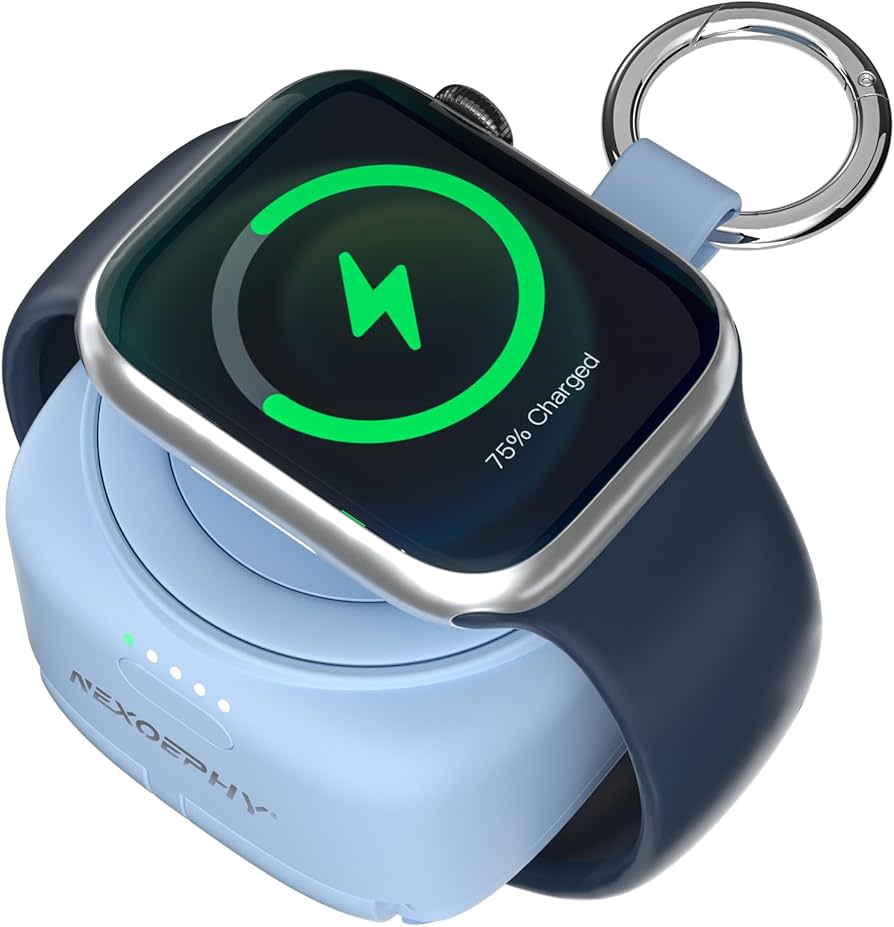
Losing your charger is common. Forgetting it shouldn’t mean a dead watch. Enter the keychain magnetic charger—your pocket-sized power solution.
How It Works
These compact adapters have a built-in magnetic puck and a USB-C plug. Simply insert it into any USB-C power source—laptop, power bank, or even your iPhone—and attach your Apple Watch. No bulky cables. No extra weight.
What to Look For
| Feature | Why It Matters |
|---|---|
| MFi Certification | Ensures compatibility, safety, and optimal speed |
| Protective Cap | Shields the charging surface from dust and scratches |
| Clip or Loop | Attaches to keys, backpacks, or lanyards |
| Dual USB Support | Works with both USB-C and USB-A ports |
| 4.5+ Star Rating | Indicates user satisfaction and reliability |
Charging Speed & Host Drain
- Full charge time: ~2 hours 15 minutes
- Drains host device: ~26% of an iPhone 16 Pro’s battery
- Why slower?: Limited power output from compact circuitry and host devices
Who Should Use This?
- Frequent travelers
- Commuters
- Anyone prone to misplacing chargers
🛒 Top Picks: Anker, Belkin, and Nomad offer MFi-certified models on Amazon and Best Buy—durable, reliable, and travel-ready.
Charge via Laptop or Computer
Your laptop isn’t just for emails—it’s a backup charging station.
Plug Cable into USB Port
Use your Apple Watch magnetic charging cable and plug the USB-C end into your laptop, desktop, or Chromebook. As long as the computer is on and the USB port delivers at least 5W, your watch will start charging.
Conditions for Success
- Computer must be powered on (not asleep or hibernating)
- Use a modern USB-C or high-power USB-A port
- Avoid low-power hubs or older machines
Pros and Cons
✅ No wall outlet needed
✅ Great for office or hotel stays
❌ Charging is very slow on older laptops
❌ May stop if the computer sleeps
💡 Pro Tip: Keep your laptop plugged in while charging for consistent power delivery.
Use a Magnetic Power Bank

For truly wireless, cable-free charging, a portable power bank with a built-in magnetic puck is the gold standard.
How It Works
Place your Apple Watch directly on the magnetic pad. Charging starts instantly—no cables, no fuss. These power banks are MFi-certified, ensuring safe and stable 5W charging.
Top Models
- Anker PowerCore Magnetic 5K
- Belkin BoostCharge Pro 5K
Both deliver enough juice to charge your Apple Watch 3–4 times on a single charge and often include USB ports for your iPhone or AirPods.
Key Benefits
- Cable-free convenience
- Compact and travel-friendly
- Charges multiple Apple devices
Ideal For
- Long flights
- Hiking trips
- Power outages
⚠️ Must recharge regularly—don’t let the power bank die when you need it most.
Try a Multi-Device Charging Dock
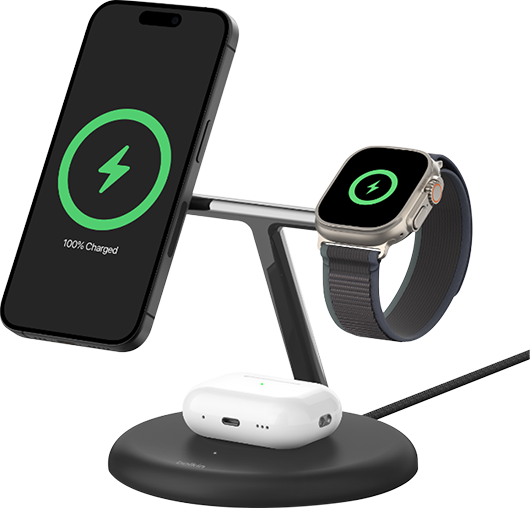
Keep all your gear powered in one sleek station.
3-in-1 Charging Stations
Models like the Belkin 3-in-1 BoostCharge Pro or Anker Cube offer:
– MagSafe iPhone charging
– AirPods charging pad
– Dedicated Apple Watch magnetic puck
Why It Works
Even though it uses one power cord, each device charges independently. These docks include the required magnetic puck, so they’re fully compatible with the Apple Watch 9.
Best For
- Bedside tables
- Office desks
- Minimalist setups
❗ Warning: Generic wireless chargers without a puck will not work—don’t waste your money.
Charge in the Car
Keep your watch alive during long drives.
Option 1: Car Charger + Magnetic Cable
- Plug a USB-C car charger into your 12V socket
- Connect the Apple Watch magnetic cable
- Snap the puck to your watch
Most modern car chargers supply 5W+, making this a reliable method.
Option 2: Smart Car Power Station
Devices like the BLUETTI AC180 include 15W wireless pads compatible with Apple Watch when used with a magnetic puck.
Who Needs This?
- Road trippers
- Ride-share drivers
- Daily commuters
🚗 Bonus: Some car mounts now include charging pucks—just check compatibility first.
Use a Portable Power Station
For off-grid or emergency scenarios, large-capacity stations are essential.
BLUETTI AC180
- 1152Wh capacity
- 100W USB-C output
- 1x 15W wireless pad (supports Apple Watch with puck)
- Perfect for camping, blackouts, or remote work
BLUETTI AC500 (Home Backup)
- Expandable up to 16,588Wh
- 2x 15W wireless pads
- Not portable, but ideal for home emergencies
| Feature | AC180 | AC500 |
|---|---|---|
| Portability | ✅ | ❌ |
| Best Use | Travel, camping | Home backup |
| Apple Watch Support | ✅ | ✅ |
🌲 Pair with BLUETTI PV120 solar panel for endless off-grid power.
Try a USB-C Hub with Watch Charger
Turn your workspace into a charging hub.
How It Helps
Docks like Satechi or HyperDrive include:
– Laptop charging (up to 100W)
– USB-A/USB-C ports
– Built-in Apple Watch magnetic puck
Ideal For
- Remote workers
- Minimalist desks
- Frequent travelers
🖥️ Bonus: Reduces cable clutter and powers everything from one outlet.
Use Public Charging Stations (With Caution)
Some airports, hotels, and co-working spaces now offer Apple Watch-compatible charging pads.
What to Watch For
✅ Use branded, enclosed stations (e.g., Belkin, Apple Store)
❌ Avoid open USB ports—risk of juice jacking (data theft)
💰 Some charge per use
🔐 Security Tip: Never leave your watch unattended. Stick to trusted locations.
Avoid Battery Cases and Charged Bands
Despite bold claims, battery-integrated bands or cases are ineffective.
Why They Fail
- Deliver only 10–20% extra charge
- Add bulk and discomfort
- Often not MFi-certified
- Risk of overheating
❌ Expert Verdict: Stick to proven methods. These are gimmicks.
Charging Speed Comparison
| Method | Time (0–100%) | Speed | Host Drain | Portability |
|---|---|---|---|---|
| Official Charger | 1h 3m | Fast | N/A | Low |
| iPhone 15 Reverse | 2h 15m | Slow | 26% iPhone | High |
| Laptop USB | 2h+ | Very Slow | Drains laptop | Medium |
| Keychain Charger | 2h 15m | Slow | 26% host | Very High |
| Magnetic Power Bank | 1h 30m | Medium | Self-powered | High |
| 3-in-1 Dock | 1h 15m | Fast | N/A | Low |
| BLUETTI AC180 | 1h 30m | Medium | Self-powered | High |
📊 Bottom Line: For speed, use official or docked chargers. For portability, go keychain or magnetic power bank.
Maintain Battery Health
Keep your Apple Watch battery strong:
- Charge between 0°C and 35°C
- Recharge at 20–30%
- Enable Optimized Battery Charging
- Clean contacts regularly
- Update watchOS
Best Solution by Scenario
| Situation | Recommended Method |
|---|---|
| Charger lost | MFi-certified magnetic cable |
| Traveling light | Keychain charger or magnetic power bank |
| Work from desk | USB-C hub or 3-in-1 dock |
| Camping or emergency | BLUETTI AC180 + solar panel |
| Daily commute | Car charger + cable |
| iPhone 15+ owner | Reverse charge in emergencies |
Final Note: You don’t need the original Apple charger to power your Apple Watch 9. As long as you use an MFi-certified magnetic puck and a USB-C power source, you can keep your watch alive anywhere. Prioritize safety, avoid cheap knockoffs, and choose solutions that fit your lifestyle—whether that’s a keychain adapter for travel or a sleek dock for your nightstand. With the right tools, you’ll never be stranded with a dead watch again.




