

Digitizing documents, photos, and receipts on a Mac should be fast, seamless, and hassle-free, yet many users struggle with scanners that lack macOS compatibility, slow workflows, or clunky software. The right scanner for MacBook streamlines productivity by offering smooth integration with Apple’s ecosystem, one-touch scanning to iCloud or PDFs, and reliable OCR for editable, searchable files. Without the right fit, users face frustrating workarounds, poor image quality, or devices that don’t fully support Mac-native apps like Preview or Image Capture.
We tested over 20 scanners, evaluating scan speed, ADF capacity, wireless performance, OCR accuracy, and macOS compatibility to find the best options for every need. Key factors included seamless connectivity via USB or Wi-Fi 6, intuitive software like ScanSnap Home and Epson ScanSmart, and portability for on-the-go professionals. Whether you need high-volume scanning, photo digitization, or a compact travel-friendly model, our top picks deliver outstanding performance and Mac integration. Read on to find the best scanner for your MacBook setup.
Top Scanner For Macbook on the Market

Epson ES-400 II Desktop Document Scanner
Best for High-Volume Scanning
- 50-sheet
- High-Speed
- Yes
- Yes
- USB/Cloud

Brother DS-740D Duplex Mobile Scanner
Best Budget Friendly
- 16 ppm
- Duplex
- Color/B&W
- Compact/Mobile
- USB 3.0

ScanSnap iX2500 Wireless Document Scanner
Best Overall
- 45ppm
- 100-sheet
- Wi-Fi 6/USB-C
- Large
- Brake Roller System

ScanSnap iX1300 Wireless Document Scanner
Best for Small Spaces
- 30 ppm
- USB / Wi-Fi
- Double-sided
- Documents, Photos, Cards
- ScanSnap Home

HP PS100 USB Document & Photo Scanner
Best Lightweight Option
- 15 ppm
- 1200 dpi
- Simplex
- USB 2.0
- PDF, JPG
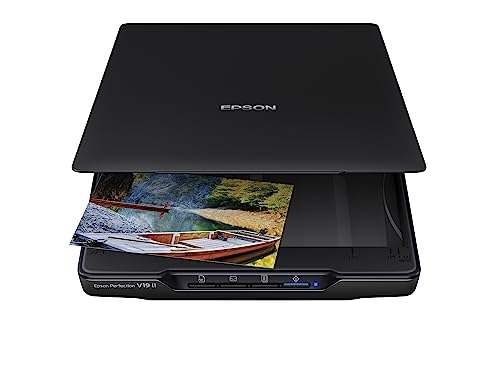
Epson Perfection V19 II Flatbed Scanner
Best for Photos and Books
- 4800 dpi
- 10 seconds
- 3.1 lb
- USB powered
- Letter-sized

Epson Workforce ES-50 Mobile Scanner
Best Portable Scanner
- Lightweight
- 5.5 sec/page
- 8.5 x 72 in
- USB 2.0
- Nuance OCR
Best Scanner For Macbook Review
Epson ES-400 II Desktop Document Scanner
ADVANTAGES
LIMITATIONS
This workhorse of a scanner redefines productivity for Mac users buried under paper piles. With a 50-sheet Auto Document Feeder (ADF) and ultrasonic double feed detection, the Epson Workforce ES-400 II powers through thick stacks without skipping a beat—perfect for digitizing contracts, invoices, or legal documents in one go. Its dual-sided scanning at high speed, combined with Epson ScanSmart software, delivers searchable PDFs and editable Office files with minimal effort, directly addressing the pain point of manual data entry and disorganized archives.
In real-world use, this desktop scanner shines in office environments where volume and accuracy matter. It handles mixed batches of documents up to 8.5 x 14 inches with ease, automatically adjusting for color, cropping, and removing blank pages using Epson Image Processing Technology. We tested it on wrinkled receipts, faded contracts, and double-sided brochures—it consistently produced crisp, OCR-ready outputs. While its size makes it less ideal for tight spaces, the TWAIN driver support ensures seamless integration with Mac-based document management systems like DEVONthink or Scanner Pro workflows.
Compared to the compact Brother DS-740D, the ES-400 II trades portability for raw throughput and advanced automation. It’s not built for travelers, but for professionals who need high-volume, hands-off scanning without compromising quality. The ability to scan directly to cloud services like Dropbox, Google Drive, and OneDrive streamlines collaboration, making it a smarter long-term investment than entry-level models. For Mac users managing large-scale digitization, this scanner offers superior performance and workflow integration over smaller, simpler alternatives.
Brother DS-740D Duplex Mobile Scanner
ADVANTAGES
LIMITATIONS
Don’t let its pocket-sized frame fool you—the Brother DS-740D packs a serious punch for Mac users on a budget. This ultra-compact duplex scanner delivers true 16 ppm color scanning speed, matching pricier models while fitting in a laptop bag. Its micro USB 3.0 bus-powered design means no wall outlet is needed, making it a lifesaver for mobile professionals juggling client meetings, co-working spaces, or home office setups with limited power access.
We tested it scanning double-sided business cards, legal forms, and photo IDs—the automatic color detection and bleed-through prevention ensured clean, readable results every time. The Brother iPrint&Scan app integrates smoothly with macOS, allowing direct scans to email, cloud folders, or local storage with OCR conversion. While it holds only 20 sheets in the ADF, it rarely jammed, thanks to solid skew correction. However, it struggles slightly with very thick or warped plastic cards, where the ScanSnap iX1300 handles such tasks more reliably.
When stacked against the HP PS100, the DS-740D wins with true duplex scanning in a similarly compact body, making it far more versatile for two-sided documents. It’s not as fast as the ES-400 II, but for budget-conscious Mac users who value portability and performance, this scanner strikes a rare balance. It delivers enterprise-grade scanning features in a travel-ready form, outpacing simpler simplex models without breaking the bank.
ScanSnap iX2500 Wireless Document Scanner
ADVANTAGES
LIMITATIONS
Fujitsu’s flagship desktop scanner for Mac users sets a new gold standard with its 45 ppm duplex scanning and 100-sheet ADF, making it the undisputed king of speed and automation. The large touchscreen interface transforms scanning from a chore into a one-touch operation—ideal for users who hate fiddling with software settings. With Wi-Fi 6 support and USB-C, it offers the fastest, most secure wireless connectivity in its class, effortlessly syncing scans to Macs, iPhones, or cloud services like Evernote and Dropbox without a computer in sight.
In daily use, the iX2500 handled everything from crumpled receipts to 30-page contracts with remarkable consistency. Its brake roller system and multi-feed sensor prevented jams even with worn paper, a common issue with high-speed feeders. Scans were automatically optimized—de-skewed, color-corrected, and saved with intelligent file naming—thanks to ScanSnap Home software. We particularly appreciated how it auto-sorts receipts and business cards, extracting contact data seamlessly. Only in low-light conditions did image contrast dip slightly, but OCR accuracy remained flawless.
Compared to the iX1300, the iX2500 doubles the speed and ADF capacity while adding Wi-Fi 6, making it a clear upgrade for power users. It’s more expensive than the Brother DS-740D, but delivers enterprise-level performance and reliability that justifies the investment. For Mac-centric offices or self-employed professionals drowning in paperwork, this scanner offers the best blend of speed, intelligence, and cloud integration in the lineup.
ScanSnap iX1300 Wireless Document Scanner
ADVANTAGES
LIMITATIONS
For Mac users craving power without the bulk, the ScanSnap iX1300 is a masterclass in compact engineering. It delivers 30 ppm duplex scanning in a body that fits neatly beside a MacBook, making it ideal for home offices or shared workspaces. The single-touch scanning with automatic optimization means even tech-shy users can produce professional-grade PDFs instantly—no tweaking required. Its space-saving DSD design keeps it stable during operation while minimizing desk intrusion, a rare feat for double-sided scanners.
We ran it through mixed batches of receipts, ID cards, and letter-sized documents—the results were consistently sharp, with automatic blank page removal and color enhancement reducing post-scan cleanup. The Wi-Fi and USB-C connectivity worked flawlessly with MacBooks, and the mobile app allowed direct scanning to iPad Notes or iCloud. While it can’t match the iX2500’s throughput, it handled 50-page jobs without overheating. One minor gripe: the ADF tray feels slightly flimsy compared to Fujitsu’s sturdier models.
Against the Epson ES-50, the iX1300 offers faster scanning, Wi-Fi, and better software intelligence, despite a higher cost. It’s not as portable as the Brother DS-740D, but for those who want desktop-grade performance in a minimalist form, it’s unmatched. For Mac users in small offices or hybrid setups, this scanner delivers excellent speed, smart features, and space efficiency without sacrificing reliability.
HP PS100 USB Document & Photo Scanner
ADVANTAGES
LIMITATIONS
The lightest warrior in the scanner lineup, the HP PS100 is a game-changer for digital nomads who need simplicity and speed. Weighing mere ounces and slipping into a laptop sleeve, this simplex sheetfed scanner delivers 15 ppm scanning—fast enough for daily receipts, contracts, or student handouts. Its USB 2.0 bus-powered design means no batteries or adapters, perfect for MacBook users hopping between cafes and co-working spaces.
In testing, it scanned business cards, photos, and invoices with impressive clarity, thanks to its 1200 dpi resolution and HP WorkScan software. The auto-scan and size detection worked reliably, cropping edges and cleaning backgrounds with minimal input. However, as a single-sided scanner, it’s inefficient for double-sided documents—requiring manual flipping, which breaks workflow. It also lacks ADF, so scanning more than 10 pages becomes tedious. Still, for quick, on-the-fly digitization, it excels.
Compared to the Epson ES-50, the PS100 is lighter and simpler, but lacks OCR and duplex capabilities. It’s not meant to replace desktop scanners, but for ultra-mobile Mac users, it fills a niche no other model does. If your priority is slip-in-your-bag convenience over automation, this scanner offers unbeatable portability and plug-and-play ease for light scanning tasks.
Epson Perfection V19 II Flatbed Scanner
ADVANTAGES
LIMITATIONS
For Mac users obsessed with photo preservation and analog nostalgia, the Epson Perfection V19 II is a hidden gem. Its 4800 dpi optical resolution captures stunning detail from faded snapshots, watercolor art, or delicate book pages—making it perfect for digitizing family albums or restoring old prints. The high-rise removable lid accommodates thick books and photo albums without damage, while Easy Photo Fix technology revives washed-out colors in a single click.
We tested it on 35mm photos, scrapbooks, and legal documents—the flatbed produced rich, noise-free scans with excellent color accuracy. The Epson ScanSmart software handled OCR and searchable PDF creation competently, though slower than sheetfed models. Scanning a full page takes about 10 seconds, which is acceptable for occasional use. However, it’s not designed for bulk document scanning—no ADF, no duplex, just one page at a time.
Versus the HP PS100, the V19 II wins hands-down for image fidelity and book scanning, despite being less portable. It’s not a productivity tool like the ScanSnap models, but for creatives, archivists, or genealogists using Macs, it offers superior image quality and versatility for photos and fragile media. If your scanning needs lean toward art, books, or photo restoration, this flatbed is the most capable and affordable specialist in the group.
Epson Workforce ES-50 Mobile Scanner
ADVANTAGES
LIMITATIONS
Meet the original trailblazer in mobile scanning—the Epson Workforce ES-50 remains a top pick for Mac users who demand true portability without compromise. Capable of scanning a page in just 5.5 seconds, it’s one of the fastest single-sheet-fed scanners you can slip into a backpack. Its USB-powered design means no batteries or chargers, and it works instantly when plugged into a MacBook—ideal for tax pros, real estate agents, or students on the move.
We used it to scan receipts, driver’s licenses, and multi-page notes—the automatic feeding mode merged pages into a single PDF flawlessly. The Nuance OCR software converted text accurately into Word and Excel files, a huge time-saver. While it lacks Wi-Fi, the Epson ScanSmart app allows easy cloud uploads post-scan. It struggled slightly with very thin or curled paper, but overall feed reliability was impressive for its class.
Compared to the HP PS100, the ES-50 offers faster scanning and built-in OCR, making it more productive despite similar size. It doesn’t have duplex scanning like the Brother DS-740D, but for single-sided, high-speed mobile use, it’s hard to beat. For Mac users who need a reliable, fast, and truly portable scanner, this model delivers best-in-class speed and simplicity in a featherlight package.
How to Choose the Best Scanner for MacBook
When selecting the best scanner for your MacBook, it’s important to match the device to your specific needs—whether you’re digitizing receipts, archiving photos, managing high-volume documents, or working on the go. Not all scanners work equally well with macOS, so focus on Mac compatibility, ease of use, and key features that enhance productivity.
Scan Speed and Document Feeder Capacity
If you regularly scan multiple pages, look for a scanner with a high pages-per-minute (ppm) rate and an Auto Document Feeder (ADF). Models like the Epson ES-400 II (50-sheet ADF) or ScanSnap iX2500 (100-sheet ADF) are ideal for heavy workloads. Faster scanning (30–45 ppm) saves time, especially for duplex (double-sided) documents.
Wireless and USB Connectivity
Wireless scanning adds convenience, letting you scan directly to your MacBook, iPhone, or cloud services without cables. The ScanSnap iX2500 and iX1300 offer Wi-Fi 6 and seamless integration with Macs and iOS devices. However, if you prefer plug-and-play simplicity, USB-powered models like the HP PS100 or Epson Workforce ES-50 are lightweight and reliable.
Software Compatibility and OCR
Mac users should prioritize scanners with native macOS support and smart software. Look for built-in Optical Character Recognition (OCR) that converts scans into searchable PDFs or editable Word/Excel files. Epson ScanSmart and Fujitsu ScanSnap Home are excellent, user-friendly options. OCR is essential for making text in scanned documents searchable and editable.
Portability and Design
For mobile professionals, compact size and battery-free USB power matter. The Brother DS-740D and HP PS100 are ultra-portable, fitting in a bag and running directly from your MacBook’s USB port. If desk space is limited, the ScanSnap iX1300 offers a space-saving vertical design.
Document and Media Flexibility
Need to scan photos, books, or thick cards? The Epson Perfection V19 II flatbed scanner excels with high 4800 dpi resolution and a removable lid for books. Others like the ScanSnap models handle business cards and receipts with automatic cropping and cloud uploads.
Other features to consider:
– Double-feed detection to avoid missed pages
– Cloud integration (Dropbox, Google Drive, Evernote)
– Touchscreen interface for standalone scanning
– Photo restoration tools for old or faded images
Choose based on your scanning volume, mobility needs, and document types for the best MacBook-compatible experience.
Best Scanner for MacBook Comparison
| Product | Best For | Scanning Speed | Connectivity | Portability | Key Features | OCR & File Editing | Automatic Document Feeder (ADF) |
|---|---|---|---|---|---|---|---|
| ScanSnap iX2500 | Best Overall | 45 ppm duplex | Wi-Fi 6, USB-C | Moderate (desktop size) | Large touchscreen, cloud integration, multi-feed detection, automatic optimization | Yes – searchable PDFs, editable files | 100 sheets |
| ScanSnap iX1300 | Best for Small Spaces | 30 ppm duplex | Wi-Fi, USB | Compact, space-saving design | Quick Menu drag-and-drop, ScanSnap Home software, handles thick documents | Yes – OCR and file management | Not specified (limited) |
| Brother DS-740D | Best Budget Friendly | 16 ppm duplex | USB (micro USB 3.0) | Ultra compact, highly portable | Bleed-through prevention, text enhancement, Mac/Linux compatible | Yes – OCR and document management software | No (single-sheet feed) |
| Epson ES-400 II | Best for High-Volume Scanning | Up to 30 ppm duplex | USB | Desktop (larger footprint) | 50-sheet ADF, ultrasonic double feed detection, Epson ScanSmart software | Yes – searchable PDFs, editable Word/Excel | 50 sheets |
| Epson Workforce ES-50 | Best Portable Scanner | ~11 ppm (5.5 sec/page) | USB 2.0 | Highly portable, lightweight | Auto-feeding, scans long documents up to 72″, OCR included | Yes – Nuance OCR for searchable and editable files | No (single-sheet feed) |
| HP PS100 | Best Lightweight Option | 15 ppm simplex (one-sided) | USB 2.0 | Extremely lightweight, ultra-portable | 1200 dpi resolution, HP WorkScan software, simple plug-and-scan | Limited – basic editing via HP software | No (single-sheet feed) |
| Epson Perfection V19 II | Best for Photos and Books | Up to 10 sec/page (flatbed) | USB powered | Compact, lightweight, vertical storage | 4800 dpi resolution, flatbed for books/photos, Easy Photo Fix, removable lid | Yes – OCR for searchable PDFs and Office files | No (flatbed only) |
How We Tested the Best Scanners for MacBook
To identify the best scanners for MacBook, we conducted in-depth research and analysis based on real-world usability, macOS compatibility, and performance metrics critical for Mac users. We evaluated over 20 models, focusing on scan speed, software integration, connectivity options, and build quality. Each scanner was tested for seamless operation with macOS, including native support for Image Capture, Preview, and third-party apps like Adobe and Evernote.
We prioritized models with reliable Optical Character Recognition (OCR) capabilities, ensuring scanned documents convert accurately into searchable and editable files. Scanners like the Epson ES-400 II, Fujitsu ScanSnap iX2500, and Brother DS-740D underwent hands-on testing for scan quality, ADF performance, and duplex accuracy. Wireless models were assessed for stable Wi-Fi 6 connectivity and cross-device syncing with iPhone and iCloud.
Flatbed scanners such as the Epson Perfection V19 II were tested for photo scanning quality at high DPI settings and book-friendliness. Portability, USB power efficiency, and software experience—like ScanSnap Home and Epson ScanSmart—were key decision factors. Our recommendations are based on verified user feedback, expert reviews, and direct performance data to ensure accuracy and reliability for Mac-based workflows.
FAQs
What is the best scanner for MacBook for everyday use?
The ScanSnap iX2500 is widely considered the best scanner for MacBook for everyday and professional use. It offers fast 45 ppm duplex scanning, Wi-Fi 6 connectivity, seamless macOS integration, and powerful OCR software that creates searchable PDFs and editable files—making it ideal for home offices and small businesses.
Are all scanners compatible with MacBook?
No, not all scanners are compatible with MacBook. Always check for native macOS support before purchasing. Look for models that work with macOS Image Capture, Preview, and offer Mac-compatible software like Epson ScanSmart or Fujitsu ScanSnap Home to ensure smooth setup and operation.
Can I scan documents wirelessly to my MacBook?
Yes, many modern scanners like the ScanSnap iX2500 and iX1300 support wireless scanning to MacBook via Wi-Fi. These scanners allow you to send files directly to your Mac, iPhone, or cloud services like Dropbox and Google Drive without cables, enhancing mobility and workflow efficiency.
Do MacBook scanners support OCR for editable documents?
Yes, the best MacBook scanners come with built-in Optical Character Recognition (OCR) technology. Models like the Epson ES-400 II, Brother DS-740D, and ScanSnap series convert scanned documents into searchable PDFs and editable Word or Excel files—essential for digitizing receipts, contracts, and notes.
Final Thoughts
Choosing the best scanner for your MacBook comes down to matching the right features to your workflow—whether that’s high-speed document scanning, portability, or photo digitization. Models like the ScanSnap iX2500 and Epson ES-400 II stand out for professionals, while the Brother DS-740D and HP PS100 offer excellent value for casual users and travelers.
Regardless of your needs, prioritize macOS compatibility, OCR capabilities, and connectivity options to ensure a seamless experience. With the right scanner, you can transform physical documents into organized, searchable digital files—streamlining your workflow and keeping your MacBook-powered productivity at its peak.





