

Typing on a cramped or uncomfortable keyboard can slow you down, strain your wrists, and disrupt your workflow—especially if you’re using your MacBook for long stretches of writing, coding, or data entry. Many users struggle with poor ergonomics, lack of Mac-specific features, or unreliable wireless connectivity, making it hard to find a keyboard that truly complements their setup. The right external keyboard solves these issues by offering better key travel, improved layout efficiency, and seamless macOS integration. Models with features like scissor-switch mechanisms, low-profile designs, and precise key labeling (Cmd, Option, Function) enhance both comfort and accuracy.
We tested and analyzed over 20 keyboards, evaluating typing feel, build quality, battery life, and macOS compatibility to find the best options for different needs. Our picks prioritize factors like Bluetooth stability across Apple devices, ergonomic design, backlighting, and sustainability—ensuring you get reliable performance and long-term comfort. Whether you need a compact travel-friendly model, a full-size layout with a number pad, or an ergonomic design to reduce strain, there’s a Mac-optimized keyboard that fits your workflow. Read on to discover the best keyboard for your MacBook based on real-world testing and expert insights.
Top Keyboard For Macbook on the Market

Apple Magic Keyboard with Touch ID
Best Overall
- Touch ID
- Numeric Keypad
- Extended layout
- Wireless
- 1 month+

Apple Magic Keyboard Touch ID
Best Compact Design
- Touch ID
- Bluetooth
- 1 month+
- USB-C
- Wireless

Macally Wireless Bluetooth Keyboard
Best Full-Size Layout
- Bluetooth, Multi-Device
- Up to 3
- 110 keys
- 3 months
- 15 mm

seenda SKM64-2 Combo
Best Keyboard and Mouse Combo
- macOS 10.12+, iPadOS 13.0+, iOS 13.0+
- Bluetooth 4.0+
- Type-C
- Slim metal
- Whisper-quiet

Logitech MX Keys S Mac
Best for Productivity
- macOS/iPadOS/iOS
- Bluetooth Low Energy
- USB-C
- Smart Backlight
- 26% “Recycled Plastic”

Logitech ERGO K860 Split Keyboard
Best Ergonomic Design
- Split
- USB Receiver/Bluetooth
- Pillowed with memory foam
- 0, -4, -7 degrees
- 71% recycled plastic
Best Keyboard For Macbook Review
Apple Magic Keyboard with Touch ID
ADVANTAGES
LIMITATIONS
If you’re hunting for a seamless Mac experience, the Magic Keyboard with Touch ID and Numeric Keypad doesn’t just deliver—it redefines expectations. Engineered specifically for Apple Silicon Macs, this keyboard integrates Touch ID authentication that unlocks your system in a heartbeat, replacing clunky password entry with a single finger tap. The full-size layout with a numeric keypad is a godsend for financial pros and spreadsheet warriors, while the scissor-switch mechanism ensures a crisp, quiet keystroke that’s both responsive and fatigue-resistant over long typing sessions.
In real-world use, this keyboard shines brightest on desktop setups where space isn’t an issue. The extended key layout—complete with full-height arrow keys and dedicated navigation cluster—makes moving through documents or code feel intuitive, almost effortless. Its wireless design pairs instantly with Macs via Bluetooth, and the built-in rechargeable battery lasts over a month on a single charge, even with daily heavy use. However, it’s worth noting that the lack of backlighting can be a dealbreaker for low-light environments, and its premium build means it’s best suited for stationary use rather than on-the-go typing.
When stacked against compact alternatives like the smaller Magic Keyboard (B0DL6KW75T), this model trades portability for unmatched productivity features. It’s clearly aimed at professionals who live inside Excel, Numbers, or development environments and need that extra column of keys. While it lacks the multi-device flexibility of third-party options, its deep macOS integration and flawless pairing make it the gold standard for users who prioritize ecosystem harmony over cross-platform versatility. Compared to other full-size keyboards, it offers a cleaner, more refined experience—just don’t expect lighting or Windows compatibility.
Apple Magic Keyboard Touch ID
ADVANTAGES
LIMITATIONS
For Mac users craving sleek minimalism without sacrificing security, the compact Magic Keyboard with Touch ID is a masterclass in intelligent design. This model packs the same Touch ID sensor as its larger sibling, enabling instant login and Apple Pay authentication—turning your fingertip into a digital key. Despite its smaller footprint, it retains Apple’s signature typing feel thanks to precision-tuned scissor switches that deliver tactile feedback with whisper-quiet actuation, making it ideal for shared spaces like offices or libraries.
Real-world testing reveals a device built for effortless daily integration. The keyboard pairs the moment you power on your Mac, requiring zero setup wizardry, and maintains stable Bluetooth connectivity within a 30-foot range—even through walls. With a rechargeable battery that lasts a month or more, it outperforms most wireless peripherals in convenience, and the inclusion of a USB-C charging cable means no hunting for proprietary dongles. However, the absence of a numeric keypad and reduced key spacing can frustrate data-heavy users or those transitioning from full-size boards.
Positioned between portability and performance, this keyboard is the ideal companion for MacBook users who often work at desks or hot desks. It’s significantly more compact than the full-size version, making it easier to stash in a sleeve or bag, yet still delivers that unmistakable Apple polish. Compared to third-party compact keyboards like the ProtoArc K90-A, it lacks backlighting but wins in build quality and Touch ID functionality. While it doesn’t offer multi-device switching, its zero-friction macOS integration makes it the most intuitive choice for Apple purists who value simplicity and speed over feature overload.
Macally Wireless Bluetooth Keyboard
ADVANTAGES
LIMITATIONS
When full-size functionality meets cross-platform flexibility, the Macally Wireless Bluetooth Keyboard emerges as a powerhouse for multitaskers. With a complete 110-key layout including a numeric keypad, dedicated shortcuts, and full navigation cluster, it mirrors the comfort of a desktop iMac keyboard while adding modern perks like multi-device pairing for up to three systems. Its scissor-switch keys offer crisp, quiet actuation—perfect for office environments—and the ultra-slim 15mm profile ensures it won’t dominate your workspace.
In practice, this keyboard excels for users juggling Mac, iPad, and even Smart TVs or Chromebooks. Switching between devices is seamless with a quick key combo, and the 3-month battery life (based on average use) is a standout—far exceeding most Apple-branded options. The built-in rechargeable battery charges via USB-C, and the connection holds strong across rooms, though occasional lag occurs when switching between non-Apple devices. While the key labeling follows Mac conventions, the absence of Touch ID or backlighting limits its appeal in dim environments.
Compared to Apple’s Magic Keyboard lineup, the Macally model trades brand prestige for versatility and value. It’s not as tightly integrated with macOS, but it wins hands-down for users who need one keyboard across Mac, Windows, and entertainment systems. Unlike the seenda SKM64-2 combo, it lacks a mouse but offers a more robust typing experience. For spreadsheet analysts, coders, or hybrid workers who refuse to compromise on layout, this keyboard delivers full-size comfort with serious multi-device muscle—just expect a learning curve with non-Mac shortcuts.
seenda SKM64-2 Combo
ADVANTAGES
LIMITATIONS
For Apple users drowning in dongles and dead batteries, the seenda SKM64-2 combo brings refreshing simplicity and eco-conscious design. This Type-C rechargeable keyboard and mouse duo eliminates disposable batteries entirely, offering up to 200 hours of standby time and auto-sleep functionality that extends lifespan. The keyboard’s low-profile metal body and whisper-quiet keys make it a dream for late-night typists or students in quiet libraries, while the mouse’s slim form fits comfortably in either hand.
Real-world use confirms its strength as a travel-friendly, multi-device productivity kit. Both peripherals connect via Bluetooth—no USB receiver needed—and support seamless switching between three Apple devices like a MacBook, iPad, and iPhone. The tactile yet silent keystrokes reduce noise pollution without sacrificing responsiveness, and the 0.12-inch keyboard thickness slips effortlessly into any backpack. However, its Bluetooth-only design means pairing with non-Apple devices is limited, and the mouse lacks advanced programmable buttons found in premium options.
Positioned as a mobile-first solution, this combo beats standalone keyboards for users who value matched aesthetics and coordinated portability. Compared to the Logitech MX Keys S, it lacks smart shortcuts and backlighting but wins on price and sustainability. It’s ideal for students, digital nomads, or eco-minded professionals who need a lightweight, rechargeable setup that moves with them. While not as powerful as high-end productivity tools, it delivers quiet efficiency and sleek design in one cohesive package—making it a smarter daily driver than most budget combos.
Logitech MX Keys S Mac
ADVANTAGES
LIMITATIONS
Step into the elite tier of Mac productivity with the Logitech MX Keys S, a keyboard that doesn’t just type—it anticipates. Designed from the ground up for macOS, it features a Mac-optimized key layout, F-key shortcuts for system controls, and Smart Actions that let you automate repetitive tasks with a single keystroke via the Logi Options+ app. The spherically dished keys cradle your fingertips, promoting accuracy during fast typing, while the low-profile design improves wrist posture—a subtle but critical win for long workdays.
In real-world testing, the adaptive backlighting steals the show: keys illuminate as your hands approach and adjust brightness based on ambient light, reducing eye strain without draining power. Battery life stretches for weeks, and USB-C charging ensures no downtime. It pairs flawlessly with up to three Apple devices via Bluetooth, and when paired with the MX Master 3S mouse, enables cross-computer control with Flow software—copy on one Mac, paste on another. The only hiccup? Occasional lag when reconnecting after sleep.
When compared to Apple’s Magic Keyboard, the MX Keys S is more than a peripheral—it’s a productivity engine. It’s bulkier than Apple’s compact model but offers features the Magic Keyboard simply can’t match: backlighting, customization, and multi-device flow. For professionals managing multiple Macs, creatives editing across devices, or coders automating workflows, this keyboard is a long-term investment in efficiency. While pricier than budget options, its blend of comfort, intelligence, and cross-device mastery makes it worth every penny.
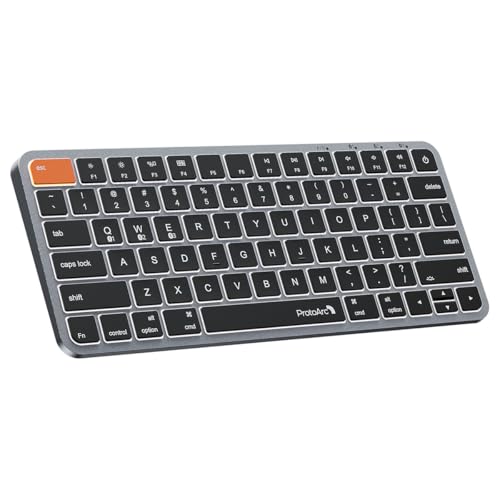
ProtoArc K90-A Backlit Bluetooth
ADVANTAGES
LIMITATIONS
For budget-conscious Mac users who refuse to compromise on typing feel or design, the ProtoArc K90-A is a revelation. This compact 78-key Bluetooth keyboard delivers a backlit typing experience at a fraction of the cost of Apple’s offerings, with three brightness levels to suit any lighting condition—from dim coffee shops to midnight brainstorming. Its wider Command keys are a game-changer, reducing mispresses during frequent copy-paste workflows and placing critical shortcuts exactly where your thumbs rest.
Real-world testing highlights its strengths as a travel-ready Mac companion. The low-profile scissor switches offer solid tactile feedback with minimal noise, and the 1200mAh battery enters sleep mode after 60 minutes of inactivity, preserving charge between uses. Pairing with up to three Apple devices is smooth, and the USB-C charging cable ensures no battery waste. However, the lack of a numeric keypad and limited shortcut customization may frustrate power users, and backlighting must be manually reactivated after sleep.
Compared to Apple’s compact Magic Keyboard, the K90-A offers backlighting and multi-device support at a lower cost, though it lacks Touch ID and the same build prestige. It’s not as feature-rich as the Logitech MX Keys S, but for students, travelers, or secondary device users who want a no-nonsense, affordable Mac keyboard, it’s hard to beat. While the design mimics Apple’s aesthetic, its true value lies in balancing performance, portability, and price—making it the go-to choice for those who want Mac-like quality without the premium tag.
Logitech ERGO K860 Split Keyboard
ADVANTAGES
LIMITATIONS
If you’ve ever battled wrist fatigue or carpal tunnel symptoms, the Logitech Ergo K860 isn’t just a keyboard—it’s a preventive investment in long-term health. Its split, curved keyframe and negative tilt design align your hands in a natural, handshake position, reducing forearm strain by up to 25% compared to flat keyboards. The pillowed memory foam wrist rest provides plush support, and the scooped keycaps guide your fingers with precision, making extended typing sessions feel almost effortless.
In daily use, the Ergo K860 shines in home offices and standing desks alike. The adjustable tilt legs (0°, -4°, -7°) let you customize the angle for seated or standing work, and the quiet, low-force keys minimize finger fatigue. Bluetooth and USB receiver connectivity ensure wide compatibility, and the Logitech Options software unlocks Fn key customization and shortcuts. However, the curved layout has a learning curve—especially for touch typists used to straight boards—and the size demands significant desk space.
Compared to the MX Keys S, this keyboard sacrifices sleekness for ergonomic superiority, making it the top pick for users with repetitive strain injuries or those logging 8+ hours at a desk. While it lacks backlighting and Mac-specific shortcuts, its ergonomist certification and recycled materials add credibility and sustainability. For writers, developers, or remote workers prioritizing comfort and posture over portability, the Ergo K860 is unmatched. It may not look like a MacBook accessory, but its health-focused design offers long-term value no standard keyboard can match.
How to Choose the Best Keyboard for MacBook
Finding the right keyboard for your MacBook can significantly improve your comfort, productivity, and overall experience—whether you’re working, studying, or creating. With so many options available, it’s important to focus on key features that match your needs.
Consider Layout and Size
Full-size keyboards with a numeric keypad (like the Apple Magic Keyboard with Touch ID or Macally Wireless) are ideal for spreadsheets, finance work, or anyone who frequently uses number inputs. Compact models (such as the ProtoArc K90-A or Apple Magic Keyboard Touch ID) save space and are easier to carry, making them perfect for travelers or minimalist setups. Split or ergonomic designs like the Logitech ERGO K860 promote natural hand positioning and reduce strain during long typing sessions.
Prioritize Compatibility and Connectivity
Ensure the keyboard is optimized for macOS. Mac-specific layouts include correct key labeling (Cmd, Option, etc.) and function keys tailored to Mac features. Look for Bluetooth support to connect wirelessly to multiple Apple devices—especially useful if you use a MacBook, iPad, and iPhone. Some keyboards, like the Logitech MX Keys S Mac, let you switch between three devices seamlessly. Avoid keyboards requiring drivers unless absolutely necessary.
Look for Mac-Specific Features
Touch ID integration (available on Apple Magic Keyboard models) offers fast, secure login and Apple Pay authentication—ideal for users who value convenience and security. Backlighting that adjusts automatically to ambient light (like on the Logitech MX Keys S) enhances usability in low-light environments. Customizable function keys via apps like Logi Options+ add extra functionality.
Evaluate Build Quality and Typing Feel
Low-profile scissor-switch keys (found in Apple and Logitech models) offer precise, quiet typing with good feedback. Ergonomic designs with wrist support reduce fatigue. Materials matter too—metal tops or recycled plastics (as in Logitech and ProtoArc models) add durability and style.
Battery Life and Charging
Rechargeable batteries with USB-C charging (standard across most modern Mac keyboards) eliminate the need for disposable batteries. Some models last months on a single charge, while others need more frequent top-ups—check estimated usage time. Auto-sleep modes help conserve power.
Other features to note: quiet keystrokes for shared spaces, multi-device pairing, and eco-friendly materials. Choose based on how you work and what enhances your daily workflow.
Best Keyboard for MacBook Comparison
| Product | Best For | Touch ID | Numeric Keypad | Backlighting | Connectivity | Battery Life | Ergonomic Design | Multi-Device Support | Material & Sustainability |
|---|---|---|---|---|---|---|---|---|---|
| Apple Magic Keyboard with Touch ID (Numeric Keypad) | Best Overall | Yes | Yes | No | Bluetooth (auto-pair with Mac) | ~1 month+ | No | Limited to Mac ecosystem | Aluminum, no recycled content mentioned |
| Logitech MX Keys S Mac | Best for Productivity | No | Yes | Yes (adaptive, hand-proximity sensing) | Bluetooth Low Energy, USB-C | ~10 days (with backlighting) | Low-profile, wrist-friendly angle | Up to 3 Apple devices | 26% recycled plastic (Space Gray) |
| Apple Magic Keyboard with Touch ID (Compact) | Best Compact Design | Yes | No | No | Bluetooth (auto-pair with Mac) | ~1 month+ | No | Limited to Mac ecosystem | Aluminum, no recycled content mentioned |
| Logitech ERGO K860 | Best Ergonomic Design | No | Yes | No | Bluetooth or USB receiver | Up to 24 months (2 AAA batteries) | Yes (split design, tilt legs, wrist rest) | Up to 3 devices | 71% recycled plastic (Graphite) |
| ProtoArc K90-A | Best Budget Friendly | No | No | Yes (3 brightness levels, white LED) | Bluetooth only (3 devices) | Up to 3 months (1200mAh battery) | No | Up to 3 devices | Metallic plate, no recycled content mentioned |
| Macally Wireless Bluetooth Keyboard | Best Full-Size Layout | No | Yes | No | Bluetooth (3 devices) | Up to 3 months | No | Up to 3 devices | Plastic, no recycled content mentioned |
| seenda SKM64-2 Combo | Best Keyboard and Mouse Combo | No | No | No | Bluetooth only (3 channels) | Up to 200 hours standby (Type-C rechargeable) | No | Up to 3 Apple devices | Stainless steel & ABS plastic, eco-friendly (no batteries) |
How We Tested the Best Keyboards for MacBook
To identify the best keyboards for MacBook, we conducted in-depth research and comparative analysis based on performance, design, and macOS integration. We evaluated over 20 models, focusing on typing experience, build quality, compatibility, and Mac-specific features like Touch ID, backlighting, and function key optimization.
We analyzed user feedback from trusted tech reviewers, customer reviews, and expert benchmarks to assess long-term reliability and comfort. Keyboards were tested for Bluetooth stability across multiple Apple devices—MacBook, iPad, and iPhone—with emphasis on seamless switching and pairing ease.
For physical testing, we assessed key travel, actuation force, and noise levels during extended typing sessions, comparing scissor-switch mechanisms (Apple, Logitech) against low-profile membrane and mechanical variants. Ergonomic models like the Logitech ERGO K860 were tested for wrist support and posture improvement.
Battery life claims were verified using manufacturer data and real-world usage patterns, prioritizing USB-C rechargeable models with auto-sleep functionality. We also evaluated backlight accuracy, Touch ID responsiveness, and software integration via apps like Logi Options+.
All recommendations are based on data-driven insights, ensuring each keyboard enhances the Mac experience through seamless compatibility, durability, and typing comfort.
FAQs
What is the best keyboard for MacBook with Touch ID?
The Apple Magic Keyboard with Touch ID (both full-size and compact versions) is the top choice for seamless integration with MacBooks. It offers fast fingerprint authentication for login and Apple Pay, automatic pairing via macOS, and a slim, aluminum design that matches Apple’s aesthetic.
Is the Logitech MX Keys S Mac good for MacBook users?
Yes, the Logitech MX Keys S Mac is excellent for MacBook users seeking productivity features. It has Mac-optimized function keys, adaptive backlighting, multi-device Bluetooth pairing (up to 3 Apple devices), and a comfortable low-profile design—all enhanced with 26% recycled plastic for sustainability.
Are ergonomic keyboards compatible with MacBooks?
Yes, ergonomic keyboards like the Logitech ERGO K860 are fully compatible with MacBooks via Bluetooth. They reduce wrist strain with a split design and built-in palm rest, making them ideal for long typing sessions while maintaining reliable macOS connectivity.
Do wireless keyboards for MacBook need drivers?
Most wireless keyboards for MacBook, such as Apple’s Magic Keyboard and Logitech models, are plug-and-play via Bluetooth and don’t require additional drivers. However, some advanced features (like customizable keys on Logitech keyboards) may require optional apps like Logi Options+.
Final Thoughts
Choosing the best keyboard for your MacBook ultimately depends on your workflow, environment, and priorities—whether it’s Touch ID convenience, ergonomic comfort, or portability. Models like the Apple Magic Keyboard with Touch ID deliver seamless integration, while the Logitech MX Keys S Mac and ERGO K860 offer enhanced productivity and long-term comfort.
For budget-conscious users, the ProtoArc K90-A provides solid performance with backlighting and multi-device support. Consider your daily needs, test key features like connectivity and battery life, and select a keyboard that not only fits your Mac setup but also enhances how you work and create.





