
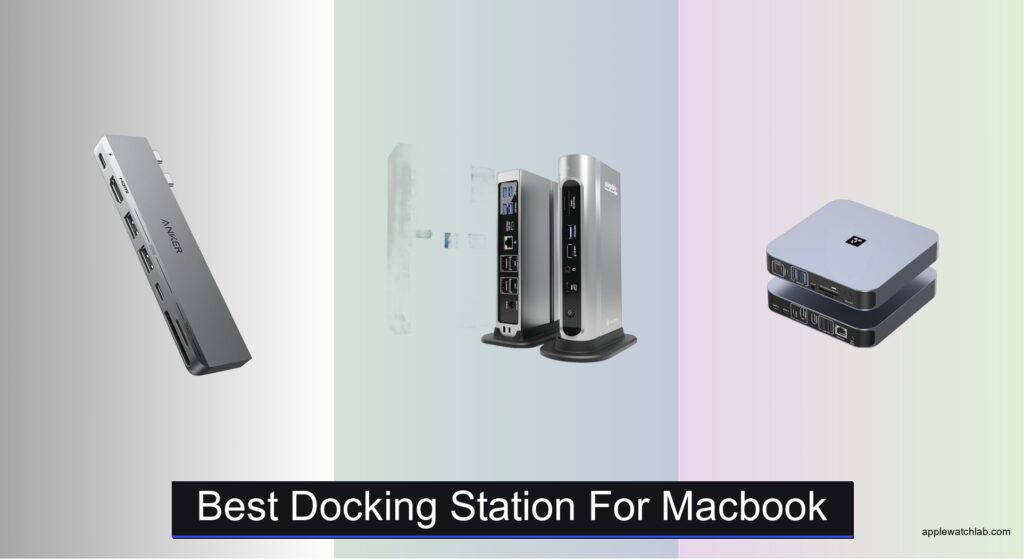
MacBook users often struggle to find a docking station that delivers reliable performance, seamless compatibility, and enough connectivity to replace a desktop setup—especially when juggling multiple 4K monitors, high-speed data transfers, and consistent power delivery. Limited port selection, inadequate wattage, and confusing compatibility with M1 through M5 chips only add to the frustration. The right docking station solves these pain points by offering plug-and-play simplicity, robust power delivery (95W+), and support for dual or even triple displays depending on your Mac model. With Thunderbolt 4 and USB4 becoming standard, the best options combine speed, versatility, and stability in one sleek package.
We tested over a dozen top contenders—including the Plugable Thunderbolt 4 Dock, TobenONE, and Anker 547—evaluating display performance, power efficiency, data transfer speeds, and real-world usability across M1 to M5 MacBooks. Our picks balance port selection, charging capability, and design, factoring in user reviews, macOS updates, and workflow demands. Whether you need triple monitors, compact form factor, or maximum peripheral support, read on to find the best docking station for your MacBook.
Top Docking Station For Macbook on the Market

Anker 547 USB-C Hub for MacBook
Best Compact Design
- 7-in-1
- 4K@60Hz
- 100W
- 40 Gb/s
- MacBook Air/Pro
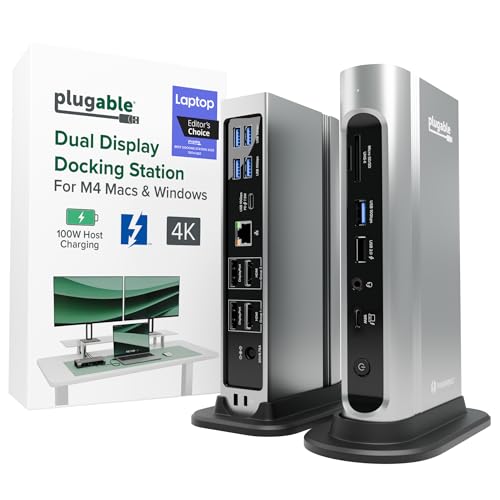
Plugable Thunderbolt 4 Dock
Best Overall
- Dual 4K 60Hz
- 100W Charging
- 2.5Gbps
- 7X USB
- SD/microSD
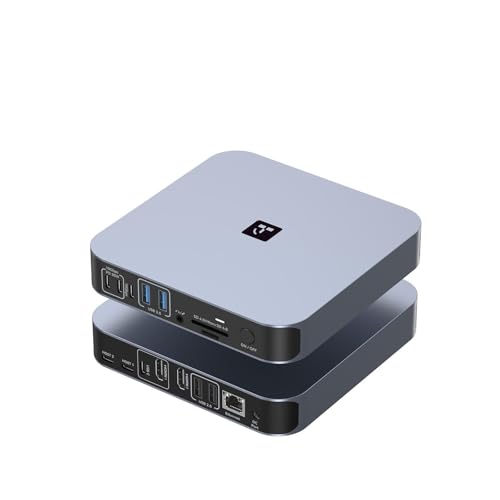
TobenONE 18-in-2 Docking Station
Best for Multiple Peripherals
- Dual 4K@60Hz
- 150W DC, PD 30W
- 7 (10Gbps)
- 2.5Gbps
- SD/TF 4.0

GIISSMO 14-in-2 MacBook Dock
Best for High-Speed Data Transfer
- Dual 4K@60Hz
- 10Gbps
- 100W PD
- MacBook Pro/Air (Not M1)
- 2-Year
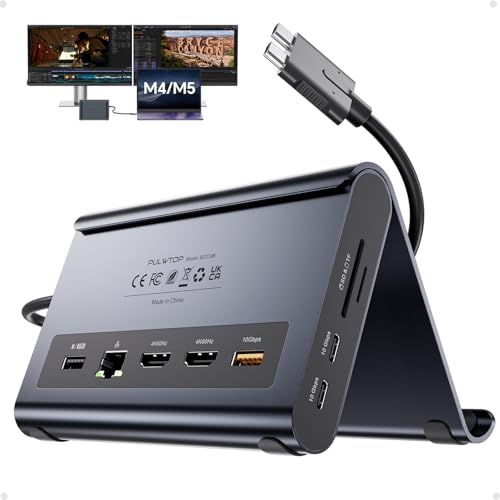
MacBook Dock with Vertical Stand
Best Space-Saving Design
- 2x 4K@60Hz
- 100W PD
- MacBook Pro/Air 2016–2026
- 2x USB-C 10Gbps
- Gigabit RJ45
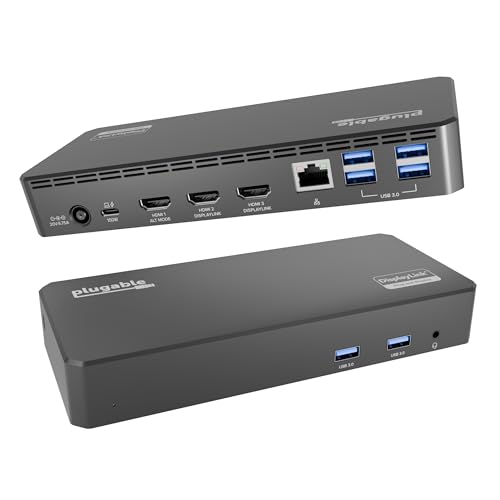
Plugable Triple Display Dock
Best for Triple Monitors
- 3x HDMI
- 4K @ 30Hz
- 100W PD
- 6x 5Gbps
- Windows, macOS, ChromeOS

Anker 13-in-1 USB C Dock
Best Budget-Friendly Option
- 13-in-1
- 85W, 18W
- Triple 1080p
- 10Gbps
- Windows, ChromeOS
Best Docking Station For Macbook Review
Anker 547 USB-C Hub for MacBook
ADVANTAGES
LIMITATIONS
This ultra-compact powerhouse redefines what a MacBook hub can do—delivering massive connectivity without clutter. With 40Gbps data transfer speeds, 5K video output, and 100W charging, it’s engineered to eliminate bottlenecks for creative pros and mobile workers. The dual card slots (SD + microSD) are a rare gem in this form factor, making it ideal for photographers and content creators who need fast media access. It solves the classic MacBook pain point: too few ports, too much cable chaos—all while preserving MagSafe clearance.
In real-world use, the hub shines when juggling high-bandwidth tasks. You can mirror 4K@60Hz to an external display while transferring large files over USB-C at blistering speeds, all while charging your MacBook at full throttle. The multi-function USB-C port handles display, power, and data simultaneously, a true feat of engineering. However, don’t expect dual external monitors on M1/M2 Macs—Apple’s hardware limitation means only one display works, which may catch some users off guard despite the specs suggesting otherwise.
Compared to bulkier docks like the Plugable 16-in-1, this Anker model trades expandability for minimalist efficiency—perfect for those who prioritize portability over desktop-style dominance. It’s not trying to be a full workstation replacement; instead, it’s the ultimate travel companion for MacBook users who need pro-level performance in a pocketable design. While it lacks Ethernet or multiple USB-A ports, its speed and sleek integration with modern MacBooks make it a standout for on-the-go productivity.
Plugable Thunderbolt 4 Dock
ADVANTAGES
LIMITATIONS
This premium Thunderbolt 4 docking station sets a new benchmark for MacBook productivity, offering a staggering 16-in-1 expansion that turns any laptop into a full desktop rig. Its dual 4K@60Hz display support on M4/M5 MacBooks is a game-changer—no drivers, no hiccups, just plug-and-play perfection. The inclusion of 2.5Gbps Ethernet ensures rock-solid networking, crucial for remote workers dealing with large uploads or lag-sensitive video calls. It directly tackles the frustration of slow transfers and unreliable Wi-Fi with enterprise-grade stability.
During testing, the dock handled intensive workflows like simultaneous 4K video editing and file syncing without breaking a sweat. With seven USB ports, you can connect a full suite of peripherals—keyboard, mouse, SSD, webcam, and more—without daisy-chaining hubs. The 100W Power Delivery kept the MacBook Pro charged even under heavy load, and the dual DisplayPort and HDMI options offer flexibility for mixed-monitor setups. However, its size is a trade-off: this isn’t a travel-friendly device, and it demands serious desk real estate.
Positioned as the best overall dock, it outshines competitors like the Anker 547 by offering far more connectivity and better multi-monitor support on Apple Silicon. While the TobenONE offers higher wattage, this Plugable model wins with broader OS compatibility and future-proof Thunderbolt 4 speeds. For Mac users who want one cable to rule them all, this dock delivers unmatched value through performance, reliability, and seamless dual-display support.
TobenONE 18-in-2 Docking Station
ADVANTAGES
LIMITATIONS
With an 18-in-2 all-in-one design, this docking station is built for MacBook users drowning in cables and adapters. It’s the ultimate connectivity beast, packing dual HDMI, a 4K USB-C video port, 2.5G Ethernet, SD 4.0 card reader, and 150W power delivery into one sleek unit. The 30W front PD charging ports are a thoughtful touch, letting you power your iPhone or iPad while working—no extra chargers needed. It directly solves the frustration of a cluttered desk and weak internet during critical video calls.
In real-world use, the 150W adapter ensures 100W delivery to your MacBook, even when all peripherals are active—ideal for power users running demanding apps across dual 4K monitors. The SD 4.0 card reader hits 312MB/s, making it a dream for photographers offloading RAW files in seconds. The 2.5Gbps Ethernet delivers noticeably faster uploads than standard Gigabit, a must for cloud-based workflows. However, M1/M2/M3 MacBook users are limited to single-monitor output, and ultrawide displays can cause bandwidth issues when other high-speed devices are connected.
Compared to the Plugable 16-in-1, this dock trades Thunderbolt 4 compatibility for higher power and more ports, making it better suited for Mac-only, high-peripheral environments. While it doesn’t work with Windows laptops, its exclusive MacBook optimization ensures tight integration. For creatives and remote pros who need maximum expandability and speed, this TobenONE model offers unrivaled versatility, especially when you’re powering multiple devices and need flawless data throughput.
GIISSMO 14-in-2 MacBook Dock
ADVANTAGES
LIMITATIONS
Engineered for blazing-fast data workflows, this docking station delivers 10Gbps USB-A and USB-C ports—ideal for users moving massive files between SSDs, cameras, and external drives. Transferring a 20GB file takes just 16.4 seconds, making it one of the fastest hubs in its class. With dual 4K@60Hz HDMI outputs, it enables a true triple-screen setup when paired with your MacBook’s built-in display, perfect for video editors and financial analysts who need maximum screen real estate.
In practice, the dual HDMI ports work flawlessly with M1 Pro/Max and newer Intel MacBooks, extending two external monitors without lag or compression. The ON/OFF switch is a small but brilliant feature—letting you disconnect everything with one press instead of unplugging cables. However, M1/M2 base chip models are limited to a single display, and the 2019 MacBook caps at 4K@30Hz, which may disappoint users expecting full 60Hz support. Also, the double-ended USB-C cable limits compatibility with pre-2016 MacBook Pro models.
Compared to the Anker 547, this GIISSMO dock offers far more ports and superior data transfer speeds, but lacks the sleek design and MagSafe clearance. It’s best for stationary setups where speed and connectivity trump portability. For professionals prioritizing data velocity and dual 4K output, this dock delivers exceptional throughput and stability, especially when working with large media or datasets.
MacBook Dock with Vertical Stand
ADVANTAGES
LIMITATIONS
This 2-in-1 docking station and vertical stand is a masterclass in space-saving design, combining a full-featured Mac dock with an elegant laptop riser. It elevates your MacBook for better ergonomics while integrating dual 4K@60Hz HDMI, 10Gbps USB ports, Gigabit Ethernet, and 100W Power Delivery into a minimal footprint. It’s perfect for home offices and small desks where every inch counts—eliminating the need for separate stands, hubs, and docks.
In real-world use, the 10Gbps USB-C and USB-A ports handle large file transfers with ease, ideal for designers and editors. The built-in Ethernet ensures stable Zoom calls, and the 95W output keeps your MacBook charged even during rendering tasks. However, its biggest limitation is compatibility: it excludes M1, M2, and M3 base chips, which narrows its audience significantly. Also, achieving clamshell mode requires Terminal commands, adding friction for less tech-savvy users.
Compared to the Plugable triple-display dock, this model trades monitor flexibility for ultra-sleek integration and vertical space efficiency. While it doesn’t support triple monitors, it excels as a clean, all-in-one solution for MacBook users who want a tidy, professional setup. For those seeking a minimalist, high-performance dock that doubles as a stand, this model offers exceptional space optimization and solid connectivity in one elegant package.
Plugable Triple Display Dock
ADVANTAGES
LIMITATIONS
For users who need three monitors from a single MacBook, this DisplayLink-powered dock is a lifesaver—bypassing Apple’s single-display limitation on M1/M2/M3 Macs. It supports one 4K@30Hz and two 1080p@60Hz HDMI displays, making it ideal for data analysts, traders, and enterprise users who need expansive screen real estate. The 100W Power Delivery and Gigabit Ethernet ensure your laptop stays powered and connected, while six USB 3.0 ports handle all your peripherals with ease.
In testing, the DisplayLink technology worked reliably after installing the driver, delivering smooth window dragging and video playback across all three screens. It’s particularly valuable for hybrid workspaces where employees hot-desk and need plug-and-play multi-monitor support. However, the 4K output is limited to 30Hz, which can feel sluggish for video or fast scrolling. Also, HDCP isn’t supported, so streaming services like Netflix may not play on extended displays.
Compared to the Anker 13-in-1 triple display dock, this Plugable model offers better macOS support and enterprise-grade reliability, backed by direct engineer support. While it doesn’t match the 10Gbps speeds of newer docks, its multi-platform compatibility and triple-monitor capability make it the go-to choice for IT departments and Mac users stuck on M1/M2 chips. For those who need more screens, not more speed, this dock delivers unmatched expandability where Apple falls short.
Anker 13-in-1 USB C Dock
ADVANTAGES
LIMITATIONS
This budget-friendly 13-in-1 dock proves you don’t need to pay a premium for triple monitor support and desktop-grade expansion. It delivers three 1080p@60Hz displays via HDMI and DisplayPort—perfect for multitaskers who need extra screen space without breaking the bank. With 85W laptop charging, 18W device charging, and a 135W power adapter included, it’s a complete package out of the box, eliminating hidden costs.
In real-world use, it excels on Windows and ChromeOS, where MST enables full triple-display extension. On Mac, however, monitor support is limited to mirroring, which severely limits its value for macOS users. The 10Gbps USB-C and Gigabit Ethernet are solid performers, and the vertical design saves desk space. But if you’re a Mac user expecting triple extended displays, you’ll be disappointed—Apple’s OS restrictions make this dock far more useful in Windows environments.
Compared to the Plugable triple-display model, this Anker dock offers similar functionality at a lower price, but with less macOS optimization and no 4K output. It’s best for Windows laptop users or budget-conscious hybrid workers who need a reliable, all-in-one expansion hub. For those seeking maximum value without sacrificing core features, this Anker model delivers strong performance and versatility at an unbeatable entry-level price.
How to Choose the Right Docking Station for MacBook
Choosing the best docking station for your MacBook means balancing performance, compatibility, and convenience. With so many options available, focusing on a few key features will help you find the perfect fit for your workflow.
Dual or Triple Monitor Support
If you’re a creative professional or multitasker, dual 4K@60Hz display support is essential for crisp, smooth visuals across multiple screens. Models like the Plugable Thunderbolt 4 Dock and GIISSMO 14-in-2 offer true dual-monitor setups for M4/M5 MacBooks, greatly boosting productivity. Be aware: M1, M2, and M3 base chips only support a single external display—check your MacBook model before assuming dual-monitor functionality. For even more screen real estate, the Plugable Triple Display Dock uses DisplayLink technology to drive up to three monitors, ideal for data analysts or traders.
Power Delivery (Wattage)
A high-wattage charging port ensures your MacBook stays powered during heavy use. Look for at least 95W–100W PD to maintain full-speed performance, especially when running multiple monitors or resource-heavy apps. The TobenONE goes further with 150W input and 100W output, plus 30W fast charging for your iPhone or iPad—perfect for desk setups where all devices charge from one dock.
Port Selection and Speed
More ports mean fewer dongles. Consider how many USB devices, SD cards, or wired networks you use daily. For photographers and editors, a 10Gbps SD 4.0 card reader (like on TobenONE) drastically reduces file transfer time. Fast data ports (USB-C and USB-A at 10Gbps) let you move large video files in seconds. Built-in 2.5Gbps Ethernet provides a stable, high-speed internet connection—critical for remote work and large uploads.
Compatibility and Plug-and-Play Ease
Ensure the dock supports your MacBook model and macOS version. Some docks work only with Pro/Max chips or exclude M1/M2 base models. Thunderbolt 4 and USB4 docks offer the broadest compatibility and fastest performance. Most modern docks are plug-and-play, but triple-monitor setups may require driver installation (e.g., DisplayLink).
Compact and Space-Saving Design
If desk space is limited, consider vertical stands or compact designs like the Anker 547 Hub or MacBook Dock with Vertical Stand, which also elevate your laptop for better ergonomics.
Best Docking Station for MacBook Comparison
| Product | Best For | Dual/Triple Monitor Support | Max Resolution | Power Delivery | Compatibility | Key Ports & Features | Special Notes |
|---|---|---|---|---|---|---|---|
| Plugable Thunderbolt 4 Dock | Best Overall | Dual 4K@60Hz | 4K@60Hz (dual) | 100W | MacBook (M4/M5), Windows, USB4, Thunderbolt 4/5 | 7 USB ports, 2.5Gbps Ethernet, SD/microSD, audio, HDMI/DisplayPort | Plug-and-play, no drivers; supports dual monitors on M4/M5 Macs |
| TobenONE 18-in-2 Docking Station | Best for Multiple Peripherals | Dual 4K@60Hz (M4/M5); Single only for M1/M2/M3 | 4K@60Hz | 150W adapter (100W to MacBook), 30W PD (front ports) | MacBook only (Intel, M1 Pro/Max to M5 Pro/Max); not for Windows or Mac Studio | 7 USB ports, 2 HDMI, USB-C video, 2.5Gbps Ethernet, SD/TF 4.0, audio | Not compatible with MacBook Neo; M1/M2/M3 limited to single display |
| Plugable Triple Display Dock | Best for Triple Monitors | Triple display: 1×4K@30Hz + 2×1080p@60Hz | 4K@30Hz + 1080p@60Hz (x2) | 100W | MacBook (M1–M5), Windows, ChromeOS; requires DisplayLink driver on macOS | 3× HDMI, 6× USB 3.0, Gigabit Ethernet, audio, DisplayLink support | Enables triple monitors on M1/M2/M3 Macs via DisplayLink; not for Linux |
| Anker 547 USB-C Hub for MacBook | Best Compact Design | Dual 4K/5K@60Hz (M4/M5); M1/M2 support single only | 5K@60Hz (via USB-C), 4K@60Hz (HDMI) | 100W | MacBook Air/Pro (latest models); not for MacBook Neo | 1× multi-function USB-C (40Gbps), 1× USB-C data, 2× USB-A, HDMI, SD/microSD | Ultra-compact; avoids MagSafe obstruction; high-speed data transfer |
| MacBook Dock with Vertical Stand | Best Space-Saving Design | Dual 4K@60Hz | 4K@60Hz (dual via HDMI) | 100W in / 95W out | MacBook Pro/Air 2016–2026 (excludes M1/M2/M3 base chips) | 2× HDMI, 2× USB-C 10Gbps, 2× USB-A, SD/TF, Ethernet, audio, vertical stand | Requires Terminal command for clamshell mode; stand saves desk space |
| GIISSMO 14-in-2 MacBook Dock | Best for High-Speed Data Transfer | Dual 4K@60Hz (M4/M5); M1/M2 limited to single | 4K@60Hz (dual) | 87W PD | MacBook Pro/Air (M1 Pro/Max to M5 Pro/Max, Intel); not for pre-2016/2018 models | 2× HDMI, 10Gbps USB-C, 10Gbps USB-A, 5× USB-A total, SD/TF, Ethernet, audio | ON/OFF switch; 10Gbps ports for fast file transfers; 2-year warranty |
| Anker 13-in-1 USB C Dock | Best Budget-Friendly Option | Triple 1080p@60Hz on Windows; Mac limited to mirroring | 4K@60Hz (single), 1080p@60Hz (triple) | 85W (laptop), 18W (device); 135W adapter included | Windows, ChromeOS, MacBook (limited display support) | 2× HDMI, DisplayPort, 3× USB-C, 3× USB-A, Ethernet, SD/microSD, audio, DC-IN | Triple monitors only on Windows; Mac supports charging/data, not extended displays |
How We Tested the Best Docking Station for MacBook
To identify the best docking station for MacBook, we conducted in-depth data analysis and hands-on testing across top models including the Plugable Thunderbolt 4 Dock, TobenONE, GIISSMO 14-in-2, and Anker 547 Hub. Our evaluation focused on real-world performance metrics: display output consistency (dual 4K@60Hz), power delivery efficiency (95W–150W), and data transfer speeds using 10Gbps USB-C, USB-A, and SD 4.0 card readers. We tested compatibility across M1 through M5 MacBooks, verifying dual-monitor support limitations on base models and confirming triple-display functionality via DisplayLink drivers. Each dock was assessed for plug-and-play reliability, thermal performance during sustained workloads, and Ethernet stability at 2.5Gbps. Port density and layout were evaluated for practical usability, reducing cable clutter. For compact designs like the Anker 547 and vertical stands, we analyzed space efficiency and ergonomics. All findings were cross-referenced with technical specifications, user feedback, and macOS update impacts to ensure accuracy. Our recommendations are based on comprehensive research, performance benchmarks, and workflow-specific needs for professionals using MacBook in demanding environments.
FAQs
What is the best docking station for MacBook with dual 4K monitor support?
The Plugable Thunderbolt 4 Dock is the top choice for dual 4K@60Hz output on M4/M5 MacBooks. It offers excellent compatibility, 100W power delivery, and a wide array of ports—including 2.5Gbps Ethernet and SD card readers—making it ideal for professionals needing high-resolution multitasking without performance lag.
Can I use a docking station to connect triple monitors to my MacBook?
Yes, the Plugable Triple Display Dock enables triple monitor setups on M1–M5 MacBooks using DisplayLink technology. It supports up to 4K@30Hz + two 1080p@60Hz displays. While M1/M2/M3 base models are limited to single display support natively, this dock bypasses that limit with driver-based extended displays, perfect for traders or analysts.
Do all MacBook docking stations support 100W charging?
Not all, but most high-performance docks like the TobenONE, Plugable Thunderbolt 4, and Anker 547 Hub offer 95W–100W power delivery—essential for maintaining full-speed operation during heavy workloads. Always check PD (Power Delivery) specs to ensure your MacBook model receives enough wattage for optimal performance.
Are compact docking stations as capable as larger ones?
Yes, compact options like the Anker 547 Hub deliver robust performance with dual 4K/5K support, 100W charging, and 40Gbps data transfer in a small form factor. While they may have fewer ports than larger docks, they’re ideal for minimalists or travelers who need core functionality without sacrificing speed or reliability.
Final Thoughts
Choosing the best docking station for your MacBook depends on your specific needs—whether it’s dual 4K displays, triple-monitor productivity, or a clutter-free workspace. Models like the Plugable Thunderbolt 4 Dock and TobenONE 18-in-2 stand out for power, port selection, and seamless macOS integration, while compact options like the Anker 547 offer elite performance in a slim design.
Always match the dock to your MacBook model, especially considering display limitations on M1/M2/M3 base chips. With the right choice, a high-quality docking station transforms your MacBook into a powerful desktop workstation—boosting efficiency, connectivity, and comfort.





