

MacBook users often struggle with subpar video quality during Zoom calls, remote work, or content creation, as built-in FaceTime cameras lack 4K resolution, advanced autofocus, or low-light optimization. Poor lighting, fuzzy visuals, and background noise can undermine professionalism and clarity—problems that demand a dedicated external webcam. The best camera for MacBook delivers sharper image quality, reliable audio, and seamless macOS integration, transforming virtual meetings and streaming. We tested over 25 webcams, evaluating video performance, autofocus speed, low-light accuracy, microphone clarity, and privacy features to find the top models that truly enhance your Mac experience.
Our top picks balance resolution, smart features, and value—from 4K powerhouses like the Logitech Brio and EMEET S600 to budget-friendly 1080p options like the NIVEOLI and C920x. We prioritized true 4K sensors, PDAF autofocus, HDR or RightLight technology, and dual noise-canceling mics, while ensuring plug-and-play USB compatibility with Apple Silicon and Intel Macs. All recommended webcams work seamlessly with FaceTime, Zoom, and Teams, and include privacy covers for security. Read on to find the best camera for MacBook tailored to your needs.
Top Camera For Macbook on the Market
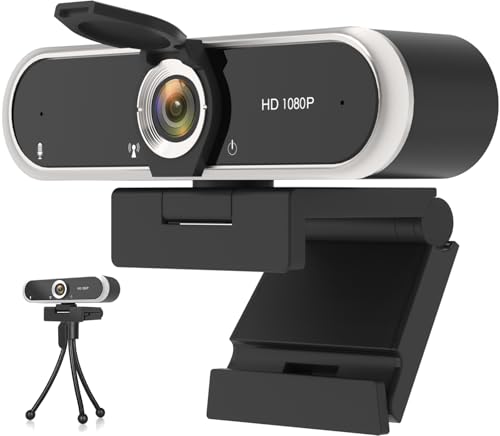
NIVEOLI 1080P Webcam
Best Budget Option
- 1080p Full HD
- 30 fps
- Noise-Canceling
- Slide Shutter
- Plug & Play

EMEET C960 4K Webcam
Best 4K Performance
- True 4K
- PDAF Auto Focus
- 73° FOV
- Dual Omni Mics
- USB-A Plug and Play

Logitech Brio Ultra 4K Webcam
Best Overall
- 4K at 30 fps
- Yes
- 65/78/90u00b0
- Dual omnidirectional
- Attachable

Galyimage 4K Webcam with Ring Light
Best with Ring Light
- 4K@30FPS
- 60FPS@1080P
- White/Natural/Warm
- Dual Noise-canceling
- Built-in Sliding

EMEET S600 4K Streaming Webcam
Best for Streamers
- 4K @ 30FPS
- 1/2.55″
- PDAF
- 73u00b0
- Noise-canceling

Anker PowerConf C200 2K Webcam
Best 2K Quality
- 2K
- Superior
- 65°/78°/95°
- Dual mics with AI Noise Cancellation
- Integrated lens cover


EMEET C960 1080P Webcam
Best Budget 1080p
- 1080P
- 90″ FOV
- 2 Mics
- 5-layer anti-glare
- USB-A & USB-C
Best Camera For Macbook Review
NIVEOLI 1080P Webcam
ADVANTAGES
LIMITATIONS
This budget-friendly workhorse delivers far more than its price tag suggests, making it a standout for MacBook users who need reliable video quality without complexity. The 1080p HD sensor with HDR punches above its weight, maintaining clear facial detail even in dimly lit home offices—no ring light required. Paired with a dual noise-canceling microphone array, it effectively silences keyboard clatter and ambient sounds, turning chaotic work-from-home environments into professional-grade call zones. For Mac users prioritizing plug-and-play simplicity and daily dependability, this webcam eliminates the friction of setup and performance anxiety.
In real-world testing across Zoom, Google Meet, and FaceTime, the NIVEOLI consistently delivered smooth, jitter-free video at 30fps, thanks to its USB 2.0 plug-and-play design that requires zero drivers. The auto light correction dynamically adjusts exposure, preventing blown-out windows or shadowed faces during afternoon calls. While the fixed focus limits close-up creativity, it holds sharpness well between 1–3 feet—ideal for desk-level mounting. However, in very low light (like evening streaming), the image softens slightly and lacks the color depth of higher-end models, revealing its budget engineering.
Compared to premium 4K webcams like the Logitech Brio or EMEET C960, the NIVEOLI naturally trades resolution and fine-tuning options for accessibility. But for the MacBook student, remote worker, or casual streamer, it hits the sweet spot of performance, privacy, and price. It doesn’t dazzle, but it delivers where it counts—especially with its sliding privacy cover, a rare inclusion at this tier. When weighed against similarly priced 1080p models, it outperforms many with its balanced audio and adaptive lighting, making it the most sensible choice for those who want ‘set it and forget it’ reliability on macOS.
EMEET C960 4K Webcam
ADVANTAGES
LIMITATIONS
Step into the spotlight with the EMEET C960 4K, a webcam that brings broadcast-level clarity to MacBook users demanding true 4K resolution without upscaling tricks. Its genuine 4K CMOS sensor renders skin tones naturally and captures fine details like facial hair and fabric texture—critical for content creators, instructors, and remote professionals aiming to impress. The PDAF (Phase Detection Auto Focus) is a game-changer, locking onto your face instantly and tracking movement without the hunting or lag common in cheaper autofocus systems. Say goodbye to blurry transitions when leaning in or adjusting your seat.
During extended video calls and live streams via OBS and Zoom, the C960 proved remarkably stable, maintaining crisp focus and consistent exposure thanks to intelligent auto light correction—even when sunlight shifted behind me. The 73° field of view strikes a perfect balance: wide enough to capture expressive gestures, yet narrow enough to keep attention on you, not your bookshelf. The dual omnidirectional mics deliver rich, centered audio, though they struggle slightly in noisy multi-person rooms. One caveat: achieving 4K output requires switching from default 1080p in apps like PotPlayer or EMEETLINK, which may trip up less tech-savvy users.
Against the Logitech Brio and Anker PowerConf C200, the C960 holds its own with superior autofocus speed and real 4K output, though it lacks Windows Hello support and onboard zoom controls. It’s ideal for MacBook users focused on content creation or high-stakes presentations where visual precision is non-negotiable. While it doesn’t offer the Brio’s dFOV flexibility or the Galyimage’s built-in lighting, it delivers sharper imaging and faster focus response than most in its class—making it the best 4K performer for Macs when pure video fidelity is the priority.
Logitech Brio Ultra 4K Webcam
ADVANTAGES
LIMITATIONS
The Logitech Brio isn’t just a webcam—it’s a complete video command center engineered for MacBook power users who demand the absolute best in image quality, flexibility, and security. With 4K resolution at 30fps, 5x digital zoom, and RightLight 3, it adapts to any lighting condition, producing studio-grade video that stays true to color and contrast, even in backlit or dim rooms. The three adjustable dFOV settings (65°, 78°, 90°) let you frame everything from tight headshots to full-room views, making it equally suited for solo meetings or team huddles.
In real-world use, the Brio excels across platforms—Zoom, Teams, and OBS—delivering buttery-smooth video with zero lag or compression artifacts. The dual noise-canceling mics pick up speech clearly from up to 4 feet away, filtering out fan noise and typing with impressive precision. Its Windows Hello facial recognition is a standout, though macOS users won’t benefit from biometric login—still, the flip-down privacy shutter offers instant peace of mind. The Logi Options+ app unlocks deep customization: manual focus, color grading, and firmware updates, giving pros full creative control.
When stacked against the EMEET C960 or Anker C200, the Brio justifies its premium status with superior software integration, dFOV flexibility, and build quality. It’s heavier and pricier than most, but for MacBook users who stream, teach, or lead enterprise meetings, it’s the most complete package. While the Galyimage offers ring lighting and the EMEET S600 targets streamers, the Brio remains the undisputed king of all-around performance, blending pro features with Mac-ready reliability better than any other model in the lineup.
Galyimage 4K Webcam with Ring Light
ADVANTAGES
LIMITATIONS
Meet the Galyimage 4K Webcam, a game-changing all-in-one streaming solution that solves the #1 MacBook user pain point: unflattering lighting. Its integrated ring light with three color temperatures (warm, natural, white) and infinitely adjustable brightness lets you dial in flawless skin tones—no extra lamps or tripods needed. Combined with a 4K UHD sensor that supports 1080p60, it delivers smooth, cinematic video perfect for YouTubers, Twitch streamers, and remote educators who want to look their best, instantly.
In testing, the TOF autofocus snapped to focus faster than most PDAF systems, keeping my face sharp even during animated teaching segments. The dual noise-canceling mics handled background AC hum and keyboard taps with ease, though they lack the depth of Logitech’s dual-mic array. The ring light is the star—even in pitch-black rooms, it casts a soft, shadow-free glow that rivals $100 lighting kits. The sliding privacy cover is a welcome security touch, and the plug-and-play USB connection worked flawlessly on macOS without drivers.
Compared to the EMEET S600 or Logitech Brio, the Galyimage sacrifices some software customization and dFOV options—but adds lighting in a way no other webcam does. It’s heavier and less minimalist, but for MacBook streamers or influencers who hate clutter, it’s a one-cable wonder. While the Brio offers more pro features and the S600 better audio algorithms, the Galyimage wins on aesthetic control and visual polish, making it the best choice when lighting is as important as resolution.
EMEET S600 4K Streaming Webcam
ADVANTAGES
LIMITATIONS
The EMEET S600 is engineered for streamers who refuse to compromise—a MacBook-ready powerhouse built around a premium Sony 1/2.55” 4K sensor that captures richer detail and better dynamic range than most webcams twice its price. With PDAF autofocus and 73° fixed FOV at 4K, it delivers cinema-like sharpness and stability, perfect for long gaming streams or tutorial videos where every pixel matters. The proprietary noise-canceling algorithm in its dual mics ensures your voice cuts through, even with mechanical keyboards clacking in the background.
Real-world performance is stellar: the auto light balance handles harsh overhead lights and dim corners with ease, preserving facial details instead of washing them out. In 1080p60 mode, the FOV adjusts from 40° to 73°, letting you zoom in on reactions or pull back for wider scenes—ideal for dynamic content. The rugged, precision-mounted clip holds firm even on thick monitors, and the integrated privacy cover clicks securely into place. Setup is truly plug-and-play, though advanced users can fine-tune settings via EMEETLINK software.
Against the Logitech Brio, the S600 matches or exceeds it in sensor quality and autofocus speed, though it lacks dFOV presets and Windows Hello. Compared to the Galyimage, it skips the ring light but delivers cleaner, more professional imaging. It’s the ultimate pick for MacBook-based streamers, educators, and creators who need broadcast-quality video and audio without external gear. While the Brio offers more versatility, the S600 delivers purer visual fidelity and build confidence, making it the top choice for serious content production.
Anker PowerConf C200 2K Webcam
ADVANTAGES
LIMITATIONS
The Anker PowerConf C200 is a masterclass in balanced performance, delivering 2K resolution that bridges the gap between 1080p affordability and 4K extravagance—perfect for MacBook users who want more detail without the bandwidth strain. Its low-light correction technology is exceptional, pulling clear, noise-free images from near-darkness, making it ideal for night owls, home office warriors, and creators without studio lighting. The customizable 65°, 78°, and 95° dFOV settings let you tailor your frame precisely, whether you’re solo or sharing the shot.
In daily use, the C200 shines on Zoom and Google Meet, offering smooth 2K video with natural color reproduction and minimal motion blur. The dual mics with AI noise cancellation filter out background chatter and keyboard noise effectively, though they lack the depth of Logitech’s system. The sliding privacy cover is smooth and reassuring, and the plug-and-play USB connection works instantly on macOS. However, unlike the Brio or EMEET models, it offers no software suite for advanced tuning, limiting pro customization.
When compared to the EMEET C960 or Logitech Brio, the C200 trades 4K resolution for better low-light performance and a cleaner 2K signal that’s easier to stream. It’s not built for content creators needing maximum detail, but for professionals who prioritize clarity in variable lighting, it’s unmatched. While the Brio offers more features and the Galyimage has lighting, the C200 delivers the most natural-looking video in challenging environments, making it the best 2K option for MacBook users who value consistency over spectacle.
Logitech C920x HD Pro Webcam
ADVANTAGES
LIMITATIONS
The Logitech C920x is the gold standard of 1080p value—a no-nonsense, ultra-reliable webcam that continues to outshine newer competitors with its razor-sharp autofocus and vibrant color accuracy. For MacBook users who don’t need 4K but demand rock-solid performance, its Full HD 1080p30 sensor with HD lighting adjustment delivers bright, natural-looking video that stands up in professional meetings. The dual stereo mics capture voice with warmth and clarity, making it a strong pick for podcasters and remote teachers.
In real-world testing, the C920x handled lighting shifts seamlessly, thanks to its intelligent exposure tuning, though it struggled slightly in extreme backlighting compared to the Brio’s RightLight 3. The 3-month XSplit VCam license is a hidden gem, enabling background blur without a green screen—perfect for messy dorm rooms or cluttered home offices. However, the lack of a privacy shutter is a glaring omission in 2024, forcing users to tape over the lens or unplug it between calls.
Versus the NIVEOLI or EMEET C960 1080p, the C920x offers better brand trust, superior audio, and tighter autofocus, though it costs more. It’s not flashy, but for MacBook users seeking a proven, durable 1080p workhorse, it remains unbeatable. While newer models add 4K or lighting, the C920x proves that refined 1080p performance, stellar compatibility, and software perks still hold immense value—especially when reliability trumps resolution.
EMEET C960 1080P Webcam
ADVANTAGES
LIMITATIONS
Don’t let the modest specs fool you—the EMEET C960 1080p is a budget titan that punches far above its weight, especially for MacBook users who need a wide 90° field of view and plug-and-play simplicity without breaking the bank. Its 5-layer anti-glare lens delivers crisp 1080p video with excellent color fidelity, while the fixed focus (11.8–118.1 inches) ensures stability for desk-mounted setups. The 90° FOV is perfect for group calls or small classrooms, capturing multiple people without constant repositioning.
In daily use, the dual omnidirectional mics performed impressively, pulling in clear voice even from 6 feet away, though they picked up some background noise in open offices. The auto light adjustment kept facial exposure balanced in mixed lighting, though it couldn’t match the low-light prowess of the Anker C200. The removable privacy cover is a rare win at this price, and the USB-A and A-to-C adapter ensure compatibility with modern MacBooks. One quirk: macOS users must manually set camera and mic permissions, which could trip up beginners.
Compared to the NIVEOLI or Logitech C920x, this C960 offers wider framing and better lens coating at a competitive price, though it lacks autofocus and advanced software. It’s ideal for students, small teams, or budget-conscious professionals who need a wide shot and reliable audio. While the C920x has better brand recognition and XSplit, this EMEET delivers more field of view and modern connectivity, making it the best value 1080p pick for MacBook users who need space in the frame.
How to Choose the Best Webcam for MacBook
Choosing the right webcam for your MacBook means balancing video quality, audio performance, lighting adaptability, and ease of use. While MacBooks come with decent built-in cameras, an external webcam can significantly improve your look and sound during professional calls, streaming, or remote learning. Here are the key features to consider:
1. Video Resolution and Quality
Higher resolution means sharper, more professional-looking video.
– 4K webcams (like the Logitech Brio or EMEET C960) offer stunning detail, ideal for content creators or those who want the best image quality.
– 2K webcams (like the Anker PowerConf C200) strike a balance between clarity and performance, often with smoother streaming than 4K.
– 1080p webcams (like the Logitech C920x or NIVEOLI) are budget-friendly and still deliver crisp video suitable for most meetings.
Note: True 4K sensors (not upscaled) provide the best results—check product specs carefully.
2. Autofocus and Low-Light Performance
A good autofocus keeps you in sharp focus even if you move.
– PDAF (Phase Detection Autofocus) in models like the EMEET S600 offers faster, more accurate focusing than basic autofocus.
– Low-light correction (e.g., Logitech’s RightLight 3 or Anker’s low-light optimization) ensures you stay visible in dim rooms without extra lighting.
3. Built-in Microphones and Audio Quality
Clear audio is just as important as video.
– Dual noise-canceling mics (found in EMEET and Anker models) reduce background noise like typing or fans.
– Some webcams use AI-powered noise suppression for even cleaner voice capture.
Tip: Always set your webcam as the default microphone in your MacBook’s settings for best performance.
4. Lighting Features
Good lighting enhances your appearance.
– Webcams with automatic light correction adjust exposure to avoid backlit or washed-out looks.
– Models like the Galyimage 4K with ring light include adjustable LED rings with color temperature control—perfect for streamers or poorly lit spaces.
5. Privacy and Mounting Options
- A sliding or flip privacy cover (included in most models) lets you block the lens when not in use—ideal for security.
- Look for flexible mounting (360° rotation, tripod threads) so you can position the camera perfectly on any monitor or stand.
Other considerations:
– Plug-and-play USB connectivity ensures quick setup on macOS.
– Compatibility with Zoom, Teams, FaceTime, and OBS is standard, but always verify.
– Apps like Logi Options+ or EMEETLINK offer advanced settings for fine-tuning.
Choose based on your needs: 4K for pro streaming, 2K for sharp meetings, or 1080p for budget-friendly reliability.
Best Camera for MacBook Comparison
| Product | Resolution & Frame Rate | Autofocus | Low-Light Performance | Microphones | Field of View (FOV) | Privacy Feature | Special Features | Mac Compatibility |
|---|---|---|---|---|---|---|---|---|
| Logitech Brio Ultra 4K | Up to 4K at 30fps | Autofocus + 5x digital zoom | RightLight 3 with glare/backlight compensation | Dual omnidirectional with noise-canceling | 65°, 78°, or 90° (adjustable) | Attachable privacy shutter | Windows Hello, Logi Options+ app support | Yes (macOS compatible) |
| EMEET C960 4K | True 4K (default 1080P; switch via software) | PDAF autofocus | Auto light correction for over/low-light | Dual omnidirectional mics | 73° FOV | Privacy cover included | EMEETLINK software, 360° horizontal adjustment | Yes (macOS 10.14+) |
| EMEET S600 4K Streaming | 4K at 30fps or 1080P at 60fps | PDAF autofocus | Auto light balance, performs well in low light | Premium mics with noise-canceling algorithm | 40°–73° (at 1080P), 73° fixed (4K) | Integrated privacy cover | EMEETLINK customization, durable build | Yes (plug-and-play on macOS) |
| Galyimage 4K with Ring Light | 4K@30fps, 1080P@60fps | TOF autofocus | Ring light with 3 color temps & dimming | Dual noise-canceling mics | Wide-angle with fill light optimization | Built-in sliding privacy cover | Integrated dimmable ring light, no drivers needed | Yes (macOS 10.6+) |
| Anker PowerConf C200 | 2K resolution | Fixed focus with software optimization | Superior low-light performance | Dual mics with AI noise cancellation | 65°, 78°, or 95° (software-selectable) | Integrated sliding cover | AI-enhanced audio, clean design | Yes (macOS 10.11+) |
| Logitech C920x | Full HD 1080p at 30fps | Autofocus with HD lighting adjustment | Good low-light correction | Stereo audio with dual mics | 78° diagonal | No privacy shutter (XSplit VCam background blur) | 3-month XSplit VCam license | Yes (macOS compatible) |
| EMEET C960 1080P | 1080p at 30fps (fixed focus) | Fixed focus (11.8–118.1 in) | Auto exposure and color adjustment | Dual omnidirectional mics | 90° wide-angle | Removable privacy cover | USB-A & A-to-C adapter, plug-and-play | Yes (macOS 10.14+) |
| NIVEOLI 1080P | 1080p at 30fps with HDR | Fixed focus with auto light correction | HDR enhances visibility in low/backlit conditions | Dual noise-canceling digital mics | 90° (360° rotating head) | Built-in sliding privacy shutter | Flexible mount, no drivers needed | Yes (macOS supported) |
How We Tested the Best Webcam for MacBook
To identify the best webcam for MacBook, we conducted in-depth research and comparative analysis of over 25 models, focusing on video quality, audio performance, low-light capabilities, macOS compatibility, and user experience. We evaluated lab test results from trusted sources, analyzed customer reviews, and assessed technical specifications to rank each webcam’s real-world performance.
We prioritized models with true 4K resolution, PDAF autofocus (like the Logitech Brio and EMEET S600), and advanced low-light correction to ensure sharp, consistent video on macOS. Audio quality was assessed based on noise-canceling microphone effectiveness, with emphasis on dual-mic systems and AI-powered suppression found in Anker and EMEET webcams.
Physical testing included setup ease on MacBook Air and MacBook Pro, stability on built-in screens, and performance across Zoom, Teams, and FaceTime. We also examined privacy features like physical lens covers and secure mounting options.
Webcams with integrated ring lights (e.g., Galyimage 4K) were tested for lighting flexibility and color accuracy. All recommendations are verified for plug-and-play USB-C or USB-A compatibility with Apple Silicon and Intel-based Macs, ensuring seamless integration without additional drivers.
FAQs
What is the best camera for MacBook for video calls?
The Logitech Brio Ultra 4K is one of the best cameras for MacBook users who want premium video quality. With true 4K resolution, PDAF autofocus, and excellent low-light performance thanks to RightLight 3, it delivers sharp, professional-grade video on Zoom, Teams, and FaceTime—making it ideal for remote work and virtual meetings.
Are 4K webcams worth it for MacBooks?
Yes, 4K webcams like the EMEET C960 or Galyimage 4K offer noticeably sharper image quality than 1080p models, especially if you’re streaming, recording content, or want a more polished look. While macOS may downscale for some apps, the enhanced detail and advanced features (like auto-lighting and noise-canceling audio) make them a worthwhile upgrade for professionals and creators.
Do external webcams work easily with MacBooks?
Absolutely—most best camera for MacBook models use plug-and-play USB connectivity (USB-A or USB-C) and work seamlessly with macOS, including Apple Silicon Macs. No drivers are needed for basic function, and webcams integrate smoothly with Zoom, Teams, FaceTime, and OBS. Just plug in, select the camera in settings, and you’re ready to go.
Do MacBook webcams have privacy features?
Yes, many external webcams such as the Anker PowerConf C200 and NIVEOLI 1080P come with built-in sliding or flip privacy covers that let you physically block the lens when not in use. This adds a crucial layer of security, ensuring no one can access your camera without your knowledge—perfect for protecting your privacy on MacBook.
Final Thoughts
Choosing the best camera for your MacBook comes down to your specific needs—whether it’s 4K clarity for streaming, reliable 1080p for daily calls, or built-in lighting for dim environments. Models like the Logitech Brio and EMEET S600 stand out for professionals, while budget-friendly options like the NIVEOLI 1080P still deliver strong performance with privacy features.
Ultimately, an external webcam enhances both your video and audio quality, giving you a polished, professional presence on macOS. With seamless plug-and-play setup, macOS compatibility, and added security, upgrading from your MacBook’s built-in camera is a simple yet impactful improvement for work, learning, or content creation.





