
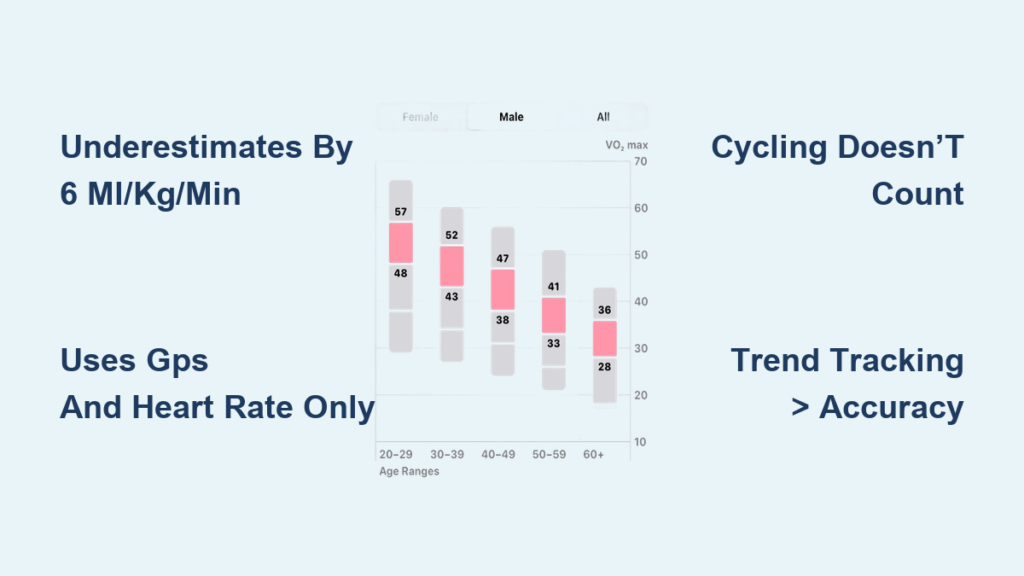
If you’ve ever glanced at your Apple Watch and wondered, “Is this VO2 max number actually accurate?” — you’re not alone. The Apple Watch estimates your cardiovascular fitness using a metric it calls “Cardio Fitness,” which is essentially a submaximal prediction of VO2 max — the maximum amount of oxygen your body can use during intense exercise. It’s meant to reflect your aerobic endurance and long-term heart health.
But here’s the catch: unlike clinical VO2 max testing, which uses a face mask and metabolic cart to measure oxygen consumption in real time, the Apple Watch relies solely on heart rate, GPS speed, and basic user data. No breath-by-breath analysis. No lab. Just algorithms crunching numbers from optical sensors and satellite signals.
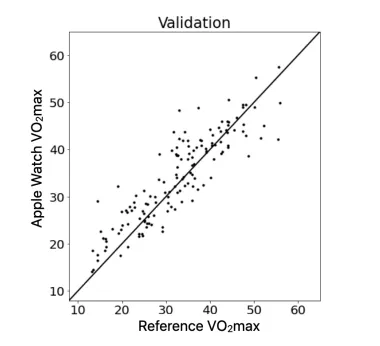
Research shows the Apple Watch consistently underestimates true VO2 max by about 6 mL/kg/min, with average errors exceeding 13%. While it may track trends over time for some users, it should not be trusted for precise values, medical assessments, or performance benchmarking. For athletes, fitness enthusiasts, or anyone serious about tracking progress, understanding the limitations of this feature is essential.
This article dives into what peer-reviewed science says, why discrepancies occur, how real users are affected, and how to get the most reliable readings — all based on clinical studies, user reports, and Apple’s own data.
Scientific Accuracy: What Peer-Reviewed Studies Reveal
Apple Watch Underestimates VO2 Max by 6 mL/kg/min
A 2024 study published in PLOS One rigorously tested Apple Watch Series 9 and Ultra 2 against indirect calorimetry — the clinical gold standard for measuring VO2 max. The results were clear:
- Mean underestimation: 6.07 mL/kg/min
- Mean Absolute Error (MAE): 6.92 mL/kg/min
- Mean Absolute Percentage Error (MAPE): 13.31%
- Limits of agreement: Ranged from –6.11 to +18.26 mL/kg/min, indicating high variability between individuals
These error margins far exceed acceptable thresholds for clinical use. While there was a moderate correlation between Apple Watch estimates and lab values, the systematic underestimation makes absolute numbers unreliable. A reading of 38 mL/kg/min doesn’t mean you’re truly at that level — it could easily be closer to 44.
Still, the study noted that the Apple Watch might serve as a scalable alternative to traditional field tests like the Cooper 12-minute run, especially for population-level fitness tracking. But for diagnosing individual fitness or health risks? It falls short.
Apple’s Own Study Shows Better Results — But With Caveats
Apple’s internal 2023 validation study, involving 755 participants, reported much more optimistic outcomes:
- VO2 max estimates within ±1.2 to 1.4 mL/kg/min of true values
- Accuracy within 4% of actual VO2 max
- Reliability (ICC) between 0.86 and 0.89, suggesting strong consistency
However, this data has not been independently replicated. Differences in participant selection, testing protocols, or proprietary algorithm tuning may explain the gap. Independent research consistently finds higher error rates, suggesting Apple’s results may reflect ideal conditions not seen in everyday use.
How It Compares to Other VO2 Max Estimation Methods
| Method | Typical Error (MAE) |
|---|---|
| Lab VO2 max (indirect calorimetry) | ~1.3 mL/kg/min |
| ACSM submaximal tests | 3.7–4.5 mL/kg/min |
| Garmin/Polar wearables | 3.0–5.0 mL/kg/min |
| Apple Watch | 6.92 mL/kg/min |
The Apple Watch’s error rate is worse than lab standards and comparable to older field tests. Despite using modern machine learning, its accuracy lags behind even basic prediction models. The takeaway? It’s better at showing trends than delivering truth.
How Apple Watch Calculates VO2 Max
Inputs That Drive the Algorithm
The Apple Watch estimates cardio fitness using four key inputs:
- Heart rate: From green LED and infrared PPG sensors
- Speed and distance: GPS and accelerometer data
- User profile: Age, sex, height, weight (must be manually updated)
- Exercise intensity: Requires ≥30% increase in heart rate above resting levels
This data comes only from outdoor walks, runs, or hikes where GPS is active and movement is continuous.
What It Doesn’t Use — And Why That’s a Problem
The Apple Watch ignores critical factors that influence cardiovascular load:
- Respiratory gas exchange (O₂/CO₂)
- Elevation gain
- Power output (e.g., cycling watts)
- Indoor workouts (unless GPS simulated)
- Perceived exertion or effort
This creates real-world issues:
– Hill sprints with high effort but slow pace may be undervalued
– Cycling, even with a chest strap, does not contribute
– Treadmill runs without GPS won’t generate a reading
– Cool-down walks with elevated HR can drag scores down
The algorithm assumes a linear relationship between heart rate and oxygen use, but this varies widely between individuals. That oversimplification is a major source of inaccuracy.
Algorithm Evolution: From Linear Models to AI
watchOS 4 (2017): Basic Regression
The original model used simple linear equations based on heart rate and pace during outdoor runs. It assumed max HR = 220 – age and fixed HR-VO2 ratios — outdated assumptions that led to large individual errors.
watchOS 7 (2021): Machine Learning Upgrade
Apple introduced deep neural networks trained on real-world exercise data. The model combined:
– Physiological modeling (oxygen kinetics via ODEs)
– Data-driven learning from diverse populations
This improved accuracy across age, sex, and fitness levels — but systematic underestimation remained.
watchOS 10+: Hybrid AI Refinement
Current models use a physics-informed AI approach, blending equations with deep learning. Apple claims better personalization, but the algorithm remains closed-source, preventing external validation.
Despite upgrades, core limitations persist — especially due to reliance on imperfect optical HR and lack of metabolic data.
Why Your Apple Watch VO2 Max Might Be Too Low
Only Outdoor Workouts Count
VO2 max is only estimated during outdoor runs, walks, or hikes with GPS. Indoor treadmill workouts do not contribute unless third-party apps simulate GPS.
User report: “I run 3x/week on a treadmill. My VO2 max never updates.” – FitUser2023
Cycling Doesn’t Improve Your Score
Even if you’re training hard on a bike with a Polar H10 chest strap and power meter, Apple Watch does not use cycling data for VO2 max.
User comparison: Garmin estimates 50 mL/kg/min from cycling; Apple Watch shows 38 — same user, same fitness. – mrmarbury
Elevation Gain Is Ignored
Running uphill increases cardiovascular strain — but Apple Watch only sees slower pace. High-effort trail runs may be misinterpreted as low fitness.
User frustration: “I train on hills weekly. Watch penalizes me for slow pace.” – TrailRunnerPro
Cool-Down Walks Drag Down Your Score
Post-workout walks with elevated heart rate (e.g., after HIIT) can be logged as low-intensity activity, pulling down your average efficiency.
User insight: “My 20-minute cool-down drags my cardio fitness down.” – Original Poster
Poor Fit or Cold Weather Skews Readings
- Loose band: Causes PPG signal dropouts → inaccurate HR
- Cold weather: Reduces optical sensor reliability
- Tattoos or dark skin: Can interfere with LED light absorption
- Arm swing or weights: Introduces motion artifacts
Fix reported: “Tightened band from 5th to 3rd hole — VO2 max jumped 4 points.” – HRFixer
Real-World User Experiences: Inconsistencies Are Common
Lab vs. Apple Watch: Gaps Up to 20 Points
Multiple users have compared Apple Watch to clinical tests:
- Clesc: Lab = 58, Apple Watch = 40 (–18)
- Repulsive-Rub-6989: Lab = 45.7, Apple Watch ≈ 34 (–11.7)
- CashSuccessful8699: Lab = 47, Apple Watch = 34, Polar = 46
These gaps confirm Apple Watch readings are not interchangeable with medical results.
Device Comparisons Show Wide Variation
- Garmin (with HRM-Run): Reports 46–55
- Polar H10 + app: Estimates 46–50
- Apple Watch (same user): 34–38
Even with the same chest strap, Apple Watch delivers lower estimates — pointing to algorithmic bias, not sensor failure.
Fitness Improves, But VO2 Max Drops
Many users report declining scores despite real progress:
- Faster mile times
- Lower resting heart rate
- Weight loss
- More workouts
Yet Apple Watch shows dropping scores — a major pain point.
User quote: “Faster, leaner, stronger — but my cardio fitness is falling.” – credit_to_reddit
Some See Plausible Trends
Not all experiences are negative:
- adamr_z: Stable 51–53 as a fit 45-year-old doing HIIT
- [deleted]: Rose from 42 to 51 over months of running
- FlyBoyMcCall: Believes it works well for long-term trend tracking
This suggests the Apple Watch is more reliable for direction than precision.
How to Improve Apple Watch VO2 Max Accuracy
Wear the Watch Snugly
A loose fit causes poor PPG signal. Wear it tight enough to limit movement, especially during runs.
Pro tip: Adjust band regularly. Bands stretch over time — reposition to earlier holes.
Use Outdoor Workouts Only
For VO2 max estimation:
– Select “Outdoor Run” or “Outdoor Walk”
– Avoid indoor treadmill unless GPS is active
– Don’t mix workout types in one session
Run on Flat Terrain for Calibration
To reduce GPS and elevation errors:
– Do a calibration run on a flat, open route
– Avoid trails, forests, or urban canyons with poor satellite signal
Follow Apple’s official guide: HT204516
Update Personal Data Regularly
Ensure these are current in the Health app:
– Weight
– Height
– Age
– Sex
Outdated info skews metabolic calculations.
Avoid Post-Workout Misclassification
- End or pause workouts immediately after finishing
- Don’t let cool-down walks auto-log as separate “outdoor walks”
- Use “End Workout” instead of letting it run
Warm Up and Avoid Confounders
- Warm up for 5–10 minutes to stabilize HR
- Avoid caffeine, alcohol, or stress before exercise
- Exercise in moderate temperatures
Alternative Ways to Estimate VO2 Max
Take the Cooper 12-Minute Run Test
Run as far as possible in 12 minutes. Estimate VO2 max with:
VO2 max ≈ (Distance in meters / 1000) × 6.65 – 5.0
Example: 2,700 meters → (2.7 × 6.65) – 5.0 = ~49 mL/kg/min
User result: “Ran 2.7 km. Cooper test says 49. Apple Watch says 34.” – No_Target_5218
Use a Simple HR-Based Formula
Estimate VO2 max using resting and max HR:
- Predicted Max HR = 208 – (0.7 × age)
- VO2 max ≈ 15.3 × (Max HR / Resting HR)
Example: 30-year-old, resting HR 55
→ Max HR = 187 → VO2 max ≈ 51.7
User comment: “This matches my lab test better than Apple Watch.” – Cvtwelcome
Get a Clinical CPET Test
For true accuracy, take a cardiopulmonary exercise test (CPET):
- Uses a metabolic cart (e.g., COSMED Quark)
- Measures O₂/CO₂, RER, HR, ECG
- Required to meet at least two of:
- HR near 220 – age
- RER ≥ 1.15
- RPE ≥ 17
- VO2 plateau
This is the only clinically valid method.
Expert advice: “If you want real VO2 max, get a stress test. It’s often insurance-covered.” – Dark_Elf_DEX
Final Verdict: Is Apple Watch VO2 Max Trustworthy?
Short Answer: No — For Absolute Values
The Apple Watch systematically underestimates VO2 max by ~6 mL/kg/min, with 13–15% average error. It fails clinical accuracy standards and should not be used to assess fitness level, diagnose low cardiovascular health, or guide medical decisions.
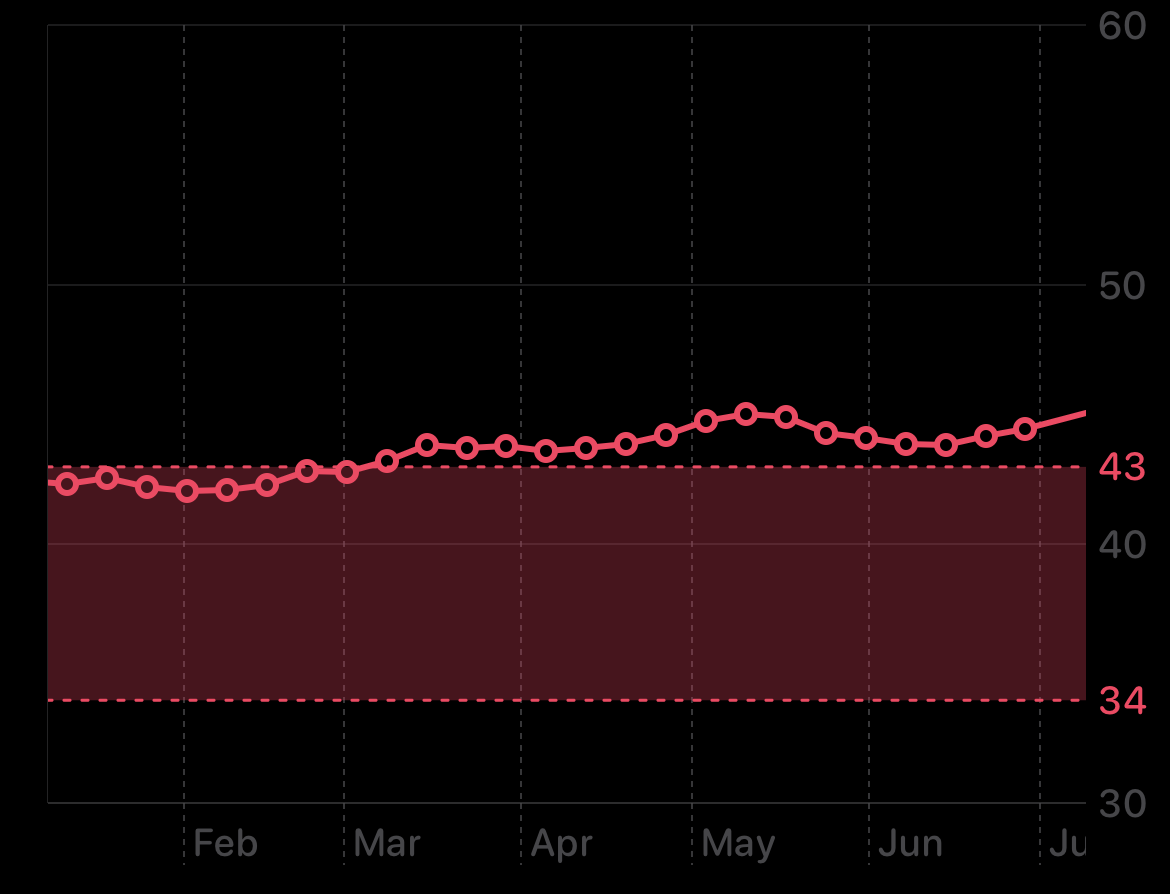
Long-Term Trends? Possibly Useful
Despite flaws, it can show relative changes over time:
– Rising trend → likely improving fitness
– Sudden drop → possible overtraining, illness, or measurement error
If you maintain consistent habits, the direction matters more than the number.
Best Use Case: Motivation, Not Measurement
Apple markets VO2 max as an estimation — not a medical tool. It’s designed to:
– Encourage movement
– Highlight fitness changes
– Support heart health awareness
It succeeds as a nudge, not a diagnostic.
Expert consensus: “View it as a direction, not a destination.” – TechnicalAtlas
“Take this feature with a grain of salt.” – Throwkage
Final Recommendation
- For general users: Track trends — ignore exact numbers
- For athletes: Use lab tests or field protocols (e.g., Cooper test)
- For health concerns: Consult a doctor and request a CPET
- For Apple Watch users: Optimize setup, use outdoors, and compare changes — not values
The Apple Watch VO2 max isn’t broken — it’s limited by design. Use it wisely, and it can still help you stay motivated. But when accuracy matters, there’s no substitute for science.




