
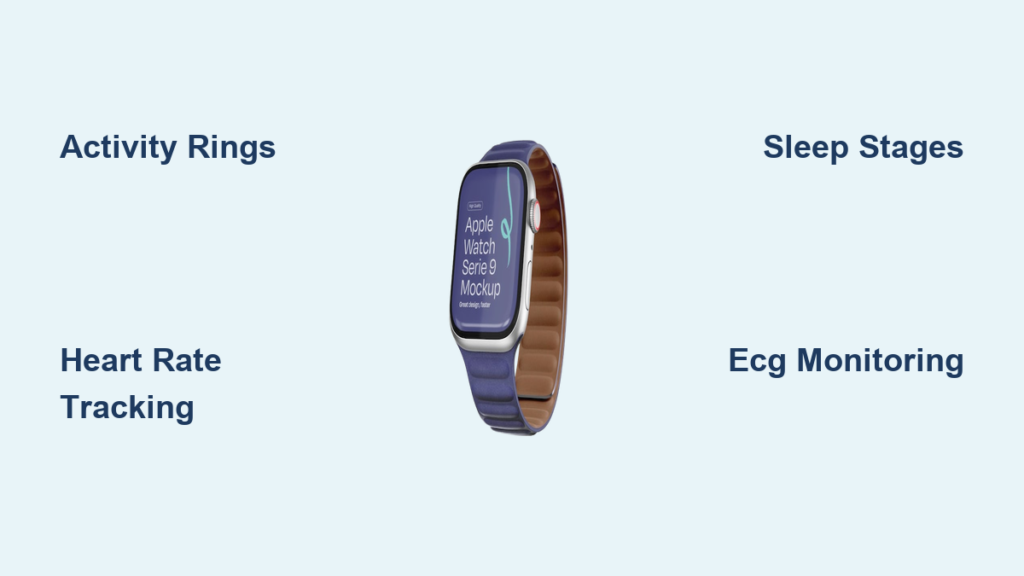
If you’ve ever wondered how your Apple Watch knows when you’re walking, sleeping, or even stressed, you’re not alone. The device does far more than tell time—it’s a 24/7 health and fitness companion that silently monitors your body and behavior using advanced sensors and smart algorithms. Whether it’s closing your Activity rings, detecting an irregular heartbeat, or predicting your next period, the Apple Watch turns everyday movements into meaningful health insights.
At its core, the watch combines optical sensors, accelerometers, GPS, and machine learning to track everything from steps to blood oxygen levels. These metrics are processed locally on the device and synced with the Health app on your iPhone, creating a detailed timeline of your physical and mental well-being. Unlike basic fitness trackers, the Apple Watch doesn’t just count steps—it interprets context, identifies trends, and even alerts you to potential health issues before symptoms arise.
In this guide, you’ll learn exactly how Apple Watch tracks fitness and health, what each metric means, and how to get the most out of its built-in tools. From Activity rings to ECG readings, sleep staging to ovulation estimates, we’ll break down every feature—so you can use your watch not just as a gadget, but as a proactive wellness tool.
Activity Rings Explained
The Activity app uses three dynamic rings to turn fitness into a daily challenge: Move, Exercise, and Stand. These aren’t just visuals—they’re personalized goals based on your habits and capabilities.
Move Ring: Track Active Calories
The red Move ring measures how many active calories you burn each day—those above your resting metabolic rate. Your Move goal starts automatically but adjusts over time based on your performance. Closing the ring means you’ve met your personalized energy expenditure target.
Pro Tip: You can manually adjust your Move goal in the Activity app on iPhone (Settings > Activity) if it feels too easy or too hard.
Exercise Ring: Earn Brisk Minutes
The green Exercise ring credits every full minute of moderate-to-vigorous activity—equal to or more intense than a brisk walk (5 km/h). It’s not just about heart rate; arm motion is required to confirm movement. That’s why sitting and breathing heavily won’t count, but walking with swinging arms will.
Note for Wheelchair Users: The Roll ring replaces Stand, tracking rolling minutes instead of standing.
Stand Ring: Stay Upright Hourly
The blue Stand ring closes when you stand and move for at least one minute during 12 different hours of the day. It’s designed to break sedentary patterns. If you forget, your watch gently taps you with a Stand reminder.
Visual Cue: Missed hours show as gray segments—stand up and walk briefly to fill them.
Workout Detection & Tracking
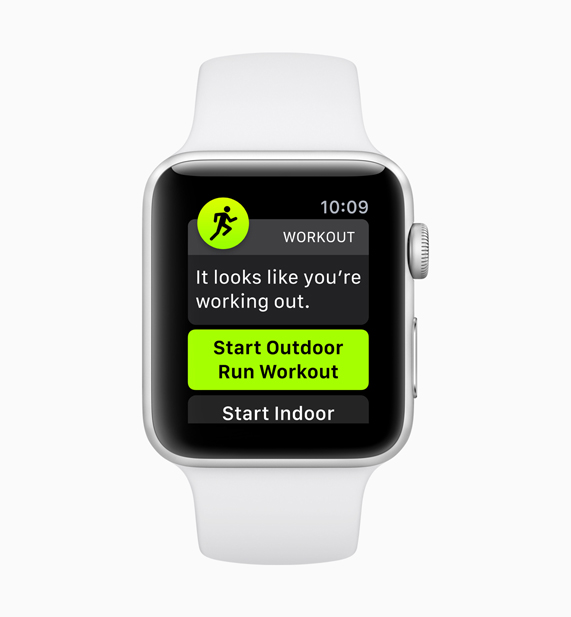
Apple Watch doesn’t need to be told when you’re exercising. It intelligently detects movement patterns and prompts you to start logging—ensuring you don’t miss credit.
Automatic Workout Reminders
If you begin running, walking, or cycling and don’t open the Workout app, your watch may detect the activity after about 10–15 minutes and send a notification: “We noticed you started a workout.” Tap to confirm, and it logs the session retroactively.
Limitation: Detection works best for continuous cardio. Strength training or intermittent efforts often go unnoticed.
Manual Workout Modes
Use the Workout app for precise tracking across dozens of activities:
- Outdoor Run / Indoor Run
- Hiking, Cycling (indoor/outdoor)
- Pool Swim, Rowing, Elliptical
- HIIT, Functional Training, Dance
- Meditations, Dives (with third-party apps)
Each mode displays real-time metrics tailored to the activity.
Real-Time Metrics During Workouts
While exercising, your watch shows key data:
- Active calories burned
- Heart rate (current, average, zones)
- Pace and distance (via GPS)
- Cadence (steps per minute)
- Elevation gain
- Stroke type and SWOLF (swimming efficiency score)
You can customize which metrics appear by swiping left and tapping the “More” button.
Apple Fitness+ Integration
When you follow a Fitness+ workout, your Apple Watch syncs heart rate, calories, and time directly. Completed sessions appear in your history, and metrics contribute to daily goals.
Bonus: On-screen coaches adapt guidance based on your real-time effort.
Daily Movement Metrics
Beyond rings and workouts, Apple Watch continuously logs foundational fitness data—all without any input from you.
Steps, Distance, and Flights Climbed
- Steps: Total steps taken daily, visible by scrolling down in the Activity app.
- Distance: Estimated walking/running/cycling distance using GPS and motion sensors.
- Flights Climbed: Counts elevation gains of ~10 feet (~3 meters) using the barometric altimeter.
Accuracy Note: Step count may slightly overestimate during driving or arm gestures.
Stair Up/Down Tracking
Logged in the Health app under Mobility, these metrics track vertical movement throughout the day, including speed and total floors ascended or descended.
Physical Effort Score
A relative intensity score appears post-workout, combining heart rate, duration, and movement to estimate exertion level. Higher scores indicate greater strain on the cardiovascular system.
Long-Term Trends & Insights
After six months of consistent use, the Fitness app on iPhone starts showing trend analysis—helping you spot declines before they become problems.
Trend Arrows: Early Warning System
Each metric gets an up/down arrow based on your last 90 days vs. previous year:
- Up arrow: Stable or improving
- Down arrow: Decline detected → triggers coaching tip
Example: A drop in walking pace might prompt: “Try adding a 10-minute walk after dinner.”
Available Trend Metrics
- Active calories
- Exercise minutes
- Stand hours
- Walking and running pace
- Cardio fitness (VO2 max)
Access: Open Fitness app → Summary → tap rings → select date range.
Motivation & Accountability Tools
Apple Watch keeps you engaged with rewards, challenges, and personalized nudges.
Awards and Achievements
Earn badges for milestones like:
- 7-day activity streaks
- 100 total workouts
- Personal records (longest run, most calories)
- Monthly challenges (e.g., “Close all rings for 20 days”)
View: Activity app → Award icon → browse categories.
Activity Competitions
Challenge friends to 7-day ring-closing contests. Competitors get daily updates, and winners earn special medals.
Privacy Option: You can hide your rings from others at any time.
Daily Coaching
Each morning, your watch delivers a personalized suggestion:
“Burn 180 more calories to close your Move ring.”
These appear in the Activity app and are based on your typical behavior.
Custom Reminders
Adjust alerts in Settings > Activity:
- Toggle Stand reminders
- Enable progress updates
- Turn off goal notifications if overwhelming
Pause Rings Without Breaking Streaks
Need a break? Use Pause Rings (Activity app → scroll down) to suspend tracking for up to 90 days. Your streak remains intact.
Use Case: Injury recovery, travel, or burnout prevention.
Heart Rate Monitoring

The Apple Watch uses green LED lights and photodiodes to measure blood flow and calculate heart rate—up to every 5 seconds during workouts, and periodically throughout the day.
Resting and Walking Heart Rate
- Resting HR: Measured during inactivity or sleep.
- Walking HR: Average rate while moving during the day.
Both are tracked over time in the Health app > Heart.
High/Low Heart Rate Alerts
Get notified if:
- Heart rate exceeds 120–150 bpm for 10+ minutes while inactive (possible stress or illness).
- Drops below 40 bpm (adjustable threshold).
Tip: Set your low HR alert higher if you’re an athlete with naturally low resting rates.
Irregular Rhythm Notifications
Uses rhythm analysis to detect signs of atrial fibrillation (AFib). If irregularity is found, you’re prompted to take an ECG.
FDA-cleared feature—not a diagnostic tool, but a screening aid.
AFib History (For Diagnosed Users)
If you’ve been diagnosed with AFib, the watch estimates the percentage of time spent in AFib over 14-day, 30-day, or 1-year periods—useful for discussing treatment with your doctor.
ECG: Electrical Heart Readings
Available on Apple Watch Series 4 and later (excluding SE models without ECG hardware).
Take a 30-Second ECG
- Open the ECG app.
- Place finger on the Digital Crown.
- Wait for reading.
Results are classified as:
- Sinus rhythm (normal)
- Atrial fibrillation (AFib)
- Low/high heart rate
- Unclassifiable
Save & Share: ECGs are stored in the Health app and can be exported as PDFs for doctors.
Blood Oxygen (SpO2) Tracking
Measures oxygen saturation in your blood using red and infrared LEDs.
When It’s Available
- Supported Models: Series 6 through 9, Ultra 1.
- Disabled: Series 10, Ultra 2, and U.S. models bought after January 18, 2024, due to legal restrictions.
- Sensor Present but Off: Newer models have hardware but no software support yet.
How to Use
- Manual Readings: Open Blood Oxygen app (takes 15–30 seconds).
- Background Monitoring: Enabled overnight with Sleep Focus (Series 6+).
Normal range: 95–100%. Below 90% may require medical attention.
Sleep Tracking & Analysis
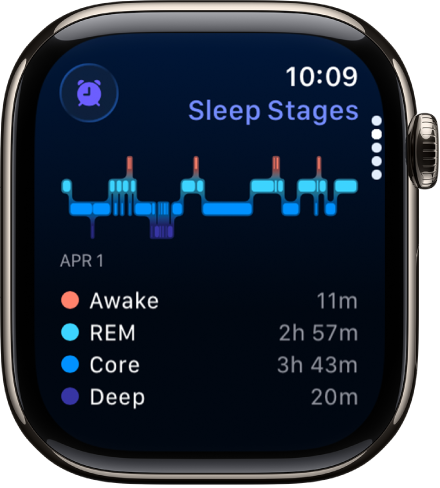
The Sleep app helps build healthy bedtime habits and analyzes sleep quality.
Set a Sleep Schedule
- Define bedtime and wake-up time.
- Enable Sleep Focus to silence notifications.
- Use haptic alarm to wake gently.
Sleep Stages Tracked
Using heart rate, movement, and (on newer models) wrist temperature:
- REM: Dream-rich, brain-active phase.
- Core (Light Sleep): Transition phase.
- Deep: Restorative, hard-to-wake phase.
Requirement: Watch must be charged above 30% before bed.
Overnight Metrics
- Respiratory rate
- Heart rate trends
- Wrist temperature changes
- Sleep duration vs. time in bed
Insight: Rising overnight heart rate may signal illness onset.
Vitals App: Unified Health Dashboard
Introduced in watchOS 10, the Vitals app gives a snapshot of overnight health metrics.
What It Shows
- Overnight heart rate
- Respiratory rate
- Wrist temperature
- Blood oxygen (if available)
- Sleep duration
Baseline & Alerts
The app establishes personal baselines over time. If multiple metrics shift at once—like elevated HR + higher breathing rate + warmer wrist—it may suggest you’re getting sick.
Use Case: Catching colds early or monitoring post-workout recovery.
Walking Stability & Fall Risk
Uses motion sensors to assess gait and balance.
Gait Analysis Metrics
- Step length
- Walking symmetry
- Variability in stride
Over time, declines in walking steadiness may indicate increased fall risk—especially in older adults.
Mobility Alerts
If your walking stability drops significantly compared to your baseline, you’ll get a notification:
“Your walking pattern has changed.”
Data Location: Health app > Mobility > Walking Steadiness.
Noise Exposure Monitoring
Protects hearing by tracking environmental sound levels.
Real-Time dB Readings
- Open Noise app to see current decibel level.
- View daily noise exposure percentage.
- Get alerts when noise exceeds 80 dB for long periods.
Example: Concerts, construction sites, or loud gyms can trigger warnings.
Cardio Fitness (VO2 Max)
Estimates aerobic fitness using heart rate during vigorous workouts.
Interpretation by Age/Sex
Results appear in Health app > Cardio Fitness, categorized as:
- Poor
- Fair
- Good
- Very Good
- Excellent
A declining VO2 max may prompt suggestions like: “Try hiking or running to improve endurance.”
Handwashing & Medication Tracking
Two unique daily habit tools.
Handwashing Timer
- Detects soap and hand motion.
- Counts down 20 seconds with haptic pulses.
- Logs duration in Health app.
Disable Option: Turn off in Settings if unnecessary.
Medications App
- Log prescriptions, vitamins, supplements.
- Set reminders for doses.
- Track adherence over time.
- Share logs with caregivers or doctors.
Mental & Emotional Health Tools
Apple Watch supports mindfulness and stress tracking.
Mindfulness App
- Guided breathing sessions.
- State of Mind logging: Choose how you feel (calm, anxious, focused).
- Builds emotional awareness over time.
Data Location: Health app > Mindfulness.
Heart Rate Variability (HRV)
Measures beat-to-beat variation—higher HRV usually means better recovery and lower stress.
- Tracked overnight.
- View nightly average in Health app > Heart > HRV.
- Used by third-party apps like Athlytic for recovery scores.
Reproductive Health Tracking

The Cycle Tracking app supports menstrual health and fertility planning.
Log Symptoms & Flow
- Track period start/end
- Record cramps, mood, energy
- Note cervical mucus and sexual activity
Predictions Improve Over Time
Uses machine learning to forecast:
- Next period
- Fertile window
Ovulation Detection (Newer Models)
With wrist temperature sensing (Series 8, Ultra, newer):
- Detects subtle overnight temp shifts.
- Sends retrospective ovulation estimate 1–2 days after the event.
- Enhances period prediction accuracy.
Note: Not available in all regions.
Environmental & Additional Sensors
Apple Watch tracks more than just body data.
Sunlight Exposure
Uses ambient light sensor to estimate time in daylight.
- Supports circadian rhythm.
- Encourages outdoor time.
- Data in Health app > Environmental > Sunlight Exposure.
Altimeter & GPS
- Altimeter: Tracks elevation for hiking and stair climbing.
- GPS: Provides accurate distance and pace during outdoor workouts.
Water Temperature (Ultra Only)
During open-water swims, the Apple Watch Ultra measures surrounding water temperature—helpful for safety and performance.
Third-Party App Enhancements
While Apple’s native apps are powerful, third-party tools add deeper insights.
Athlytic: Recovery & Exertion
- Tracks HRV, resting HR, sleep.
- Calculates Recovery, Exertion, and Energy scores.
- Watch complication shows real-time status.
- Subscription: $24/year.
User Insight: High anxiety days correlate with low recovery.
AutoSleep: Advanced Sleep Analytics
- Provides sleep quality score.
- Tracks respiration, HRV, and movement.
- Helps test bedtime changes.
- One-time cost: $4.99.
Cronometer: Nutrition Sync
- Logs food and nutrients.
- Syncs with Apple Health to compare calories in vs. out.
- Highlights deficiencies (e.g., magnesium, vitamin C).
- Gold version: $7.99/month.
StrongLifts 5×5: Weight Training
- Focused on five compound lifts.
- Watch shows rest timer and heart rate.
- Logs workouts into Health.
Accuracy & Limitations
Apple Watch is not a medical device—its data should be interpreted with context.
Factors Affecting Accuracy
- Loose fit: Reduces heart rate accuracy.
- Tattoos or dark skin: May interfere with optical sensors.
- Non-cardio activities: Strength training often undercounted.
- Hilly terrain: Slow uphill walks may not earn Exercise credit.
Common User Frustrations
- Exercise ring doesn’t close during high-effort manual labor.
- Sleep apps report different durations.
- Some Health app trends disappear without explanation.
Best Practice: Focus on long-term trends, not single readings.
Privacy & Data Control
Your health data stays private and secure.
- Stored on-device with end-to-end encryption.
- iCloud backup optional.
- Full control over app permissions in Health app > Data Access & Devices.
- Share data with family or doctors if needed.
You decide who sees your cycle logs, medications, or mental state entries.
Final Note: The Apple Watch is more than a fitness tracker—it’s a holistic health companion that learns, adapts, and alerts. By understanding how it tracks metrics—from Activity rings to ovulation—you can use it to make smarter lifestyle choices. Wear it consistently, combine native features with trusted apps, and focus on trends over time. With this approach, your Apple Watch becomes not just a device, but a partner in long-term well-being.




