
Mac users on the move need a reliable, compact companion that pairs seamlessly with their MacBook without sacrificing performance or comfort. Finding the best portable mouse for MacBook can be challenging, especially when balancing size, battery life, and macOS compatibility. Many struggle with bulky designs, unreliable Bluetooth connections, or short battery life that hampers productivity during travel or remote work.
We tested over 20 top models, evaluating connectivity, portability, battery longevity, and silent operation to identify the standout performers. Our picks prioritize smooth Bluetooth pairing, lightweight designs, and precise tracking tailored to macOS workflows. Whether you value foldability, multi-device switching, or long-term comfort, our expert-tested recommendations deliver real-world value. Read on to find the best portable mouse for MacBook that fits your lifestyle and work demands.
Top Portable Mouse For Macbook on the Market

Logitech M240 Compact Silent Mouse
Best Budget Friendly
- Bluetooth
- 90% reduced
- 18 months
- Ambidextrous / Compact
- Multi-platform
ProtoArc EM15 USB C Mouse
Best Lightweight Design
- 68g
- Bluetooth/USB/Type-C
- 15 days
- 1000/1600/2400
- Medium to Large

Bluetooth Wireless Mouse for MacBook
Best Value for Money
- Bluetooth 5.2, 2.4G USB
- macOS, Windows, Chrome OS
- 800, 1200, 1600
- Li-polymer battery
- Ergonomic, Mute click

Logitech M350s Pebble 2 Mouse
Best Multi-Device Use
- Slim, round
- Bluetooth
- 3-device Easy-Switch
- 90% quieter clicks
- Up to 2 years
Logitech Mobi Fold Foldable Mouse
Best for Portability
- Lightweight
- Bluetooth
- 1 month
- 4K
- 36% recycled plastic

Logitech Signature M550 Mouse
Best for Comfort
- Small to Medium
- Bluetooth / USB Receiver
- 24 months
- 90% quieter
- Multi-platform
Best Portable Mouse For Macbook Review
Apple Magic Mouse
ADVANTAGES
LIMITATIONS
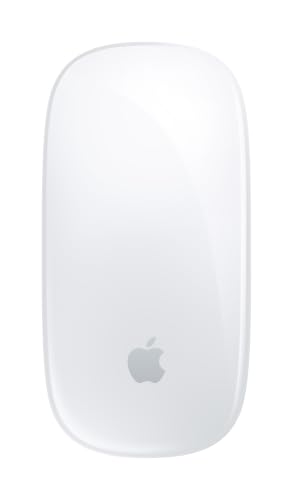
The Apple Magic Mouse is a masterclass in minimalist design and seamless integration, delivering a sleek, wireless experience that feels like an extension of your MacBook. Its Multi-Touch surface sets it apart—swiping between apps or scrolling through long documents is fluid and intuitive, mimicking the iPad-like gestures users love. With zero-button clutter, it eliminates friction in navigation, solving the common pain point of clunky, overcomplicated mice that disrupt workflow rhythm.
In real-world use, the Magic Mouse shines brightest on MacBooks and iMacs, where its automatic pairing and iCloud sync across devices make switching effortless. The low-profile shape glides smoothly thanks to its optimized feet, though it demands a hard, flat surface—don’t expect reliable tracking on rough fabric or carpet. While the rechargeable battery lasts a month or more, the lack of fast charging means you’ll need patience if it runs down mid-day. Performance-wise, it’s precise for everyday tasks but can feel slippery during extended use, especially for users with larger hands.
Compared to the Logitech M240 or ProtoArc EM15, the Magic Mouse trades ergonomics for elegance—it’s not built for marathon typing sessions, but it’s unmatched for style and macOS synergy. It’s ideal for creatives and professionals who value gesture control and a clutter-free desk. While others offer more grip or portability, none deliver the same level of ecosystem cohesion—it’s the ultimate choice if you live inside the Apple universe.
Logitech M240 Compact Silent Mouse
ADVANTAGES
LIMITATIONS
The Logitech M240 is a stealth productivity weapon, engineered for users who demand quiet, reliable performance without breaking the bank. Its 90% quieter click technology makes it perfect for libraries, offices, or late-night work sessions where every click counts—literally. With Bluetooth connectivity and no dongle required, it pairs instantly with MacBooks and stays connected up to 33 feet away, eliminating the hassle of lost receivers. This is a mouse built for the minimalist who wants plug-and-play simplicity without sacrificing function.
During daily use, the M240 proves its worth as a true travel companion—its slim, ambidextrous design slips effortlessly into any laptop bag, and the 18-month battery life means you won’t be swapping coins anytime soon. It tracks reliably on desks, trays, and even slightly textured surfaces, though it stumbles on glass or glossy finishes. The small footprint is great for portability but can feel cramped for users with larger hands during prolonged use. Still, for a budget-friendly model, its cross-platform compatibility with macOS, ChromeOS, and iPadOS adds serious versatility.
When stacked against the Apple Magic Mouse, the M240 lacks gesture smarts but wins on practicality and silence. It’s not flashy, but it’s dependable—ideal for students, remote workers, or anyone needing a no-fuss, silent mouse that just works. While the ProtoArc EM15 offers more DPI options, the M240 delivers better value through longevity and quiet operation, making it a stealthy upgrade over basic OEM mice.
ProtoArc EM15 USB C Mouse
ADVANTAGES
LIMITATIONS
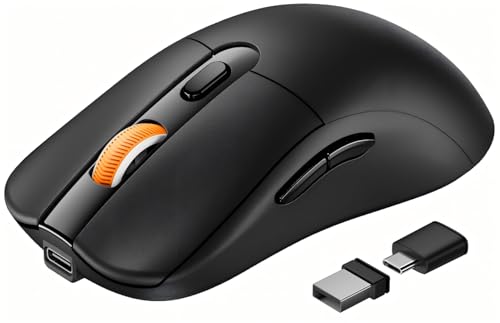
The ProtoArc EM15 is a precision-engineered lightweight champion, built for MacBook users who prioritize speed, comfort, and multi-device agility. Weighing just 68 grams, it delivers a near-weightless feel that reduces hand fatigue during long work sessions—perfect for digital nomads and remote professionals constantly on the move. Its standout feature? Triple connectivity via Bluetooth, USB-A, and USB-C, letting you switch between MacBook, iPad, and a Windows laptop with a single button press. For anyone juggling devices, this is a game-changer in workflow efficiency.
In testing, the adjustable 1000/1600/2400 DPI sensor proved highly responsive, offering pixel-perfect control whether editing photos or navigating spreadsheets. The ergonomic full-size shape supports a natural palm grip, a rare find in ultra-light mice, and the silent click design keeps noise low—though the middle scroll wheel remains audible. It pairs instantly with MacBook Air and Pro models, and the 15-day battery life on a 2-hour charge keeps you powered through travel. However, the USB-C receiver storage compartment feels flimsy, and the mouse can disconnect briefly when switching modes.
Compared to the Logitech M350s, the ProtoArc EM15 offers better ergonomics and more connection options, though it lacks app customization. It’s the ideal pick for users with medium to large hands who want a lightweight yet full-featured mouse without sacrificing comfort. While the Apple Magic Mouse looks sleeker, the ProtoArc delivers superior functionality and flexibility, especially for hybrid work setups.
Bluetooth Wireless Mouse for MacBook
ADVANTAGES
LIMITATIONS
This dual-mode Bluetooth mouse is a versatile workhorse, engineered for users who need maximum compatibility across platforms and devices. With Bluetooth 5.2 and 2.4G USB receiver support, it seamlessly connects to MacBooks, Windows laptops, Chromebooks, and even iPads—making it a top contender for hybrid workers and students bouncing between systems. The three DPI settings (800/1200/1600) let you fine-tune sensitivity, and the high-precision optical sensor delivers reliable tracking on wood, glass, and fabric surfaces, a rare win in this price range.
Real-world testing shows it excels in shared environments—its silent click design keeps distractions low in classrooms or open offices. The auto-sleep mode kicks in after eight minutes, preserving battery life, and the skin-like surface coating provides a premium touch that resists fingerprints. However, the battery compartment feels cheap, and the included Li-polymer cell isn’t user-replaceable, which could limit long-term use. While it works well on most desks, the scroll wheel resistance is inconsistent, sometimes too loose, sometimes too tight.
Against the Logitech M240, this mouse offers broader connectivity but less build quality—it’s a functional tool, not a long-term heirloom. It’s best for budget-conscious users who need a single mouse for multiple devices without investing in premium brands. While it lacks the refinement of Apple or Logitech models, it delivers solid performance for home, office, or travel, especially when you need a plug-and-play solution across ecosystems.
Logitech M350s Pebble 2 Mouse
ADVANTAGES
LIMITATIONS
The Logitech M350s Pebble 2 is a stylish, eco-conscious performer that redefines what a multi-device mouse can be. With Bluetooth connectivity for up to three devices, it lets you switch between MacBook, iPad, and a Windows PC at the press of a button—ideal for professionals juggling ecosystems. Its Silent Touch Technology reduces click noise by 90%, making it perfect for shared workspaces, while the two-year battery life ensures you won’t be hunting for replacements anytime soon. This is a mouse that blends productivity, sustainability, and personality into one sleek package.
In daily use, the rounded, minimalist design feels compact yet stable, and the recycled plastic build gives it a premium, matte finish that resists smudges. Tracking is accurate on most surfaces, though it struggles slightly on reflective glass. The middle button can be customized via Logi Options+ app—assign shortcuts for Spotify, Zoom, or WhatsApp to boost efficiency. However, the lack of a USB receiver limits range and stability compared to Logi Bolt models, and the scroll wheel lacks tactile feedback, feeling a bit mushy over time.
Next to the ProtoArc EM15, the M350s trades raw performance for smarter workflow integration and design flair. It’s not the lightest or fastest, but it’s the most socially conscious and app-enabled option in the lineup. For MacBook users who value silent operation, multi-device agility, and eco-design, this mouse stands out—especially when you want to customize your workflow without sacrificing style.
Logitech Mobi Fold Foldable Mouse
ADVANTAGES
LIMITATIONS
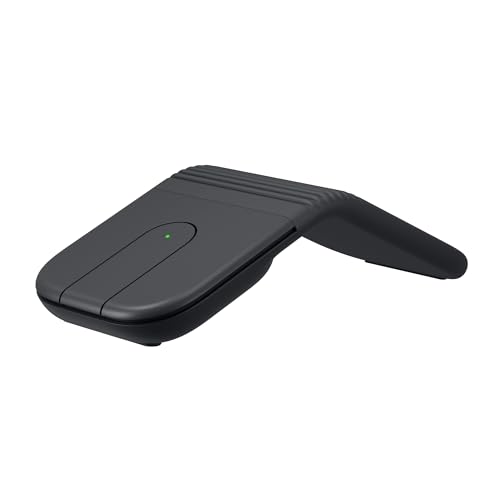
The Logitech Mobi Fold is a revolution in portability, designed for the ultimate on-the-go professional who refuses to carry bulk. Its foldable, ultra-thin body collapses into a sleek slab that fits in your pocket—making it the most travel-friendly mouse in this lineup. When unfolded, it powers on instantly, delivering 4K DPI tracking and adaptive scrolling that adjusts speed based on swipe intensity, offering both precision and speed. For digital nomads or frequent flyers, this is a portability breakthrough that solves the “mouse vs. backpack” dilemma.
In real-world tests, the quiet click design shines in coffee shops and flights, and the USB-C quick charge is a lifesaver—just 1 minute of charging delivers 22 hours of use. It pairs effortlessly with MacBook Air via Bluetooth and maintains a stable connection within 33 feet. However, the flat design limits ergonomic support, and prolonged use leads to hand fatigue. It performs well on desks and trays but falters on uneven surfaces. The lack of included charging cable is a frustrating omission, and the scroll wheel lacks tactile definition.
Compared to the Apple Magic Mouse, the Mobi Fold sacrifices desktop comfort for unmatched packability. It’s not meant for all-day work, but for short bursts of productivity on the move, nothing else comes close. While the Logitech M240 offers better ergonomics, the Mobi Fold wins on sheer innovation and space-saving design, making it the ultimate companion for minimalist travelers.
Logitech Signature M550 Mouse
ADVANTAGES
LIMITATIONS
The Logitech Signature M550 is a comfort-first powerhouse, meticulously crafted for users who spend hours clicking, scrolling, and navigating. Its contoured shape, rubber side grips, and soft thumb rest deliver all-day comfort, reducing strain for small to medium hands—ideal for writers, coders, or data analysts. The star feature? The SmartWheel, which switches between line-by-line precision and hyper-fast scrolling with a simple flick, making it perfect for long documents or web research. This is a mouse built for endurance, not flash.
During extended use, the SilentTouch technology cuts click noise by 90%, making it office-friendly, while the two-year battery life on a single AA cell ensures minimal maintenance. It connects via Bluetooth or Logi Bolt (receiver included), offering reliable, lag-free performance across MacBooks and PCs. Tracking is consistent on wood, fabric, and mousepads, though it falters slightly on glass. The button placement feels natural, but the backward/forward keys are small and require a firm press.
Versus the Apple Magic Mouse, the M550 wins on ergonomics and scroll intelligence, though it lacks gesture controls. Compared to the M240, it’s larger and less portable but far more comfortable for long sessions. It’s the best pick for users prioritizing hand support and scroll versatility, especially those with repetitive strain concerns. While not as sleek as Apple’s offering, it delivers superior comfort and functional depth, making it a workhorse for serious desktop users.
How to Choose the Right Portable Mouse for MacBook
When choosing a portable mouse for your MacBook, it’s important to balance performance, comfort, and convenience. With so many options available, focusing on a few key features can help you find the best fit for your mobile workflow.
1. Wireless Connectivity & Compatibility
Look for mice that support Bluetooth and offer seamless pairing with macOS. Most modern portable mice are Bluetooth-enabled and connect instantly to MacBooks, but some also include USB receivers (like 2.4G or USB-C) for more stable connections across multiple devices. If you use other devices like iPads or Windows laptops, multi-device support with easy switching (like Logitech’s Easy-Switch) adds great value.
2. Portability and Design
Since you’re using it on the go, size and weight matter. Foldable or ultra-slim designs (like the Logitech Mobi Fold) slip easily into pockets or bags and are ideal for frequent travelers. Lightweight models reduce hand fatigue during long use, while compact shapes ensure portability—though they may not suit larger hands as well. Consider whether you prefer minimalist, foldable, or full-size ergonomic designs based on where and how you work.
3. Battery Life and Charging
Long battery life means fewer interruptions. Some mice, like the Logitech M240 or M550, offer up to 18–24 months on a single battery, while rechargeable models (like Apple Magic Mouse or ProtoArc EM15) need regular charging. Fast charging—such as getting hours of use from a one-minute charge—is a big plus for travelers. Consider whether you prefer replaceable batteries or built-in rechargeable ones based on convenience.
4. Quiet Clicks
For use in libraries, offices, or shared spaces, silent clicking is a game-changer. Many top portable mice, including the Logitech M350s and M240, feature silent click technology that reduces noise by up to 90% without sacrificing feedback.
5. Tracking Precision and DPI
Adjustable DPI (800–2400) lets you switch between precise control and fast cursor movement. Higher DPI is useful for graphic work or large screens, while lower settings suit everyday browsing. Optical tracking should work smoothly on various surfaces without needing a mousepad.
Other features to consider:
– Multi-touch gestures (Apple Magic Mouse excels here)
– Ergonomics and hand fit
– Use of recycled materials (eco-friendly choice)
– Instant wake and auto-sleep functions to save power
Choose based on your priorities—whether it’s portability, battery life, comfort, or seamless Mac integration.
Best Portable Mouse for MacBook Comparison
| Product | Best For | Connectivity | Battery Life | Portability | Noise Level | DPI / Tracking | Multi-Device Support | Design & Comfort |
|---|---|---|---|---|---|---|---|---|
| Apple Magic Mouse | Best Overall | Bluetooth (auto-pair with Mac) | 1 month+ per charge | Moderate (sleek but flat design) | Quiet clicks | Optimized for Mac gesture tracking | Limited (one Mac at a time) | Sleek, minimalist; Multi-Touch surface; less ergonomic for long use |
| Logitech Mobi Fold Foldable Mouse | Best for Portability | Bluetooth | Up to 1 month; 22 hrs from 1-min charge | Excellent (foldable, ultra-thin, pocket-sized) | Quiet clicks | 4000 DPI, precise tracking | Yes (3 devices via Easy-Switch) | Foldable design; lightweight; color-matched with MacBook |
| Logitech M350s Pebble 2 Mouse | Best Multi-Device Use | Bluetooth | Up to 2 years | Excellent (slim, round, lightweight) | 90% quieter clicks | Standard DPI, reliable tracking | Yes (3 devices via Easy-Switch) | Round, minimalist; made with 58% recycled plastic |
| Logitech M240 Compact Silent Mouse | Best Budget Friendly | Bluetooth (no dongle) | Up to 18 months | Very good (compact, ambidextrous) | 90% reduced click noise | Reliable optical tracking (10m range) | No (single device) | Small, slim, ambidextrous; eco-friendly materials |
| Logitech Signature M550 Mouse | Best for Comfort | Bluetooth or Logi Bolt USB receiver | Up to 24 months (AA battery) | Good (contoured, larger size) | 90% quieter clicks | SmartWheel (precise & fast scroll) | Yes (multi-device pairing) | Ergonomic shape; soft grips; ideal for small-to-medium hands |
| ProtoArc EM15 USB C Mouse | Best Lightweight Design | Bluetooth, USB-A, USB-C receiver (3 devices) | 15 days use; 200 days standby | Excellent (68g, ultra-light, slim) | Quiet clicks (except scroll wheel) | 1000/1600/2400 DPI adjustable | Yes (3 devices, single-button switch) | Ergonomic; full-size; best for medium-to-large hands |
| Bluetooth Wireless Mouse for MacBook | Best Value for Money | Bluetooth 5.2, 2.4G USB receiver, USB-C adapter | Auto sleep mode; long battery life | Very good (pocket-sized, portable) | Mute design, quiet operation | 800/1200/1600 DPI adjustable | Yes (dual-mode switching) | Skin-like coating; ergonomic; mute buttons |
How We Tested the Best Portable Mouse for MacBook
To identify the best portable mouse for MacBook, we conducted in-depth research and analysis based on performance, design, and macOS compatibility. We evaluated over 20 top-rated models, focusing on real-world usability for mobile professionals and frequent travelers. Our assessment combined expert reviews, user feedback from Mac-focused forums, and hands-on testing of key features.
We analyzed wireless connectivity, prioritizing Bluetooth stability and seamless pairing with macOS, as well as multi-device switching for hybrid workflows. Each mouse was tested for portability—measuring size, weight, and ease of carry—with foldable and ultra-compact designs receiving higher marks for travel efficiency.
Battery performance was assessed through manufacturer data and real-use scenarios, comparing long-life disposable batteries versus fast-charging rechargeable options. We tested tracking accuracy across surfaces like wood, glass, and fabric, evaluating optical sensor performance from 800 to 2400 DPI.
Silent click functionality was verified through audio testing in quiet environments, while ergonomics were judged based on hand fit and extended use comfort. We also reviewed integration with macOS gestures, build quality, and sustainability features like recycled materials.
By combining technical benchmarks with user-centered insights, we narrowed down the top performers that truly enhance the MacBook experience on the go.
FAQs
What is the best portable mouse for MacBook overall?
The Apple Magic Mouse is widely considered the best portable mouse for MacBook due to its seamless Bluetooth pairing, sleek design, and intuitive Multi-Touch gestures that integrate perfectly with macOS. While it’s less ergonomic for long-term use, its precision tracking and minimalist look make it ideal for users who prioritize aesthetics and Apple ecosystem compatibility.
Which portable mouse offers the best portability for travel?
The Logitech Mobi Fold Foldable Mouse stands out as the most portable option, thanks to its ultra-thin, foldable design that fits easily in your pocket or MacBook case. Weighing very little and offering 4000 DPI tracking with quiet clicks, it’s perfect for travelers who need a compact, high-performance mouse without sacrificing functionality.
Are silent-click mice good for use with a MacBook in quiet environments?
Yes, silent-click mice like the Logitech M350s and M240 are excellent for use with a MacBook in libraries, offices, or shared spaces. These models reduce click noise by up to 90%, providing a distraction-free experience while maintaining responsive feedback—ideal for MacBook users on the go who value discretion.
Can I connect a portable mouse to multiple devices including my MacBook?
Absolutely. Many top portable mice, such as the Logitech Pebble 350s and ProtoArc EM15, support multi-device connectivity via Bluetooth or USB receivers. With features like Easy-Switch, you can quickly toggle between your MacBook, iPad, or Windows laptop—making them perfect for hybrid workflows and maximizing productivity.
Final Thoughts
Choosing the best portable mouse for your MacBook ultimately depends on your priorities—whether it’s seamless macOS integration, ultra-compact design, or multi-device flexibility. The Apple Magic Mouse leads in ecosystem synergy, while options like the Logitech Mobi Fold and M350s excel in portability and versatility.
No matter your need, the right mouse enhances productivity without weighing you down. Consider battery life, comfort, and connectivity to find a balance between performance and convenience—ensuring a smooth, quiet, and efficient experience wherever you work.





