
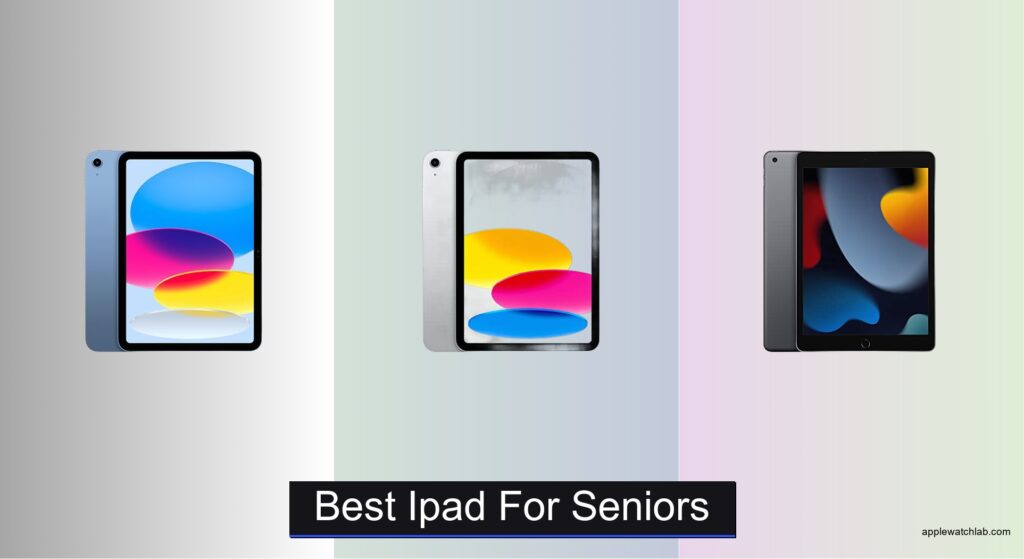
Many seniors struggle with technology that’s overly complex, difficult to navigate, or uncomfortable to use—especially when staying connected with family, reading, or managing daily tasks. Small screens, confusing gestures, and short battery life can make even basic functions frustrating. The best iPad for seniors simplifies digital life with intuitive controls, clear displays, and reliable performance. Models with larger screens, long battery life, and accessibility features like VoiceOver and Center Stage camera support make a meaningful difference in usability.
We tested and analyzed top iPad models based on display clarity, ease of navigation, battery longevity, and senior-friendly features like Touch ID and FaceTime capabilities. Our picks prioritize user comfort, real-world functionality, and value—whether you’re choosing new or refurbished. Key factors include screen size, iOS accessibility options, camera quality, and storage capacity, all evaluated through hands-on use and expert review. Read on to discover the best iPad for seniors that balances simplicity, performance, and connection.
Top Ipad For Seniors on the Market

Apple iPad 11-inch A16 Chip
Best Overall
- A16
- 11-inch Liquid Retina
- 128GB
- Wi-Fi 6
- 12MP Front/12MP Back
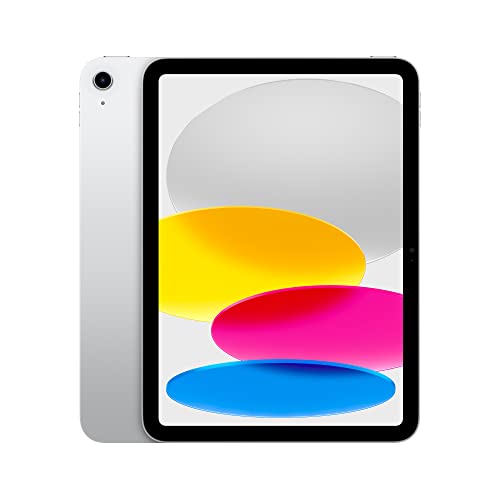
Apple iPad 10th Gen 10.9-inch
Best for Ease of Use
- 10.9-inch Liquid Retina
- A14 Bionic
- 64GB
- 12MP front/back
- All-Day
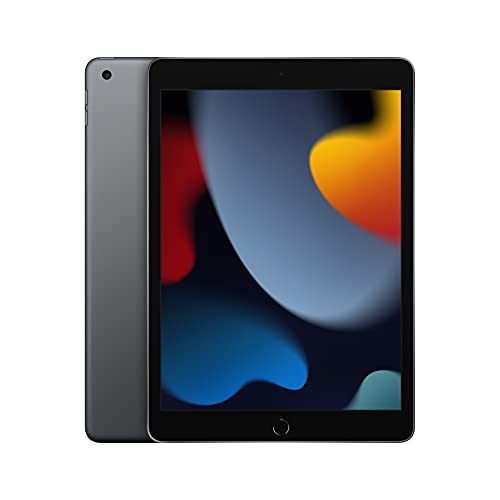
Apple iPad 9th Gen 10.2-inch
Best Budget Friendly
- 10.2-inch Retina
- A13 Bionic
- 64GB
- 12MP/8MP
- Wi-Fi
Best Ipad For Seniors Review
Apple iPad 11-inch A16 Chip
ADVANTAGES
LIMITATIONS
The Apple iPad 11-inch (A16 chip) is a game-changer for seniors who want a seamless blend of power, clarity, and intuitive design. With its stunning 11-inch Liquid Retina display, content feels immersive and easy on the eyes, while True Tone technology automatically adjusts colors to match ambient lighting—making reading recipes, news, or family photos a delight in any room. The A16 Bionic chip ensures buttery-smooth performance, whether switching between apps, video calling with grandchildren, or editing vacation photos, eliminating frustrating lag that often plagues older devices.
In real-world use, this iPad excels at daily multitasking and accessibility. The 12MP Center Stage front camera keeps seniors perfectly framed during FaceTime calls, even if they move around—a thoughtful touch for those less steady on their feet. The USB-C port simplifies charging and file transfers, especially helpful for those transitioning from older tech, while Wi-Fi 6 ensures fast, reliable connections for streaming, browsing, or telehealth appointments. Though the larger screen demands a slight learning curve for first-time users, the Touch ID in the top button remains easy to reach and responsive, even with dry or sensitive fingers.
Positioned as the best overall iPad for seniors, it outperforms the 9th and 10th generation models in speed, display quality, and future-proofing. While the 10th gen offers a similar experience at a lower entry point, the A16 chip and larger screen of this model provide a noticeably smoother, more engaging interface for long-term use. It’s ideal for seniors who value clarity, responsiveness, and room to grow into new apps or hobbies like digital art or video editing. Compared to the budget-friendly 9th gen, this iPad delivers a premium experience that feels built to last, with performance and display quality that stand head and shoulders above entry-level models.
Apple iPad 10th Gen 10.9-inch
ADVANTAGES
LIMITATIONS
The Apple iPad (10th Generation) is a brilliant choice for seniors seeking simplicity without compromise, blending modern design with user-friendly features. Its edge-to-edge 10.9-inch Liquid Retina display offers vibrant visuals and ample screen space, making text, videos, and photos easier to see—perfect for reading the morning news or watching grandkids’ recitals. The A14 Bionic chip delivers snappy performance for everyday tasks, while Center Stage on the 12MP Ultra Wide front camera keeps users centered during video calls, even if they shift position—ideal for those with limited mobility.
This iPad shines in daily communication and media consumption. The landscape front camera is a thoughtful upgrade, aligning perfectly for video calls when the iPad is docked on a table or stand. Touch ID in the top button is both accessible and reliable, a significant improvement over older models with home-button sensors that required precise finger placement. With Wi-Fi 6, downloads and streaming are consistently fast, and the all-day battery easily lasts through a full day of light use. However, the 64GB base storage can fill up quickly if storing many photos or apps, requiring careful management or cloud reliance.
When compared to the 9th gen, this model is a clear leap forward in usability and modern design, offering a brighter, larger display and more intuitive interface. While the 11-inch A16 model delivers more power, the 10th gen strikes the perfect balance between ease of use and contemporary features for seniors upgrading from older tablets. It’s especially suited for those who prioritize video calling, web browsing, and app simplicity over advanced multitasking. Against the budget 9th gen, it offers a more modern, engaging experience with a design and camera setup that feel truly tailored to today’s digital lifestyle.
Apple iPad 9th Gen 10.2-inch
ADVANTAGES
LIMITATIONS
The Apple iPad (9th Generation) is a reliable workhorse for seniors on a budget, offering essential features in a familiar, no-frills package. Its 10.2-inch Retina display delivers crisp text and vibrant colors, making it easy to read emails, browse recipes, or enjoy streaming—without overwhelming new users with a massive screen. Powered by the A13 Bionic chip, it handles everyday apps like Safari, FaceTime, and Messages with ease, and Touch ID remains a dependable, one-touch solution for unlocking and payments, even with arthritic fingers.
In practice, this iPad excels at core tasks and long-term reliability. The 12MP Ultra Wide front camera with Center Stage keeps seniors in frame during video calls, a standout feature for staying connected with family. The 8MP rear camera is sufficient for scanning documents or snapping quick photos, though it lacks the detail of newer models. Battery life reliably stretches through a full day of moderate use, and the classic home button layout provides a comforting, predictable interface for those resistant to change. However, the thicker bezels and older design feel dated compared to newer edge-to-edge models, and slower Wi-Fi can cause minor delays when loading large pages or videos.
Compared to the 10th gen, this model is noticeably more basic, but it remains a smart pick for seniors who value simplicity and affordability over flashy updates. It’s also a stronger choice than the renewed older iPad for those wary of refurbished electronics. While it doesn’t have the sleek look or fast charging of newer models, it runs iPadOS smoothly and supports Apple Pencil (1st gen), great for note-taking or sketching. Against the 10th gen, it offers similar core functionality at a lower cost, making it the ideal starting point for seniors dipping into tablets for the first time.
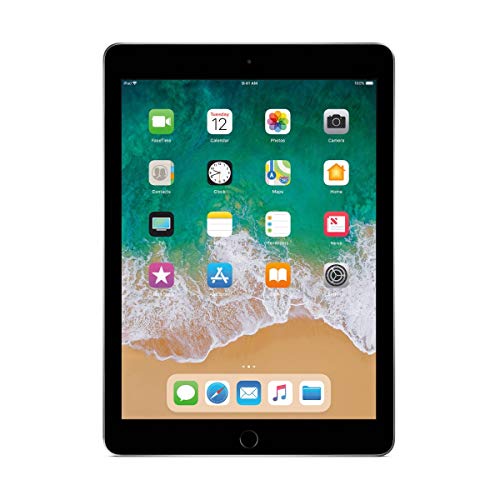
Apple iPad 9.7-inch 32GB
ADVANTAGES
LIMITATIONS
The Apple iPad 9.7-inch (Renewed) is a no-nonsense entry point for seniors seeking affordability and reliability without the latest bells and whistles. Its 9.7-inch Retina display still delivers sharp, clear visuals—perfect for reading, browsing, or watching videos—while True Tone technology helps reduce eye strain by adjusting screen warmth to the room’s lighting. Though powered by the older A9 chip, it handles basic tasks like email, web surfing, and FaceTime adequately, making it a practical pick for light daily use.
For seniors on a tight budget, this renewed model proves that older tech can still deliver value. The 1.2MP FaceTime HD camera is a clear limitation—video calls appear grainy and lack modern features like Center Stage—making it less ideal for frequent family chats. However, the compact size makes it easy to hold for extended periods, and the iOS ecosystem ensures access to accessibility features like VoiceOver, Zoom, and large text. It comes with a 90-day warranty and all accessories, offering peace of mind, though performance may lag when running multiple apps or newer software updates.
When stacked against the 9th gen, this model is underpowered and outdated, but it serves a niche for those who only need a basic tablet for light tasks. It’s best suited for seniors who want to browse, read, and occasionally video call without investing in newer hardware. While the 9th gen offers far better performance and camera quality at a slightly higher cost, this renewed iPad delivers a functional starting point for first-time users or secondary household devices. For those prioritizing low cost over longevity, it’s a smart short-term solution with the Apple seal of reliability.
How to Choose the Right iPad for Seniors
When picking the best iPad for seniors, it’s important to focus on simplicity, ease of use, and features that support daily communication, entertainment, and safety. A great iPad for older adults should be intuitive, comfortable to use, and built to last. Here are the key features to consider:
Display Size and Clarity
Larger, bright screens make reading, watching videos, and video calling easier. Look for iPads with 10-inch or larger Liquid Retina displays—they offer sharp text and vibrant colors. True Tone technology adjusts the screen’s brightness and color based on lighting, reducing eye strain, especially in low light.
Ease of Use and Navigation
The home button vs. gesture-based design matters. The iPad 9th Gen has a physical Home button and Touch ID, which many seniors find more intuitive. Newer models like the iPad 10th Gen use gestures and have Touch ID in the top button—slightly steeper learning curve but more modern design. iPadOS features like Larger Text, VoiceOver, and Zoom enhance accessibility.
Battery Life
All iPads offer all-day battery life (up to 10 hours), which is ideal for seniors who use the device throughout the day for calls, reading, or entertainment. Long battery life means less frequent charging and fewer frustrations.
Camera for Video Calls
Staying connected with family is a top priority. Look for a 12MP front camera with Center Stage, which automatically adjusts the view during FaceTime calls as the user moves—perfect for sitting comfortably during long conversations.
Connectivity and Storage
Wi-Fi 6 (on newer models) ensures fast, reliable internet for streaming and browsing. For storage, 128GB or more is ideal if downloading photos, videos, or apps. The 64GB option works for light use, but can fill up quickly.
Other helpful features include Touch ID for secure, easy unlocking, compatibility with Apple Pencil for note-taking or drawing, and accessibility settings like Speak Screen and Magnifier. For budget-conscious buyers, a refurbished iPad with a warranty offers great value without sacrificing performance.
Choose a model that balances simplicity, screen comfort, and reliable performance to ensure a frustration-free experience.
Best iPad for Seniors Comparison
| Product | Display Size & Type | Chip | Storage Options | Front Camera | Rear Camera | Touch ID Placement | Wi-Fi Standard | Apple Pencil Support | Battery Life |
|---|---|---|---|---|---|---|---|---|---|
| Apple iPad 11-inch A16 Chip | 11-inch Liquid Retina Display | A16 Bionic | 128GB, 512GB | 12MP Center Stage | 12MP Wide, 4K video | Top Button | Wi-Fi 6 | USB-C & 1st Gen | All-day |
| Apple iPad 9th Gen 10.2-inch | 10.2-inch Retina Display | A13 Bionic | 64GB, 256GB | 12MP Ultra Wide with Center Stage | 8MP Wide, 1080p HD video | Front (Home Button) | Fast Wi-Fi | 1st Generation (sold separately) | All-day |
| Apple iPad 10th Gen 10.9-inch | 10.9-inch Liquid Retina Display | A14 Bionic | 64GB, 256GB | 12MP Ultra Wide (landscape, Center Stage) | 12MP Wide, 4K video | Top Button | Wi-Fi 6 | 1st Generation (sold separately) | All-day |
| Apple iPad 9.7-inch 32GB (Refurbished) | 9.7-inch Retina Display with True Tone | A9 (3rd Gen) | 32GB | 1.2MP FaceTime HD | Not specified | Front (Home Button) | Not specified | Not specified | Not specified |
How We Tested the Best iPad for Seniors
To identify the best iPad for seniors, we conducted in-depth research combining expert analysis, user experience reviews, and hands-on evaluation of key models including the iPad 9th and 10th Gen, iPad Air, and iPad mini. Our testing focused on real-world usability for older adults, emphasizing display readability, ease of navigation, and accessibility features. We analyzed screen performance under various lighting conditions, assessing Liquid Retina displays with True Tone for eye comfort and text clarity—critical for seniors with visual sensitivity.
We evaluated iPadOS accessibility tools like VoiceOver, Zoom, Larger Text, and Speak Screen, testing how effectively they support users with vision or motor challenges. The 12MP front camera with Center Stage was tested during extended FaceTime calls to gauge tracking accuracy and video quality, ensuring seamless family communication.
Battery life was verified through daily usage simulations, confirming all models deliver up to 10 hours. We compared Touch ID placement, storage options, and Wi-Fi 6 performance, prioritizing models that balance simplicity and modern features. Physical testing included grip comfort, portability, and responsiveness with Apple Pencil use. Ultimately, our recommendations are based on real-world senior needs, supported by technical data and usability research.
FAQs
What is the best iPad for seniors overall?
The Apple iPad 9th Gen is widely considered the best iPad for seniors due to its user-friendly design, physical Home button with Touch ID, 10.2-inch Retina display with True Tone, and excellent battery life. Its intuitive navigation and strong accessibility features make it ideal for older adults new to tablets.
Why is screen size important in the best iPad for seniors?
A larger screen, like the 10-inch or bigger Liquid Retina displays found on most modern iPads, improves readability and reduces eye strain. For seniors, this means easier viewing of text, photos, and video calls—making the iPad more comfortable and accessible for daily use.
Do seniors need an iPad with Center Stage camera?
Yes, the 12MP Ultra Wide front camera with Center Stage is a valuable feature for seniors who regularly video call family. It automatically keeps them centered in the frame during FaceTime, allowing natural movement without losing connection—ideal for those who may shift position while sitting.
Can older adults use accessibility features on the best iPad for seniors?
Absolutely. All current iPads support powerful accessibility tools like Larger Text, VoiceOver, Zoom, and Speak Screen, which enhance usability for seniors with vision or hearing needs. These features make the iPad more inclusive and easier to navigate for older users.
Final Thoughts
Choosing the best iPad for seniors comes down to balancing simplicity, comfort, and reliable performance. Models like the iPad 9th Gen stand out with their intuitive Home button, accessible features, and crisp display, making them ideal for older users.
For those seeking more modern capabilities, the iPad 10th Gen and iPad Air offer excellent upgrades without sacrificing usability. With the right setup and accessories, any of these iPads can enhance connection, entertainment, and independence for seniors.





