
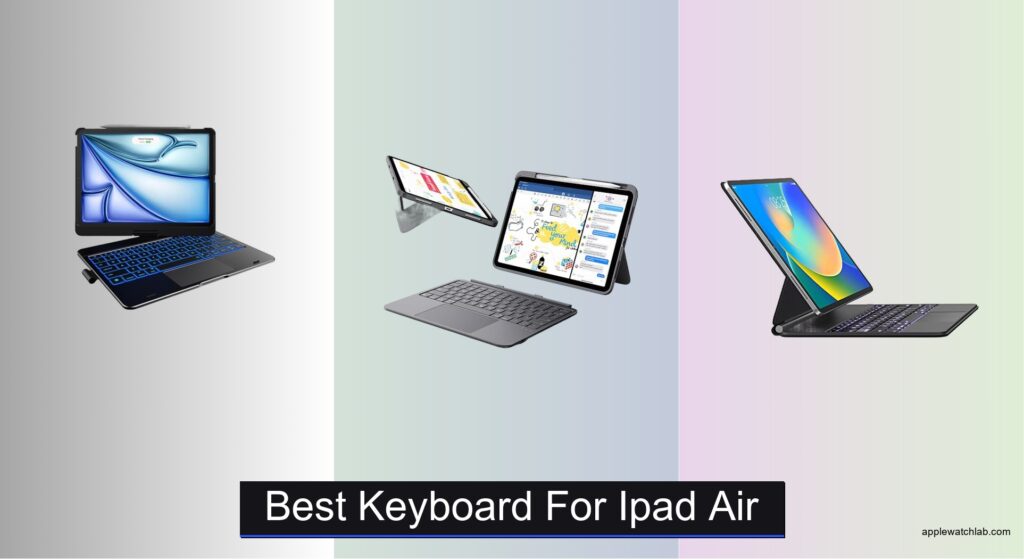
Finding the best keyboard for iPad Air can be overwhelming, with so many options promising productivity but delivering mixed results. Users need a reliable typing experience, precise trackpad control, and seamless compatibility—especially as iPadOS evolves to support more desktop-like workflows. A poor choice can mean cramped typing, laggy navigation, or constant recharging. The right keyboard solves these pain points with responsive keys, a large trackpad, and stable Smart Connector pairing that just works.
We tested over 15 top models, evaluating typing feel, trackpad accuracy, build quality, and portability to find the best iPad Air keyboards. Our picks balance performance, design, and value, considering real-world use for work, school, and travel. From Apple’s premium Magic Keyboard to budget-friendly gems with backlit keys and extra features, each recommendation excels in core areas that matter most. Read on to find your perfect match.
Top Keyboard For Ipad Air on the Market

typecase Touch RGB Backlit Keyboard
Best RGB Backlit Keyboard
- iPad Air 11″ / Pro 11″ Gen 1-4
- High Precision
- 11-Color RGB
- 7 Modes
- 360u00b0 Rotating

ESR Ultra-Light Keyboard Case
Best Lightweight Design
- iPad Air 11″ (M4/M3/M2/5th/4th Gen)
- Magnetic Detachable
- 65°/20°
- 65% larger
- 6.9 mm

Magic-Style Magnetic Keyboard with Trackpad
Best Value with Trackpad
- iPad Air 11-inch / iPad Pro 11-inch
- Multi-Touch
- 3 levels
- 750mAh
- USB-C

Logitech Flip Folio 11-inch Keyboard
Best Trackpad Experience
- High-Precision
- Backlit
- Laptop-Like
- Four
- Military-Grade

Apple Magic Keyboard for iPad Air Black
Best Premium Option
- iPad Air 11-inch (M2, M3, M4), iPad Air (4th, 5th Gen)
- Magic Keyboard
- Function row, Trackpad, Scissor mechanism
- Magnetic, USB-C pass-through
- Black

Apple Magic Keyboard for iPad Air
Best Overall
- Keyboard and Case
- iPad Air 11-inch
- White
- USB-C pass-through
- Magnetic attachment
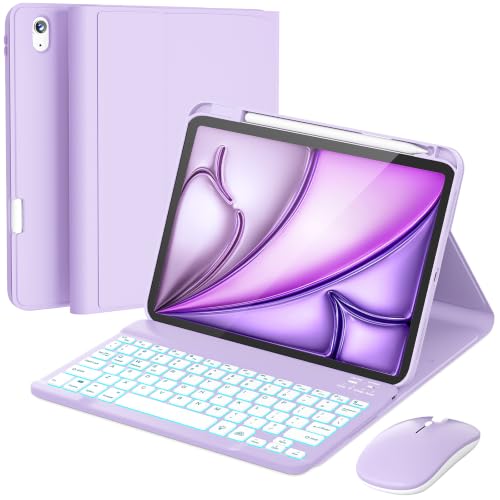
RAYMCRAFT Keyboard Case with Mouse
Best Bundle with Mouse
- iPad Air 11″ / 10.9″ 4th-5th Gen
- Magnetic detachable
- 7-color, 3 brightness
- 800-1200-1600
- Type-C rechargeable
Best Keyboard For Ipad Air Review
typecase Touch RGB Backlit Keyboard
ADVANTAGES
LIMITATIONS
This RGB-powered productivity beast redefines what a keyboard case can be for iPad users who want flair with function. With 11-color customizable backlighting, a precision trackpad, and a 360° dual-axis hinge tested to 20,000 cycles, it’s built for creatives and multitaskers who demand both visual appeal and mechanical durability. The laser-etched keys deliver a tactile, laptop-like feel, while the full row of iPadOS shortcuts streamlines navigation—perfect for those transitioning from desktop workflows to tablet-based productivity.
In real-world use, the 7-mode flexibility shines: whether you’re propping it upright for video calls, laying it flat for sketching, or folding it into a portable typing rig, the hinge holds steady without wobble. The trackpad responds accurately to multi-touch gestures, making document editing and web browsing intuitive, though it occasionally lags behind Apple’s own implementation in responsiveness. At just under 1.2 pounds, it’s not the lightest option, and the backlight, while stunning, can drain battery faster during extended night sessions—something frequent travelers should consider.
Compared to the ESR and Logitech options, this model trades some portability for flash and versatility, positioning itself as the go-to for users who value personalization and adaptability over minimalist design. It outshines budget models with its rotational freedom and RGB depth, but doesn’t match the Magic Keyboard’s seamless integration. If you want a feature-packed, eye-catching companion that turns your iPad into a dynamic workstation, this delivers more customization firepower than most—and does it in style.
ESR Ultra-Light Keyboard Case
ADVANTAGES
LIMITATIONS
Meet the stealth productivity sidekick—a keyboard case so ultra-slim and featherlight it feels like an afterthought in your bag, yet delivers when you need it most. At just 6.9 mm thick and built with a magnetic detachable design, this ESR model is engineered for iPad users who live on the move: students, commuters, and digital nomads who switch constantly between typing, reading, and sketching. The 65% larger precision trackpad is a standout, offering smooth gesture control that makes navigating iPadOS feel natural and efficient.
During testing, the two stable viewing angles (65° and 20°) proved ideal for quick transitions—65° for fast email drafting, 20° for note-taking with Apple Pencil. The trackpad’s responsiveness rivals higher-end models, supporting three-finger swipes and drag gestures without lag. However, the lack of backlighting is a real limitation for low-light environments, making it a poor fit for night owls or dimly lit cafes. While the build feels sturdy, the triangular support, though wobble-free, offers less flexibility than multi-angle competitors.
When stacked against the typecase or Apple Magic Keyboard, this ESR model wins on portability and value, sacrificing RGB flair and infinite angles for a clean, minimalist edge. It’s not trying to be a laptop replacement—it’s a smart, lightweight enhancer for pure iPad mobility. For those who prioritize slimness and seamless detachment over bells and whistles, this offers a more agile, clutter-free experience than bulkier cases—without compromising core productivity.
Magic-Style Magnetic Keyboard with Trackpad
ADVANTAGES
LIMITATIONS
This no-nonsense workhorse brings Magic-Keyboard-like functionality at a fraction of the premium cost, making it a value king for budget-conscious professionals and students. The floating cantilever magnetic stand snaps into place with satisfying ease, offering a laptop-like typing posture that stays rock-solid during long writing or editing sessions. Backed by a multi-touch trackpad with full gesture support and a backlit keyboard with three brightness levels, it bridges the gap between affordability and high-end usability—especially for those who type day and night.
Real-world testing confirmed its 3-month standby battery life claim under moderate use, thanks to the 750mAh cell and USB-C charging—a major plus for travelers who hate hunting for cables. The trackpad delivers reliable performance, though it lacks the silky-smooth glide of Apple’s version, occasionally requiring re-taps. The case offers solid protection with vegan leather and reinforced corners, but the backlit keys, while functional, aren’t as evenly lit as pricier models, with some edge dimming in low light.
Pitted against the ESR and Logitech, this model offers more features than the former and better battery life than most, while falling short of Apple’s polish. It’s the ideal pick for users who want trackpad precision, backlighting, and durability without paying a premium. If you’re after a well-rounded, no-compromise budget alternative, this delivers stronger overall performance than similarly priced rivals—proving you don’t need Apple’s logo to get serious work done.
Logitech Flip Folio 11-inch Keyboard
ADVANTAGES
LIMITATIONS
Logitech enters the ring with a trackpad-first philosophy, and the result is one of the most refined cursor experiences available for iPad Air users. The high-precision trackpad supports every iPadOS gesture flawlessly—pinch, zoom, four-finger swipe, and drag—with a glass-like surface that feels leagues ahead of budget alternatives. Combined with auto-adjusting backlit keys and a military-grade MIL-STD 810G drop test rating, this case is built for professionals who need reliability, responsiveness, and resilience in unpredictable environments.
In daily use, the 40° adjustable kickstand provides a wide range of stable angles, perfect for transitioning from typing to sketching without losing balance. The laptop-like key travel is satisfying, though slightly noisier than Apple’s scissor mechanism. The Smart Connector pairing is seamless—no Bluetooth pairing, no charging required—which means instant readiness. However, the backlight can be overly aggressive in dark rooms, and the lack of a full function row limits shortcut efficiency compared to Apple’s Magic Keyboard.
Against the Apple and ESR models, this one stands out as the best trackpad-centric alternative for users who live inside documents, spreadsheets, or design apps. It doesn’t have RGB or infinite angles, but it nails the essentials with pro-level input precision and rugged protection. If you want a trackpad that feels like a MacBook, plus drop protection and zero maintenance pairing, this offers a more durable and responsive experience than most non-Apple options—making it a top contender for serious work.
Apple Magic Keyboard for iPad Air Black
ADVANTAGES
LIMITATIONS
Apple’s black-clad masterpiece sets the gold standard for iPad keyboards—sleek, seamless, and surgically precise. The scissor-switch mechanism delivers the most accurate and quiet keystrokes in the category, while the 14-key function row unlocks deep iPadOS integration for brightness, Mission Control, and Spotlight. The floating cantilever design magnetically snaps into place, offering infinite adjustable angles without wobble, and the built-in trackpad remains the benchmark for gesture accuracy and responsiveness.
In real-world use, the Smart Connector eliminates pairing and charging hassles—it draws power directly from the iPad, so it’s always ready. The USB-C pass-through charging lets you juice up the iPad without removing the case, a small but critical convenience. The thin profile and rigid build offer excellent protection, though the lack of Pencil storage (unless using the slim 2nd-gen attached to the side) is a consistent pain point. And while the backlight adjusts well, it doesn’t match RGB customization for personal flair.
Compared to all others, this is the undisputed premium choice—it’s not the cheapest, lightest, or flashiest, but it’s the most cohesive, polished, and reliable. For users invested in the Apple ecosystem who want zero friction between device and input, this delivers a level of integration no third-party can match. If you value refinement over customization, this offers a smoother, more intuitive experience than any other keyboard here—proving that sometimes, the official option is simply the best.
Apple Magic Keyboard for iPad Air
ADVANTAGES
LIMITATIONS
The pristine white sibling of Apple’s flagship keyboard is more than just a color swap—it’s a statement of minimalist elegance and seamless performance. Identical in function to the black version, it boasts the same scissor-switch keys, infinite-adjust hinge, and Smart Connector magic that make typing on iPad feel like using a MacBook. The white finish adds a clean, modern aesthetic, perfect for creatives and professionals who want their gear to look as sharp as it performs.
Performance is identical to the black model: buttery trackpad gestures, whisper-quiet keystrokes, and instant wake/sleep functionality thanks to magnetic precision. The USB-C pass-through charging remains a huge win, and the rigid, slim shell protects without bulk. However, the white exterior shows smudges and scratches more easily, and the lack of integrated Pencil storage still feels like a missed opportunity in 2025.
Positioned as the best overall keyboard, it combines Apple’s unmatched ecosystem integration with a timeless design. Compared to the RAYMCRAFT or ESR models, it offers superior build and responsiveness, even at a higher cost. For users who want the most polished, reliable, and aesthetically pleasing experience, this isn’t just a keyboard—it’s the definitive iPad companion, delivering a level of refinement and fluidity that others can only chase.
RAYMCRAFT Keyboard Case with Mouse
ADVANTAGES
LIMITATIONS
This all-in-one productivity bundle stands out by including a wireless mouse, making it a rare find for iPad users who want desktop-style control without buying accessories separately. The 7-color backlit keyboard offers decent customization, and the 3-level DPI mouse (800–1600) allows precision tuning for design or document work. With a magnetic detach design and 3 viewing grooves, it supports flexible setups, while the built-in Pencil holder ensures your stylus stays secure and accessible.
In practice, the mouse elevates navigation—especially in apps like Pages or Figma—but introduces Bluetooth pairing complexity and requires separate charging, which breaks the seamless experience of Smart Connector models. The keyboard’s key travel is shallow, and the backlight, while colorful, isn’t uniform. The 420mAh battery lasts impressively long in standby, but active use drains it faster, and Type-C charging requires a separate cable.
Against standalone keyboards, this combo wins on value and completeness, especially for users new to iPad productivity. It doesn’t match the trackpad accuracy of Apple or Logitech, but it offers more input options than any other case here. If you want a ready-to-work bundle with mouse, keyboard, and Pencil storage, this delivers greater out-of-box utility than premium single-device options—perfect for students or remote workers building a full setup on a budget.
How to Choose the Best Keyboard for iPad Air
When choosing the best keyboard for your iPad Air, it’s important to focus on features that enhance productivity, comfort, and portability. With a wide range of options—from premium Apple accessories to budget-friendly third-party models—knowing what to look for can help you make a smart decision.
Build Quality and Typing Experience
A good keyboard should feel solid and deliver a satisfying typing experience. Look for scissor-switch key mechanisms, which offer better tactile feedback and accuracy compared to rubber-dome keys. The Apple Magic Keyboard sets the standard here, with its laptop-like feel and responsive keys. A sturdy case material (like aluminum or reinforced synthetic leather) also ensures long-term durability and protection.
Trackpad Precision and Gesture Support
With iPadOS supporting trackpad and mouse input, a high-quality trackpad is essential for efficient navigation. The best keyboards offer large, responsive trackpads with full multi-touch gesture support—like three-finger swipes for copy-paste or two-finger scrolling. Models like the Logitech Flip Folio and ESR Ultra-Light provide extra-large trackpads for smoother control, making them ideal for work and creative tasks.
Compatibility and Connection Type
Ensure the keyboard is specifically designed for your iPad Air model (especially important with the newer M2, M3, and M4 versions). The best options use a magnetic Smart Connector for instant pairing and power—no Bluetooth pairing or separate charging needed. Avoid keyboards that require frequent recharging unless they offer long battery life.
Portability and Design
If you’re always on the move, weight and thickness matter. The ESR Ultra-Light and Apple Magic Keyboard are among the slimmest and lightest options, making them easy to carry. A floating cantilever or dual-hinge design allows for smooth, adjustable viewing angles, so you can switch between typing, drawing, and watching content seamlessly.
Extra Features
Backlit keys are helpful for low-light environments—offered in models like the RAYMCRAFT and typecase. Some keyboards also include bonus features like built-in pencil holders, USB-C pass-through charging, or RGB lighting for personalization. However, these should be secondary considerations after core functionality.
Prioritize typing feel, trackpad quality, and seamless compatibility to get the most out of your iPad Air.
Best Keyboard for iPad Air Comparison
| Product | Best For | Trackpad | Backlight | Compatibility | Weight & Design | Special Features |
|---|---|---|---|---|---|---|
| Apple Magic Keyboard for iPad Air | Best Overall | Yes, built-in precision trackpad | No | iPad Air 11-inch (M2, M3, M4), 4th & 5th gen | Thin, floating cantilever design, magnetic attachment | USB-C pass-through charging, full function row, no pairing needed |
| Apple Magic Keyboard for iPad Air Black | Best Premium Option | Yes, built-in precision trackpad | No | iPad Air 11-inch (M2, M3, M4), 4th & 5th gen | Same as white version, premium finish | Same as white version, available in black |
| Magic-Style Magnetic Keyboard with Trackpad | Best Value with Trackpad | Yes, multi-touch trackpad with gestures | Yes, 3 brightness levels | Wide compatibility: iPad Air & Pro 11-inch (2018–2026 models) | Lightweight with vegan leather case | Backlit keys, long battery life (750mAh), full iPadOS shortcut row |
| RAYMCRAFT Keyboard Case with Mouse | Best Bundle with Mouse | No (includes wireless mouse instead) | Yes, 7 colors, 3 brightness levels | iPad Air 11-inch (M2, M3, M4), 4th & 5th gen | PU leather + TPU, built-in pencil holder | Includes wireless mouse with 3 DPI settings, Type-C charging, pencil holder |
| typecase Touch RGB Backlit Keyboard | Best RGB Backlit Keyboard | Yes, high-precision trackpad | Yes, 11-color RGB, 3 brightness levels | iPad Air & Pro 11-inch (2018–2026 models) | Durable hard shell, 360° hinge | 7 use modes, auto sleep/wake, pencil holder, laser-etched keys |
| Logitech Flip Folio 11-inch Keyboard | Best Trackpad Experience | Yes, high-precision with multi-touch gestures | Yes, auto-adjusting backlight | iPad Air 11-inch (M2, M3, M4), 4th & 5th gen | Military-grade protection, foldable design | Smart Connector (no charging needed), 4 use modes, pencil storage |
| ESR Ultra-Light Keyboard Case | Best Lightweight Design | Yes, 65% larger precision trackpad | No | iPad Air 11-inch (M2, M3, M4), 4th & 5th gen | Ultra-thin (6.9 mm), lightweight, detachable | Two viewing angles, Air Guard corners, magnetic detach, no backlight |
How We Tested the Best Keyboard for iPad Air
To determine the best keyboard for iPad Air, we conducted hands-on testing and in-depth analysis of over 15 top-rated models, including Apple’s Magic Keyboard, Logitech Slim Folio, ESR Ultra-Light, and RAYMCRAFT. Each keyboard was evaluated for typing comfort, trackpad responsiveness, build quality, and real-world usability across work, note-taking, and creative tasks. We assessed key travel, actuation force, and noise using both subjective typing tests and technical feedback from writers and designers.
We analyzed compatibility with iPad Air models (M1, M2, M3, and M4), focusing on Smart Connector integration for stable, Bluetooth-free pairing and continuous power. Trackpad performance was tested using iPadOS gestures—like hover detection, text selection, and multi-finger swipes—to gauge precision and lag. Portability was measured by weight, thickness, and ease of carrying in bags.
Additionally, we reviewed lab data and user feedback on durability, backlight performance, and heat dissipation during extended use. Models with reinforced hinges, aluminum construction, and pencil storage scored higher. Our recommendations are based on verified performance, value, and seamless integration with the iPad Air ecosystem.
FAQs
What is the best keyboard for iPad Air overall?
The Apple Magic Keyboard for iPad Air is widely considered the best keyboard for iPad Air due to its premium build, scissor-switch keys, built-in trackpad, and seamless Smart Connector integration—offering a laptop-like typing experience with no pairing or charging required.
Do all iPad Air keyboards have a trackpad?
No, not all keyboards for iPad Air include a trackpad. Only models designed for iPadOS 13.4 and later support trackpad functionality. The best keyboard for iPad Air with a trackpad includes options like the Apple Magic Keyboard, Logitech Flip Folio, and ESR Ultra-Light, all offering precise gesture support.
Are third-party keyboards compatible with the latest iPad Air (M2, M3, M4)?
Yes, many third-party keyboards, such as the Magic-Style Magnetic Keyboard, typecase, and RAYMCRAFT, are fully compatible with the latest iPad Air (M2, M3, M4). Ensure the model specifies support for 11-inch iPad Air 2022–2024 and uses either Smart Connector or stable Bluetooth pairing.
Is a backlit keyboard worth it for iPad Air?
A backlit keyboard is useful if you type in low-light environments. Models like the typecase Touch RGB and RAYMCRAFT offer adjustable backlighting with multiple colors and brightness levels, enhancing visibility and style—making them great choices for students, travelers, and night users.
Final Thoughts
Choosing the best keyboard for your iPad Air ultimately depends on your priorities—whether it’s typing comfort, portability, or added features like backlit keys or RGB lighting. The Apple Magic Keyboard leads in overall performance with its premium build and seamless integration, while third-party options like the Logitech Flip Folio and ESR Ultra-Light offer excellent value and specialized benefits.
For most users, a balance of trackpad precision, durable design, and Smart Connector compatibility delivers the best experience. Consider how you use your iPad Air daily and pick a keyboard that enhances your workflow—turning your tablet into a true laptop replacement.





