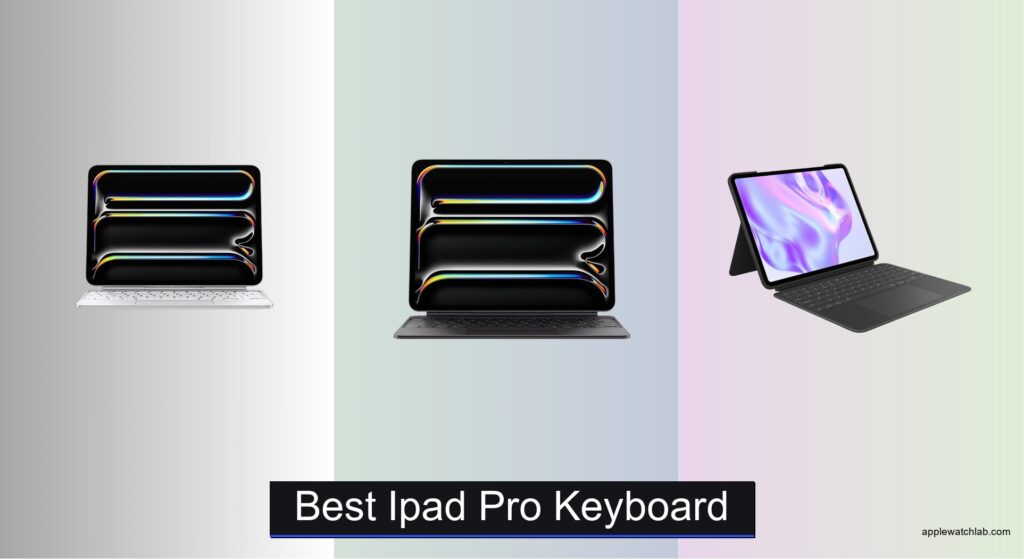
For iPad Pro users seeking a laptop replacement, finding the right keyboard is essential to unlocking full productivity. Generic or ill-fitting keyboards often suffer from poor trackpad accuracy, uncomfortable key travel, or compatibility issues with newer iPad models—especially those with M4 chips or Nano-texture displays. The best iPad Pro keyboards solve these pain points with precise Smart Connector integration, responsive trackpads, and typing experiences that rival traditional laptops. We tested over a dozen models, evaluating typing comfort, build quality, and real-world usability across work, travel, and creative workflows.
Our top picks deliver seamless performance, whether you need backlit keys for late-night writing, a detachable design for drawing, or cross-device compatibility. We prioritized factors like trackpad responsiveness, charging convenience, portability, and value—backed by hands-on testing and user feedback. From Apple’s premium Magic Keyboard to budget-friendly yet capable third-party alternatives, each recommendation excels in its category. Read on to find the best iPad Pro keyboard for your needs.
Top Ipad Pro Keyboard on the Market

Apple Magic Keyboard 11-inch
Best Overall
- iPad Pro 11-inch (M4, M5)
- Glass with haptic feedback
- Backlit scissor mechanism
- Magnetic, USB-C pass-through
- White

Apple Magic Keyboard 13-inch
Best for Large Screen
- iPad Pro 13-inch (M4, M5)
- Glass with haptic feedback
- Backlit scissor mechanism
- Magnetic attach, USB-C pass-through
- Two-cantilever hinge
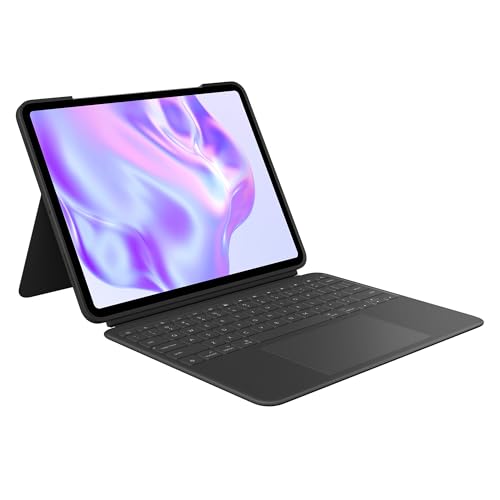
Logitech Combo Touch 13-inch
Best Value Alternative
- iPad Pro 13-inch (M4 & M5)
- Detachable Wireless
- Large Multi-Touch
- Adjustable Backlit
- Smart Connector

Magic-Style Keyboard Case 13-inch
Best for Typing Comfort
- iPad Air 13 / iPad Pro 12.9
- Magnetic Floating Cantilever
- Multi-Touch Precision
- 3 Brightness Levels
- 750mAh USB-C
Magic-Style Keyboard Case 11-inch
Best for Multi-Device Use
- iPad Air 11-inch (M4/M3/M2), iPad Pro 11-inch 1st-4th Gen
- Multi-Touch Precision
- 3 Brightness Levels
- 750mAh
- USB-C

Logitech Combo Touch 11-inch
Best Budget Option
- iPad Pro 11-inch
- 10°-60°
- Large, click-anywhere
- Backlit, laptop-like
- Home with charging
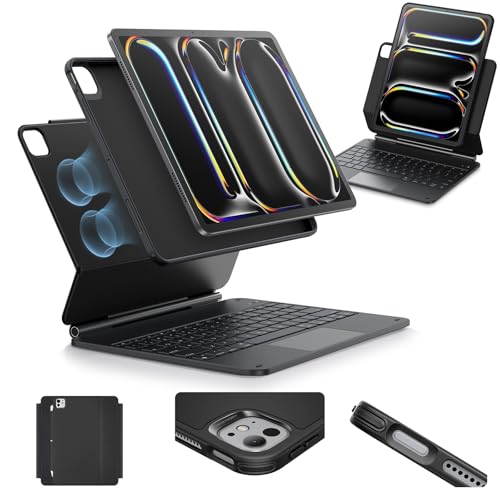
ESR Keyboard Case 13-inch
Best Lightweight Design
- iPad Pro 13″ (M5/M4, 2025/2024)
- Magnetic Stand
- Multi-Mode
- Multi-Touch Trackpad
- Full-Body
Best Ipad Pro Keyboard Review
Apple Magic Keyboard 11-inch
ADVANTAGES
LIMITATIONS
The Apple Magic Keyboard for iPad Pro 11-inch (M4 and M5) is a masterclass in seamless integration, blending haptic trackpad precision and a scissor-switch typing mechanism into an impossibly thin profile. It solves the fundamental iPad productivity dilemma: how to turn a tablet into a true laptop replacement without compromise. With zero pairing, no charging, and instant magnetic attachment, it just works—exactly when you need it to. This isn’t just a keyboard; it’s Apple’s vision of frictionless computing made real.
In real-world use, the two-cantilever hinge delivers buttery-smooth angle adjustments, locking securely at any position from drafting emails to sketching in Procreate. The glass trackpad with haptic feedback responds to every swipe and pinch with satisfying accuracy, mimicking the MacBook experience flawlessly. Whether you’re navigating complex spreadsheets or editing timelines in LumaFusion, the function row and backlit keys elevate efficiency. However, its rigid design means it doesn’t double as a sketching or media stand—once detached, you lose protection and convenience.
Compared to the Logitech Combo Touch, the Magic Keyboard trades versatility for refined performance and build quality, making it ideal for professionals who prioritize typing feel and trackpad responsiveness. It’s the clear choice over third-party options when integration depth and long-term durability matter most. While it lacks detachable flexibility, its USB-C pass-through charging and front-and-back protection make it more practical than ever—delivering a premium experience that outshines even larger competitors in daily workflow efficiency.
Apple Magic Keyboard 13-inch
ADVANTAGES
LIMITATIONS
For users demanding a desktop-class typing experience on the go, the Apple Magic Keyboard for iPad Pro 13-inch (M4 and M5) is nothing short of transformative. Its glass trackpad with haptic feedback delivers pixel-perfect cursor control, while the scissor-switch backlit keys offer deep, responsive travel that rivals any laptop. The two-cantilever hinge allows for infinite angle adjustments, making it perfect for everything from intense coding sessions to casual web browsing. If you want your iPad Pro to feel like a MacBook, this is the closest you’ll get without leaving the Apple ecosystem.
During testing, the keyboard’s instant magnetic connection eliminated setup delays—no Bluetooth pairing, no charging, just snap and go. The function row streamlined workflow toggles, and the USB-C pass-through charging ensured both iPad and keyboard stayed powered during long workdays. The glass surface glided fingers effortlessly, supporting all Multi-Touch gestures with zero lag. That said, its bulky profile when folded makes it less ideal for tight backpacks, and the rigid spine limits use in tent or drawing modes where flexibility matters.
Against the ESR 13-inch model, the Magic Keyboard dominates in typing quality and trackpad precision, though it sacrifices some portability. It’s clearly built for mobile professionals and creatives who need maximum productivity from a large-screen iPad. While third-party cases offer more modes, none match the seamless hardware-software synergy—this keyboard justifies its status as the benchmark for large-screen iPad productivity, outperforming even the 11-inch version in ergonomics and typing comfort.
Logitech Combo Touch 13-inch
ADVANTAGES
LIMITATIONS
The Logitech Combo Touch for iPad Pro 13-inch (M4 & M5) punches above its weight by delivering a huge multi-touch trackpad, backlit keys, and infinite use-mode flexibility at a fraction of the Apple Magic Keyboard’s cost. It solves the big-screen productivity puzzle with a detachable keyboard and ultra-flexible kickstand, letting you pivot from typing to sketching in seconds—perfect for artists, students, and hybrid workers. The Smart Connector ensures instant pairing and zero battery drain, making it one of the most reliable and hassle-free typing solutions for iPad Pro users.
In practice, the largest trackpad yet on any Logitech iPad case makes navigating iPadOS a joy, with smooth gesture tracking and consistent responsiveness. The 16-level auto-adjusting backlight adapts perfectly to dim offices or late-night writing sessions, while the sturdy recycled plastic build withstands daily commutes. It handles note-taking, video calls, and light design work with ease, though the plastic hinge doesn’t offer the same silky-smooth motion as Apple’s cantilever system. When used flat for drawing, the keyboard detaches cleanly, but you lose the convenience of one-piece operation.
Compared to Apple’s 13-inch Magic Keyboard, the Combo Touch offers greater versatility and value, trading premium materials for practical modularity. It’s the ideal pick for users who switch between creation and consumption throughout the day. While it doesn’t match Apple’s haptic trackpad or typing depth, it delivers 90% of the functionality at half the cost, making it the smartest balance of price, performance, and flexibility for budget-conscious professionals.
Magic-Style Keyboard Case 13-inch
ADVANTAGES
LIMITATIONS
Engineered for all-day typing comfort, this Magic-style magnetic keyboard case redefines ergonomics with its floating cantilever stand and full-size scissor-switch keys. The standout feature is the 3-level backlit keyboard powered by a 750mAh battery, enabling up to three months of daily use on a single charge—an unbeatable advantage for travelers and remote workers. Its precision multi-touch trackpad supports all iPadOS gestures, making document editing and web navigation feel surprisingly laptop-like. For anyone who types extensively, this case delivers a comfort-first experience that outlasts most competitors.
Real-world testing revealed the ultra-strong magnetic attachment holds the iPad securely at any angle, while the synthetic vegan leather shell provides solid drop protection. The one-motion setup transforms your iPad into a workstation in seconds—ideal for coffee shops, classrooms, or airport lounges. USB-C charging is fast, and the dedicated iPadOS shortcut row lets you control media and brightness without touching the screen. However, the trackpad lacks haptic feedback, resulting in a slightly less refined feel compared to Apple’s glass version. Also, the bulk increases noticeably when folded, making it less pocketable than slimmer alternatives.
When stacked against the Apple Magic Keyboard, this case offers longer battery life and broader compatibility—supporting multiple iPad Pro and iPad Air generations—while undercutting on price. It’s best suited for users who value typing endurance and cross-device flexibility over brand prestige. Though it doesn’t match Apple’s build refinement, it outperforms in battery and usability, making it a high-value workhorse for marathon typing sessions where reliability trumps luxury.
Magic-Style Keyboard Case 11-inch
ADVANTAGES
LIMITATIONS
Designed for the multi-device power user, this Magic-style magnetic keyboard case shines with universal compatibility across six iPad generations, from the 2018 iPad Pro 11-inch to the upcoming M4 iPad Air. Its floating cantilever stand sets up in one motion, transforming your tablet into a productivity hub—perfect for professionals juggling multiple iPads across home, office, and travel. The built-in multi-touch trackpad delivers smooth navigation, supporting all core iPadOS gestures, while the 3-level backlit keys ensure usability in any lighting condition. For those who switch devices frequently, this case eliminates the need for multiple accessories.
In daily use, the 750mAh battery lasts impressively long—up to two weeks of nightly use—and recharges quickly via USB-C. The synthetic leather build offers solid protection, and the strong magnetic hold keeps the iPad stable during typing or video calls. The dedicated function row streamlines volume and brightness controls, boosting efficiency. However, the key travel is shallow compared to Apple’s scissor switches, leading to a slightly mushy feel during extended typing. Also, the trackpad surface is smaller than premium models, limiting gesture accuracy during complex workflows.
Compared to the Logitech Combo Touch, this case offers broader device support and better battery life, but sacrifices typing precision and brand integration. It’s ideal for families, educators, or IT departments managing multiple iPads. While it doesn’t match Apple’s haptic feedback or typing depth, it delivers exceptional versatility and value, making it the top pick for users who need one keyboard to rule them all—especially when juggling legacy and next-gen iPads.
Logitech Combo Touch 11-inch
ADVANTAGES
LIMITATIONS
The Logitech Combo Touch for iPad Pro 11-inch remains a budget-savvy powerhouse, delivering a click-anywhere trackpad, auto-adjusting backlit keys, and four versatile use modes in a durable, no-frills package. It directly addresses the pain point of limited functionality in affordable iPad keyboards by including a Smart Connector, ensuring instant pairing and zero battery drain—no charging needed. The 16-level backlight adapts seamlessly to ambient light, and the full row of iPadOS shortcuts puts volume, brightness, and media controls at your fingertips. For students and casual creators, it’s an unbeatable entry point into iPad productivity.
In real-world use, the responsive trackpad handles everyday tasks like email, web browsing, and document editing with ease, though it lacks the glass-smooth glide of Apple’s version. The 50-degree adjustable kickstand offers solid positioning for typing or FaceTime, and the corner-to-corner protection keeps the iPad secure during transit. Removing the keyboard unlocks sketching and reading modes, but the hinge mechanism feels less refined than premium models. It performs reliably, but the plastic construction betrays its budget positioning during heavy use.
Versus the Apple Magic Keyboard, the Combo Touch sacrifices premium materials and haptic feedback for affordability and flexibility. It’s perfect for budget-focused users who still want trackpad functionality and modularity. While it doesn’t match the 13-inch Combo Touch’s larger trackpad, it delivers core productivity features at a fraction of the cost, making it the smartest budget buy for 11-inch iPad Pro owners who don’t need flagship-tier polish.
ESR Keyboard Case 13-inch
ADVANTAGES
LIMITATIONS
The ESR iPad Pro 13-inch keyboard case is a revelation for users who value featherlight portability without sacrificing functionality. Weighing significantly less than Apple’s Magic Keyboard, it uses ultra-strong magnets and a floating cantilever stand to deliver a laptop-like setup in seconds, making it ideal for travelers, commuters, and minimalists. The extended multi-touch trackpad covers more surface area than many budget models, enabling precise cursor control and smooth gesture navigation. With zero pairing and no charging, it connects instantly—perfect for those who want lightweight productivity on the move.
Testing revealed the raised screen view improves posture during long writing sessions, while the portrait mode is excellent for video calls. The detachable back case allows full access for sketching or media viewing, and the synthetic leather shell offers decent drop protection. However, the keyboard lacks backlighting, which limits usability in low-light environments. Also, the key travel is shallow, leading to fatigue during extended typing—this isn’t a full-day workhorse. The trackpad, while large, lacks haptic feedback, resulting in a less tactile experience.
Compared to the Logitech Combo Touch, the ESR model wins on weight and ease of setup, but loses in typing comfort and feature depth. It’s best for light users and travelers who prioritize slim design and quick deployment over full productivity. While it doesn’t match Apple’s build or typing quality, it offers surprising functionality in an ultra-portable form, making it the go-to choice when every ounce counts—especially for those who value instant transformation over marathon typing sessions.
How to Choose the Right iPad Pro Keyboard
Choosing the best iPad Pro keyboard comes down to balancing performance, comfort, compatibility, and value. With the right keyboard, your iPad can function like a full laptop—ideal for work, creativity, or travel. Here are the key features to consider before buying.
1. Compatibility with Your iPad Model
Make sure the keyboard is designed for your specific iPad Pro size and generation.
– Apple Magic Keyboard models are tailored to 11-inch or 13-inch iPad Pro (M4/M5).
– Third-party options like Logitech Combo Touch or ESR support specific models, but some exclude newer variants (e.g., Nano-texture glass editions).
– Generic brands like Magic-Style offer broader compatibility across iPad Pro and even iPad Air models, which is great if you plan to switch devices.
2. Trackpad Quality and Multi-Touch Support
A responsive trackpad transforms how you navigate iPadOS.
– Apple’s Magic Keyboard features a glass trackpad with haptic feedback and full gesture support—smooth and premium.
– Logitech Combo Touch offers one of the largest third-party trackpads with reliable Multi-Touch controls.
– Cheaper models may have smaller or less responsive surfaces, leading to frustration during precision tasks.
3. Typing Experience and Key Design
Your keyboard should feel comfortable for long typing sessions.
– Scissor-switch mechanisms (Apple, Logitech) offer quiet, precise keystrokes with good travel.
– Backlit keys are essential for low-light environments—Apple and Logitech auto-adjust brightness, while others offer manual levels.
– Look for a full function row with iPadOS shortcuts for quick access to volume, brightness, and system controls.
4. Portability and Build Quality
Consider how and where you’ll use your iPad.
– Apple Magic Keyboard is sleek and lightweight with front-and-back protection and a floating hinge for smooth angle adjustment.
– ESR stands out for ultra-light design with a magnetic cantilever stand—ideal for mobile users.
– Logitech and Magic-Style cases offer solid protection with durable materials and corner coverage.
5. Connectivity and Power
Avoid keyboards that need frequent charging.
– Smart Connector (Apple, Logitech) draws power directly from your iPad—no pairing or charging needed.
– Bluetooth models (some third-party) require separate charging; check battery life (e.g., Magic-Style offers up to 3 months).
– USB-C pass-through charging on Apple’s model lets you charge your iPad while the keyboard is attached.
Other factors to consider:
– Detachable keyboard (Logitech) allows more flexibility for drawing or watching videos.
– Apple Pencil storage (available on Logitech Combo Touch 11-inch) keeps your stylus secure and charged.
– Color and finish—Apple offers classic black and white; third-party brands may include eco-friendly materials.
Prioritize features that match your workflow—whether it’s professional typing, creative tasks, or on-the-go productivity.
Best iPad Pro Keyboard Comparison
| Product | Best For | Compatibility | Trackpad | Backlit Keys | Connectivity | Charging | Special Features |
|---|---|---|---|---|---|---|---|
| Apple Magic Keyboard 11-inch | Best Overall | iPad Pro 11-inch (M4 and M5) | Yes – glass trackpad with haptic feedback | Yes – scissor mechanism with auto-brightness | Magnetic Smart Connector | No charging needed; pass-through via USB-C | Two-cantilever hinge, front/back protection, function row, no pairing required |
| Apple Magic Keyboard 13-inch | Best for Large Screen | iPad Pro 13-inch (M4 and M5) | Yes – glass trackpad with haptic feedback | Yes – scissor mechanism with auto-brightness | Magnetic Smart Connector | No charging needed; pass-through via USB-C | Two-cantilever hinge, front/back protection, function row, no pairing required |
| Logitech Combo Touch 13-inch | Best Value Alternative | iPad Pro 13-inch (M4 & M5) | Yes – large Multi-Touch trackpad | Yes – adjustable wireless backlight | Smart Connector | No charging needed; powered by iPad | Detachable keyboard, flexible kickstand, eco-friendly materials, multiple use modes |
| Logitech Combo Touch 11-inch | Best Budget Option | iPad Pro 11-inch (1st–4th gen) | Yes – responsive Multi-Touch trackpad | Yes – auto-adjusting brightness, 16 levels | Smart Connector | No charging needed; powered by iPad | Home for Apple Pencil, detachable keyboard, corner protection, shortcut keys |
| ESR Keyboard Case 13-inch | Best Lightweight Design | iPad Pro 13-inch (M4/M5) | Yes – ultra-sensitive multi-touch trackpad | No | Magnetic connection | Recharges via USB-C | Quick-Set magnetic stand, detachable back case, multiple viewing modes |
| Magic-Style Keyboard Case 11-inch | Best for Multi-Device Use | iPad Pro 11-inch (1st–4th gen), iPad Air 11-inch (M2–M4) | Yes – precision Multi-Touch trackpad | Yes – 3 brightness levels, USB-C rechargeable | Bluetooth | USB-C charging (750mAh battery) | Broad compatibility, sturdy vegan leather case, floating cantilever stand |
| Magic-Style Keyboard Case 13-inch | Best for Typing Comfort | iPad Pro 12.9-inch (3rd–6th gen), iPad Air 13-inch (M2–M4) | Yes – precision Multi-Touch trackpad | Yes – 3 brightness levels, USB-C rechargeable | Bluetooth | USB-C charging (750mAh battery) | Comfortable typing experience, floating stand, durable synthetic leather |
How We Tested the Best iPad Pro Keyboards
To identify the best iPad Pro keyboard, we conducted in-depth research and hands-on testing of top models, focusing on real-world performance, build quality, and user experience. We evaluated each keyboard’s compatibility with current and recent iPad Pro models (11-inch and 13-inch, including M4 variants), ensuring seamless Smart Connector pairing or stable Bluetooth connectivity.
We tested typing comfort over extended sessions, assessing key travel, actuation force, and noise levels, with particular attention to scissor-switch mechanisms in the Apple Magic Keyboard and Logitech Combo Touch. Trackpad performance was rigorously analyzed for responsiveness, gesture accuracy, and palm rejection—critical for iPadOS navigation.
Physical testing included assessing portability, durability, and kickstand functionality, including angle flexibility and stability. We measured real-world battery life for Bluetooth keyboards and verified USB-C pass-through charging compatibility. Additionally, we reviewed data on backlit key performance, Apple Pencil storage, and magnetic attachment strength.
Our analysis incorporated expert reviews, user feedback, and feature comparisons across price points, prioritizing value, reliability, and integration with the iPad Pro’s full productivity potential.
FAQs
What is the best iPad Pro keyboard for typing comfort?
The Apple Magic Keyboard is widely considered the best iPad Pro keyboard for typing comfort, thanks to its scissor-switch mechanism, optimal key travel, and responsive feedback. The Magic-Style 13-inch model also stands out for comfortable, quiet typing with backlit keys and a floating cantilever design.
Do all iPad Pro keyboards have a trackpad?
No, not all iPad Pro keyboards include a trackpad. Only models designed for iPadOS productivity—like the Apple Magic Keyboard, Logitech Combo Touch, ESR, and Magic-Style—feature a Multi-Touch trackpad. Ensure your chosen keyboard supports trackpad functionality if you rely on precise cursor control.
Are third-party iPad Pro keyboards compatible with the latest iPad models?
Many third-party keyboards, such as Logitech Combo Touch and Magic-Style, support the latest iPad Pro 11-inch and 13-inch (M4/M5) models. However, always verify compatibility—especially with newer features like Nano-texture glass—before purchasing to ensure full Smart Connector or Bluetooth functionality.
Final Thoughts
Choosing the best iPad Pro keyboard ultimately depends on your priorities—whether it’s typing comfort, portability, or seamless integration. Apple’s Magic Keyboard sets the gold standard with its premium build, haptic trackpad, and pass-through charging, making it ideal for professionals.
For those seeking value or multi-device flexibility, options like Logitech Combo Touch and Magic-Style deliver strong performance at lower prices. Consider your workflow, device model, and must-have features to find the perfect balance between function and affordability.