If you’ve ever finished a workout and glanced at your Apple Watch to see it report 400+ calories burned—only to wonder, “Did I really burn that much?”—you’re not alone. Millions rely on the Apple Watch to track daily activity, manage weight, and stay motivated with those satisfying Activity ring closures. But when it comes to how accurate Apple Watch calorie counting really is, the answer isn’t simple: the numbers are often inflated, sometimes by as much as 75%, especially during intense or irregular activities.
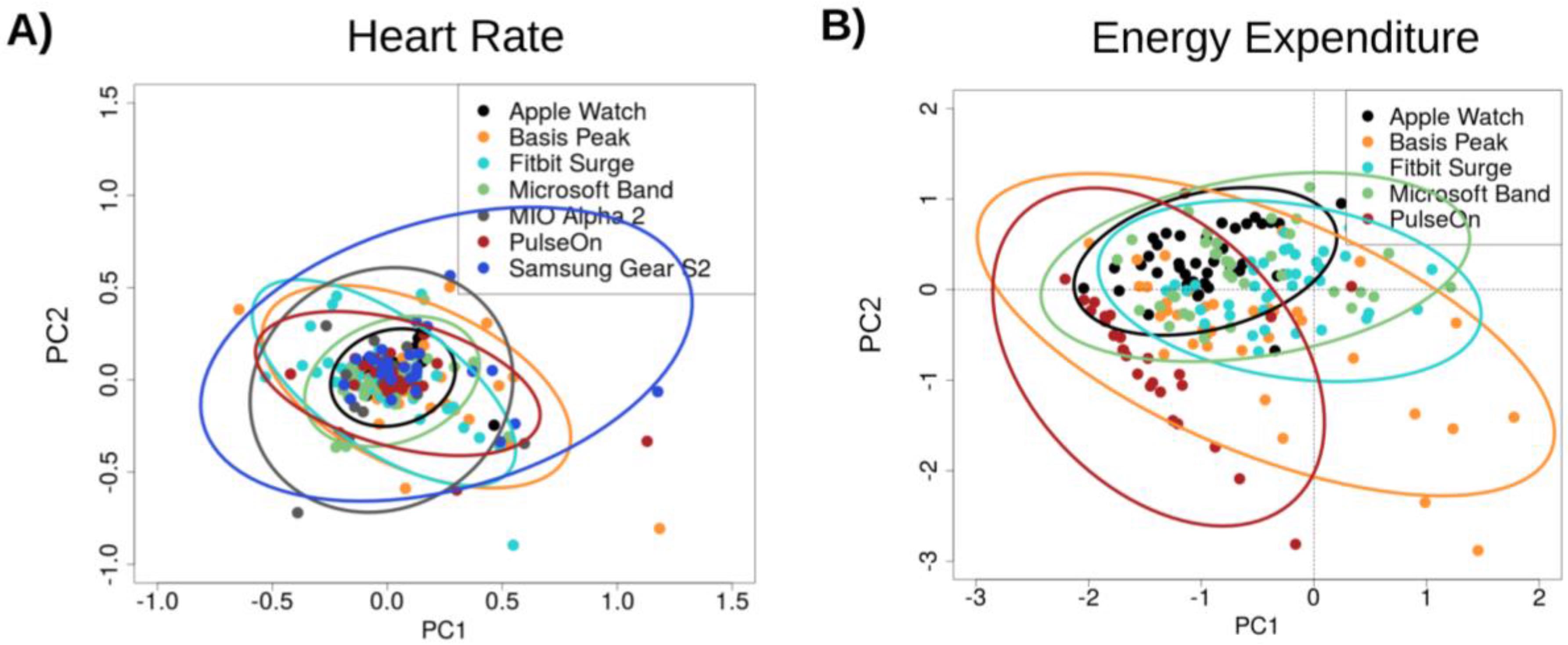
Research shows Apple Watch calorie estimates typically fall 18–40% off from actual energy expenditure, with overestimations being far more common than underestimations. While its heart rate and step tracking are clinically reliable, the calorie burn figures are better viewed as educated estimates rather than precise measurements. That doesn’t mean they’re useless—in fact, one real-world 12-week experiment found that despite flawed per-workout data, the Apple Watch’s daily totals predicted actual weight loss within just 0.4 pounds.
This means the device may not be perfect for tracking individual workouts, but it can effectively reflect long-term trends in energy balance when used consistently and thoughtfully. The key is understanding how it works, where it fails, and how to use it wisely—especially if you’re trying to lose weight, build fitness, or avoid overeating based on misleading numbers.
How Apple Watch Calculates Calorie Burn

The Apple Watch doesn’t measure calories directly. Instead, it estimates total energy expenditure (TEE) by combining personal biometrics with real-time sensor data through proprietary algorithms.
Uses Biometrics and Motion to Estimate Burn
Your age, sex, height, weight, and fitness level form the foundation for calculating your Resting Energy Expenditure (REE)—the calories you burn just staying alive. Then, during activity, the watch layers in live data from multiple sensors:
- Optical heart rate monitor: detects exertion via pulse
- Accelerometer and gyroscope: track movement intensity and pattern
- GPS: measures distance and pace for outdoor workouts
- Barometer: senses elevation changes, adjusting for uphill effort
These inputs feed into machine learning models trained on large datasets, allowing Apple to tailor calorie estimates based on activity type—running, cycling, swimming, or HIIT.
No Muscle Mass or Body Fat Adjustments
One major flaw: the watch doesn’t account for body composition. Two people of the same height and weight—one with high muscle mass, one with higher body fat—will have vastly different metabolisms, but Apple Watch treats them identically. This means lean, muscular individuals may burn up to 20% more than predicted, while others may burn less.
Heart Rate Accuracy: The Most Reliable Input
Since heart rate is a primary driver of calorie estimation, its accuracy is critical—and this is where the Apple Watch shines.
Clinically Validated Heart Monitoring
Multiple studies confirm Apple Watch heart rate tracking is within 2–5% of ECG-grade medical equipment during steady-state cardio. In one stress test, the maximum deviation was only 4–6 beats per minute compared to hospital monitors.
This makes it highly reliable for tracking intensity during:
– Brisk walking
– Running
– Cycling
– Swimming
Less Accurate During High-Intensity or Erratic Movement
However, optical sensors struggle during HIIT, weightlifting, or CrossFit. Factors like sweat, loose fit, tattoos, or dark skin can interfere with readings, leading to:
– Delayed heart rate spikes
– Erratic jumps due to motion noise
– Gaps in data collection
When heart rate data falters, so does calorie estimation—often overestimating due to lagging recovery zones or motion artifacts.
Step Count vs. Calorie Burn: One’s Solid, the Other Isn’t
Not all Apple Watch metrics are equally trustworthy.
Step Tracking Is Highly Accurate
Studies show Apple Watch step counts have a mean absolute error of 8.17%, well within the <10% clinical accuracy threshold. It reliably detects cadence and gait, making it excellent for tracking daily movement.
Calorie Estimates Are Frequently Overstated
In contrast, calorie burn estimates show 27–30% average error, often overestimating actual energy use. One lab test found a 75% overestimation during a treadmill run (550 vs. 323 kcal measured via indirect calorimetry).
“Do not take every number as 100% truth, especially the calories. Think of it as a helpful guide, not a diagnostic tool.”
— Minsoo Kang, Professor of Sport Analytics, University of Mississippi
Calorie Accuracy Varies by Activity Type
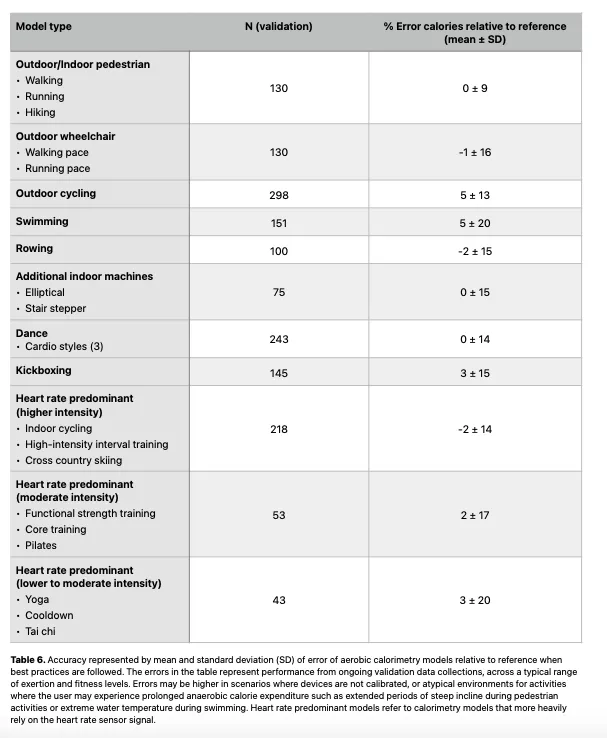
The Apple Watch performs very differently depending on what you’re doing.
Steady-State Cardio: Most Accurate
Walking, running, and cycling produce the most reliable estimates due to predictable motion and strong heart rate correlation.
Outdoor Runs with GPS: Best Results
With GPS active and proper calibration, Apple Watch can estimate burn within ±10%. One user recorded a 6.5% overestimation (636 vs. 597 kcal) during an outdoor run—close enough for trend tracking.
Indoor Treadmill: Less Reliable
Without GPS, the watch relies more on arm motion and heart rate. Holding the rails or having an uneven stride can inflate calorie counts.
Resistance Training: Highly Inaccurate
Weightlifting, kettlebells, and bodyweight circuits are where Apple Watch fails hardest.
Why It Struggles
- Non-repetitive motion confuses accelerometers
- Heart rate lags behind effort
- Minimal arm movement reduces detection
Users report 375 active calories burned in an hour of bicep curls—despite low perceived exertion. One study found error rates up to 93% in resistance training.
HIIT and Interval Workouts: Unreliable
Short bursts of effort followed by rest create mismatched heart rate and calorie curves. The watch may credit calories after the workout ends, inflating totals.
Tennis and Pickleball: Wildly Inconsistent
Erratic swings and intermittent effort make these sports hard to model. Users describe calorie counts that feel “wildly high” compared to other trackers. Using the generic “Other” mode worsens inaccuracies.
Swimming: Moderately Accurate
Water reduces optical sensor performance, but the watch uses stroke detection and lap timing to compensate. With proper swim calibration, estimates can be moderately reliable, though independent validation is limited.
Real-World Evidence: Lab Tests vs. User Results
What do controlled studies and personal experiments tell us?
Lab Tests Show Consistent Overestimation
Three trials using indirect calorimetry (gold standard) revealed:
| Activity | Lab Calories | Apple Watch | Error |
|---|---|---|---|
| Treadmill Run | 323 | 550 | +75% |
| Outdoor Run | 597 | 636 | +6.5% |
| Stationary Bike | 380 | 466 | +22.5% |
The trend is clear: Apple Watch overestimates, especially in short, intense sessions.
One User’s 12-Week Weight Loss Experiment
A 49-year-old man tracked:
– All food intake (1,300+ entries)
– Apple Watch energy expenditure
– Daily weight
Results:
– Predicted deficit: 87,157 kcal → expected loss: 24.9 lbs
– Actual loss: 24.7 lbs
Despite flawed workout estimates, daily totals aligned closely with real-world energy balance—proving the watch can be accurate for long-term trends.
Factors That Improve or Hurt Accuracy
Several user-controlled factors influence how close the numbers are.
Outdated Personal Data
One user saw a drastic drop in daily calories after updating an old weight. Even 5–10 pound differences alter metabolic calculations.
Fix: Update weight, height, age, and sex in the Health app monthly.
Poor Fit or Placement
A loose watch bounces, reducing sensor contact.
Fix: Wear snugly, 1–2 finger widths above the wrist bone. Tighten during workouts.
Wrong Workout Mode
Choosing “Other” instead of “Running” or “Cycling” forces a generic algorithm.
Fix: Always select the most specific activity type.
Lack of Calibration
The watch learns your stride over time.
Fix: Do a 20-minute outdoor walk or run with GPS. Repeat every few months.
VO₂ Max Errors
Apple estimates fitness from heart rate trends. If VO₂ Max is off, calorie models suffer.
Fix: Reset Fitness Calibration Data in the Watch app under Privacy.
How to Get Better Results
You can’t make it perfect, but you can improve accuracy.
Calibrate Regularly Outdoors
- Complete a 20-minute continuous walk or run outside
- Keep arms moving naturally
- Ensure Location Services and Motion Calibration & Distance are enabled
Wear It Correctly
- Snug but not tight
- Avoid wearing over tattoos or dark skin
- Use breathable bands for sweaty sessions
Reset Calibration When Needed
If VO₂ Max drops suddenly or calorie totals seem off, reset fitness data and recalibrate.
Validate With Weight Trends
“You can’t outsmart thermodynamics. If your weight isn’t changing, the device is likely wrong—not you.”
Best validation method:
1. Track daily weight (morning, post-bathroom)
2. Calculate weekly average
3. Compare to weekly calorie deficit
4. If weight is stable but deficit suggests loss → watch is overestimating
Who Should Trust the Numbers?
Can Trust (With Caveats)
- Casual exercisers using it for motivation
- Weight loss beginners tracking trends
- Endurance athletes monitoring heart rate zones
Use case: Closing rings, building habits, staying active.
Should Be Skeptical
- Precision dieters in 200–300 kcal deficits
- Body recomposition seekers
- Clinical populations (thyroid, heart, metabolic issues)
Risk: Basing meals on inflated burn can stall progress or cause weight gain.
Best Practices for Real-World Use
- Don’t eat back all burned calories – allow only a 100-calorie buffer.
- Focus on weekly averages, not daily fluctuations.
- Combine with other metrics: weight, waist size, energy, performance.
- Consider an RMR test ($100–$200) for true resting burn.
- Trust heart rate, not calories – use zones for training, not calorie counts.
Final Note: The Apple Watch is not a medical-grade calorimeter, but it’s a powerful tool for consistency, motivation, and trend tracking. Its calorie numbers are often inflated—especially in strength and interval training—but when used wisely, they can help you stay active and aware. For real progress, let your weight, energy, and body changes be the final judges, not the number on your wrist.