
If your Apple Watch is leaving a red, painful, or blistering mark on your wrist—especially under the sensor array—you’re not alone. A growing number of users across Apple Watch Series 6 through Ultra 2 and SE models have reported skin burns or burn-like injuries appearing precisely where the back sensors make contact. These aren’t typical rashes: they often resemble sunburns or heat damage, with circular patterns matching the watch’s optical heart rate and blood oxygen sensors.
Unlike allergic reactions, which usually cause itching and swelling under the band, these injuries frequently occur only under the sensor housing, with no irritation elsewhere. Many users report no prior skin sensitivities, years of safe use, and sudden onset after upgrading to newer models. Despite medical documentation and visible damage, Apple often attributes the issue to “skin sensitivity” or “allergic reaction”—even when no rash, itching, or nickel exposure explains the injury.
This guide dives deep into the real causes, backed by user reports, medical insights, and technical analysis. You’ll learn how to stop the burning, protect your skin, and get support from Apple—or take further action if needed. Most importantly, you’ll discover the #1 fix that works for most users: disabling a single feature that may be overheating your wrist.
Decode the Burn Pattern
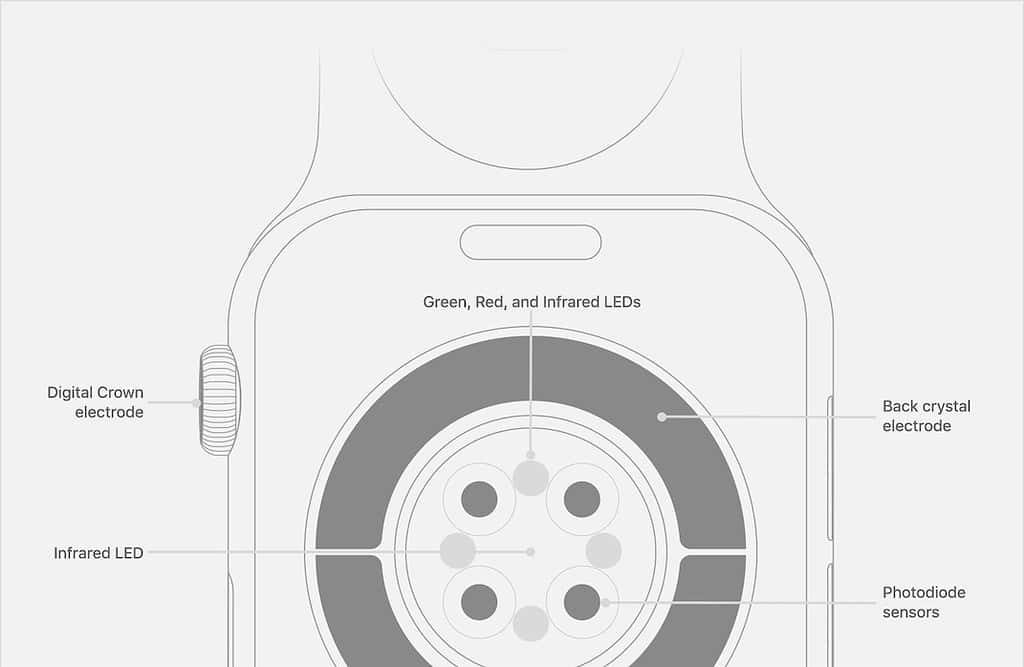
Match the Mark to Sensor Layout
Look closely at the injury. If it’s circular or ring-shaped, aligns with the cluster of sensors on the back, and appears after hours of wear (especially overnight), it’s likely linked to the optical heart rate or blood oxygen (SpO2) sensors.
- 🔴 Red ring under sensor array = heat/light exposure
- 🔺 No irritation under band = rules out allergy
- 🕒 Delayed onset (waking up in pain) = prolonged sensor activity
- 🚫 No itching = not contact dermatitis
This pattern strongly suggests thermal or photonic exposure, not an allergic reaction. The sensors emit red and infrared LEDs—low-level but continuous during SpO2 monitoring—which can generate heat over time, especially during sleep tracking.
“The red mark is now flaking, so it’s very reminiscent of sunburn.” — Eric Wilton, London
Users consistently report waking up to a burning sensation, sometimes feeling the watch itself was hot. In severe cases, skin turns leathery, blisters form, or sores develop—symptoms far beyond irritation. These injuries often heal slowly, and may leave behind scarring or discoloration, especially with repeated exposure.
Confirm the Model Risk

Series 6 to Ultra 2 Affected
Burn reports span multiple models:
– Apple Watch Series 6
– Series 7
– Series 8
– Series 9
– SE
– Ultra
– Ultra 2
Key trend: Many users had no issues with older models (e.g., Series 4 or 5) but developed burns after upgrading. This suggests changes in sensor behavior, software frequency, or thermal design may be contributing.
Titanium models—marketed as hypoallergenic—are not immune. Since titanium doesn’t contain nickel, persistent burns point to non-material causes, like heat or light from sensors. Even users with no history of allergies and years of safe wear are reporting sudden, unexplained injuries—pointing to a systemic issue, not individual skin sensitivity.
Recognize the Symptoms
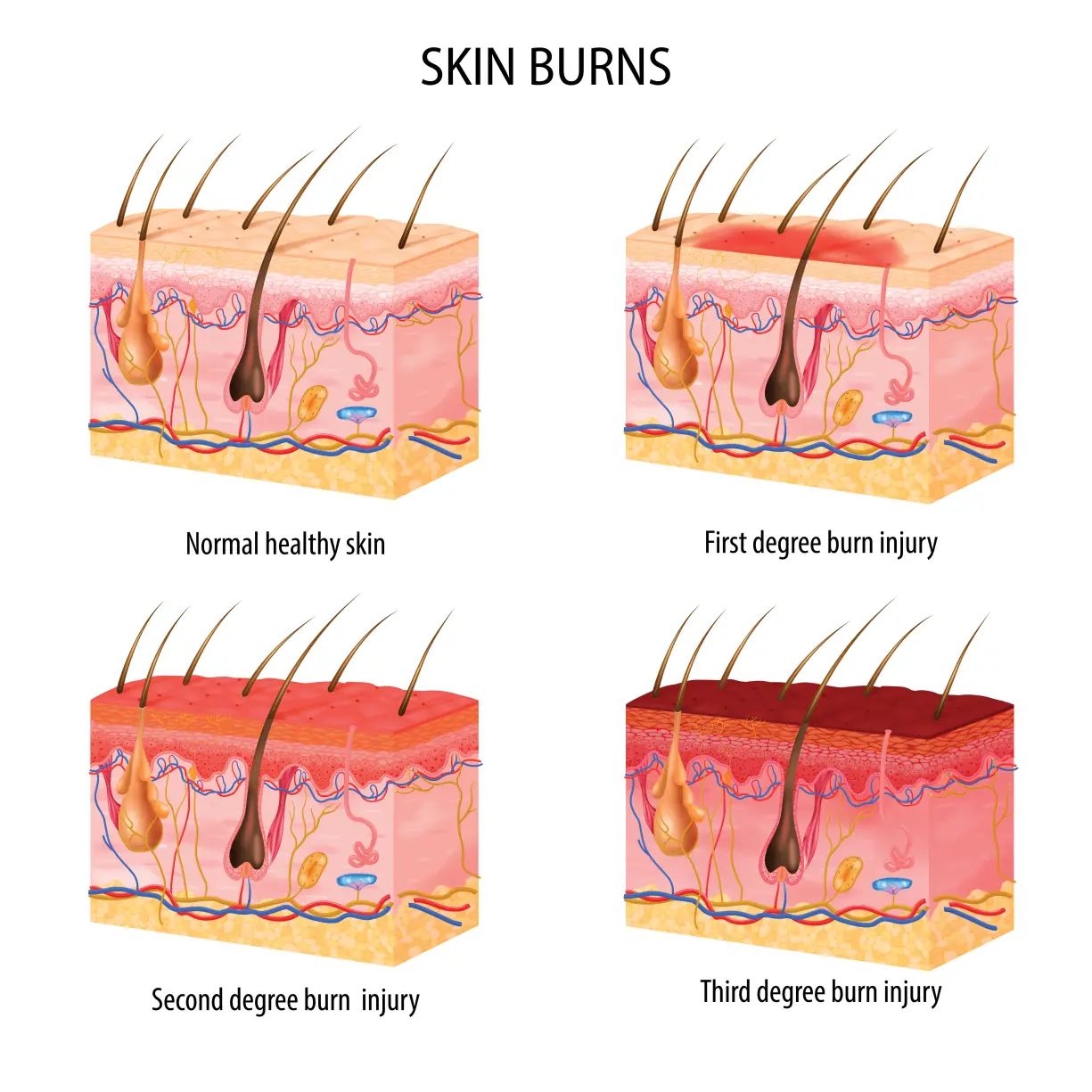
Identify Burn Severity Levels
| Level | Signs | Action |
|---|---|---|
| Mild | Redness, slight flaking | Stop wearing, disable SpO2 |
| Moderate | Swelling, pain, persistent redness | See doctor, clean watch |
| Severe | Blisters, open sores, scabbing | Discontinue use, seek medical care |
| Chronic | Recurring despite changes | Consider legal or consumer action |
“I woke up when it happened and felt that my watch was very hot. My skin turned leathery over the reddened part.” — User report
If you wake up with a burning sensation or visible damage, remove the watch immediately. The injury may worsen even after removal due to delayed skin response.
Fix It: Disable Blood Oxygen Monitoring
Stop SpO2 Sensor Overuse
The most effective fix reported by users: turn off Blood Oxygen monitoring.
This feature uses infrared and red LEDs that pulse every 5 minutes (or continuously during sleep) to measure oxygen levels. Prolonged activation can generate low-grade heat, especially if the watch is worn tightly or during high-activity periods.
How to Disable:
- Open Watch app on iPhone
- Go to Privacy > Health > Blood Oxygen
- Toggle “Blood Oxygen” OFF
- Restart Apple Watch
“They have now gone for me. I turned off the blood oxygen monitor… I now have no marks on my wrist.” — nfshirley
“If you use the O2 sensor on an Apple Ultra 2, your watch will burn your wrist.” — UKGandalf
Trade-off: You lose overnight SpO2 tracking, but gain skin safety. For most, this is a fair compromise.
Adjust Wear Habits
Reduce Heat Buildup
Even with SpO2 off, poor wear habits can trap heat and sweat.
Wear Looser, Not Tighter
- Band should allow one finger underneath
- Prevents friction and improves airflow
- Reduces pressure on sensitive skin
Rotate Wrist Position
- Wear on opposite wrist while healing
- Shift watch slightly higher or lower to avoid same spot
Remove During Rest
- Take off during sleep, showers, or workouts
- Let skin breathe for at least 2–4 hours daily
Avoid Sweat Trapping
- Don’t wear during intense exercise unless necessary
- Dry wrist and watch thoroughly before reapplying
Clean and Maintain Properly
Eliminate Irritant Buildup
Sweat, soap residue, and dead skin can accumulate under the watch, creating a moist, acidic environment that weakens skin barrier.
Nightly Cleaning Routine:
- Wipe back of watch with damp microfiber cloth (no soap)
- Dry with clean towel
- Clean wrist area with water, pat dry
- Wait 5 minutes before re-wearing
Avoid:
- Perfumed lotions or soaps on wrist
- Harsh cleaners (alcohol, bleach)
- Nail polish or DIY coatings (may block sensors)
“Clean it every night. It’s not hard.” — Community advice
Use a Protective Barrier
Shield Skin Without Blocking Sensors
Some users apply a clear, thin barrier to prevent direct skin contact while maintaining sensor function.
Resin Coating (User-Tested)
- Apply clear epoxy resin over sensor array
- Thin layer allows light transmission but blocks skin penetration
- Reapply every few weeks as it wears
“Buy some clear resin… place just enough to cover the round sensor… the sensor still can read your wrist, but it cannot penetrate the skin.” — Jlove2025
Third-Party Protectors
- Look for sensor window films or silicone guards
- Ensure cutouts match sensor layout
- Avoid thick covers that interfere with heart rate readings
⚠️ Warning: Apple does not endorse these mods and may void service eligibility.
Rule Out Allergies (But Don’t Assume)
Test for Nickel Sensitivity
Apple claims most cases are allergic reactions, usually to nickel in stainless steel. But evidence is weak when:
– You wear other metal jewelry without reaction
– Burns appear only under sensors, not band
– No itching or rash symptoms
Get a Patch Test
- Visit a dermatologist or allergist
- Request nickel allergy test
- Confirm or rule out true allergy
Titanium models reduce but do not eliminate risk—so if you’re burning with titanium, it’s likely not an allergy.
Understand Apple’s Response
Why Support Denies the Problem
When you report a burn, Apple typically:
1. Asks for photos and usage history
2. Sends cleaning and wearing guidelines
3. Labels it “skin sensitivity” without diagnostics
4. Returns watch with “no issues found”
Key Limitations:
- No thermal testing on returned devices
- Diagnostics check software, not heat output
- Case files often pre-labeled as allergy
- No written confirmation of findings
“They informed me that there was nothing they could do… it had already been noted as an allergic reaction.” — User, April 2025
This pattern suggests systemic dismissal rather than individual error.
Demand Better Support
Escalate Your Case
If standard support fails:
1. Call back and ask for senior advisor or engineering team
2. Reference case number and previous interactions
3. Submit medical photos and doctor’s note
4. Request replacement or refund
Retailer Refund Option
- Return to Apple Store or retailer (e.g., Best Buy, Curry’s)
- Show injury and explain risk
- UK case: Curry’s gave full cash refund after burn proof
“I was given a full refund… the store manager acknowledged the link to the watch.”
Apple may offer refund after deadline if injury is severe, but no compensation for pain or medical costs.
Seek Medical Confirmation
Get a Doctor’s Diagnosis
Visit a dermatologist to:
– Confirm thermal or chemical burn
– Rule out infection, eczema, or fungal issues
– Obtain medical documentation
“I went directly to my dermatologist who confirmed that it was indeed a burn.” — Fab1989
Medical proof strengthens your case with Apple and consumer agencies.
Report to Safety Agencies
Force Accountability
If Apple won’t act, file a report with:
– U.S.: Consumer Product Safety Commission (CPSC)
– UK: Trading Standards
– EU: Safety Gate (RAPEX)
Include:
– Photos of injury and watch
– Medical records
– Timeline of events
– Apple support case number
These reports can trigger official investigations and recalls.
Consider Legal Action
When to Sue
If you have:
– Severe burns or scarring
– Medical bills
– Lost wages
– No resolution after 6+ months
→ Consult a product liability lawyer
“I’m considering legal action, as all other options have been exhausted.” — SouthernChest9084
Class-action lawsuits are possible if enough users come forward.
Prevent Future Burns
Long-Term Safety Tips
✅ Keep SpO2 off unless medically needed
✅ Clean watch and wrist nightly
✅ Wear loosely, rotate wrists
✅ Avoid wearing while charging
✅ Update software (Apple may patch sensor bugs)
✅ Monitor skin weekly for early redness
💡 Pro Tip: Use a non-metal band (silicone, nylon) to reduce heat retention.
Final Note
Apple Watch wrist burns are real, documented, and recurring—not just “user error.” While Apple defaults to blaming skin sensitivity, the pattern of sensor-aligned injuries, heat sensations, and relief from disabling SpO2 points to a design or software flaw.
You can protect yourself:
– Stop using Blood Oxygen monitoring
– Clean and wear properly
– Get medical help if needed
– Report to Apple and safety agencies
Until Apple acknowledges the risk and issues a software fix or warning, your awareness is your best defense.
Stay safe. Listen to your skin. And don’t let a smartwatch compromise your health.




