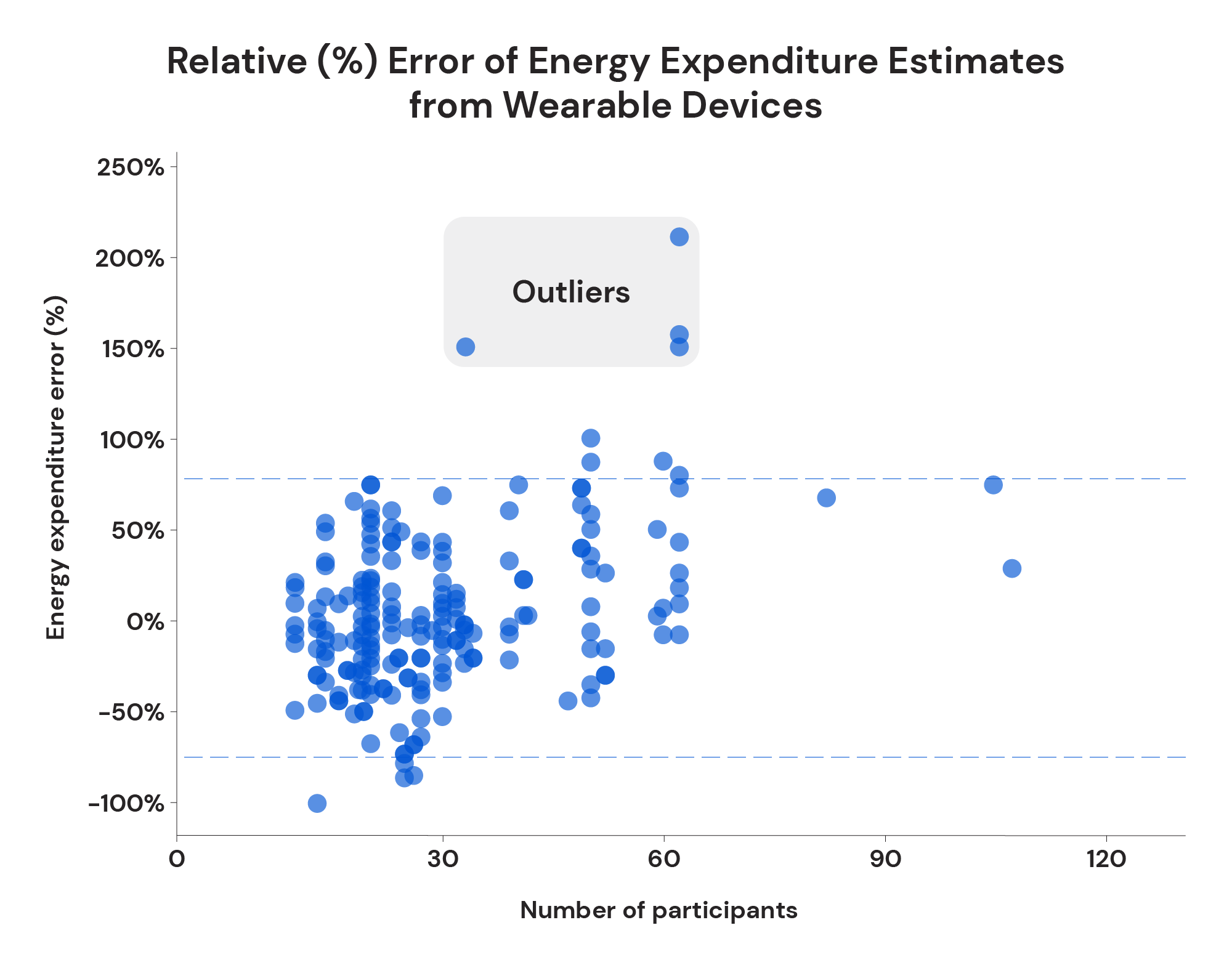
If you’ve ever closed your Move ring with pride or adjusted your dinner based on your Apple Watch’s “calories burned” number, you’re part of a massive group relying on this data for fitness and diet decisions. But here’s the hard truth: your Apple Watch doesn’t measure calories—it guesses them. Using algorithms, sensors, and your personal profile, it estimates how much energy you’ve burned. And while those numbers look precise, research shows they can be off by 18% to over 75%, especially during certain workouts.
That means if your watch says you burned 500 active calories, your body might have actually used only 300—or even 600. For anyone tracking calories to lose weight, this margin of error is dangerously wide. Yet, despite these flaws, millions still find value in the Apple Watch—not because the numbers are perfect, but because the trends are meaningful.
This deep dive reveals what science, real-world tests, and user data say about Apple Watch calorie accuracy—so you can decide when to trust it, when to question it, and how to use it wisely.
Lab Tests Reveal High Error Rates in Calorie Estimates
Apple Watch Fails Scientific Standards for Calorie Accuracy
While the Apple Watch excels at step counting (within ~8% error) and heart rate tracking (~4–5% error), its calorie estimates fall short of scientific reliability. A 2025 meta-analysis of 56 studies found the Apple Watch has an average error rate of 27.96% for energy expenditure—far above the 10% threshold considered acceptable in clinical or research settings.
This means that even under controlled conditions, the Apple Watch’s calorie numbers are too inconsistent to be used for precise dietary planning. The discrepancy arises because the watch doesn’t directly measure metabolism. Instead, it infers calorie burn from heart rate, motion, and personal data—each of which introduces potential inaccuracies that compound in the final estimate.
Key Insight: Just because heart rate is accurate doesn’t mean calorie math is. Even small errors in interpreting exertion get magnified when converted into energy units.
Overestimation Is Common During Cardio Workouts
Independent lab tests using indirect calorimetry—the gold standard for measuring real calorie burn—show a consistent pattern: the Apple Watch tends to overestimate energy expenditure during steady-state cardio.
Running Test (Elevate Performance Services)
- Actual calories burned: 323 kcal
- Apple Watch reported: 550 kcal → 75% overestimation
Running Test (HSS Lab)
- Actual: 597.2 kcal
- Apple Watch: 636 kcal → 6.5% over
Cycling Test (HSS Lab)
- Actual: 380.3 kcal
- Apple Watch: 466 kcal → 22.5% over
Why This Happens: The algorithm may misinterpret GPS fluctuations, warm-up phases, or arm movement as higher effort. Unlike a cycling power meter, which measures mechanical output, the Apple Watch relies on indirect proxies—making it prone to inflation.
Long-Term Tracking Can Be Surprisingly Accurate
Despite daily inaccuracies, one 12-week real-world study showed the Apple Watch could predict weight loss within 0.4 pounds of actual results. A 49-year-old male meticulously tracked:
– Every meal (1,300+ entries)
– Daily weight (morning, post-bathroom)
– Apple Watch Series 5 energy expenditure
- Predicted final weight: 193.7 lbs
- Actual final weight: 193.3 lbs
Takeaway: While individual workout data may be flawed, the cumulative energy balance over weeks can align closely with reality—making the Apple Watch surprisingly useful for long-term fitness tracking.
How Apple Watch Calculates Calories: Inputs and Assumptions

Personal Data Drives the Baseline
The Apple Watch uses your age, sex, height, weight, and wheelchair status to calculate resting metabolic rate (RMR)—the calories you burn just staying alive. These inputs are critical, and outdated data skews results.
Case Example: One user reported a 30% drop in daily calorie burn after updating his weight in the Health app from 220 lbs to 195 lbs. The watch assumed a lighter body required less energy.
If your weight has changed, update it immediately in Health App → Health Profile.
Sensor Data Fuels Active Calorie Estimates
Three key sensors power active calorie calculations:
- Optical Heart Rate Sensor: Measures BPM continuously. Accuracy drops with loose fit, tattoos, or sweat.
- Accelerometer: Tracks steps, cadence, and movement intensity.
- Barometer & GPS: Detect elevation changes and outdoor pace.
These inputs are combined with activity type (e.g., “Outdoor Run” vs. “HIIT”) to apply the right algorithm.
Proprietary Algorithms Fill the Gaps
Apple uses activity-specific models to estimate energy use. For example:
– Running: Uses GPS pace, heart rate, and VO₂ max estimates
– Cycling: Relies more on heart rate (since arm motion is minimal)
– Strength Training: Often inflates burn due to erratic arm movement
Pro Tip: The algorithm assumes average body composition. If you’re muscular, you likely burn more than estimated. Higher body fat? You may burn less.
Why Apple Watch Overestimates Calories
Workout Type Heavily Influences Accuracy
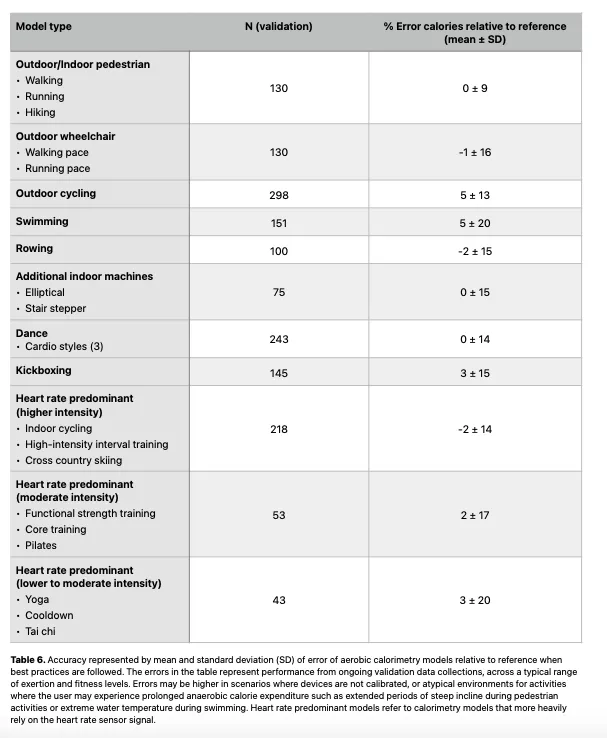
Not all activities are tracked equally. Here’s how accuracy varies:
| Activity | Accuracy | Why |
|---|---|---|
| Outdoor Running | High | GPS + heart rate + motion align well |
| Cycling | Moderate | Arm movement doesn’t reflect leg effort |
| Resistance Training | Low | Arm swings inflate perceived exertion |
| HIIT / CrossFit | Low | Rapid HR changes confuse algorithms |
| Swimming | Moderate | Water affects optical HR sensor |
| Tennis / Pickleball | Low | Irregular motion → erratic readings |
User Report: “Did a moderate 1-hour bicep workout—Apple Watch said 375 calories. No way that’s accurate.”
Poor Calibration Skews Results
An uncalibrated watch may misjudge your stride or effort level.
How to Calibrate:
- Enable Motion Calibration & Distance in Settings
- Do a 20-minute outdoor walk or run at natural pace
- Repeat every few months or after fitness gains
You can also reset calibration data in the Watch app under Privacy → Reset Fitness Calibration Data.
Heart Rate Sensor Limitations
Even with ~95% accuracy, optical HR sensors fail under:
– Loose fit
– Dark skin or tattoos
– Wearing above the wrist bone
– Heavy sweating
Fix: Wear the watch snug, just below the wrist bone, for best contact.
Gender and Body Composition Bias
A 2025 study found the Apple Watch:
– Underestimates calorie burn in men
– Overestimates in women
Possible Cause: Algorithms trained on population averages may not reflect individual metabolic differences, especially across sex and fitness levels.
Apple Watch vs. Other Calorie Trackers
Compared to TDEE Calculators
When personal data is accurate and all activity is logged, Apple Watch total energy often aligns closely with TDEE calculator outputs—but only over weeks, not days.
Example: BMR (from TDEE calc) + Apple Watch active calories ≈ predicted daily burn
This makes it useful for long-term trend analysis.
Compared to MyFitnessPal
One user logged:
– Apple Watch: 461 active calories
– MyFitnessPal: 48 calories
Why?
– Apple uses heart rate + motion
– MFP often uses step-only models without physiological input
Apple’s estimate is more dynamic—but not always more accurate.
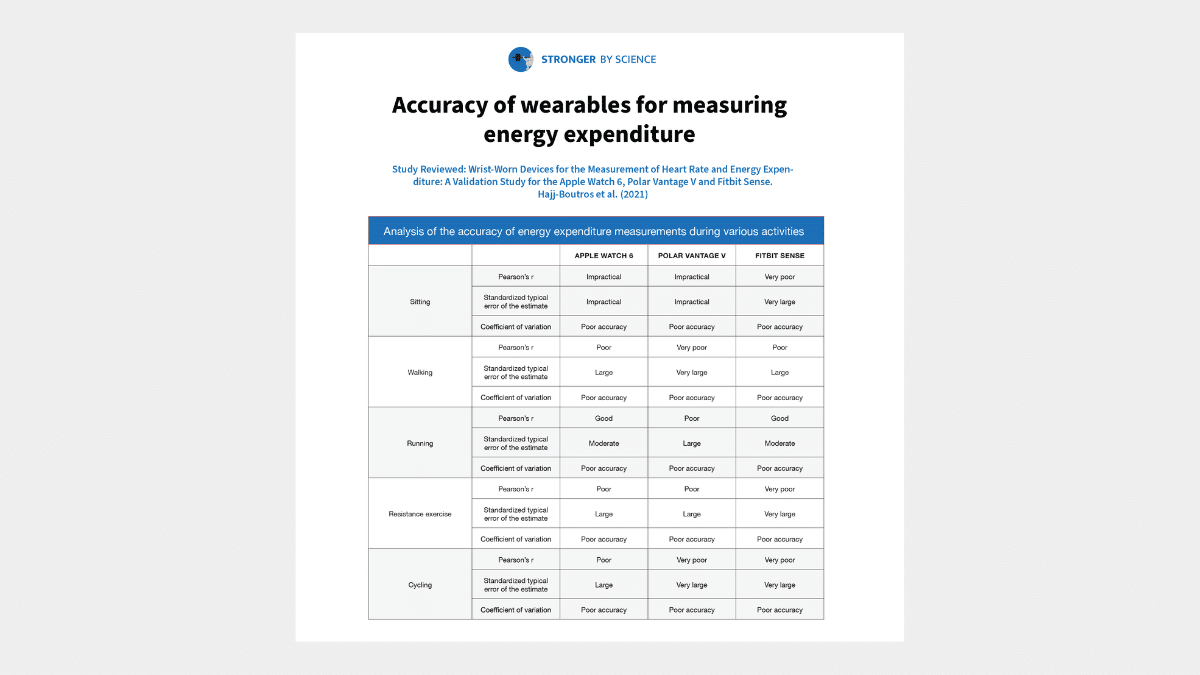
Compared to Other Wearables
| Device | Running Accuracy | Cycling Accuracy | Notes |
|---|---|---|---|
| Apple Watch | Overestimates (6.5–75%) | Overestimates (22.5%) | Strong HR tracking |
| Garmin | ~0.7% under | ~24% over | Uses Firstbeat analytics |
| Whoop | +1.1% | -7.3% | Best for steady cardio |
| Oura Ring | +24% | -16% | Poor response to acute effort |
Bottom Line: No wearable is perfect. Accuracy depends on activity type, wear position, and algorithm design.
How to Improve Calorie Tracking Accuracy
Validate with Weight Trends
The best real-world test of calorie accuracy is your weight.
How to Check:
- Track daily food intake (Cronometer or MyFitnessPal)
- Weigh yourself daily, same time
- Calculate weekly average weight
- Compare to predicted change based on Apple Watch deficit
Formula:
– Expected loss = (Avg daily deficit × 7) / 3500
– Actual loss = Week 1 avg – Week 2 avg
– Difference × 3500 ÷ 7 = daily over/underestimationExample: If Apple Watch says you’re in a 700-calorie deficit but weight stays flat, it’s likely overestimating by ~700 calories/day.
Adjust for Known Bias
Many users apply a personal correction factor:
– “If Apple says 500, I count 250–300”
– “I multiply active calories by 0.6”
Caution: Don’t set a fake weight (e.g., goal weight) in Health app—this distorts other metrics.
Use Clinical Testing for Precision
For serious fat loss:
– RMR Test: Measures actual resting burn via breath analysis
– DEXA Scan: Reveals fat/muscle ratio, which affects metabolism
Expert Tip: “Book an RMR test—it’s the best starting point for accurate calorie planning.”
Then compare Apple Watch’s resting energy estimate to your real RMR.
When to Trust Apple Watch Calories
For General Fitness & Motivation: ✅ Yes
- Trend tracking: Increasing weekly active calories likely reflects real progress.
- Ring closures: Great for consistency and habit-building.
- Heart rate zones: Reliable for training intensity.
Use It To: Stay active, celebrate progress, and maintain routine.
For Weight Loss & Diet Planning: ❌ Not Directly
- Do NOT use Apple Watch calories to set daily intake
- A 40% overestimate could mean eating 200–500 extra calories/day unknowingly
Better Approach:
– Use RMR or TDEE calculator for baseline
– Add half of Apple Watch active calories as a cushion
– Track weekly weight as the final judge
For Athletes & Performance: ✅ With Caveats
- Use with power meters, lactate tests, or perceived exertion
- Log workouts with correct activity type
- Calibrate regularly and wear properly
Pro Move: Use Apple Watch for session RPE correlation, not absolute numbers.
Final Verdict: Trends Over Numbers
The Apple Watch is not a lab instrument—it’s a motivational companion. Its calorie estimates are:
– Too inaccurate for precise dieting
– Good enough for tracking fitness trends
– Most reliable when validated with real-world data
Best Practices Summary:
– Keep personal data updated
– Calibrate monthly
– Use correct workout types
– Trust weekly trends, not daily numbers
– Validate with weight and RMR when it matters
Don’t treat your Apple Watch as a calorie counter. Treat it as a daily nudge toward movement—and let your body, not the screen, be the ultimate measure of progress.