
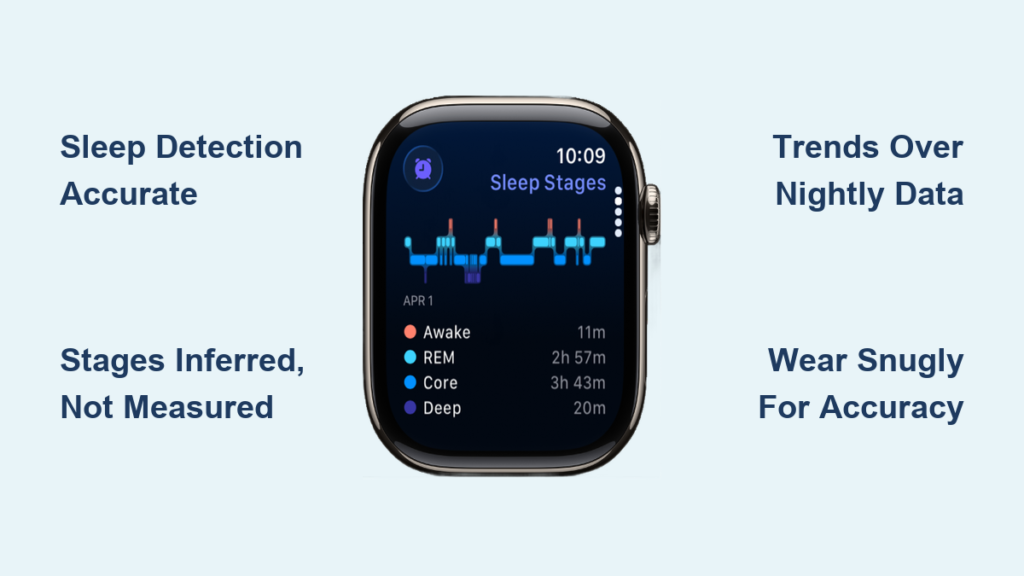
If you’re relying on your Apple Watch to tell you how well you slept, you’re not alone. Millions use it to track sleep duration, stages, and quality. But here’s the real question: how accurate is Apple Watch sleep tracking? While Apple delivers sleek visuals and detailed reports in the Health app, the truth behind those numbers—especially deep and REM sleep—is more nuanced than the data suggests.
Research shows the Apple Watch excels at detecting whether you’re asleep or awake, often matching clinical-grade tools with over 95% sensitivity. But when it comes to sleep stages, it’s not measuring brainwaves. Instead, it’s making educated guesses based on heart rate, movement, breathing, and (on newer models) wrist temperature. That means while your nightly deep sleep number might look precise, it could be off by 30 minutes—or more.
Still, the value isn’t in perfection. The Apple Watch shines not in pinpoint nightly accuracy, but in revealing long-term trends. Did drinking wine last night consistently reduce your deep sleep over two weeks? Did morning workouts improve your sleep efficiency? These patterns—when combined with habit tracking—can drive real behavioral change.
In this guide, we’ll break down exactly how accurate Apple Watch sleep tracking really is, what affects its precision, and how to get the most reliable data—so you can trust the trends, even if you question the exact minutes.
Sleep Detection: Highly Accurate
The Apple Watch performs exceptionally well at one core task: telling when you’re asleep versus awake.
Over 95% Sensitivity vs. Clinical Standards
A peer-reviewed study in Sensors compared the Apple Watch to polysomnography (PSG), the gold standard for sleep measurement. Results showed the Watch achieved over 95% sensitivity in detecting sleep vs. wake states—on par with or better than many research-grade actigraphy devices.
This high accuracy comes from combining:
– Accelerometry (motion detection)
– Heart rate variability (HRV)
– Respiratory rate
When your body settles into sleep, your heart rate slows, movement decreases, and breathing stabilizes. The Watch detects these changes and logs sleep onset with strong reliability.
Outperforms Older Research Devices
Traditional actigraphy devices—used in sleep studies for decades—typically show 86–94% agreement with PSG. The Apple Watch now exceeds that range, proving modern wearables can rival clinical tools in basic sleep-wake detection.
Even human sleep technicians scoring PSG data only agree about 83% of the time—meaning there’s natural variability in the “gold standard” itself.
Sleep Stages: Limited by No Brain Monitoring

Despite its strengths, the Apple Watch has a critical limitation: it does not measure brain activity.
No EEG = Inferred Sleep Stages
Clinical sleep staging uses electroencephalography (EEG) to detect brainwave patterns unique to:
– Light sleep
– Deep (slow-wave) sleep
– REM (rapid eye movement) sleep
Since the Apple Watch lacks EEG, it infers sleep stages based on:
– Low HRV → possible deep sleep
– Minimal movement → possible sustained sleep
– Breathing patterns → possible REM
– Wrist temperature (Series 8+) → circadian clues
These are indirect proxies, not direct measurements.
Deep Sleep Often Underestimated
Multiple users and independent testers report the Apple Watch underestimates deep sleep:
– One EEG comparison showed 90 minutes of actual deep sleep, but the Watch recorded only 20–40 minutes.
– Another user felt unrested despite a “great” sleep score, suggesting poor stage accuracy.
Biomedical engineers and sleep researchers agree: without brain monitoring, deep sleep tracking is essentially a guess based on stillness and heart rate.
“Unless you’re tracking the brain directly, ‘Deep Sleep’ on a watch is often just a guess based on how still you are.” – Biomedical Engineer, Somnolinc
Real-World Accuracy Challenges
Even with advanced sensors, real-world use introduces variables that reduce reliability.
Movement Misinterpreted as Wakefulness
The Watch can mistake normal sleep behaviors for wakefulness:
– Rolling over
– Wrist twitching
– Adjusting position
One user described being a “flipper-overer” and suspected every turn was logged as a wake-up event. This inflates Wake After Sleep Onset (WASO) and fragments sleep reports.
Loose Fit Breaks Heart Rate Data
Optical heart rate sensors require consistent skin contact. A loose fit creates gaps in HR data, leading to:
– Incomplete sleep stage logs
– False wake detections
– Lower overall accuracy
Fix: Wear snugly (two-finger rule). Too loose = unreliable data.
Wrist Detection Must Be On
If Wrist Detection is disabled, the Watch won’t record overnight heart rate, crippling sleep staging. Always ensure:
– Wrist Detection is enabled (Watch > Passcode)
– Sleep Focus is active
Model and Software Impact Accuracy
Not all Apple Watches are equal. Newer models and software updates improve tracking.
Series 8+ Adds Wrist Temperature
Starting with Series 8, the Watch tracks wrist temperature overnight. While not used directly in sleep staging, it helps:
– Detect circadian shifts
– Identify hormonal changes
– Explain early awakenings
Data appears in Health > Body Measurements > Wrist Temperature.
Series 9+ Sleep Apnea Detection (FDA-Cleared)
Apple Watch Series 9 and later include an FDA-approved sleep apnea detection feature, which:
– Uses Blood Oxygen app during sleep
– Analyzes breathing patterns
– Flags potential apnea after 10+ nights of tracking
Note: This is screening, not diagnosis. Medical evaluation is still required.
Software Updates Improve Algorithms
Apple has quietly improved sleep algorithms in recent updates:
– Better movement filtering
– Refined HRV analysis
– Enhanced stage classification
One YouTube researcher (ltFFp1xM5_U) noted visible improvements post-update, narrowing the gap with competitors like Oura.
Apple Watch vs. Oura vs. Fitbit: Accuracy Compared
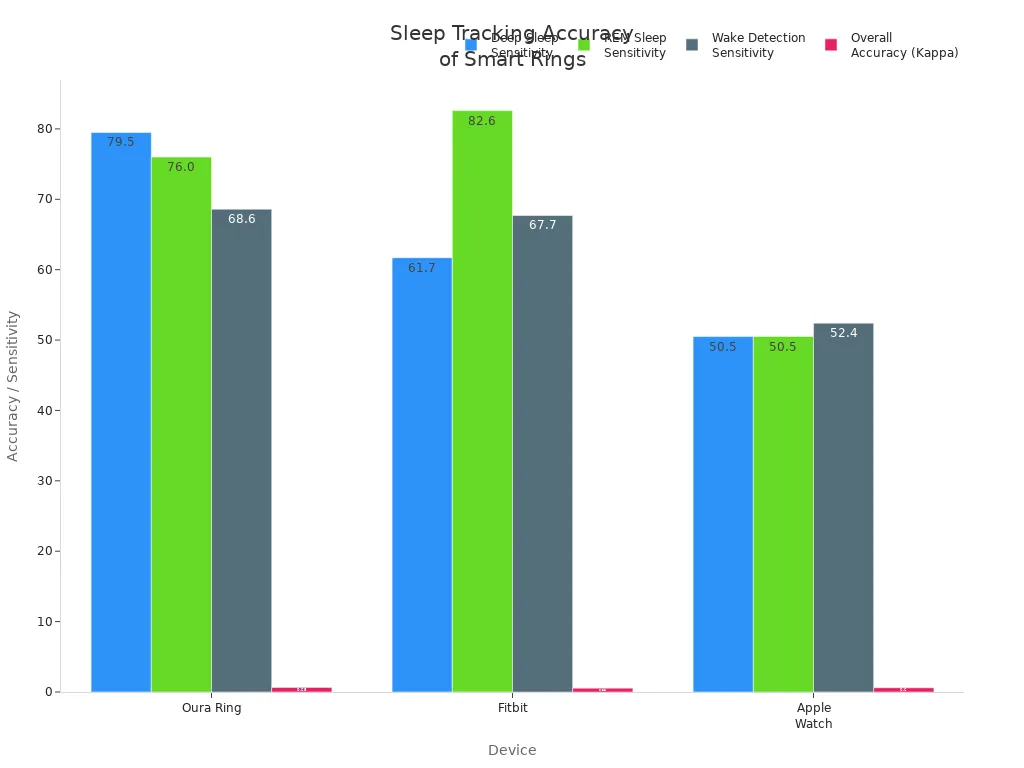
| Metric | Apple Watch | Oura Ring | Fitbit Sense |
|---|---|---|---|
| Sleep vs. Wake | >95% sensitivity | >95% sensitivity | >95% sensitivity |
| Deep Sleep Detection | Moderate | 79.5% sensitivity | Lowest |
| Four-Stage Accuracy | Moderate | Best in class | Lower |
| Wake Detection | Moderate | 68.6% | Low |
| Battery Life | ~18 hours | ~7 days | ~6 days |
| Medical Certification | Sleep apnea screening (FDA) | None | None |
Oura Ring Leads in Sleep Staging
The Oura Ring outperforms the Apple Watch in deep sleep and wake detection, likely due to:
– More advanced algorithms
– Higher sampling frequency
– Ring form factor (less movement artifact)
But Apple Watch updates frequently, and the gap is closing.
Fitbit Lags Behind
Fitbit shows the lowest accuracy in deep sleep detection and wake classification, making Apple Watch a stronger choice for stage tracking.
Long-Term Trends > Nightly Numbers
The biggest insight from sleep tracker users? Focus on trends, not single nights.
Nightly Data Is Noisy
One night’s deep sleep might read 40 minutes; the next, 1 hour. That doesn’t mean your body changed—it means the algorithm did.
As researcher CaspinK put it:
“Individually, nights? No [not accurate]. Long-term trends? Yes.”
Patterns Reveal Real Insights
Over weeks, the Apple Watch can show:
– Caffeine after 2 PM → reduced deep sleep
– Evening alcohol → lower REM
– Afternoon exercise → improved sleep efficiency
– Late screen time → delayed sleep onset
One user logged habits and found:
“One glass of wine consistently dropped my deep sleep by 20 minutes. The Watch already had the data—I just needed to connect it.”
How to Improve Apple Watch Sleep Accuracy

1. Enable Sleep Tracking
Without this, the Health app may use iPhone usage data instead of Watch sensors.
Steps:
– Open Watch app → Sleep → Enable “Track Sleep with Apple Watch”
2. Wear It Snugly
Loose fit = poor HR data = inaccurate staging.
Tip: Two-finger tight—snug but not uncomfortable.
3. Keep Battery Above 30%
Low battery stops tracking mid-night.
Fix: Use charging reminders in Sleep settings.
4. Use Sleep Focus
Activates automatically at bedtime, enabling:
– Do Not Disturb
– Background HR monitoring
– Sleep stage tracking
5. Log Daily Habits
Track:
– Caffeine
– Alcohol
– Stress
– Exercise
– Screen time
Then compare with sleep data in Health app.
6. Check Wrist Temperature Trends
In Health app > Browse > Body Measurements > Wrist Temperature.
Use to spot:
– Hormonal shifts (e.g., ovulation)
– Illness onset
– Circadian disruptions
Limitations You Should Know
Not a Medical Device
Apple Watch sleep data:
– Cannot diagnose insomnia, apnea, or narcolepsy
– Should not replace a sleep study
– May miss clinical issues
If you suspect a disorder, see a sleep specialist.
Individual Variability Matters
Accuracy depends on:
– Sleep position (side vs. back)
– Movement style (tossing vs. still)
– Skin tone (optical HR sensors less accurate on darker skin)
– Watch model (Series 6 vs. 9)
Software Is Still Evolving
Apple’s sleep algorithm has improved, but it’s not perfect. Expect ongoing refinements.
Final Verdict: Reliable for Trends, Not Precision
| Metric | Accuracy Level | Best Use |
|---|---|---|
| Sleep vs. Wake | ✅ High | Trust bedtime/wake time logs |
| Total Sleep Duration | ✅ Reliable | Use for consistency tracking |
| Deep/REM Sleep | ⚠️ Moderate | View as trends, not exact minutes |
| Wake After Sleep Onset | ⚠️ Overestimated | Be skeptical of “fragmented” reports |
| Long-Term Insights | ✅ High | Correlate with habits |
| Medical Diagnosis | ❌ Not suitable | Consult a doctor for concerns |
Expert Consensus
- Apple Watch is one of the best consumer sleep trackers for sleep-wake detection.
- Lags behind Oura Ring in sleep staging accuracy.
- Most valuable for long-term behavioral insights, not nightly precision.
“The Apple Watch is just a number. Habits around sleep, not technology, produce healthy sleep.” – CaspinK
Bottom Line: Use It as a Guide, Not a Gospel
The Apple Watch sleep tracker is reasonably accurate for detecting when you sleep and how long, outperforming older clinical tools in sleep-wake classification. But its deep and REM sleep estimates are inferential, not direct, and should be interpreted cautiously.
For most users, the real power isn’t in the nightly report—it’s in spotting patterns over time. When you pair sleep data with lifestyle logging, the Watch becomes a powerful tool for improving sleep hygiene.
Just remember: your body knows best. If you feel rested, trust that more than the watch. If you feel tired despite a “great” score, listen to your body—not the algorithm.
Use the Apple Watch to guide better habits. But don’t let it define your sleep.





