
If you’re relying on your Apple Watch to track workouts, monitor fitness progress, or detect potential heart issues, one question matters most: how accurate is Apple Watch heart rate monitoring? Backed by over a decade of sensor evolution and dozens of clinical studies, the answer is nuanced—yes, it’s highly accurate under ideal conditions, but performance dips during intense or irregular activities. Across tens of thousands of real-world and lab-tested scenarios, Apple Watch consistently delivers heart rate readings within ±5 bpm of medical-grade devices—especially at rest and during steady exercise. However, accuracy varies by model, movement type, skin tone, and fit. This guide breaks down exactly when and why the Apple Watch excels—and where it falls short—so you can trust your data with confidence.
Resting & Sedentary Accuracy
Apple Watch shines when you’re still. Whether checking your morning resting heart rate or monitoring background trends throughout the day, the optical sensor delivers clinically reliable results.
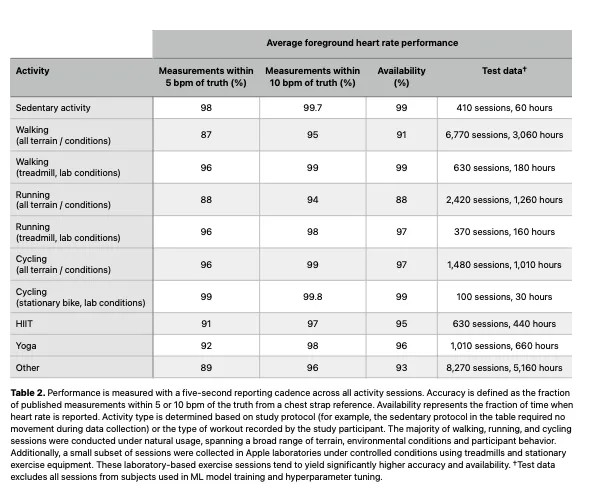
98% Within ±5 BPM at Rest
In Apple’s 2024 internal study involving tens of thousands of measurement sessions:
– 98% of resting readings were within ±5 beats per minute (bpm) of reference devices
– 99.7% were within ±10 bpm
– Infrared LEDs used for passive monitoring performed slightly less precisely (89% within ±5 bpm), but remain effective for long-term trend tracking
A 2026 meta-analysis in npj Digital Medicine, pooling data from 82 studies and over 430,000 participants, found a mean bias of just -0.27 bpm—indicating near-perfect alignment on average, with limits of agreement between -7.19 and +6.64 bpm.
This level of precision means that for most users, daily resting heart rate trends recorded by the Apple Watch are not only consistent but clinically meaningful. One 78-year-old user compared Apple Watch Series 7 data with a Holter monitor and found daily averages within 1–15 bpm, despite occasional peak discrepancies. These minor deviations don’t undermine the device’s strength: long-term pattern recognition, not millisecond-level accuracy.
Pro Tip: Enable “Wrist Detection” and wear the watch snugly overnight for accurate resting HR and heart rate variability (HRV) tracking during sleep.
Workout Mode Accuracy
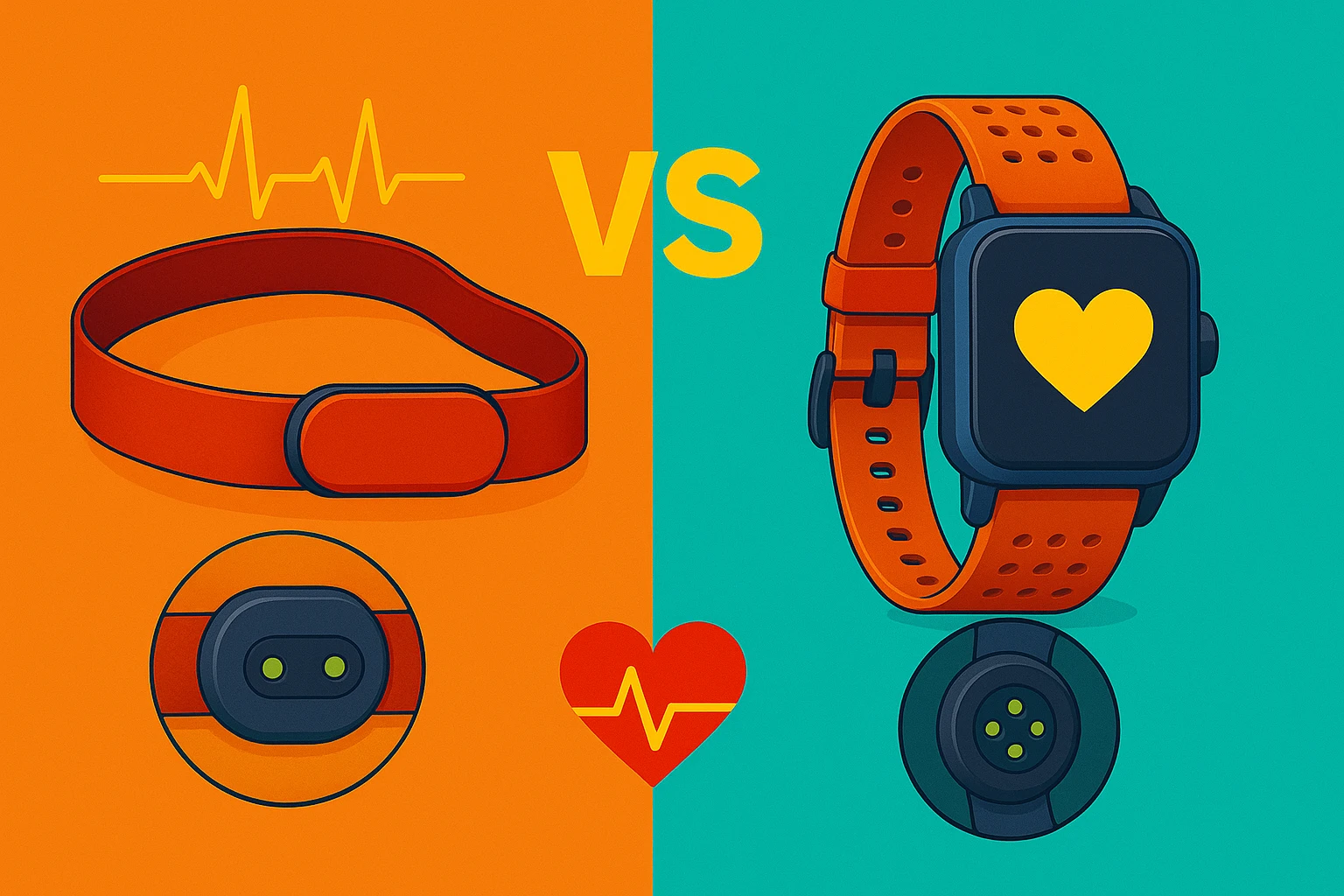
When you start a workout, the Apple Watch switches from infrared to green LEDs, which pulse rapidly to capture high-fidelity heart rate data. This mode delivers top-tier accuracy—most of the time.
Steady-State Exercise: Nearly Chest-Strap Level
For activities like walking, running, and cycling at consistent effort:
– Running: 88% of readings within ±5 bpm
– Walking: 87%
– Outdoor cycling: 96%
– Studies comparing Apple Watch to Polar H7 chest straps show deviations as low as 0.3 to 1.3 bpm
One peer-reviewed study in the Journal of Student Research found no statistically significant difference between Apple Watch and chest strap during treadmill runs. Marathoners and fitness enthusiasts often report abandoning dedicated fitness trackers due to Apple Watch’s reliability.
The rhythmic motion of running actually helps the optical sensor detect pulsatile blood flow more clearly. Combined with advanced motion filtering algorithms, the Apple Watch performs exceptionally well in predictable, repetitive movements.
High-Intensity Intervals: Lag and Delay
During HIIT, sprints, or rapid HR changes:
– 1–3 second lag in detecting spikes
– Accuracy drops due to motion artifacts and blood flow shifts
– Readings may underestimate peak HR or miss short bursts entirely
While average HR over a session remains reliable, instantaneous readings during transitions (e.g., sprint-to-recovery) are less trustworthy. Users training for performance should cross-check with a chest strap, especially if their regimen relies on precise heart rate zones.
Accuracy by Activity Type
Not all workouts are equal for optical sensors. Here’s how Apple Watch performs across common exercises.
High Accuracy Activities
| Activity | Accuracy Level | Why It Works |
|---|---|---|
| Walking | ★★★★★ | Low motion artifact; stable wrist position |
| Running (treadmill or outdoor) | ★★★★★ | Rhythmic motion enhances signal detection |
| Outdoor Cycling | ★★★★☆ | Good signal unless grip blocks sensor |
User Note: One cyclist reported perfect sync with Garmin chest strap during road rides but signal loss on bumpy trails due to vibration.
Moderate Accuracy Activities
| Activity | Accuracy Level | Common Issues |
|---|---|---|
| Indoor Cycling (trainer) | ★★★☆☆ | Handlebar grip, arm position, and sweat can interfere |
| Elliptical | ★★★☆☆ | Irregular arm motion confuses PPG algorithm |
| Rowing | ★★☆☆☆ | Overhead pulls cut off blood flow; repeated signal dropouts |
Low Accuracy Activities
| Activity | Accuracy Level | Key Limitations |
|---|---|---|
| Boxing / Martial Arts | ★★☆☆☆ | Fast, unpredictable movements overwhelm sensor |
| Weightlifting (pull-ups, dips) | ★☆☆☆☆ | Arm elevation reduces perfusion; grip pressure blocks sensor |
| Tennis / Racquet Sports | ★★☆☆☆ | Wrist rotation and impact disrupt signal |
Expert Insight: For strength training, focus on rep count and rest intervals rather than real-time HR. The watch often recovers post-set.
Clinical & Medical Use Cases
Can you trust your Apple Watch for health monitoring? The answer depends on context.
Atrial Fibrillation (AFib) Detection
The ECG app (Series 4 and later) is FDA-cleared and effective:
– Pooled sensitivity: 79% for detecting AFib
– Specificity: 91%—meaning false alarms are rare
– However, 15–25% of readings are inconclusive, limiting diagnostic value
A Cleveland Clinic pilot study on 50 post-op cardiac patients found:
– rc = 0.86 correlation during AFib episodes
– But only rc = 0.64 in sinus rhythm
– Conclusion: Use with caution—not a replacement for telemetry
Warning: One user received repeated low-HR alerts, leading to pacemaker discovery. While life-saving, another saw false high readings (170 bpm at rest), causing unnecessary ER visits.
Chronic Conditions: Hypertension, Diabetes
Studies confirm strong correlation between Apple Watch and chest straps in patients with:
– Hypertension
– Type 2 diabetes
– Cardiovascular disease
For trend monitoring—like tracking HR response to medication or lifestyle changes—it’s clinically useful. But absolute values should be verified with medical devices if treatment decisions are involved.
Factors That Reduce Accuracy
Even the best tech fails under the wrong conditions. These variables significantly impact heart rate readings.
Poor Fit and Placement
- Loose band = motion artifact = erratic readings
- Too tight = restricted blood flow = false lows
- Wear snugly during workouts, slightly looser at rest
- Position sensor on top of wrist, not underside (though some users report accuracy either way)
Fix: Tighten band so two fingers fit underneath. Consider a breathable band like Zugu or Wristband for sweaty sessions.
Skin Tone and Tattoos
- Darker skin tones absorb more green light, potentially reducing signal strength
- Multiple user reports and some studies suggest higher error rates in melanated skin
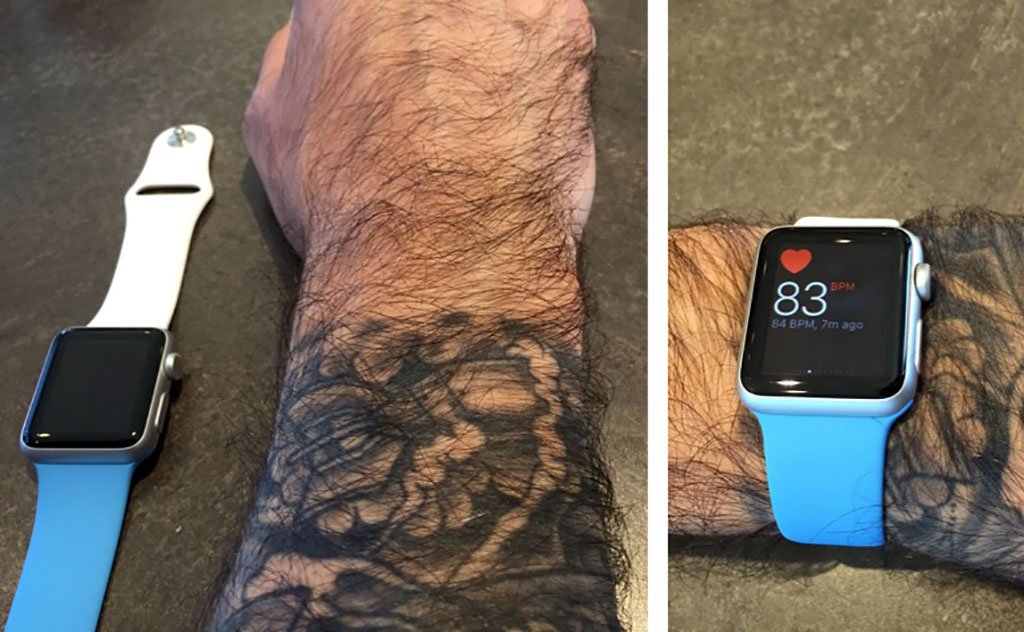
- Tattoos—especially dark, dense ink—can block or scatter LED light, causing signal dropout or false spikes
Pro Tip: Try wearing the watch above the tattoo or on the opposite wrist.
Environmental Conditions
- Cold weather: Vasoconstriction reduces blood flow to skin → weaker signal
- Heat and sweat: Can improve conductivity but may cause slippage
- Low perfusion: Common in elderly or post-surgery patients with edema
Workaround: Moisten the sensor area lightly in dry conditions to enhance light transmission.
Model-by-Model Accuracy Comparison
Newer Apple Watches are significantly more accurate thanks to sensor upgrades.
| Model | Sensor Gen | Background HR Accuracy (±5 bpm) | Key Features |
|---|---|---|---|
| Series 1–3, SE (1st gen) | 1st | ~72% | Basic PPG, prone to motion errors |
| Series 4–5, SE2 | 2nd | ~85% | Better motion filtering, lower lag |
| Series 6–10, Ultra, Ultra 2 | 3rd | 91–96% | Narrower LoA (-3.68 to +2.59), SpO₂ support |
The third-gen sensor (Series 6+) shows tighter limits of agreement and better performance in variable conditions. Ultra 2 users report occasional discrepancies (20–30 bpm lower than Suunto), but these may stem from fit or firmware.
How to Maximize Accuracy
You can’t change your skin tone or upgrade mid-workout—but you can optimize everything else.
Official Apple Tips
- Update personal info (age, weight, gender) for accurate calorie and VO₂ max estimates
- Enable Wrist Detection—required for background HR
- Start correct workout type (e.g., select “Indoor Cycle” not “Other”)
- Calibrate outdoors using GPS to improve motion algorithms
- Avoid tattoos or scars under the sensor
User-Tested Hacks
- Reboot the watch if HR seems off—resets sensor stack
- Try the other wrist—some users get better signal on dominant vs. non-dominant
- Clean the sensor weekly with a dry cloth—dirt blocks light
- Pair with Bluetooth chest strap (e.g., Polar H10, Garmin HRM-Pro) for race-day precision
- Cross-check manually: Count pulse at radial artery for 60 seconds
Bonus: Use armband sensors like Scosche Rhythm+ for weightlifting—more stable than wrist-based PPG.
What Apple Watch Gets Wrong
Despite impressive HR accuracy, other metrics are far less reliable.
Calories Burned: Highly Inaccurate
- Mean Absolute Percentage Error (MAPE): 27.96%
- Ranges from 9.71% (running) to 151.66% (walking) in some studies
- Depends heavily on user-entered data (weight, age)
Reality Check: Don’t use calorie burn to guide diet. Focus on trends, not totals.
VO₂ Max: Clinically Significant Error
- One study found mean underestimation of -6.07 mL/kg/min
- Enough to misclassify fitness level (e.g., “fair” vs. “good”)
- Use as rough estimate only
Sleep Staging: Guesswork, Not Science
- Good at detecting sleep vs. wake (90%+ accuracy)
- Poor at distinguishing deep vs. light vs. REM
- Tends to overestimate light sleep, underestimate deep
Blood Oxygen (SpO₂): Marginal Reliability
- Mean bias: -0.04%, but limits of agreement: -4.01 to +3.94%
- Less accurate below 90% SpO₂—exactly when it matters most
- Not suitable for diagnosing hypoxia
Final Verdict: Should You Trust It?
Yes—for Trends, Not Perfection
The Apple Watch heart rate monitor is one of the most accurate wrist-based PPG sensors available. For:
– Resting HR tracking: Excellent
– Steady workouts: Reliable
– Long-term fitness trends: Clinically meaningful
– AFib alerts: Life-saving in some cases
But for:
– Peak HR during HIIT: Use a chest strap
– Medical diagnosis: Always verify with a doctor
– Absolute calorie counts: Ignore them
Bottom Line
“The Apple Watch won’t replace an ECG machine. But for a $400 smartwatch, it’s saving lives.”
If you wear it correctly, keep it updated, and understand its limits, your Apple Watch delivers trustworthy heart rate data in most everyday scenarios. For athletes and patients alike, it’s a powerful tool—not a medical device, but close enough to matter.
Final Note: Always validate abnormal readings. A 170 bpm resting pulse could be a sensor glitch—or the first sign of a serious condition. When in doubt, check manually or consult a physician.




