You turn on a used Apple Watch, only to be greeted by a prompt asking for an Apple ID and password you don’t own. Or maybe you sold your old Apple Watch but forgot to unpair it—and now the buyer can’t use it. In both cases, you’re facing Activation Lock on Apple Watch, Apple’s powerful anti-theft feature designed to protect your device from unauthorized use. While it’s a security win, it can be a major hurdle if not handled correctly.
The good news? There are official, reliable ways to remove Activation Lock—no risky hacks or shady tools needed. The bad news? There’s no shortcut. If you’re the original owner, a new buyer, or trying to recover a lost device, this guide covers every legitimate method Apple provides to remove Activation Lock on Apple Watch, including step-by-step instructions, troubleshooting tips, and critical buyer/seller advice.
Whether you’re preparing to sell, just bought a secondhand watch, or lost your device, you’ll learn how to unlock it safely and permanently using Apple’s approved processes.
Unpair Apple Watch via iPhone (Fastest Method for Original Owners)
If you still have access to both your Apple Watch and its paired iPhone, this is the best and fastest way to remove Activation Lock.
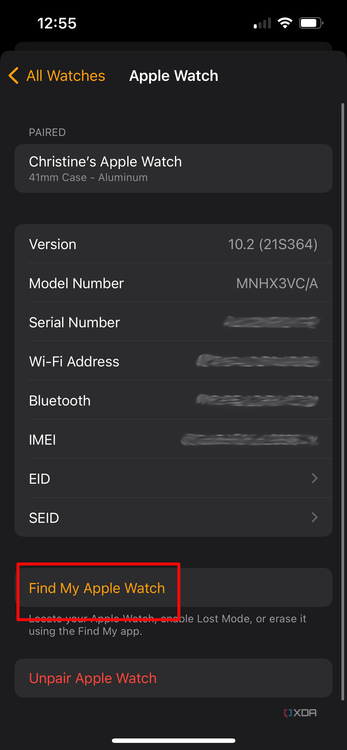
Step-by-Step: How to Unpair and Remove the Lock
- Keep your Apple Watch and iPhone close together.
- Open the Apple Watch app on your iPhone.
- Tap the My Watch tab at the bottom.
- At the top, tap All Watches.
- Tap the (i) icon next to your Apple Watch.
- Select Unpair Apple Watch.
- Confirm by tapping Unpair [watch name].
- Enter your Apple ID password when prompted.
- For cellular models, choose whether to keep or remove your cellular plan.
The Apple Watch will begin erasing all data. This takes a few minutes. Once complete, the device restarts to the setup screen—Activation Lock is now removed.
✅ Pro Tip: After unpairing, go to Settings > [Your Name] > Find My > Devices on your iPhone and confirm your Apple Watch no longer appears. This ensures it’s fully disassociated from your account.
Why This Method Is Most Reliable
- Instantly removes Activation Lock.
- Erases all personal information.
- Disconnects the device from Find My.
- No waiting or approval required.
❌ Critical Mistake: Simply resetting the Apple Watch from its settings does not remove Activation Lock. You must unpair via the iPhone app to fully unlock it.
Remove Activation Lock Remotely via iCloud (No Device Access Needed)
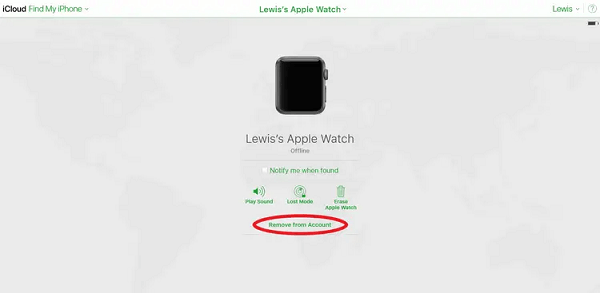
Lost your Apple Watch or sold it without unpairing? Don’t worry—you can still remove Activation Lock remotely through iCloud, even if the device is offline.
What You Need
- Your Apple ID and password.
- The Apple Watch must have been previously linked to your iCloud account.
- Internet access to log in to iCloud.
How to Remove the Lock via iCloud
- Go to iCloud.com and sign in.
- Click Find My in the app grid.
- Click All Devices in the top-left.
- Find your Apple Watch in the list and click it.
- Click Erase Apple Watch.
- Follow the prompts to confirm the erase.
- After erasure, click Remove from Account.
⚠️ Important: Erasing the device does not remove Activation Lock. You must click Remove from Account to fully detach it from your iCloud.
What Happens Next
- The Apple Watch is wiped and no longer protected by Find My.
- If it reconnects to the internet later, it won’t appear in your device list.
- A new user can set it up without your credentials.
✅ Best Practice: Always remove the device from your account before selling or giving it away—even if you don’t have the watch in hand.
Request Removal Through Apple Support (For Buyers With Proof of Purchase)
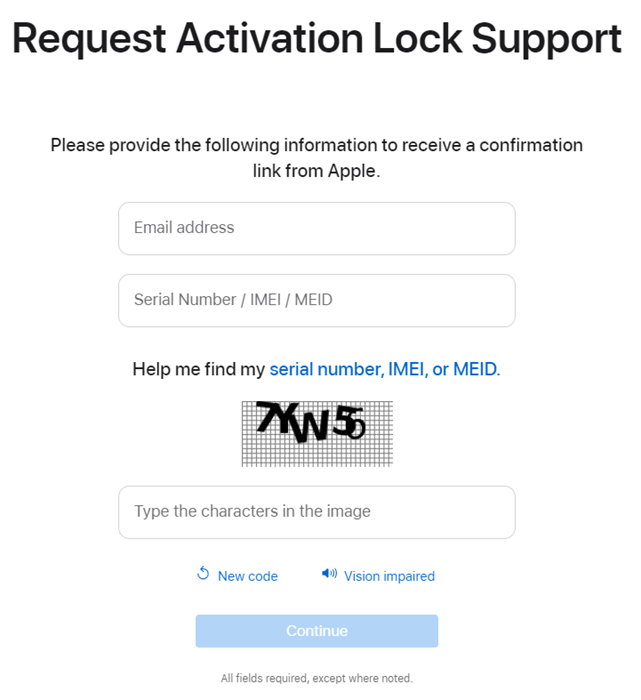
Bought a used Apple Watch that’s still locked? If the previous owner won’t help, your only legitimate option is to request removal through Apple’s Activation Lock Support.
Who Qualifies?
Only verified buyers with original proof of purchase can submit a request. Apple does not accept:
– Screenshots of PayPal, Venmo, or Cash App.
– Handwritten notes or secondhand sale agreements.
– Gift receipts or trade-in confirmations.
Accepted proof includes:
– A retail receipt from an Apple Store or authorized reseller.
– Must include: device serial number, purchase date, store name, and address.
How to Submit the Request
- Visit Apple’s Activation Lock Support page (search: “Remove activation lock Apple support”).
- Click “Start activation lock support request”.
- Select “Personally owned device”.
- Enter:
– Your email address
– The Apple Watch serial number or IMEI
– Complete the CAPTCHA - Click Continue.
- Check your email and verify the request.
- Provide:
– Your full name
– Store name and address
– Purchase date (if listed) - Upload a clear, legible copy of the original receipt.
- Submit and wait 2–10 business days for Apple’s response.
🛑 Warning: Any third-party service claiming to unlock your Apple Watch is a scam. Never share your Apple ID or pay for “unlocking” tools.
What Happens After Approval?
- Apple removes Activation Lock remotely.
- You’ll receive an email confirmation.
- The Apple Watch can now be set up normally.
❌ If your request is denied, the device remains locked. Return it to the seller or report it as stolen.
Troubleshoot: Sold Apple Watch But It’s Still Locked
You sold your Apple Watch, but the buyer says it’s asking for your Apple ID. You don’t have the device anymore—what now?
Remove from Account Without the Watch
You can still remove it from your iCloud—no physical access needed.
Option 1: Via iPhone Settings
- Open Settings on your iPhone.
- Tap [Your Name] > Find My > Devices.
- Scroll down and tap the Apple Watch.
- Tap Remove from Account.
Option 2: Via Watch App
- Open the Apple Watch app.
- Tap All Watches.
- Tap the (i) icon next to the sold watch.
- Tap Remove from Account.
✅ This breaks the iCloud link and disables Activation Lock—even if the device was never unpaired.
❌ Never share your Apple ID password. It’s unnecessary and puts your entire Apple ecosystem at risk.
Fix: Bought a Locked Apple Watch – What Now?
You power on a used Apple Watch and it asks for someone else’s Apple ID. It’s still under Activation Lock.
Immediate Steps to Take
-
Check Lock Status:
Go to checkcoverage.apple.com, enter the serial number, and look for:
– Activation Lock: Enabled → Still locked
– Activation Lock: Disabled → Ready to use -
Contact the Seller:
Ask them to:
– Unpair the watch via their iPhone.
– Remove it from their Find My list. -
File a Dispute:
If bought on eBay, Facebook Marketplace, or Craigslist, open a buyer protection case immediately.
Can You Use It Without Unlocking?
No. An Apple Watch with Activation Lock cannot be used until the lock is removed by the original owner or Apple with valid proof.
❌ No DNS trick, jailbreak, or software bypass works. These are scams designed to steal your information.
Handle Offline or Disconnected Watches
Trying to erase a lost Apple Watch via iCloud but seeing “Device must be online”? Here’s the truth:
- Erase command requires the device to be online.
- But removing from your iCloud account works immediately, even if offline.
- Once removed, the next time the watch connects to Wi-Fi or cellular, it bypasses Activation Lock.
✅ Always remove the device from your account before selling or losing it.
Key Requirements for Unlocking
| Requirement | Details |
|---|---|
| Apple ID & Password | Needed by original owner for unpairing or iCloud removal. |
| Proof of Purchase | Required for buyers. Only original receipts accepted. |
| Serial Number | Found in Settings > General > About or on original packaging. |
| IMEI (Cellular Models) | Required for support requests. |
| Processing Time | 2–10 business days for Apple Support decisions. |
✅ Tip: Save your Apple Watch’s serial number in a secure place—helps with future support requests.
Prevent Issues When Selling or Buying
For Sellers: Remove Lock Beforehand
- Unpair via Watch app—best method.
- Remove from iCloud if device is missing.
- Cancel cellular plan to avoid charges.
- Verify removal at iCloud.com/find.
✅ Final Check: Turn on the Apple Watch. If setup starts without an Apple ID prompt, you’re good.
For Buyers: Verify Before You Pay
Never buy a used Apple Watch without checking Activation Lock status.
What to Ask the Seller
- “Can you unpair it now?”
- “Is Find My turned off?”
- “Can I see the setup screen?”
What to Check Yourself
- Power on the Apple Watch.
- Start setup.
- If it asks for an Apple ID, it’s locked.
- If it proceeds to language selection, it’s free.
Also:
– Use Apple’s Check Coverage page.
– Request a copy of the original receipt.
❌ Walk away if the seller refuses to verify or provide proof.
Final Tips and Warnings
Activation Lock Cannot Be Bypassed
There is no public workaround. Any website or service claiming to unlock your Apple Watch:
– Is a scam
– May steal your data
– Could install malware
🛑 Never enter your Apple ID on third-party sites.
Sharing iCloud Password Is Dangerous
You don’t need to give your Apple ID to remove a device. Original owners can unpair or remove remotely—no password sharing required.
✅ Safer: Remove the device from your account yourself and confirm it’s gone.
All Models Are Covered
Activation Lock applies to:
– Apple Watch Series 1 through 11
– Apple Watch SE (1st & 2nd gen)
– Apple Watch Ultra
– All cellular and GPS models
Removal process is the same across all versions.
Summary: How to Remove Activation Lock on Apple Watch
- ✅ Original Owner? Unpair via iPhone or remove remotely via iCloud.
- ✅ New Buyer? Submit proof of purchase to Apple Support.
- ✅ Sold It? Remove from account via Settings or Watch app.
- ❌ No Bypasses Exist—avoid third-party “unlocking” services.
- ✅ Always Verify lock status before buying or selling.
By following Apple’s official procedures, you protect your data, prevent fraud, and ensure smooth ownership transfer. Whether you’re clearing your device or claiming a new one, removing Activation Lock on Apple Watch is simple—when you do it the right way.
🔐 Best Practice: Before selling, gifting, or recycling, always unpair your Apple Watch using the Watch app. It erases data, removes Activation Lock, and cancels cellular plans—keeping your account secure and the next user happy.