You’re going about your day when a subtle alert appears: “Elevated stress detected.” Yet you feel fine—why is your Apple Watch sounding the alarm? The answer lies not in mood detection, but in Heart Rate Variability (HRV), a powerful physiological signal your watch measures continuously. While Apple doesn’t offer a built-in stress score, it collects the precise biometric data that third-party apps use to deliver real-time stress insights, trend analysis, and personalized alerts. This transforms your Apple Watch into a proactive wellness tool—capable of spotting rising stress before you consciously feel it. In this guide, you’ll discover how HRV reveals your nervous system’s state, which apps turn raw data into actionable stress scores, how accurate these tools really are, and how to use them to build resilience.
HRV: The Science Behind Apple Watch Stress Detection
At the core of stress tracking is Heart Rate Variability (HRV)—the millisecond-level variation between consecutive heartbeats. A healthy heart doesn’t beat like a metronome; instead, it naturally fluctuates, especially during relaxed breathing. These tiny variations reflect the balance between your sympathetic nervous system (fight-or-flight) and parasympathetic nervous system (rest-and-digest).
What High and Low HRV Reveal About Your Stress Levels
- High HRV indicates strong parasympathetic activity—your body is recovering, resilient, and under low stress.
- Low HRV signals sympathetic dominance—often tied to mental strain, poor sleep, overtraining, or anxiety.
A 2024 study in Frontiers in Computer Science confirmed that wearables like the Apple Watch can detect real-world stress using HRV. Even more compelling, a 2025 preprint in medRxiv found HRV-based monitoring outperformed self-reported mood logs, suggesting your watch may detect stress onset before you’re emotionally aware of it.
The Apple Watch captures HRV via its optical heart sensor and stores the data in the Health app under “Heart Rate Variability.” However, Apple leaves interpretation to you—or third-party apps.
Why Apple Hasn’t Released a Native Stress Score
Despite having the hardware, Apple has not introduced a built-in stress score. The company prioritizes clinical accuracy and meaningful outcomes over feature speed. Instead, it offers the Mindfulness app, which includes:
- Breathe: Guided breathing to trigger relaxation
- State of Mind: Mood logging
- Reflect: Emotional awareness prompts
These tools are reactive—they help you respond to stress after noticing it, not detect it early. Rumors suggest AI-powered stress tracking may come in a future watchOS update, but nothing is confirmed as of 2026.
Top Apps That Turn Apple Watch Into a Stress Coach
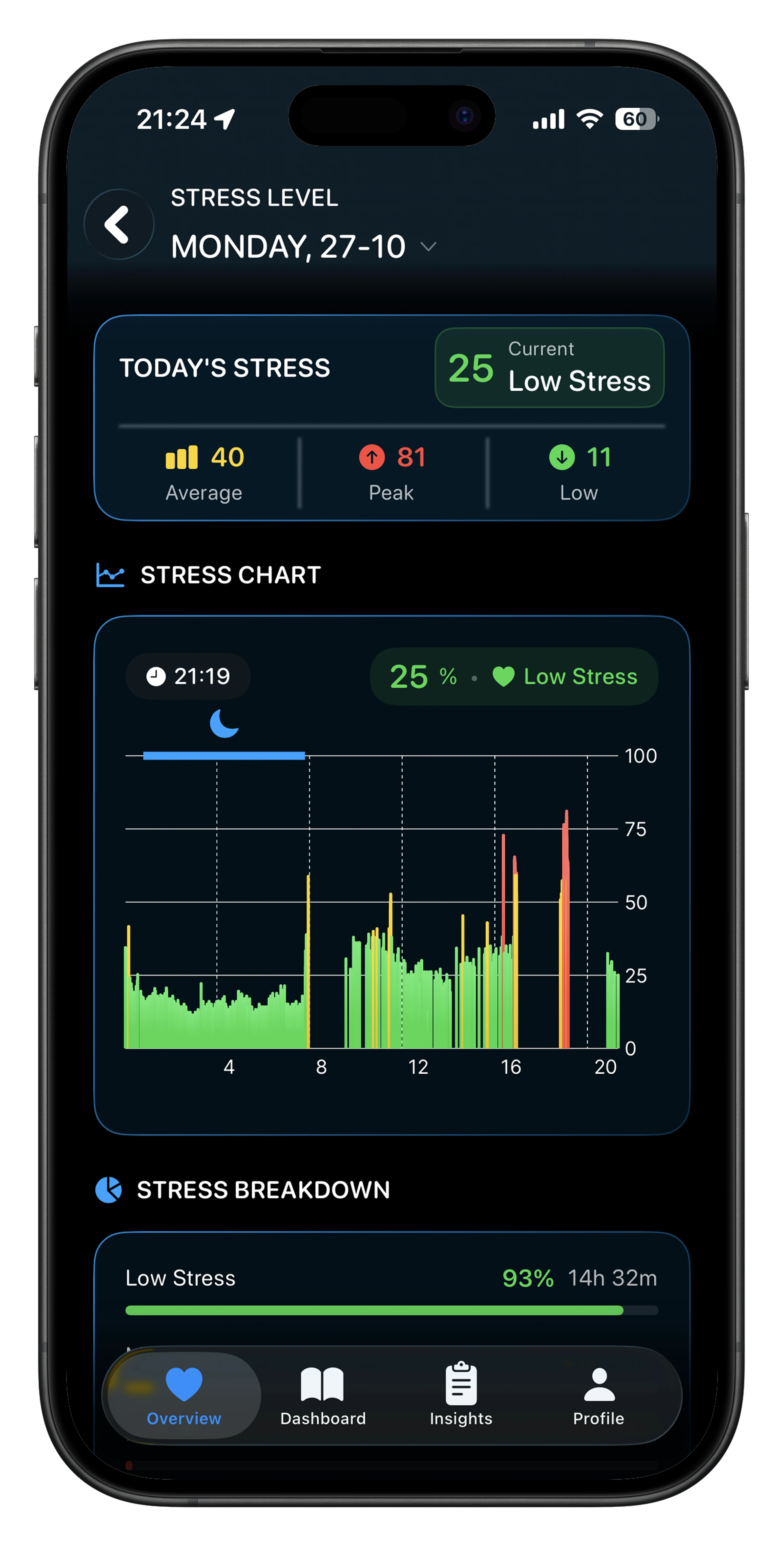
Since Apple doesn’t provide automatic stress scoring, third-party apps access HRV and resting heart rate from Apple Health to generate real-time insights.
Stress Monitor for Watch: Daily Stress Scoring & Heat Maps
This app delivers a 1–100 daily stress score using HRV and resting heart rate.
- Real-time tracking with trend graphs and weekly summaries
- Stress heat-map calendar reveals recurring high-pressure times
- Manual mood logging correlates feelings with biometrics
- AI-powered Stress Diffusion (premium) suggests de-escalation strategies
- Free with optional subscription; integrates with ECG and Breathe
Users praise its visual clarity, especially the heat map for identifying patterns like post-work stress spikes.
StressFace: Simple 1–10 Stress Feedback
Translates HRV into a clear 1–10 stress scale with instant feedback.
- Example: One user saw stress drop from 5 to 4 after a 1-minute breathing session
- Customizable thresholds align scores with personal experience
- Free version includes real-time tracking and basic watch face complication
- Premium ($1.99/month) adds:
- Full daily stress timeline
- Guided meditations
- Calendar sync to link stress to meetings
- Custom alerts (e.g., notify when stress >6)
- One-week free trial available
Built specifically for Apple Watch, it emphasizes wrist-first usability.
Welltory: AI-Powered Wellness Reports
Rated 4.65/5 from over 140,000 reviews, Welltory combines HRV with sleep and activity for holistic insights.
- AI-driven stress scores and personalized recommendations
- Syncs with Oura Ring, Polar chest straps, and Muse headband
- Generates reports on recovery, energy, and emotional state
- Premium features:
- Unlimited HRV scans
- Stress management plans
- Expert-led wellness courses
- Subscription is cheaper via website
Users call it “life-changing” for preventing burnout and improving emotional awareness.
Livity: Continuous Monitoring with On-Device Privacy
Marketed as a WHOOP or Oura alternative, Livity offers full wellness tracking using only your Apple Watch.
- Tracks:
- Stress level
- Recovery score
- Body battery
- Sleep quality
- Training load
- Privacy-first design: All data stays on-device—no cloud uploads
- Ideal for security-conscious users
Livity gives athletes and professionals a complete readiness picture without extra hardware.
Bevel: Focus and Burnout Prevention
Priced at $6/month, Bevel focuses on digital well-being and focus.
- Identifies stress patterns through behavioral analytics
- Integrates with Focus Modes and notification settings
- Helps create digital boundaries
- One user called it “worth every penny” for managing work anxiety
Best used with intentional digital hygiene habits.
StressWatch: AI Health Coach & Real-Time Awareness
A feature-rich app with innovative tools for engagement.
- AI Health Coach answers questions about your data on the watch
- Mr. Fizz: Animated avatar changes color with stress (blue = calm, red = stressed)
- Bio Age: Estimates biological age from HRV trends
- Watch face complications show stress emoji (😰/😌), bars, caffeine, and hydration
- Smart notifications: “Your stress has been elevated over the past 30 minutes”
- Manual check: Use Breathe app for a 3-minute HRV baseline
- Pro subscription ($12.99/month or $29.99/year) unlocks:
- Continuous monitoring
- Full HRV history
- Exportable data
- Featured in Apple App Store’s Best of August and Essential Watch Apps
StressWatch makes stress visible, engaging, and actionable—all from your wrist.
How to View HRV Data in Apple Health
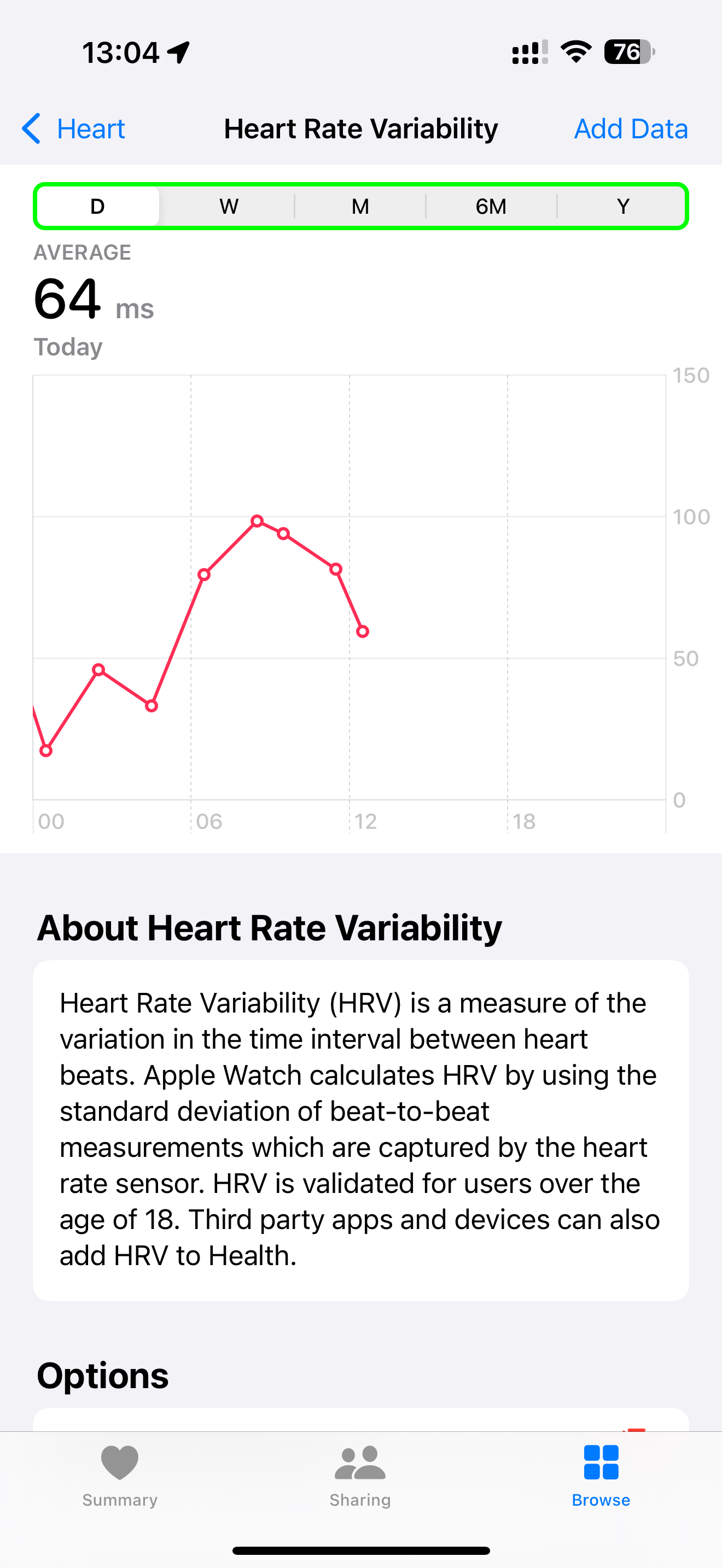
Even without third-party apps, you can monitor trends manually.
Access HRV in Apple Health
- Open the Health app on iPhone
- Tap Browse > Heart
- Select Heart Rate Variability
- View trends by hour, day, week, or month
Interpreting HRV Trends
- Consistent drop below baseline = increased stress or fatigue
- Rising HRV = better recovery and resilience
- Correlate dips with:
- Poor sleep
- Intense workouts
- Caffeine
- Emotional events
Limitation: Apple Health shows raw HRV in milliseconds (ms) without interpretation—you must know your personal baseline.
Best Practices for Accurate Stress Tracking
Establish Your HRV Baseline
- Wear your Apple Watch consistently for 7–14 days
- Measure HRV at the same time daily—morning upon waking is ideal
- Avoid caffeine, alcohol, and intense exercise before recording
This builds a personalized reference for detecting deviations.
Optimize App Settings
Choose between:
– Frequent readings: Lower accuracy, higher battery use
– Infrequent readings: Higher accuracy, less drain
Enable background monitoring for continuous tracking. Sync with your calendar to link stress spikes to events.
Use Breathing to Reset Your Nervous System
Controlled breathing at 4–6 breaths per minute activates the parasympathetic system, increasing HRV.
- Use the Mindfulness app for guided sessions
- Try a 3-minute Breathe session when alerted
- Apps like StressFace show measurable drops in stress scores post-breathing
Make breathwork a proactive habit.
Activate Focus Modes to Reduce Mental Load
Digital distractions spike cortisol. Reduce overload with:
– Custom Focus Modes (Work, Sleep, Fitness)
– Calming watch faces
– Silenced non-essential notifications
Pair Focus with stress alerts to create automatic mental boundaries.
Log Mood and Context to Improve Accuracy
Manual logging enhances insight.
- Record:
- Emotions
- Activities
- Caffeine intake
- Sleep quality
- Use apps like Stress Monitor or StressWatch to tag triggers (e.g., “client call”)
Over time, this reveals hidden stressors and behavioral patterns.
Is Apple Watch Stress Tracking Accurate?
Scientific Validation
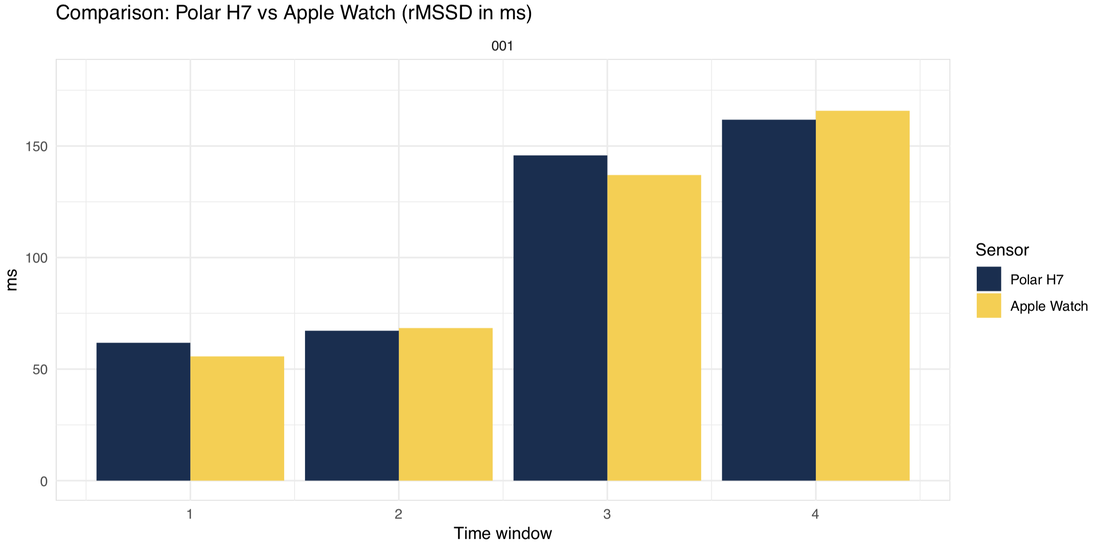
- HRV accuracy: Studies show Apple Watch HRV closely matches chest straps and ECGs—especially at rest.
- Stress detection: A 2024 systematic review confirmed wearable HRV reliably detects stress in daily life.
- Comparison to rivals:
- Garmin, Oura, and WHOOP have built-in stress scores
- Apple Watch hardware is equivalent—the gap is software
- Third-party apps bridge this, offering similar insights
Interpreting Stress Scores
There’s no universal “normal.” Scores are relative to your baseline.
| Score Range | Meaning |
|---|---|
| 1–3 | Low stress, good recovery |
| 4–6 | Moderate, manageable |
| 7–10 | High stress—intervention needed |
Calibration ensures your app aligns with how you actually feel.
Real-World Benefits Users Report
- Pattern recognition: Spotting stress before presentations or during commutes
- Behavioral change: Earlier bedtimes, reduced caffeine, scheduled breathing breaks
- Burnout prevention: Catching chronic stress before emotional exhaustion
- Improved productivity: Combining Focus Modes with stress alerts
- Emotional awareness: Linking biometrics with mood logs
One user said: “I used to think I was fine—until my HRV dropped for three days. Turned out I was overtraining and under-sleeping.”
Limitations and Privacy Considerations
- Not medical-grade: No app diagnoses conditions—results are for informational use only
- Battery impact: Continuous monitoring increases power use, though most apps optimize efficiently
- Data privacy:
- StressWatch: Collects purchase and usage data
- Livity: Keeps all data on-device—no cloud storage
- Subscription fatigue: Most advanced features require ongoing payments
- Calibration needed: Initial readings may not match how you feel—use manual logging to fine-tune
Final Recommendations
- Start with Apple Health: Monitor HRV trends manually for 1–2 weeks. Learn your baseline.
- Try free versions first: Test StressFace, Stress Monitor, or Welltory to compare.
- Use one-week trials: Premium apps like StressWatch offer full trials—evaluate before paying.
- Enable watch complications: Keep stress levels visible at a glance.
- Combine with lifestyle changes: Use insights to improve sleep, cut caffeine, and practice breathwork.
- Seek professional help if needed: Persistent low HRV or high stress scores may signal burnout.
Your Apple Watch already collects the data to understand your stress. With the right app, you can turn passive biometrics into proactive well-being intelligence—making your wrist a true stress coach.
Leave a Reply