
You’re about to head out the door, glancing at your Apple Watch only to see the dreaded “5% battery” warning—and your magnetic charger is nowhere to be found. Before you panic, here’s the truth: you can’t charge an Apple Watch without some form of magnetic connection, but you don’t need Apple’s original wall adapter or even the full-length cable to keep it powered.
The key is understanding that the magnetic puck is non-negotiable, but the power source feeding it isn’t. Whether you’ve lost your charger, are traveling, or stuck in an emergency, there are multiple safe, reliable ways to power up your device. From using your iPhone 15’s USB-C port to portable magnetic keychain chargers and solar-powered stations, this guide breaks down every working method—plus what doesn’t work (yes, MagSafe fans, we’re looking at you).
Let’s explore how to keep your Apple Watch alive without the standard magnetic charger setup.
Use Any USB-C Power Source
If you still have the magnetic charging cable but lost the wall adapter, you’re in luck. The USB-C end of your Apple Watch charger is compatible with any standard USB-C power source—not just Apple’s 20W brick.
Plug Into Laptops, Phones, or Power Banks
You can power the magnetic puck from:
– MacBooks and Windows laptops – Just plug in and ensure the laptop is awake (sleep mode may disable USB power).
– iPhone 15 and later – These models support USB-C output, so you can directly connect the magnetic charger.
– Power banks with USB-C output – Even compact ones work, though charging speed varies.
– Car USB-C ports – Common in newer vehicles; ideal for road trips.
– Public USB stations – Found in airports or hotels (use only wireless pads for security).
Pro Tip: If charging doesn’t start, wake your laptop or check if the USB port is in power-saving mode.
Charging Speed Varies by Source
Not all USB-C ports deliver the same power. Here’s how long it takes to fully charge a Series 10 (46mm) from 0%:
| Power Source | Full Charge Time |
|---|---|
| Official 20W Adapter | ~1 hour 3 min |
| Laptop USB-C Port | ~1.5–2 hours |
| 10W Power Bank | ~2 hours |
| iPhone Reverse Charging | ~2h 15m |
While slower, these alternatives will get the job done in a pinch.
Portable Magnetic Keychain Chargers

Lost the entire cable? A keychain magnetic charger is your best emergency backup. These tiny devices combine a retractable USB-C connector with a built-in magnetic puck.
How They Work
- Plug the charger into any USB-C power source.
- Snap your Apple Watch onto the magnetic side.
- The green lightning bolt confirms charging has started.
These are MFi-certified, lightweight (under 1 oz), and cost under $30—perfect for travelers or forgetful users.
Performance & Compatibility
- Charges Series 1–10, Ultra, and SE models
- Full charge time: ~2h 15m (Series 10)
- Battery drain on iPhone 16 Pro: ~26% to fully charge the watch
Despite slower speeds, these adapters maintain the same battery health and safety as official chargers—if MFi-certified.
Charge Using iPhone Reverse Power (iPhone 15+ Only)
If you own an iPhone 15 or later, you can use it as a power source—but not wirelessly.
The Correct Method
- Connect the Apple Watch magnetic charger to your iPhone via USB-C.
- Place the watch on the charger.
- Watch for the green lightning bolt.
⚠️ Myth Alert: You cannot place the Apple Watch directly on the back of your iPhone like AirPods. True wireless reverse charging is not supported.
Pros and Cons
| ✅ Pros | ❌ Cons |
|---|---|
| No wall outlet needed | Drains iPhone battery significantly |
| Uses devices you already own | Only works on iPhone 15 and newer |
| Great for emergencies | Slower than wall charging |
Tip: Keep your iPhone above 30% to avoid completely draining it.
Magnetic Power Banks with Built-In Chargers

Skip the cables entirely with power banks that have a built-in magnetic charging puck.
Top Pick: Anker MagGo 10K (35W)
- Capacity: 10,000mAh
- Output: 30W USB-C (charges phone and watch simultaneously)
- MFi-Certified: Yes
- Speed: Reaches 47% in 30 minutes (Series 9)
- Design: Foldable, includes USB-C cable
How to Use
- Turn on the power bank.
- Align your Apple Watch with the magnetic puck.
- Charging starts automatically.
Bonus: Use the USB-C port to charge your iPhone at the same time—perfect for travel.
3-in-1 Wireless Charging Stations
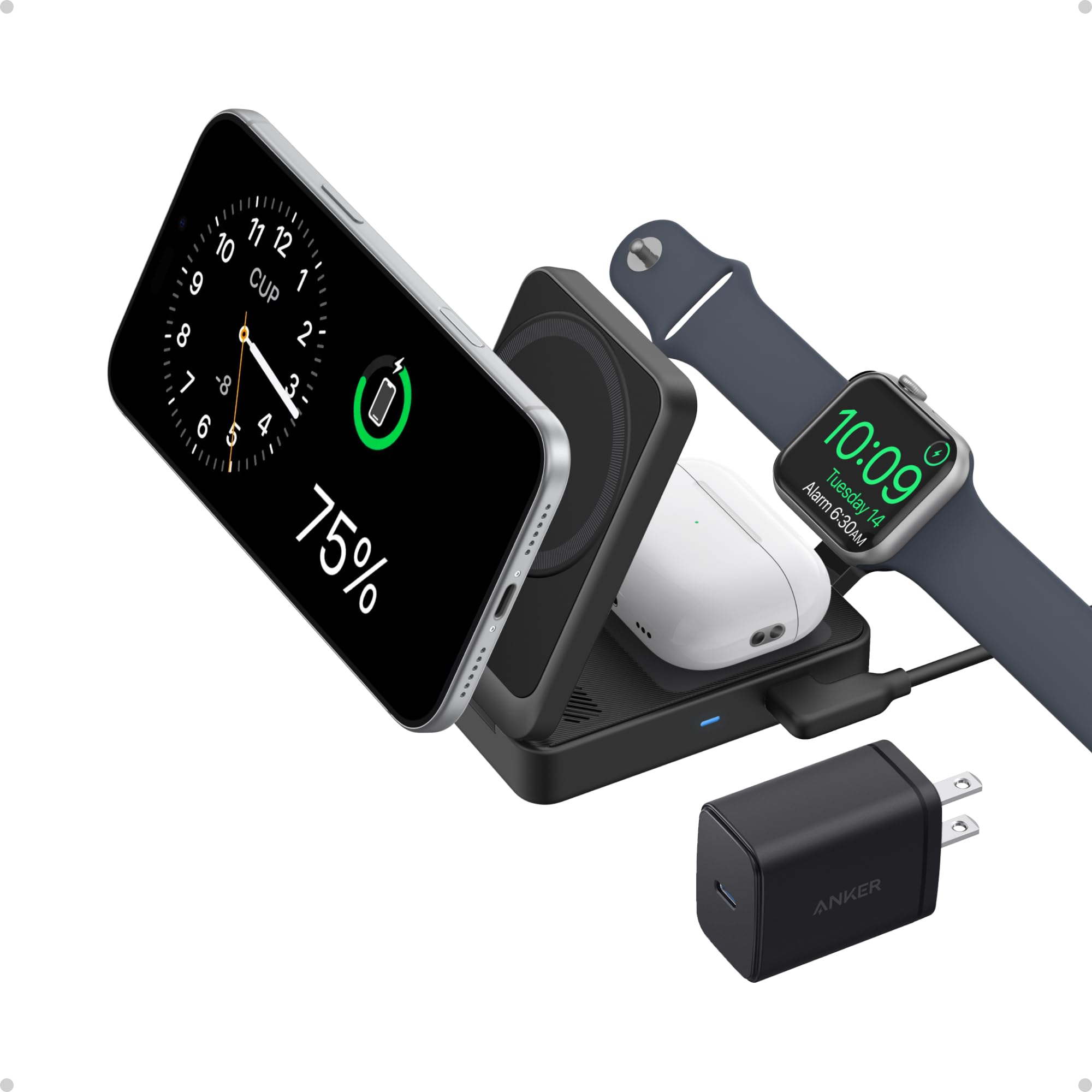
Eliminate cable clutter with a multi-device charging station that powers your Apple Watch, iPhone, and AirPods together.
Example: Anker MagGo Foldable 3-in-1
- Charges: Apple Watch, MagSafe iPhone, Qi AirPods
- Speed: 47% in 30 minutes (Series 9)
- Certification: MFi
- Design: Compact, foldable, travel-ready
Setup
- Plug into a wall outlet or power bank.
- Place each device on its marked spot.
- Magnets align everything automatically.
Why It’s Great:
– No tangled cords
– Charges all Apple devices at once
– Safe, Apple-approved charging
Best For: Nightstands, office desks, hotel rooms.
Car Charging Solutions
Stay powered on the road with these two options:
1. Car USB Charger + Magnetic Cable
- Use a 12V-to-USB-C adapter in your car’s cigarette lighter.
- Plug in your magnetic charger.
- Avoid low-power ports (e.g., some dashboards or infotainment systems).
Tip: Test the port with your phone first to confirm power output.
2. Portable Power Stations (BLUETTI AC180/AC500)
These solar-compatible units are ideal for off-grid charging:
| Model | Best For | USB-C Output |
|---|---|---|
| BLUETTI AC180 | Camping, travel | 100W |
| BLUETTI AC500 | Home backup | 2x 100W |
How to Use:
– Plug the magnetic charger into a USB-C port.
– Or place a magnetic puck on the wireless pad and attach your watch.
Bonus: AC180 supports solar charging—perfect for emergencies.
USB-C Hubs with Watch Charging
For remote workers, a USB-C hub with built-in Apple Watch charging is a game-changer.
Features
- Integrated magnetic puck
- Multiple ports (HDMI, USB-A, Ethernet)
- MFi-certified
- Cable management
Use Case
Plug into your MacBook, and your Apple Watch charges while you use a monitor, keyboard, and wired internet—all through one hub.
Ideal For: Digital nomads, home offices, frequent travelers.
Third-Party Magnetic Chargers: What to Buy (and Avoid)
Not all third-party chargers are safe. Here’s how to choose wisely.
What to Look For
| Feature | Why It Matters |
|---|---|
| MFi Certification | Ensures Apple-approved safety |
| Strong Magnets | Prevents accidental detachment |
| Overcharge Protection | Stops charging at 100% |
| Customer Reviews | Look for consistent 4.5+ star ratings |
Avoid These
- Chargers under $15 (often fake or uncertified)
- No safety certifications
- Poor build quality (wobbly magnets, flimsy cables)
Warning: Cheap chargers can damage your watch or cause overheating.
Why Qi and MagSafe Chargers Don’t Work
Let’s debunk two common myths.
Can I Use a Qi Wireless Charger?
- Standard Qi pads: ❌ No. Apple Watch does not support standard Qi.
- Qi2-certified pads: ✅ Only if explicitly labeled “Apple Watch compatible” and MFi-certified.
- Look for the Apple Watch icon on the product.
Can I Use MagSafe?
- ❌ No. MagSafe is designed for iPhones only.
- The magnets and coils don’t align with the Apple Watch.
- Placing your watch on a MagSafe charger will not charge it.
Solar Charging (Off-Grid Method)
For camping or emergencies, you can solar-charge your Apple Watch—indirectly.
How It Works
- Use a portable solar panel (e.g., EcoFlow, BLUETTI) to charge a power bank.
- Then use the power bank to run a magnetic charger.
Or, use a solar generator like BLUETTI AC180 with USB output.
Requirements
- Solar panel with USB-C or AC output
- Power bank or solar generator
- Magnetic charging cable or puck
Limitations:
– Slow on cloudy days
– Requires setup time
– Not practical for daily use
Best For: Emergency kits, long hikes, off-grid cabins.
Public Charging Stations: Use With Caution
Airports and hotels often have wireless pads.
Pros
- No need to carry a charger
- Convenient for travelers
Cons
- Juice jacking risk: Malicious USB ports can steal data.
- Unreliable power
- Dirty or damaged surfaces
Safety Rule: Only use wireless pads. Never plug into public USB-A or USB-C ports.
Hidden Diagnostic Port: Not a Real Option
Older Apple Watch models (Series 1–3) had a tiny port under the band slot.
- Purpose: Internal diagnostics only
- Never intended for user charging
- No accessories exist to use it safely
Bottom Line: This is not a charging method. Ignore any online hacks claiming otherwise.
Troubleshooting: Watch Won’t Charge?
Even with the right tools, issues happen.
1. Check the Charger
Look for frayed wires, bent connectors, or loose magnets.
2. Clean the Contacts
Wipe the back of the watch and charger puck with a dry cloth. Use compressed air for lint.
3. Restart the Watch
Hold the side button to power off, then restart. If frozen, force restart by holding side button + Digital Crown for 10 seconds.
4. Test the Power Source
Try a different USB port or adapter.
5. Update watchOS
Go to Settings > General > Software Update.
6. Contact Apple Support
If nothing works, your charging coil may need repair.
Battery Care Best Practices
Keep your battery healthy:
Do This
- Charge between 20% and 80%
- Use MFi-certified chargers
- Enable Optimized Battery Charging
- Clean contacts weekly
- Avoid soft surfaces (beds, couches)
Avoid These
- Leaving at 100% for days
- Using uncertified chargers
- Taping the watch to a charger
- Charging on tilted surfaces
- Plugging into low-power or sketchy USB ports
FAQs: Quick Answers
Can I charge Apple Watch with iPhone charger?
No—not directly. But you can use the iPhone’s USB-C port to power the magnetic charger.
Can I use MagSafe?
❌ No. MagSafe is for iPhones only.
Can I use a regular Qi charger?
Only Qi2 pads that explicitly support Apple Watch. Standard Qi? ❌ No.
How long to charge?
- 0% to 80%: ~1.5 hours
- 0% to 100%: ~2.5 hours
Do all Apple Watches use the same charger?
✅ Yes. All models use the same magnetic system.
What if I lose my charger?
Buy a replacement or use a keychain magnetic adapter.
How do I know it’s charging?
Look for the green lightning bolt.
Should I charge every night?
✅ Yes. Enable Optimized Battery Charging.
Final Verdict: What Works, What Doesn’t
| Method | Works? | Notes |
|---|---|---|
| USB-C Port (laptop, phone) | ✅ Yes | Needs magnetic cable |
| Keychain Magnetic Adapter | ✅ Yes | Portable, MFi-certified |
| iPhone Reverse Charging | ✅ Yes | iPhone 15+ only |
| Magnetic Power Bank | ✅ Yes | Fast, cable-free |
| 3-in-1 Charging Station | ✅ Yes | Ideal for home/office |
| Car Charger + Cable | ✅ Yes | Reliable for trips |
| Solar via Power Station | ✅ Yes | Off-grid capable |
| Public Wireless Pad | ✅ Yes | Avoid USB ports |
| Qi2-Certified Charger | ✅ Yes | Must say “Apple Watch compatible” |
| Standard Qi Charger | ❌ No | Not supported |
| MagSafe | ❌ No | iPhone-only |
| Hidden Port | ❌ No | Not functional |
| Android Reverse Charging | ❌ No | Not supported |
Final Tips
- Carry a backup: A $25 keychain charger can save your day.
- Stick to MFi-certified gear: Protect your investment.
- Clean regularly: Lint is the #1 cause of charging failure.
- Plan ahead: If you travel or work remotely, invest in a magnetic power bank.
While you can’t charge an Apple Watch without some magnetic connection, you have more options than you think. With the right tools, your watch stays powered—anytime, anywhere.




