
You’ve just bought a used Apple Watch or are preparing to sell your old one—only to be stopped by a persistent screen demanding an Apple ID and password you don’t have. That’s Activation Lock, Apple’s powerful anti-theft feature designed to protect your data and prevent unauthorized use. But if you’re stuck, don’t panic: there are legitimate ways to disable Activation Lock on Apple Watch—no hacks, no risks, just Apple-approved methods.
Activation Lock is tied directly to Find My and activates the moment you pair your Apple Watch with an iPhone. Even a full factory reset won’t remove it. The lock ensures that only the rightful owner can erase or reactivate the device. Whether you’re selling, buying, inheriting, or recovering a lost watch, this guide walks you through every official method Apple provides to disable Activation Lock safely and permanently.
By the end, you’ll know exactly how to unpair, remove, or request removal—depending on your situation—and avoid the common pitfalls that leave a device locked and unusable.
Unpair Apple Watch From iPhone to Remove Activation Lock
If you still have access to your Apple Watch and the iPhone it was paired with, unpairing through the Watch app is the fastest, most reliable way to disable Activation Lock.
This method automatically removes the device from your iCloud account and lifts the lock during the reset process.
How to Unpair via the Watch App
- Open the Apple Watch app on your iPhone.
- Tap “My Watch”, then go to the top-left and select “All Watches”.
- Tap the “i” (information) icon next to your Apple Watch.
- Select “Unpair Apple Watch”.
- Confirm by tapping “Unpair” and enter your Apple ID password when prompted.
⏳ The process takes 5–10 minutes. Keep both devices nearby and charged.
After unpairing:
– The Apple Watch erases all data and settings.
– Activation Lock is permanently disabled.
– The watch restarts in setup mode, ready for a new user.
✅ Pro Tip: Always unpair this way before selling or gifting. It guarantees Activation Lock removal and prevents buyer issues.
Remove Apple Watch Remotely via iCloud
Lost your Apple Watch or sold it without unpairing? You can still disable Activation Lock remotely—as long as you have access to the original Apple ID.
This method is essential if the device is out of your hands but still linked to your account.
Step-by-Step: Remove via iCloud.com
- Go to www.icloud.com/find on any browser.
- Sign in with the Apple ID associated with the Apple Watch.
- Click “Find My”, then “All Devices”.
- Locate your Apple Watch in the device list.
- Click on it, then select “Remove This Device”.
✅ Important: “Remove This Device” disables Activation Lock. “Erase Apple Watch” only deletes data but does not remove the lock unless followed by device removal.
What Happens After Remote Removal?
- The Apple Watch is officially detached from your iCloud account.
- Activation Lock will be lifted the next time the watch connects to Wi-Fi or cellular.
- A new user may need to restart the device for the change to take full effect.
🔔 Note: You may see “Unable to connect to device”—this is normal. As long as it’s removed from iCloud, the lock is cleared.
Bypass Activation Lock With Proof of Purchase
Bought a used Apple Watch that’s still locked? You can’t remove Activation Lock without the previous owner—unless you have valid proof of purchase.
Apple allows new owners to submit a support request to remove the lock, but strict documentation rules apply.
What Qualifies as Valid Proof?
Apple only accepts original purchase documentation that includes:
– Your name
– Apple Watch model
– Serial number or IMEI
– Purchase date and retailer
– Official branding (e.g., Apple, Best Buy)
Accepted Formats:
– Physical receipt
– Digital invoice (PDF or email)
– Order confirmation from Apple or authorized reseller
Not Accepted:
– Screenshots of eBay or Facebook Marketplace
– Third-party reseller receipts without official branding
– Gift receipts (rarely accepted)
How to Submit an Activation Lock Support Request
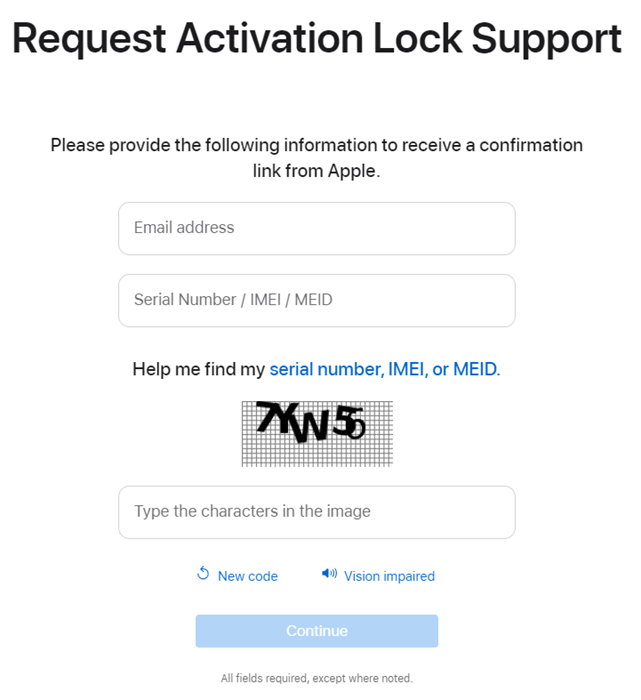
- Visit: Activation Lock Support
- Scroll down and click “Start activation lock support request.”
- Select “Personally owned device.”
- Enter:
– Your email address
– The Apple Watch’s serial number
– Complete the CAPTCHA - Click “Continue” and verify your email.
- Upload your proof of purchase and submit.
🕒 Apple typically responds within 10 business days. Approval depends on document accuracy.
✅ Success Tip: Ensure the serial number on the receipt matches the device exactly. Mismatches are the top reason for rejection.
How to Remove Activation Lock on an Inherited Apple Watch
Inherited an Apple Watch from a deceased family member? You can request access through Apple’s Account Recovery for Deceased Users program.
This is the only legal path if you don’t have the original Apple ID credentials.
Required Documents
You must provide:
– Death certificate
– Legal proof of relationship (will, court order, power of attorney)
– Proof of ownership (original receipt or purchase confirmation)
– Your government-issued ID
How to Submit the Request
- Go to: Request Access to Deceased User’s Apple Account
- Fill out the online form.
- Upload all required documents.
- Submit and wait for Apple’s review.
🕒 Approval can take several weeks. Each case is reviewed individually.
⚠️ No Exceptions: Apple will not remove Activation Lock without complete documentation.
What Doesn’t Work: Avoid These Activation Lock “Fixes”
Many users search for quick fixes—but most are scams, ineffective, or dangerous.
❌ Third-Party Unlock Tools
Software like Dr.fone, iRemove, or iCloud bypass tools:
– Are scams or malware.
– Don’t work on modern Apple Watches.
– Can brick your device or steal personal data.
Apple does not endorse any third-party unlock tools.
❌ Erasing Directly on the Apple Watch
Going to Settings > General > Reset > Erase All Content and Settings:
– Clears personal data.
– Does NOT remove Activation Lock.
– Leaves the device stuck on the Apple ID screen.
Always unpair via iPhone or iCloud instead.
❌ Walking Into an Apple Store Without Proof
Apple Store technicians cannot remove Activation Lock unless you:
– Provide proof of purchase, or
– Are logged into the original Apple ID.
They have no override ability. Come prepared or you’ll be turned away.
Find Your Apple Watch Serial Number
You’ll need the serial number for iCloud removal, support requests, or checking lock status.
Where to Find It
- On the back of the Apple Watch (engraved)
- Watch app > My Watch > General > About
- Original packaging
- Purchase receipt
✅ Copy it carefully. One wrong character can delay removal.
For Sellers: Best Practices to Avoid Activation Lock Issues
Avoid post-sale problems by following these steps.
Always Unpair Before Selling
- Use the Watch app to unpair.
- Confirm the device disappears from iCloud.com/find.
- Never give your Apple ID password to the buyer.
✅ Final Check: After unpairing, the watch should start in setup mode—no Apple ID prompt.
For Buyers: How to Stay Safe When Buying Used
Protect yourself from buying a locked, unusable device.
Verify Activation Lock Status Before Paying
- Ask the seller for the serial number.
- Visit activationlock.apple.com.
- Enter the serial number.
✅ Safe to Buy: If it says “This device is not linked to an Apple ID.”
❌ Do Not Buy: If “Activation Lock enabled” appears—unless the seller removes it in front of you.
✅ Best Practice: Watch the seller unpair the watch via their iPhone before handing over payment.
Summary: How to Disable Activation Lock on Apple Watch
| Your Situation | Solution | What You Need |
|---|---|---|
| Original owner, device accessible | Unpair via Watch app | iPhone, Apple ID |
| Lost or sold without unpairing | Remove via iCloud.com | Apple ID, serial number |
| New owner with locked device | Submit proof of purchase | Original receipt, serial number |
| Inherited from deceased owner | Request account access | Death cert, legal docs, receipt |
| Found a lost watch | Return or report | Serial number, location info |
🛡️ Golden Rule: Activation Lock cannot be bypassed without authorization. The only safe, legal methods are:
– Unpairing via iPhone
– Removing via iCloud
– Submitting proof to Apple
For official help:
– Apple Activation Lock Support
– Find My on iCloud
– Apple ID Recovery
Always follow proper transfer procedures—your Apple Watch’s security and usability depend on it.





