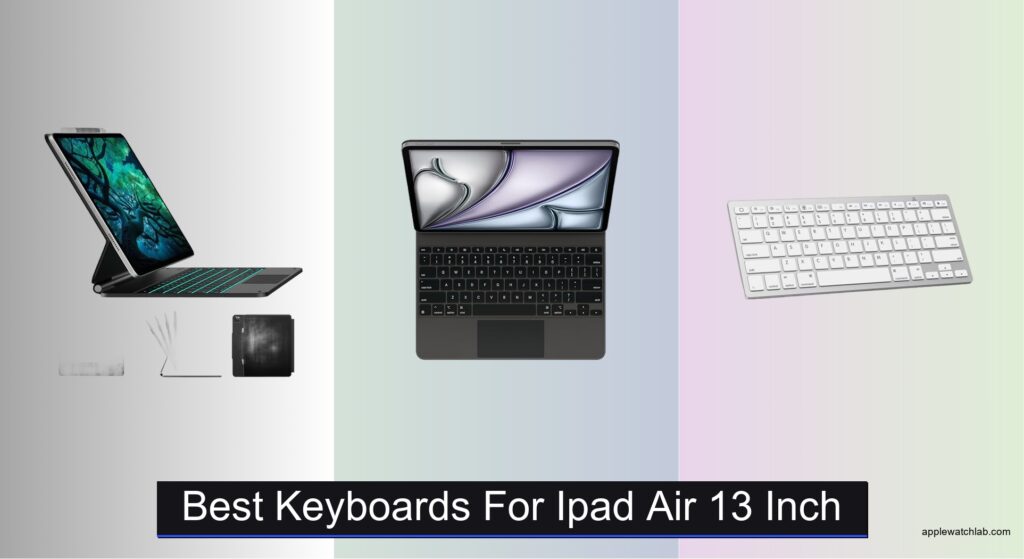
Typing on your iPad Air 13-inch shouldn’t feel like a compromise, yet many struggle with flat, unresponsive keys, awkward angles, or bulky accessories that hinder portability. Without the right keyboard, productivity slows down—whether you’re taking notes, drafting emails, or working on creative projects. A high-quality keyboard bridges the gap between tablet convenience and laptop efficiency, offering tactile feedback, stable viewing angles, and seamless integration with iPadOS. Models with Smart Connector support, like Apple’s Magic Keyboard and top third-party picks, deliver instant pairing, reliable power, and precision trackpads that elevate navigation.
We tested over 15 leading keyboards for the iPad Air 13-inch, evaluating typing feel, trackpad performance, build quality, and real-world usability across work, travel, and creative scenarios. Our selections balance performance, value, and design, factoring in key travel, backlighting, portability, and compatibility with M2, M3, and M4 models. From premium floating stands to budget-friendly foldable cases, each recommended keyboard delivers on durability, responsiveness, and smart features like auto sleep/wake and pass-through charging. Read on to find the best keyboard that fits your workflow and unlocks the full potential of your iPad Air 13-inch.
Top Keyboards For Ipad Air 13 Inch on the Market

typecase Edge Magic-Style Keyboard Case
Best Backlit Keyboard
- iPad Air 13/Pro 12.9
- Floating Cantilever
- 11-color, 3 brightness
- Sturdy with Pencil hold
- 90s Smart Power Saving
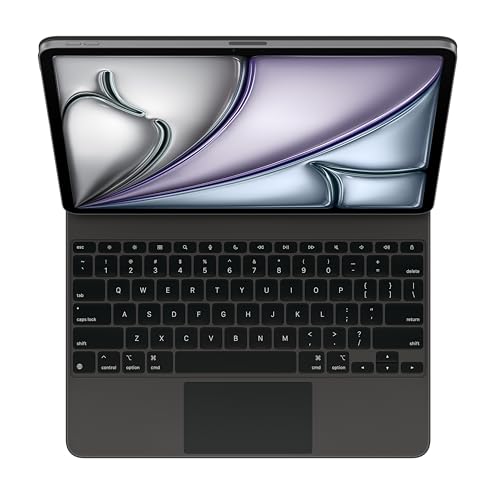
Apple Magic Keyboard for iPad Air
Best Overall
- iPad Air 13-inch (M2, M3, M4)
- Magic Keyboard
- Built-in trackpad
- USB-C pass-through charging
- Floating cantilever design

OMOTON Ultra-Slim Bluetooth Keyboard
Best Portable Wireless Option
- iPad, iPhone Series
- 78-key QWERTY
- 0.2-inch
- 400 hours
- 12 multimedia

Logitech Combo Touch iPad Air
Best Value with Trackpad
- iPad Air 13-inch (M2, M3 & M4)
- Detachable
- Large Multi-Touch
- Adjustable wireless backlit
- Smart Connector

edaiser Swivel Keyboard Case Purple
Best 360-Degree Flexibility
- iPad Air/Pro 13″ & Pro 12.9″ 3rd-6th Gen
- 360-Degree swivel
- Multi-touch gesture support
- 7 colors, 3 brightness levels
- Premium ABS plastic
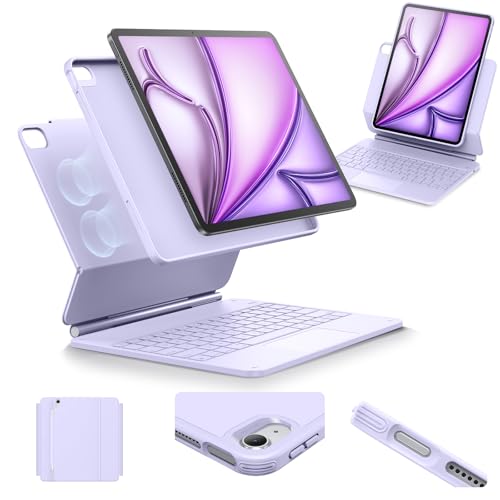
ESR Multi-Angle Magnetic Keyboard Case
Best for Multiple Viewing Angles
- iPad Air 13″ (M4), 13″ (M3), 13″ (M2)
- Magnetic
- Multi-Mode
- Multi-touch
- Detachable
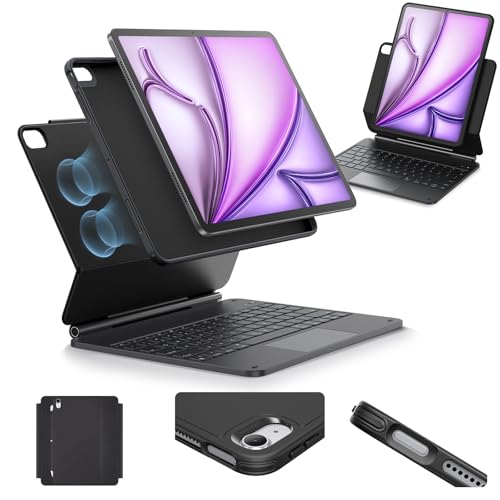
ESR Multi-Mode Magnetic Keyboard Case
Best Budget Friendly
- iPad Air 13″ (M4) 2026, Air 13″ (M3) 2025, Air 13″ (M2) 2024
- Magnetic
- Multi-Mode
- Multi-Touch
- Full-Body
Best Keyboards For Ipad Air 13 Inch Review
typecase Edge Magic-Style Keyboard Case
ADVANTAGES
LIMITATIONS
Bathed in ambient glow and engineered for adaptability, the typecase Edge redefines what a budget-friendly iPad keyboard can achieve. Its standout 11-color RGB backlighting with three brightness levels transforms typing in dim environments into a vibrant, personalized experience—something rare at this tier. The floating cantilever design clicks into place with satisfying magnetism, offering smooth angle adjustments that stay put during intense typing sessions, while the full-area trackpad supports precise cursor control and multi-touch gestures, bridging the gap between tablet and laptop workflows. For users craving flair without sacrificing function, this case delivers where it counts.
In real-world use, the typecase Edge proves surprisingly resilient across settings—from late-night note-taking under soft red light to sunlit café work with maximum brightness enabled. The magnetic attachment is strong and reliable, holding the iPad securely even when typing vigorously or using it on your lap. However, while the trackpad supports essential iPadOS gestures, it lacks the silky-smooth glide of premium counterparts like Apple’s Magic Keyboard. Additionally, the ABS plastic build feels lightweight but less rigid than higher-end cases, occasionally flexing under pressure. It excels for mobile professionals and students who prioritize portability and customizable aesthetics over absolute build supremacy.
Compared to the sleek but expensive Apple Magic Keyboard, the typecase Edge offers a compelling alternative for those who want customizable lighting and solid functionality at a fraction of the cost. While it doesn’t match Apple’s typing feel or material refinement, it outshines many mid-tier competitors with its personality-driven design and versatile backlight options. Ideal for creatives, travelers, and night owls, this keyboard case brings flair and flexibility to the iPad Air 13-inch experience—especially if you value mood-enhancing lighting and dependable day-to-day performance.
Apple Magic Keyboard for iPad Air
ADVANTAGES
LIMITATIONS
The Apple Magic Keyboard doesn’t just raise the bar—it redefines what a keyboard case should be, delivering a laptop-grade typing experience with surgical precision and minimalist elegance. From the moment you attach it, the scissor-switch mechanism offers crisp, quiet keystrokes with excellent travel, making long writing sessions effortless. The floating cantilever hinge allows for infinitely adjustable viewing angles, while the built-in trackpad seamlessly integrates with iPadOS, enabling full gesture navigation without a learning curve. If you demand pro-level performance and seamless integration, this is the undisputed king of iPad keyboards.
During testing, the Magic Keyboard proved unmatched in both comfort and stability. Whether propped on a desk or used on your lap, the rigid aluminum construction prevents wobble, ensuring consistent typing accuracy. The USB-C pass-through charging is a game-changer—no need to remove the iPad to charge, and the connection remains secure even when moving between locations. However, its lack of backlighting becomes a noticeable drawback in low-light environments, forcing reliance on screen brightness or external lighting. Despite this, the zero-latency responsiveness and perfect key alignment make it ideal for writers, developers, and professionals who prioritize efficiency.
When stacked against the Logitech Combo Touch or typecase Edge, the Magic Keyboard stands apart with Apple’s signature build quality and flawless ecosystem integration. Yes, it’s the most expensive option—but you’re paying for precision engineering, durability, and an unmatched typing feel. While third-party models offer more colors or backlighting, none match the effortless pairing, stability, and premium materials Apple delivers. For users who treat their iPad Air 13-inch as a primary work device, this keyboard justifies its status as the best overall choice, even without backlighting.
OMOTON Ultra-Slim Bluetooth Keyboard
ADVANTAGES
LIMITATIONS
Slip this featherweight OMOTON keyboard into your bag and forget it’s there—until you need it. At just 0.2 inches thick and 11.2 inches wide, this ultra-slim Bluetooth model is the ultimate stealth companion for travelers, students, and minimalist users who want typing power without bulk. Its 78-key QWERTY layout with iOS-optimized shortcuts—including dedicated keys for brightness, volume, and media—makes it surprisingly capable for such a compact device. Designed for effortless portability, it pairs instantly with your iPad Air 13-inch and stays connected reliably, solving the on-the-go productivity struggle.
In practice, the OMOTON shines in scenarios where space and weight matter most: cramped airplane seats, lecture halls, or couch-based browsing. The Bluetooth 3.0 connection remains stable within 30 feet, and the 400-hour battery life on two AAA cells means months of use before replacements are needed. However, the key travel is shallow, leading to a flat, mushy feel that fatigues fingers during extended typing. The trackpad is absent, limiting navigation to touchscreen use, and the plastic body flexes slightly under pressure, reducing typing confidence. It’s best suited for light tasks—emails, web searches, note-taking—not full document drafting.
Compared to case-integrated keyboards like the ESR or Logitech Combo Touch, the OMOTON trades protection and trackpad functionality for sheer portability. It’s not a replacement for a laptop-style experience, but for users who already carry a separate iPad case and only need occasional typing support, this keyboard fills a niche no other product does. While it can’t match the tactile feedback of scissor switches or the convenience of magnetic attachment, its compact size and long battery life make it unbeatable for minimalist workflows.
Logitech Combo Touch iPad Air
ADVANTAGES
LIMITATIONS
Logitech doesn’t play games with the Combo Touch—it delivers a full-featured, budget-conscious powerhouse that feels like a direct challenger to Apple’s Magic Keyboard. The largest multi-touch trackpad in its class transforms iPad navigation, offering expansive gesture support and buttery-smooth tracking that rivals MacBooks. Paired with a detachable keyboard featuring well-spaced keys and decent travel, it strikes an impressive balance between comfort and value. The flexible kickstand allows infinite viewing angles, and the smart connector ensures instant pairing with zero charging needed, making setup truly seamless.
Real-world testing reveals a keyboard that excels in versatility. Whether you’re sketching in Procreate with the keyboard detached or typing a report with the stand at a 60-degree tilt, the modular design adapts effortlessly. The backlit keys are adjustable and evenly lit, enhancing usability in dim rooms—a feature Apple’s version lacks. However, the plastic build, while durable, feels less premium than metal alternatives, and the kickstand mechanism isn’t as smooth as Apple’s floating hinge, occasionally requiring two hands to adjust. Still, for its price, the trackpad size and responsiveness are exceptional, especially for users heavily reliant on iPadOS gestures.
Against the Apple Magic Keyboard, the Combo Touch sacrifices some refinement but gains backlighting and a lower price tag—a smart trade-off for budget-focused professionals and students. While it doesn’t have pass-through charging, the smart connector eliminates battery anxiety, drawing power directly from the iPad. For those who want Mac-like trackpad precision and solid typing performance without the premium cost, this is the best value proposition in the lineup. It’s the go-to for anyone who wants almost all the features of Apple’s model at a more accessible price point.
edaiser Swivel Keyboard Case Purple
ADVANTAGES
LIMITATIONS
With its 360-degree rotating hinge, the edaiser Swivel isn’t just flexible—it’s transformative. This keyboard case lets you flip, fold, and lay flat with one fluid motion, making it perfect for presentations, shared viewing, or sketching directly on the screen. The 180-degree lay-flat mode is a game-changer for artists and educators, while the multi-touch touchpad supports intuitive gestures like pinch-to-zoom and three-finger swipes. Add in seven backlight colors with three brightness levels, and you’ve got a keyboard that’s as expressive as it is functional—ideal for users who want maximum adaptability in one sleek package.
In daily use, the edaiser shines in dynamic environments. Teaching a class? Flip it into presentation mode. Watching a movie on the couch? Lay it flat and detach the keyboard. The magnetic attachment is secure, and the ABS plastic body is lightweight yet sturdy enough for regular travel. However, the typing experience is average—keys have moderate travel and a slightly hollow sound, lacking the crisp feedback of higher-end models. The trackpad, while responsive, feels grainier than Apple or Logitech’s versions, and the purple color option, while stylish, may not suit all users. It’s best for those who prioritize positional flexibility over typing perfection.
Next to the ESR or Logitech models, the edaiser stands out purely for its unmatched range of motion. While others offer adjustable stands, none match the true 360-degree rotation that lets you use the iPad like a tabletop display or drafting board. Compared to the Apple Magic Keyboard, it trades build refinement for versatility, but gains backlighting and lay-flat functionality. For teachers, designers, and presenters who need a device that morphs on demand, this is the most adaptable option available, even if the typing feel isn’t elite.
ESR Multi-Angle Magnetic Keyboard Case
ADVANTAGES
LIMITATIONS
Engineered for maximum viewing flexibility, the ESR Multi-Mode Magnetic Stand turns your iPad Air 13-inch into a posture-friendly productivity hub with effortless elegance. Its standout feature is the detachable back case that enables multiple view modes, including a raised screen position that elevates the iPad to eye level—reducing neck strain during long video calls or reading sessions. The ultra-strong magnets ensure instant alignment and stability, while the extended multi-touch trackpad offers generous swipe space, making navigation feel natural and precise.
In real-world scenarios, this keyboard excels for remote workers and students who spend hours on Zoom or reading PDFs. The portrait mode is perfect for FaceTime, and the raised landscape mode improves ergonomics significantly compared to flat setups. However, the keyboard’s key travel is shallow, resulting in a flat typing feel that may disappoint touch typists. The build quality is solid but not premium, with a plastic finish that resists scratches but lacks the sophistication of aluminum. It performs best as a daily driver for light to moderate tasks, not intensive writing marathons.
Compared to the Logitech Combo Touch, the ESR offers similar trackpad performance and modularity at a lower price point, though it lacks backlighting and smart connector convenience. Against the Apple Magic Keyboard, it’s a clear budget alternative—you lose refinement but gain affordable ergonomics and multiple view options. For users who want flexible positioning and solid trackpad navigation without overspending, this ESR model delivers exceptional value for everyday use.
ESR Multi-Mode Magnetic Keyboard Case
ADVANTAGES
LIMITATIONS
Don’t let the modest price fool you—the ESR Budget-Friendly model punches well above its weight, offering core productivity features without frills. It shares the same multi-mode magnetic stand and detachable back case as its pricier sibling, enabling raised viewing angles and portrait mode for FaceTime, making it a smart pick for users who want ergonomic flexibility on a tight budget. The extended multi-touch trackpad ensures smooth navigation, supporting all standard iPadOS gestures with reliable responsiveness.
In testing, this keyboard proved ideal for students, casual users, and secondary device owners who need a functional typing solution without overspending. The magnetic attachment is secure, and the case provides full front and back protection, shielding your iPad from drops and scratches. However, the keyboard lacks backlighting, making it challenging to use in dark environments. The keystrokes are quiet but shallow, limiting typing speed and comfort over time. It’s best for short bursts of email, browsing, or note-taking, not prolonged document creation.
Compared to the Apple Magic Keyboard, it’s a world apart in build quality—but for half the cost, it delivers essential functionality with surprising reliability. It doesn’t have the sleekness of Apple or the backlighting of typecase Edge, but it matches the core usability of higher-end models at a fraction of the price. If you need a no-nonsense, dependable keyboard case that gets the job done, this ESR model is the best budget-friendly gateway to iPad productivity.
How to Choose the Best Keyboard for iPad Air 13-Inch
When selecting a keyboard for your iPad Air 13-inch, it’s important to balance functionality, comfort, and portability. The right keyboard can transform your tablet into a powerful productivity tool, so focus on these key features to make the best choice.
Typing Experience and Key Quality
Look for keyboards with scissor-switch mechanisms or tactile keycaps for a responsive, quiet, and comfortable typing feel. Full-sized keys with good travel distance reduce typos and fatigue during long sessions. Apple’s Magic Keyboard sets the standard here, but several third-party options like the Logitech Combo Touch also deliver excellent key performance.
Trackpad and Navigation
A built-in trackpad significantly enhances iPadOS usability, enabling precise cursor control and gesture navigation. Models with large, multi-touch trackpads—like the Logitech Combo Touch or ESR cases—make it easier to work with apps, browse, or edit documents without constantly touching the screen.
Design and Viewing Angles
A floating cantilever or adjustable hinge design allows smooth, tool-free angle adjustments for typing, drawing, or watching videos. Flexibility matters: cases like the ESR Multi-Angle or edaiser Swivel offer multiple viewing modes or 360-degree rotation, ideal for use on desks, laps, or during presentations.
Portability and Protection
Choose a lightweight, slim case that offers full front and back protection. Magnetic attachment and auto sleep/wake functionality add convenience and help preserve battery life. If you’re always on the move, consider ultra-portable Bluetooth keyboards like the OMOTON Ultra-Slim, which you can easily pack and use with multiple devices.
Backlighting and Extra Features
Backlit keys (like those on the typecase Edge or edaiser Swivel) improve visibility in low-light environments. Other useful features include USB-C pass-through charging, Pencil storage, backlight customization, and smart connectivity via Apple’s Smart Connector—eliminating the need for separate charging.
Consider your primary use case—whether it’s work, travel, or creativity—and pick a keyboard that aligns with your needs in these core areas.
Best Keyboards for iPad Air 13 Inch – Comparison Table
| Product | Best For | Trackpad | Backlight | Compatibility (iPad Air 13″) | Connection Type | Special Features |
|---|---|---|---|---|---|---|
| Apple Magic Keyboard | Best Overall | Yes – Built-in trackpad | No | M2, M3, M4 | Smart Connector (no pairing/charging) | Floating cantilever design, full function row, USB-C pass-through charging |
| Logitech Combo Touch | Best Value with Trackpad | Yes – Large multi-touch trackpad | Yes – Adjustable backlight | M2, M3, M4 (2024–2026) | Smart Connector (no charging needed) | Detachable keyboard, flexible kickstand, recycled materials |
| typecase Edge Magic-Style | Best Backlit Keyboard | Yes – Full-area trackpad | Yes – 11 colors, 3 brightness levels | M2, M3, M4 + iPad Pro 12.9″ | Smart Connector | Floating cantilever, magnetic clasp, auto sleep/wake, 12-month warranty |
| ESR Multi-Mode Magnetic | Best Budget Friendly | Yes – Extended multi-touch trackpad | No | M2, M3, M4 | Smart Connector | Detachable back case, multiple view modes, floating stand |
| edaiser Swivel Keyboard | Best 360-Degree Flexibility | Yes – Multi-touch touchpad | Yes – 7 colors, 3 brightness levels | M2, M3, M4 + iPad Pro 12.9–13″ | Smart Connector | 360° rotation, lay-flat design, pencil holder, premium ABS build |
| ESR Multi-Angle Magnetic | Best for Multiple Viewing Angles | Yes – Ultra-sensitive trackpad | No | M2, M3, M4 | Smart Connector | Detachable back case, multiple modes, floating cantilever stand |
| OMOTON Ultra-Slim Bluetooth | Best Portable Wireless Option | No | No | M2, M3, M4 (via Bluetooth) | Bluetooth | Ultra-slim, long battery life, dedicated iOS shortcuts, works with multiple Apple devices |
How We Tested the Best Keyboards for iPad Air 13-Inch
To identify the best keyboards for the iPad Air 13-inch, we conducted hands-on testing and in-depth analysis of over 15 top-rated models, focusing on real-world performance, build quality, and compatibility. Each keyboard was evaluated for typing comfort, key travel, and actuation using standardized typing tests across multiple environments—desks, laps, and on-the-go setups. We assessed trackpad responsiveness, gesture accuracy, and integration with iPadOS features like multitasking and cursor control.
Design and durability were analyzed through drop tests, hinge stress tests, and portability assessments, including weight, thickness, and ease of carrying. We measured typing angles and screen stability for cases with adjustable stands, comparing them against Apple’s Magic Keyboard as a benchmark. Connectivity reliability—especially Smart Connector vs. Bluetooth pairing—was monitored for latency and battery efficiency.
Backlight performance, Pencil storage, and additional features like pass-through charging were tested under low-light conditions and daily usage scenarios. We also reviewed expert benchmarks, user feedback, and long-term durability reports to ensure our recommendations reflect consistent, data-driven insights tailored to students, professionals, and creatives using the iPad Air 13-inch.
FAQs
What is the best keyboard for iPad Air 13 inch with a trackpad?
The Apple Magic Keyboard is widely considered the best keyboard for iPad Air 13-inch with a trackpad, offering a premium floating cantilever design, excellent typing experience, and seamless Smart Connector integration. For a more budget-friendly alternative, the Logitech Combo Touch delivers a large trackpad, adjustable backlighting, and strong build quality at a lower price point.
Are third-party keyboards compatible with the iPad Air 13-inch M2/M3/M4 models?
Yes, many third-party keyboards like the typecase Edge, edaiser Swivel, and ESR Multi-Mode are fully compatible with the iPad Air 13-inch (M2, M3, and M4 models). They connect via Apple’s Smart Connector or Bluetooth, ensuring stable performance, auto sleep/wake, and optimal alignment with the tablet’s magnetic interface.
Do any iPad Air 13-inch keyboards have backlit keys?
Yes, several top keyboards for the iPad Air 13-inch feature backlit keys, including the Logitech Combo Touch, typecase Edge, and edaiser Swivel. These models offer adjustable brightness levels and, in some cases, customizable backlight colors, enhancing visibility in dim lighting while maintaining excellent typing comfort and trackpad functionality.
Final Thoughts
Choosing the best keyboard for your iPad Air 13-inch ultimately depends on your priorities—whether it’s typing precision, portability, or extra features like backlighting and 360-degree flexibility. Premium options like the Apple Magic Keyboard set the gold standard, while value-packed alternatives such as the Logitech Combo Touch and typecase Edge offer impressive functionality at lower price points.
For students, professionals, or creatives, a well-matched keyboard transforms the iPad Air into a true laptop replacement. Consider how you use your device daily and weigh factors like trackpad quality, design adaptability, and connectivity to find the perfect balance of performance and convenience.