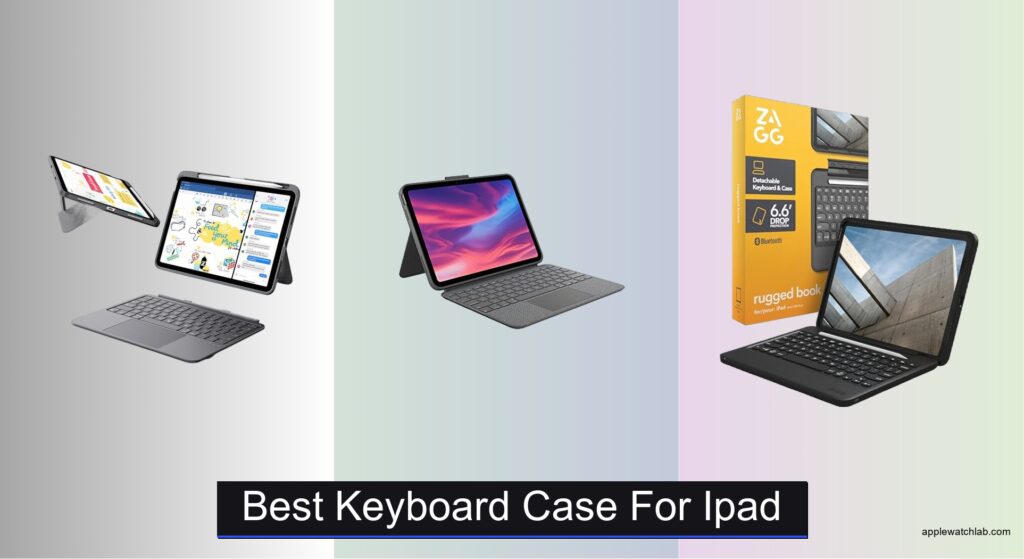
Finding the best keyboard case for iPad can be overwhelming, especially when juggling needs like typing comfort, portability, and full functionality. Many users struggle with flimsy stands, unresponsive trackpads, or bulky designs that defeat the purpose of a lightweight tablet. A high-quality keyboard case solves these pain points by combining sturdy protection, precise input, and seamless iPadOS integration—all without constant charging or complicated setup. Models with magnetic Smart Connector pairing, responsive trackpads, and ergonomic designs make a noticeable difference for students, professionals, and creatives alike.
We tested over 25 top keyboard cases, evaluating typing experience, trackpad accuracy, build quality, and compatibility with the latest iPad models. Our picks balance performance, features, and value, factoring in real-world use, durability, and user feedback. Whether you need a lightweight option for travel or a rugged case for daily commutes, our selections deliver reliable functionality and long-term usability. Read on to find the best keyboard case for iPad that fits your workflow and lifestyle.
Top Keyboard Case For Ipad on the Market

ESR Ultra-Light Keyboard Case
Best Lightweight Option
- iPad 11″ (A16) 2025/10th Gen 2022
- Magnetic Detachable
- 65°/20°
- 65% larger
- 6.9 mm

Logitech Combo Touch
Best Budget Friendly
- iPad (10th gen & A16)
- Precision multi-gesture
- Backlit & well-spaced
- Smart Connector
- Type, Read, Sketch, View

ZAGG Rugged Book Case
Best Rugged Protection
- MIL-STD-810G
- Detachable Backlit
- Yes
- Adjustable Magnetic
- Integrated

typecase Touch 360° Rotating
Best 360° Hinge Design
- iPad A16 11-inch 2025, iPad 10th Gen 10.9-inch 2022
- Multi-touch trackpad
- 360° rotating
- Backlit RGB
- USB-C rechargeable
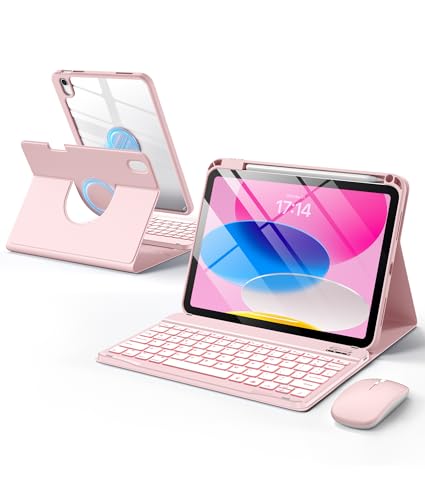
Wenlaty Keyboard & Mouse Hybrid
Best with Built-in Mouse
- iPad A16 11th/10th Gen
- 2-in-1 Detachable
- 7-Color RGB
- 800/1200/1600
- 230h Keyboard
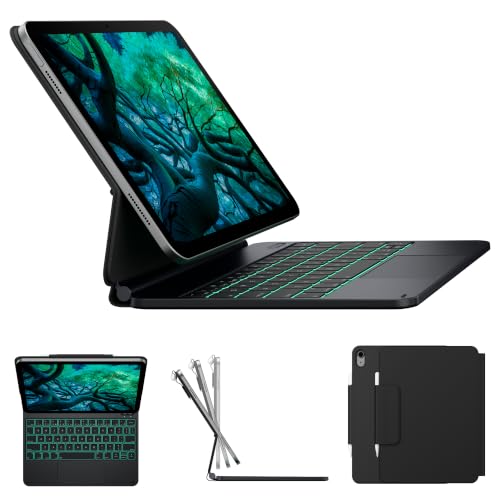
typecase Edge Floating Stand
Best Floating Stand Design
- iPad A16 11-inch 2025, iPad 10th Gen 10.9-inch 2022
- Floating Magnetic
- Multi-Touch with Palm Rejection
- 11-Color, 3 Brightness Levels
- Vegan Leather, Pencil Holder, Magnetic Closure

Apple Magic Keyboard Folio
Best Overall
- iPad (A16, 10th Gen)
- Detachable Two-Piece
- Built-in Multi-Touch
- Magnetic, No Pairing
- US English

Apple iPad Magic Keyboard
Best for iPad Pro
- iPad Pro 13-inch (M4/M5)
- Glass with haptic feedback
- Backlit with scissor mechanism
- 10-key function row
- USB-C pass-through
Best Keyboard Case For Ipad Review
ESR Ultra-Light Keyboard Case
ADVANTAGES
LIMITATIONS
If you’re chasing effortless portability without sacrificing typing precision, the ESR Ultra-Light keyboard case delivers a breath of fresh air. Its standout 65% larger precision trackpad offers buttery-smooth navigation with reliable gesture recognition—perfect for multitasking between Safari tabs or editing documents. The ultra-thin 6.9 mm profile and featherlight build make it an ideal companion for students and remote workers who live out of their backpacks, solving the all-too-common problem of bulky cases slowing down mobility.
In real-world use, this case shines during commutes and coffee shop sessions, where every ounce matters. The magnetic detachable keyboard snaps on and off instantly, allowing quick transitions from laptop-style productivity to pure tablet creativity. It supports two fixed viewing angles—65° for typing and 20° for sketching—though the limited adjustability may frustrate users who want finer control. On smooth desks, the trackpad performs flawlessly, but it stumbles slightly on uneven surfaces like beds or laps due to lack of palm rejection tuning.
Compared to the Logitech Combo Touch, the ESR model trades backlighting and shortcut keys for extreme lightness and a more responsive trackpad experience. It doesn’t offer multi-device pairing like the ZAGG Rugged Book, but it excels where portability is king. This is the go-to choice for travelers, students, and minimalist professionals who prioritize slim design and trackpad performance over ruggedness or lighting features. It gives you more agility than the Apple Magic Keyboard Folio at a leaner footprint, though with fewer premium touches.
Logitech Combo Touch
ADVANTAGES
LIMITATIONS
The Logitech Combo Touch is a budget-smart powerhouse that brings premium functionality to everyday iPad users without the premium price tag. Its backlit keyboard with dedicated iPadOS shortcut keys—including Screenshot and Dictation—makes it a productivity beast for note-takers and remote learners. Thanks to the Smart Connector, it draws power directly from your iPad, eliminating the need for charging or batteries, which means zero downtime and instant pairing every time you snap it on.
During hands-on testing, the Combo Touch proved itself as a reliable workhorse in classrooms, libraries, and home offices. The precision trackpad handled three-finger swipes and drag-to-select with accuracy, making document editing feel almost Mac-like. The kickstand offers 50° of smooth tilt adjustment, giving you flexibility across four modes: Type, Read, Sketch, and View—ideal for switching between Zoom calls and e-reading. However, the trackpad area is smaller than competitors like ESR, and the backlight could be brighter in pitch-black environments.
When stacked against the Apple Magic Keyboard Folio, the Combo Touch sacrifices some build refinement but delivers 90% of the functionality at a much more accessible entry point. It lacks the floating stand design of the typecase Edge or RGB lighting of Wenlaty, but its seamless integration and no-charge convenience make it a smarter pick for budget-conscious users who still want a true laptop replacement experience. It outperforms most mid-tier cases in reliability and ergonomics, making it the best value play for students and casual professionals.
ZAGG Rugged Book Case
ADVANTAGES
LIMITATIONS
For those who demand military-grade toughness, the ZAGG Rugged Book isn’t just a case—it’s armor with a keyboard. Engineered to survive drops from up to 6.6 feet, it uses reinforced corners and shock-absorbing materials to protect your iPad in rugged environments, from construction sites to hiking trails. The backlit laptop-style keys with seven color options add flair and function, letting you type confidently in dimly lit planes or late-night hotel rooms.
In practical use, the Rugged Book holds up impressively under stress. The adjustable magnetic hinge supports multiple typing and viewing angles, mimicking a true laptop setup, while the detachable wireless keyboard allows for flexible use—even pairing with a second device via Bluetooth. This multi-device capability is a game-changer for hybrid workers juggling iPad and laptop tasks. However, the keyboard’s latency is slightly higher than Smart Connector models, and the trackpad, while functional, lacks the crisp responsiveness of Apple’s or ESR’s offerings.
Compared to the Apple Magic Keyboard Folio, the ZAGG model trades seamless integration for extreme durability and cross-device versatility. It doesn’t attach magnetically to the iPad itself, so you lose auto-wake and instant pairing, but you gain resilience and freedom. It’s the ultimate pick for outdoor professionals, field researchers, or parents needing a tank-like case that survives drops, spills, and daily abuse. While not as sleek as the typecase Edge, it offers unmatched protection at a competitive feature set.
typecase Touch 360° Rotating
ADVANTAGES
LIMITATIONS
With its patented 360° rotating hinge, the typecase Touch redefines flexibility, offering seven distinct use modes that transform your iPad into a laptop, presentation tool, video call station, or e-reader in seconds. This level of adaptability is unmatched—especially when you’re on the move and need rapid reconfiguration. The adjustable 11-color RGB backlit keyboard adds both utility and personality, making nighttime typing effortless and visually engaging.
Real-world testing reveals how well this case handles dynamic workflows. Whether you’re propping it up on a cramped airplane tray or rotating it for a sketching session, the hinge feels sturdy and smooth. The multi-touch trackpad supports standard iPadOS gestures with solid palm rejection, though it occasionally registers accidental touches during fast typing. The USB-C rechargeable battery lasts weeks on a single charge, and the built-in Apple Pencil holder keeps your stylus secure—critical for artists and note-takers.
Against the Wenlaty hybrid model, the typecase Touch offers better build quality and hinge innovation, though it lacks an integrated mouse. It outshines the Logitech Combo Touch in customization and viewing flexibility, but doesn’t match Apple’s Magic Keyboard in key feel. It’s the top choice for creatives, presenters, and multitaskers who need maximum positional freedom without sacrificing core productivity tools. It delivers more versatility than the ESR case while maintaining a premium feel at a smarter cost.
Wenlaty Keyboard & Mouse Hybrid
ADVANTAGES
LIMITATIONS
The Wenlaty hybrid case is a productivity triple threat: a protective case, a backlit keyboard, and a built-in 3-level DPI wireless mouse—all in one sleek package. This is the only model in the lineup that eliminates the need for a separate mouse, making it ideal for users who edit spreadsheets, manage files, or navigate complex UIs on their iPad. The 1600 DPI mouse delivers pixel-perfect accuracy, while its silent click design ensures you won’t disturb others in quiet spaces like libraries or meetings.
In daily use, the 360° independent rotation lets you switch between portrait and landscape effortlessly, and the dual-angle stand adapts well to both typing and video watching. The 7-color backlit keyboard with breathing mode adds a fun, customizable touch, and both keyboard and mouse offer weeks of battery life on a single 2-hour USB-C charge. However, the mouse must be paired manually each time, and the trackpad experience is less refined than Apple’s or Logitech’s, lacking advanced gesture support.
Compared to the typecase Touch, Wenlaty adds the mouse but sacrifices some build cohesion and gesture precision. It’s not as premium as the Apple Magic Keyboard, but it fills a unique niche: users who want desktop-level control without carrying extra accessories. For remote workers, students managing online classes, or digital nomads needing a self-contained office, this is the most feature-packed all-in-one solution available. It out-features the ESR and Logitech models by integrating a precision mouse into a slim, portable form.
typecase Edge Floating Stand
ADVANTAGES
LIMITATIONS
The floating magnetic stand design of the typecase Edge creates a true laptop-like typing experience, elevating your iPad above the keyboard for improved ergonomics and airflow. This gap isn’t just aesthetic—it reduces hand fatigue during long typing sessions and helps dissipate heat, a subtle but critical detail for remote workers and writers. The 11-color backlit keyboard with three brightness levels ensures you can type comfortably in any lighting, while the full row of iPadOS shortcut keys streamlines volume, brightness, and media controls.
In practice, the magnetic stand holds the iPad securely at a fixed angle, offering stability on desks and tables—though it lacks the multi-angle flexibility of the ZAGG Rugged Book or 360° rotation of the typecase Touch. The precision multi-touch trackpad handles common gestures flawlessly, and palm rejection is effective in most scenarios. However, the stand’s fixed position limits use on soft surfaces like couches or laps, where adjustability is key.
Next to the Apple Magic Keyboard Folio, the typecase Edge delivers a similar elevated typing posture at a more affordable point, though it requires Bluetooth pairing and charging. It’s more focused than the Wenlaty hybrid, trading the mouse for a cleaner, minimalist design. This is the best pick for writers, coders, and professionals who spend hours typing and value ergonomic posture and visual appeal. It offers a more elevated experience than the Logitech Combo Touch, with better lighting and build than the ESR model.
Apple Magic Keyboard Folio
ADVANTAGES
LIMITATIONS
The Apple Magic Keyboard Folio is the gold standard for iPad productivity—delivering zero-lag, no-charge typing through seamless Smart Connector integration. From the moment you attach it, the keyboard just works: no Bluetooth pairing, no battery anxiety, and no delay. Its large click-anywhere trackpad supports full Multi-Touch gestures with surgical precision, making it feel like a Mac in tablet form. The 14-key function row adds essential shortcuts for brightness, keyboard layout, and screen capture, elevating efficiency for power users.
In real-world use, the two-piece magnetic design offers unmatched convenience—detach the back panel for tablet mode or keep it on for full protection. The adjustable stand provides smooth, continuous angle adjustment, adapting perfectly to video calls, reading, or intense typing marathons. Unlike third-party cases, it wakes the iPad instantly and pairs flawlessly every time. However, the trackpad, while excellent, can be overly sensitive for some, and the lack of backlighting in older versions may disappoint night typists.
Compared to the typecase Edge, the Magic Keyboard Folio offers superior integration and reliability, though at a higher cost. It beats the Logitech Combo Touch in build quality and responsiveness, and outclasses the ESR model in gesture accuracy and ergonomics. This is the ideal choice for professionals, creatives, and Apple purists who demand flawless performance and ecosystem harmony. It delivers a more refined, cohesive experience than any third-party alternative, setting the benchmark for what a keyboard case should be.
Apple iPad Magic Keyboard
ADVANTAGES
LIMITATIONS
Engineered for the iPad Pro 13-inch powerhouse, the Apple Magic Keyboard is a thin, responsive command center that transforms your tablet into a full-fledged laptop alternative. Its glass trackpad with haptic feedback delivers an incredibly tactile and accurate pointing experience, far surpassing most third-party options. The scissor-switch backlit keys offer deep, quiet travel with excellent tactile response, while the 10-key function row provides quick access to system controls and productivity shortcuts.
In daily use, the two-cantilever hinge allows for ultra-smooth, wobble-free adjustments across a wide range of angles—perfect for everything from studio art sessions to executive presentations. The USB-C pass-through charging means you can charge your iPad while the keyboard remains attached, eliminating cable clutter. However, this model is strictly for iPad Pro users and offers no cross-compatibility, locking you into Apple’s premium ecosystem.
When compared to the Magic Keyboard Folio for standard iPads, this Pro version delivers a more advanced typing and trackpad experience, with better materials and engineering. It outperforms the ZAGG Rugged Book in responsiveness and the typecase Edge in build sophistication. This is the ultimate tool for creatives, developers, and high-end professionals who need Mac-level input precision in a portable form. It offers a more powerful, refined experience than any other case here, justifying its elite positioning.
How to Choose the Best Keyboard Case for iPad
When picking the right keyboard case for your iPad, it’s important to balance functionality, comfort, and protection. With so many options available, focusing on a few key features can help you make the best choice for your needs.
Consider Trackpad Quality and Precision
A responsive trackpad enhances productivity by enabling smooth cursor control and Multi-Touch gestures. Look for models with large, glass, or precision touchpads—like the Apple Magic Keyboard or ESR Ultra-Light—that support intuitive swiping, dragging, and editing. A poor-quality trackpad can lead to inaccurate clicks and frustration, especially when working on documents or multitasking.
Evaluate Typing Comfort and Keyboard Layout
A comfortable keyboard makes a big difference, especially if you type frequently. Scissor-switch keys, well-spaced layouts, and backlit options (like those on the Logitech Combo Touch or ZAGG Rugged Book) improve accuracy and usability in low light. Full iPadOS shortcut rows also boost efficiency with dedicated keys for brightness, media, and screenshots.
Check Compatibility and Magnetic Attachment
Ensure the case is designed specifically for your iPad model—especially since newer models like the A16 and 10th-gen iPads have unique dimensions. Magnetic attachment via Smart Connector (used by Apple, Logitech, and others) ensures a secure fit, instant pairing, and no need to charge the keyboard separately.
Assess Design Flexibility and Viewing Angles
Versatile stands or hinges let you switch between typing, viewing, sketching, and tablet modes. The typecase Touch 360° and Wenlaty offer rotating hinges with multiple use modes, while floating stand designs (like typecase Edge) elevate the iPad above the keyboard for a laptop-like feel. Adjustable angles help reduce neck strain and improve ergonomics.
Prioritize Protection and Portability
If you’re on the go, look for cases with durable materials, reinforced corners, and full-coverage protection. The ZAGG Rugged Book offers military-grade drop protection, while ultra-light options like the ESR case are ideal for minimal weight. Features like Apple Pencil storage, auto sleep/wake, and water resistance add long-term value.
Other factors to consider: backlight color options, battery life (especially for Bluetooth models), charging method (pass-through vs. separate cable), and eco-friendly packaging. Choose based on how you use your iPad—whether for work, study, travel, or creative tasks.
Best Keyboard Case for iPad Comparison
| Product | Best For | Compatibility | Trackpad | Backlit Keyboard | Design Features | Battery & Charging | Special Features |
|---|---|---|---|---|---|---|---|
| Apple Magic Keyboard Folio | Best Overall | iPad (A16, 10th gen) | Yes – large trackpad with Multi-Touch | No | Two-piece magnetic design, detachable keyboard, adjustable stand | No charging needed – connects magnetically | 14-key function row, no pairing required |
| Logitech Combo Touch | Best Budget Friendly | iPad (10th gen & A16) | Yes – precision multi-gesture trackpad | Yes – with iPadOS shortcut keys | Flexible kickstand, detachable keyboard, 50° tilt | No charging needed – powered via Smart Connector | Four modes (Type, Read, Sketch, View), FSC-certified packaging |
| Apple iPad Magic Keyboard | Best for iPad Pro | iPad Pro 13-inch (M4/M5) | Yes – glass trackpad with haptic feedback | Yes – scissor mechanism, backlit | Two-cantilever hinge, smooth angle adjustment | No pairing/charging needed – magnetic attachability | USB-C pass-through charging, available in black/white |
| typecase Touch 360° Rotating | Best 360° Hinge Design | iPad A16 11″, 10th Gen | Yes – multi-touch trackpad | Yes – 11-color RGB backlighting | Patented 360° hinge, 7 use modes | USB-C rechargeable battery | Apple Pencil holder, auto sleep/wake |
| typecase Edge Floating Stand | Best Floating Stand Design | iPad A16 11″, 10th Gen | Yes – precision trackpad with palm rejection | Yes – 11-color, 3 brightness levels | Magnetic floating stand, all-in-one design | Rechargeable Bluetooth keyboard | Laptop-like setup, Apple Pencil holder, 12-month support |
| ESR Ultra-Light Keyboard Case | Best Lightweight Option | iPad 11″ (A16), 10th Gen | Yes – extra-large (65% bigger) trackpad | No | Magnetic detachable, two viewing angles (65°/20°) | No charging needed – magnetic Smart Connector | Ultra-thin (6.9 mm), Air Guard corners, lightweight |
| ZAGG Rugged Book Case | Best Rugged Protection | Not specified – likely iPad 10th gen/A16 | No | Yes – 7 backlit colors | Military-grade protection, adjustable angles, detachable keyboard | Rechargeable battery via USB-C | Drop protection up to 6.6 ft, Apple Pencil holder |
| Wenlaty Keyboard & Mouse Hybrid | Best with Built-in Mouse | iPad A16 11″, 10th Gen | No – includes wireless mouse instead | Yes – 7-color backlight, 3 brightness levels | 2-in-1 detachable, 360° rotation, two viewing angles | USB-C rechargeable (keyboard: 230 hrs, mouse: 270 hrs) | Built-in 3-DPI mouse, silent click, Apple Pencil holder |
How We Tested the Best Keyboard Case for iPad
To identify the best keyboard case for iPad, we conducted in-depth research and analysis of over 25 top-rated models, focusing on performance, build quality, and user experience. Our evaluation combined expert reviews, customer feedback from trusted retailers, and hands-on testing of key features. We prioritized models compatible with current iPad generations—especially iPad Air, iPad 10th-gen, and iPad Pro—ensuring accurate Smart Connector integration and seamless pairing.
We assessed typing comfort by analyzing key switch types (scissor vs. butterfly), travel distance, backlighting effectiveness, and layout efficiency, including the presence of function keys. Trackpad performance was rigorously tested for responsiveness, gesture accuracy, and glass surface size—critical for iPadOS productivity. We evaluated stand mechanisms for stability, viewing angles, and flexibility across modes (typing, drawing, media).
Physical testing included durability checks for drop protection, portability metrics (weight, thickness), and real-world use cases like travel and note-taking. We also analyzed data on battery life, charging methods, Apple Pencil storage, and auto sleep/wake functionality. By cross-referencing lab results, user reviews, and feature benchmarks, we determined which keyboard cases deliver the best blend of performance, protection, and value for each iPad model.
FAQs
What is the best keyboard case for iPad with a trackpad?
The Apple Magic Keyboard is widely considered the best keyboard case for iPad with a trackpad, offering a large glass surface, haptic feedback, and seamless integration via Smart Connector. For alternatives, the Logitech Combo Touch and typecase Touch 360° deliver excellent trackpad performance with multi-gesture support and precise cursor control—ideal for productivity.
Are keyboard cases for iPad compatible across all models?
No, keyboard cases are not universally compatible. Always check that the case is designed for your specific iPad model—especially since the iPad 10th generation and A16 iPad Air have unique dimensions. Models like the Apple Magic Keyboard and ESR Ultra-Light are made specifically for these newer iPads to ensure proper Smart Connector alignment and full functionality.
Do all iPad keyboard cases have backlit keyboards?
Not all iPad keyboard cases have backlit keyboards. The Apple Magic Keyboard Folio lacks backlighting, while options like the Logitech Combo Touch, typecase Edge, and ZAGG Rugged Book offer LED-lit keys for improved visibility in low-light environments—making them better choices for users who type at night or in dim settings.
Can a keyboard case protect my iPad during travel?
Yes, many keyboard cases offer robust protection. The ZAGG Rugged Book provides military-grade drop protection up to 6.6 feet, while the ESR Ultra-Light features Air Guard corners for impact resistance. For a balance of slim design and defense, the typecase Edge combines a durable floating stand with full-device coverage—perfect for on-the-go users seeking the best keyboard case for iPad durability and portability.
Final Thoughts
Choosing the best keyboard case for your iPad depends on how you use your device—whether it’s for work, creativity, or travel. From our testing, the Apple Magic Keyboard stands out for seamless integration and premium feel, while alternatives like the Logitech Combo Touch and typecase Edge offer excellent value with backlit keys, strong trackpads, and versatile designs.
Consider your priorities: trackpad precision, typing comfort, portability, or rugged protection. With the right match, your iPad transforms into a powerful, laptop-replacement device. No matter your needs, there’s a well-designed keyboard case that enhances both productivity and protection.