
You check your Apple Watch after a 30-minute jog: 420 active calories burned. It’s a satisfying number—proof of effort. But how does your wrist device know? And should you trust it when tracking weight loss or fitness progress? The truth is, the Apple Watch doesn’t directly measure calorie expenditure. Instead, it estimates it using a smart combination of your personal health data, real-time sensor inputs, and advanced algorithms developed by Apple. While not lab-accurate, it’s one of the most sophisticated consumer tools available for tracking energy burn.
The system breaks down your daily energy use into two parts: active calories, which come from movement and exercise, and passive calories, the energy your body uses just to breathe, circulate blood, and stay alive. Together, they make up your total daily energy expenditure (TDEE). This article dives deep into how Apple uses heart rate, motion, GPS, elevation, and your fitness level to generate these numbers—what affects accuracy, how to improve it, and when to take the data with a grain of salt.
Personal Data: The Foundation of Calorie Estimation
Before your Apple Watch can estimate how many calories you burn, it needs to know who you are. During setup, you enter key biometric details that form the baseline for all metabolic calculations.
Key Biometrics That Shape Calorie Estimates
- Age
- Sex
- Height
- Weight
- Wheelchair use status
These inputs help Apple estimate your Resting Metabolic Rate (RMR)—the number of calories your body burns at rest. Apple uses population-based metabolic equations similar to the Mifflin-St Jeor formula, which is widely used in clinical settings to predict RMR based on age, sex, height, and weight.
Example: A 30-year-old woman, 160 cm tall and weighing 58 kg, might have an RMR of around 1,380 kcal/day, or roughly 57 calories per hour at rest.
This passive calorie burn runs 24/7—even while you sleep—and typically accounts for 60–75% of your total daily energy use.
What Apple Doesn’t Know (But Should)
The Apple Watch does not consider:
– Body fat percentage
– Muscle mass
– Hormonal conditions (like hypothyroidism)
– Medications that affect metabolism
This is a major limitation. Two people with identical stats but different body compositions can have vastly different actual calorie needs. If you’re highly muscular, you likely burn more than estimated. If you have higher body fat, you may burn less. Without body composition data, the estimates remain generalized.
Real-Time Sensors That Power Active Calorie Tracking
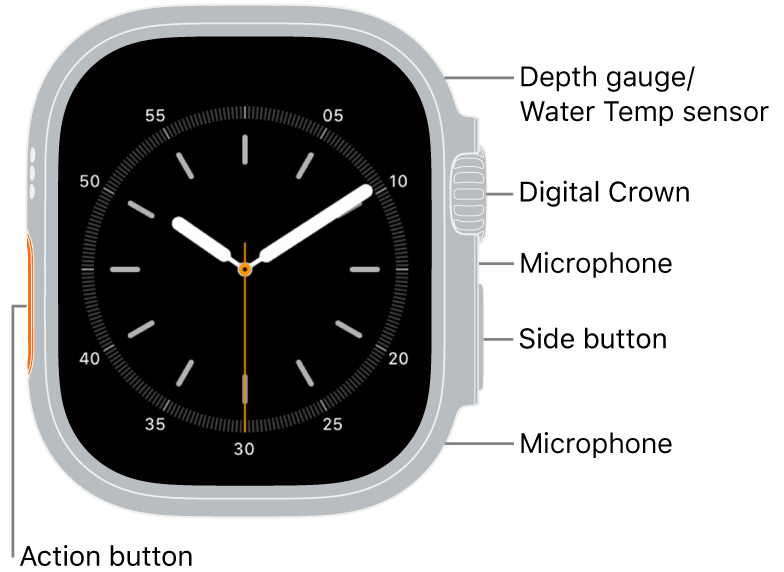
While your personal data sets the metabolic baseline, real-time sensor input drives active calorie estimation. The Apple Watch fuses data from six built-in sensors to assess how hard you’re working.
Role of Each Sensor in Calorie Calculation
| Sensor | Function in Calorie Estimation |
|---|---|
| Optical Heart Rate Sensor | Measures heart rate via photoplethysmography (PPG); higher HR = greater exertion |
| Accelerometer | Detects movement intensity, steps, and activity type |
| Gyroscope | Enhances motion tracking by detecting wrist rotation and orientation |
| GPS | Tracks speed, distance, and route—critical for outdoor runs and rides |
| Barometer | Measures elevation changes; uphill effort increases calorie cost |
| Ambient Light Sensor | Helps determine indoor vs. outdoor context (indirect role) |
Together, these sensors allow Apple to assess not just that you’re moving, but how you’re moving—your pace, terrain, and cardiovascular strain.
Pro Insight: Running uphill at 7 km/h will show higher calorie burn than the same speed on flat ground, even with identical heart rate, because GPS and barometer data confirm increased effort.
How Active Calories Are Estimated (Beyond Heart Rate)
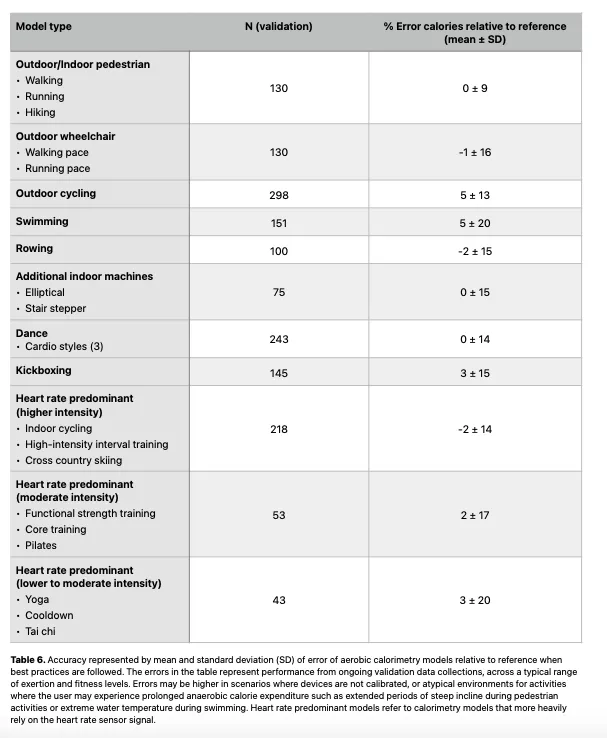
Active calories are calculated dynamically, adjusting every few seconds based on real-time effort. Apple’s proprietary algorithm considers multiple factors:
- Heart rate above resting baseline
- Movement intensity (from accelerometer)
- Pace and distance (from GPS or stride analysis)
- Elevation gain (from barometer)
- Selected workout type
- VO₂ Max estimate (on Series 3 and newer)
Key Insight: Two workouts with the same heart rate and duration can show different calorie burns due to pace, terrain, or effort patterns.
For example:
– A 5 km run at 5:00/km burns more than 6:00/km, even with similar heart rate
– A sprint interval session may show higher burn than steady jogging due to burst intensity
“The one that burnt higher calories had a much faster pace—I think that’s the main factor.” – playboicargreentea
This confirms that pace and movement dynamics are heavily weighted—sometimes more than heart rate alone.
Why Workout Type Selection Matters
The workout mode you select isn’t just for record-keeping—it changes how calories are calculated.
Activity-Specific Algorithms
Each workout type uses a tailored model:
| Workout Mode | Calorie Estimation Focus |
|---|---|
| Outdoor Run | GPS speed, elevation, stride length, heart rate |
| Indoor Run | Accelerometer + heart rate (no GPS) |
| Cycling | Cadence, power estimation, heart rate |
| Swimming | Stroke count, arm motion, lap time |
| HIIT | Heart rate spikes, recovery periods, burst intensity |
| Functional Training | Mixed movements, heart rate response |
Warning: Logging a HIIT session as “Walk” or “Other” can underestimate calorie burn by 30–50%, because the algorithm won’t account for anaerobic effort.
Always select the closest match to ensure accurate modeling.
VO₂ Max and Fitness Level Adjustments
Newer Apple Watch models estimate VO₂ Max—your body’s oxygen efficiency—during outdoor walks or runs.
How Fitness Impacts Calorie Burn
- Higher VO₂ Max = better cardiovascular fitness
- Fitter users burn fewer calories doing the same workout
- Apple adjusts estimates downward as your fitness improves
Example: Running 5 km at 6:00/km today may show fewer calories than it did six months ago—even if it feels just as hard—because your body is now more efficient.
This reflects real physiology: a trained athlete burns less energy for the same task than a beginner.
Caveat: VO₂ Max estimates can be inaccurate for elite athletes or those with atypical heart rate responses.
Active vs. Passive vs. Total Calories: What Each Means
Understanding these three metrics is essential for interpreting your data.
| Metric | Definition | Where to Find It |
|---|---|---|
| Active Calories | Burned through movement and exercise | Red Move ring in Activity app |
| Passive Calories | Burned at rest (RMR) | Not shown directly; calculate as Total – Active |
| Total Calories | Active + passive combined | Health app → Health Data → Activity → Calories |
Quick Math:
Passive Calories = Total Calories – Active Calories
Example: 2,400 total – 400 active = 2,000 passive
The Move ring only fills with active calories, so passive burn doesn’t help you “close the ring”—but it’s still a major part of your daily energy use.
Accuracy: How Close Is Apple Watch to Reality?
While convenient, Apple Watch calorie estimates aren’t perfect. Studies using indirect calorimetry (the gold standard) reveal important gaps.
Scientific Findings on Accuracy
- Error Range: 18–40% deviation from actual burn
- Stanford Study (2017): Apple Watch was mid-pack among wearables, off by ~27%
- Real-World Test: One user burned 323 kcal (measured), Apple reported 550 kcal (+70%)
- Gender Bias: Apple tends to underestimate in men, overestimate in women
Bottom Line: For most users, Apple Watch is within ±25% of true burn—good for tracking trends, not precision.
Activity-Specific Accuracy Levels
Not all workouts are tracked equally.
| Activity | Accuracy | Why? |
|---|---|---|
| Walking/Running (outdoor) | High | GPS + heart rate + elevation = strong signal |
| Cycling | Moderate–High | Improved with GPS; indoor cycling less accurate |
| Swimming | Moderate | Relies on stroke detection; no GPS |
| Weight Training | Low–Moderate | Wrist motion doesn’t reflect effort well |
| CrossFit/Tennis | Low | Erratic motion confuses sensors |
Reason: Resistance and interval training involve isometric holds and bursts—difficult to capture via wrist-based sensors.
How to Improve Calorie Tracking Accuracy
You can’t make Apple Watch lab-accurate, but you can boost reliability.
6 Key Steps to Better Accuracy
- Calibrate Regularly: Do a 20-minute outdoor run/walk to teach your watch your stride and effort response
- Reset Fitness Calibration if VO₂ Max or calorie data seems off (Watch app → Privacy → Reset)
- Keep Weight Updated in Health app—even 2–3 kg changes affect estimates
- Wear Snugly during workouts—1 finger above wrist bone, skin contact
- Avoid “Other” Workout Mode—use HIIT, Functional Training, or Dance instead
- Use Clinical Testing (RMR or DEXA) for precision goals like weight loss
Pro Tip: Cold hands or loose fit can cause poor heart rate readings, leading to overestimated calorie burn.
Third-Party Apps and Calorie Syncing
Apps like MyFitnessPal, Lose It!, and Cronometer sync with Apple Health to compare calories in vs. calories out.
Note: These apps use Apple’s data—they don’t recalculate it. So if Apple overestimates your burn, diet apps may suggest you eat more, potentially undermining weight loss.
Always treat Apple’s numbers as estimates, not gospel.
Final Verdict: Can You Trust Apple Watch Calories?
When It’s Reliable
- Tracking trends over time (e.g., weekly progress)
- Monitoring consistency in activity
- Motivating daily movement (via ring closure)
- Estimating daily energy needs (combined with food logs)
When to Be Cautious
- Weight loss planning with tight deficits
- Medical or clinical nutrition decisions
- Strength training or anaerobic workouts
- Elite athletic training
Realistic Expectation: If Apple says you burned 500 active calories, actual is likely between 350 and 650 kcal.
Key Takeaways
- Apple Watch estimates calories using your age, sex, height, weight, and real-time heart rate, motion, GPS, and elevation
- It separates active (exercise) and passive (resting) calories
- Workout type selection and fitness level (VO₂ Max) adjust burn estimates
- Accuracy ranges from ±18–40%, best for steady cardio, worst for weights and intervals
- Improve accuracy by calibrating, wearing snugly, updating data, and selecting correct workout types
- Use it for trend tracking, not precise calorie counting
The Apple Watch isn’t a metabolic lab—but it’s the best tool most of us will ever have on our wrists. Use it wisely, understand its limits, and let it guide—not dictate—your fitness journey.





