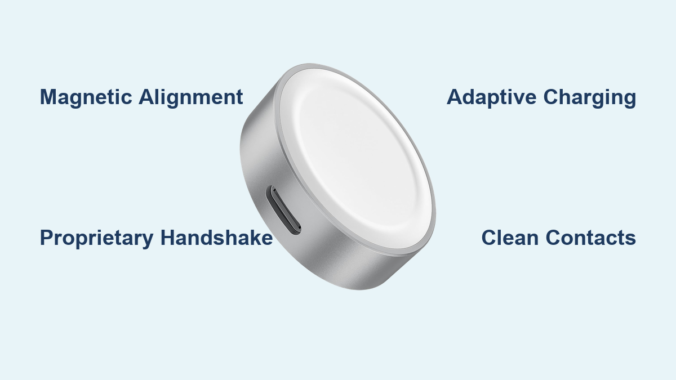
You set your Apple Watch on the smooth white magnetic charger, and it snaps into place with a quiet click. Charging begins instantly—no plugs, no struggle. But what makes this process so seamless? And why won’t any other smartwatch, even one with magnetic charging, work on the same puck?
The answer isn’t just magnetism—it’s a precision-engineered system combining physics, custom hardware, and digital communication. Unlike standard wireless chargers that follow the Qi protocol, Apple’s solution is built from the ground up to fit the unique constraints of the Apple Watch. It’s not merely how it charges, but why only Apple Watches can.
In this guide, we’ll dive into the science and strategy behind the Apple Watch magnetic charger. You’ll discover how magnetic alignment ensures perfect coil positioning, why proprietary communication blocks third-party devices, and what makes this system faster and safer than generic alternatives.
Magnetic Induction: The Science Behind Wireless Power
At its core, the Apple Watch charger uses magnetic induction, a method of transferring energy without wires. This involves two coils—one in the charger, one inside the watch—that exchange power through an invisible magnetic field.
How Energy Transfers Wirelessly
When you plug in the charger, electricity flows through a tightly wound copper coil in the puck. This creates an oscillating magnetic field. When the Apple Watch is placed nearby, this field induces a current in the matching coil inside the watch, which then powers the battery.
But efficient transfer depends on precise alignment. Even a millimeter of misalignment can cause significant energy loss or prevent charging altogether. That’s where Apple’s design takes over.
Why Standard Qi Charging Wouldn’t Work
Qi wireless charging works well for smartphones because they have large, flat surfaces and room for bigger coils. The Apple Watch, however, is tiny and curved. A standard Qi coil is too large and inefficient for such a small target area.
So Apple developed a miniaturized, high-precision coil system—smaller and more focused than typical Qi coils. This allows for stronger coupling between the charger and watch, maximizing power transfer in a fraction of the space.
Magnets Do More Than Hold: Precision Alignment System
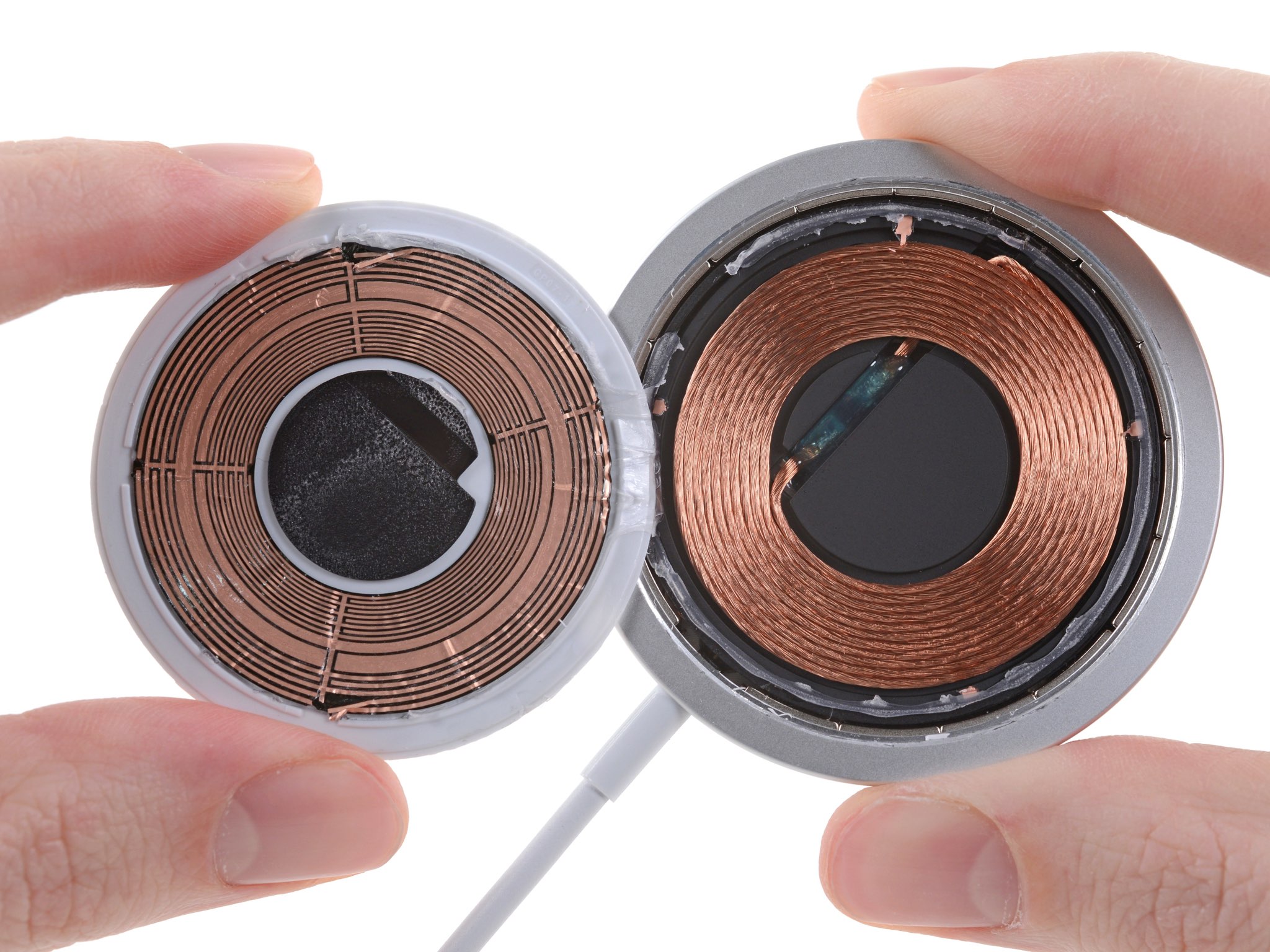
The satisfying snap when your Apple Watch attaches isn’t just for convenience—it’s critical for performance. The magnets aren’t just for attachment; they ensure perfect coil alignment every time.
Self-Correcting Magnetic Fit
Inside the charging puck is a ring of magnets arranged with exact spacing and polarity. These align perfectly with a corresponding ring of magnets in the back of the Apple Watch. When brought close, the magnetic fields pull the watch into the ideal position—automatically correcting any tilt or offset.
This self-aligning feature is like a mechanical “key” that only fits one lock. It eliminates user error and ensures the coils are always face-to-face, maximizing efficiency.
Magnetic Polarity as a Security Check
Interestingly, the direction of the magnetic field matters. If the internal magnets in the watch become reversed—such as after exposure to a strong external field like an MRI machine—the watch may no longer snap on correctly or initiate charging.
This shows that magnetism isn’t just physical—it’s part of a hardware-level compatibility gate. Only devices with the correct magnetic signature can achieve proper alignment and begin charging.
Proprietary Communication: The Hidden Handshake
Even if another device could physically align with the charger, it still wouldn’t charge. That’s because Apple adds a digital authentication layer before sending power.
Device Recognition Before Power Delivery
Before any energy flows, the charger and watch exchange data through the same magnetic link used for power. Using modulated signals, they perform a silent handshake to verify:
- The device is a genuine Apple Watch
- The battery needs charging
- The correct voltage and current are required
- No foreign objects (like metal debris) are interfering
This communication happens in milliseconds, but it’s essential for safety and efficiency.
Why Third-Party Devices Can’t Charge
While Apple borrowed ideas from the Qi standard—like object detection and power negotiation—it uses its own proprietary signaling format. This means:
- Standard Qi chargers can’t “speak” to the Apple Watch
- Non-Apple watches lack the firmware to respond correctly
- Even clones with similar magnets fail the authentication check
Some MFi-certified (Made for iPhone/iPad) chargers do work because Apple licenses them and provides access to the correct protocols. But unapproved chargers often result in slow charging, overheating, or no charge at all.
Custom Charging Profile: Smarter, Safer Power Delivery
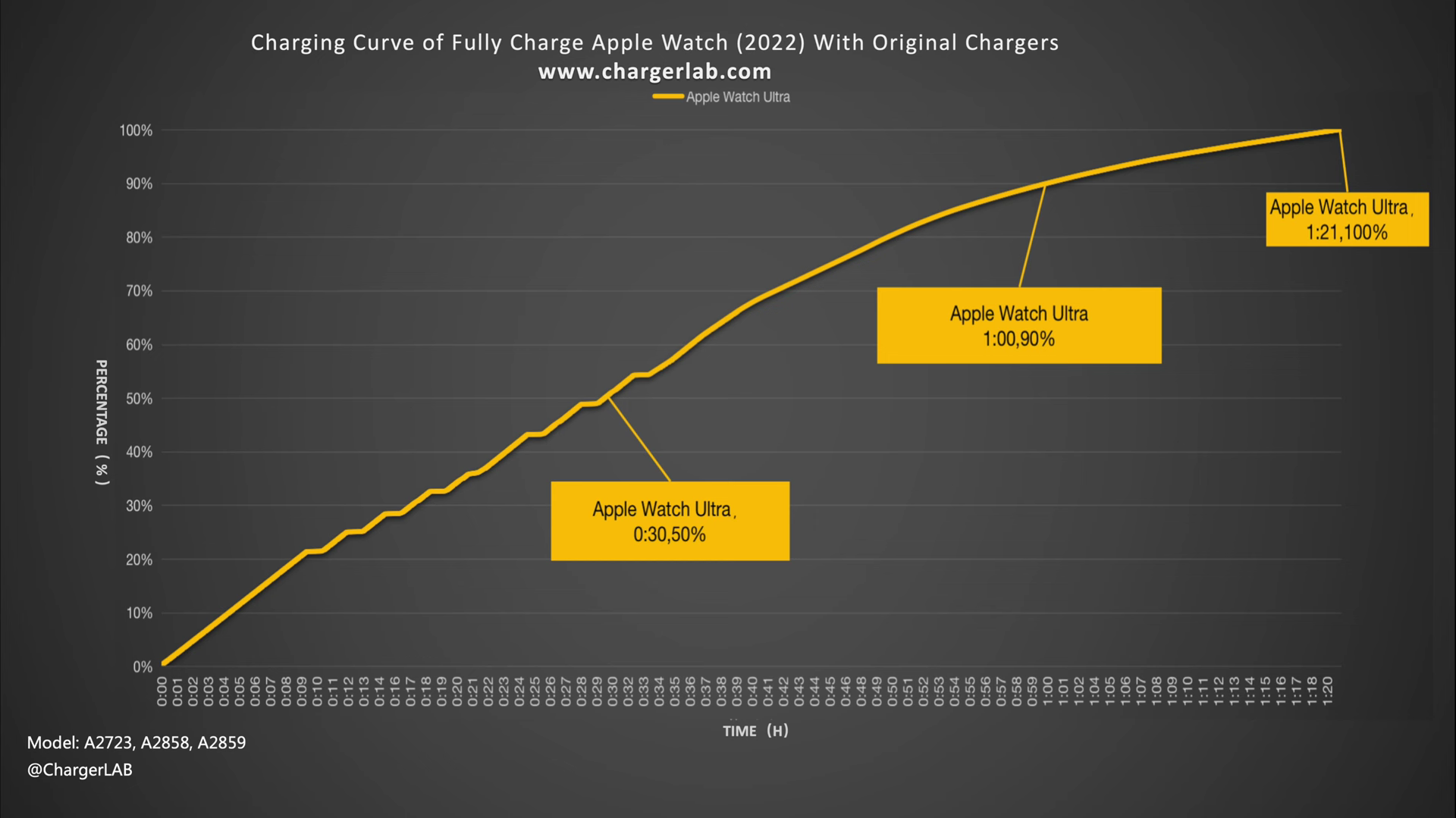
Apple doesn’t just send raw power—it adapts the charging process in real time to protect the battery and improve longevity.
Adaptive Charging Based on Conditions
The charger adjusts power output based on multiple factors:
- Battery level: Charging slows after 80% to reduce stress
- Temperature: If the watch gets too hot, charging pauses
- Usage: If you’re using the watch while charging, power delivery is optimized to avoid overheating
This intelligent control helps extend battery lifespan and prevents damage from overcharging or thermal stress.
Faster Than Standard Wireless Charging
Thanks to end-to-end optimization, the Apple Watch can go from 0% to 80% in about 90 minutes—impressive for its size. Generic Qi chargers couldn’t match this speed on such a small device due to alignment issues and less efficient power negotiation.
Physical Design: Built for Exclusivity
The charger’s sleek, curved shape isn’t just aesthetic—it’s functional engineering.
Contoured Fit for Maximum Contact
The puck’s surface mirrors the curvature of the Apple Watch back. This ensures full contact, reduces wobbling, and maintains the optimal distance between coils (typically less than 1 mm). Any gap reduces efficiency, so this close fit is crucial.
Why Other Watches Don’t Fit
Other smartwatches have different:
- Back curvatures
- Magnet layouts
- Coil positions
Even magnetic chargers from Samsung, Garmin, or Fitbit won’t align properly. It’s like trying to plug a USB-C cable into a Lightning port—similar idea, incompatible execution.
Why Apple Didn’t Use Standard Qi Charging
When the Apple Watch launched in 2015, Qi was designed for larger devices. It had loose alignment tolerances and larger coils, making it inefficient for a small, curved wearable.
Engineering Necessity Over Standardization
Apple needed a system that was:
- Compact enough to fit inside the watch
- Efficient enough to charge quickly
- Reliable enough for daily use
Off-the-shelf Qi solutions failed on all three counts. So Apple built its own—combining the best of wireless charging with custom innovations.
Apple’s Selective Use of Standards
It’s worth noting: Apple uses industry standards when they work. iPhones support Qi. AirPods charge on Qi pads. But for the Watch, engineering needs trumped compatibility.
This reflects Apple’s broader philosophy: adopt standards when practical, innovate when necessary.
Can Non-Apple Devices Charge on It? (Spoiler: No)
Despite attempts, no non-Apple device can reliably or safely charge on the Apple Watch magnetic charger.
Risks of Using Unapproved Chargers
Third-party magnetic chargers often:
- Lack proper authentication
- Use lower-quality coils
- Deliver unstable power
- Overheat or damage the watch
Using them can lead to:
- Battery degradation
- Charging interruptions
- Failed software updates
- Voided warranty
Apple recommends only using Apple-branded or MFi-certified accessories to avoid these risks.
Future of Apple Watch Charging: What’s Next?
Apple has used magnetic inductive charging since the first Watch. But change may be coming.
Could USB-C Replace It?
With Apple switching to USB-C across iPhones and iPads, some expect the Watch to follow. However, the current magnetic system offers faster, more convenient charging than a tiny port might provide. Plugging in a small cable daily could be frustrating and wear out over time.
Is True Wireless Charging Possible?
Future tech like resonant charging or beamforming could allow spatial charging—where you just place the watch anywhere on a pad. But current efficiency and safety concerns make this unlikely for now.
For the foreseeable future, Apple’s magnetic system remains the best balance of speed, safety, and user experience.
Troubleshooting Common Charging Issues
Even the best system can fail. Here’s how to fix common problems.
Watch Won’t Snap On
- Clean the back of the watch and charger—dirt or metal debris can block magnets
- Check for magnet damage—if the watch feels loose, internal magnets may be compromised
- Avoid strong magnetic fields—MRI machines or speakers can reverse polarity
No Charging Despite Connection
- Try a different cable and adapter—use Apple 5W or higher
- Restart the watch—software glitches can block charging
- Check for moisture—water in the charging port can interrupt power
Overheating During Charging
- Remove the watch and let it cool
- Avoid charging in hot environments (e.g., direct sunlight)
- Use only certified accessories to prevent power surges
Maximizing Charger Lifespan and Safety
Your charger is durable—but care extends its life.
Best Practices
- Unplug when not in use to reduce coil stress
- Avoid sharp cable bends—they damage internal wires
- Keep it dry—moisture harms circuitry
- Store flat—prevents magnet weakening over time
When to Replace
Replace the charger if you notice:
- Frayed or cracked cable
- Burning smell or discoloration
- Intermittent charging
- Weak magnetic hold
Apple offers replacements through support, and MFi-certified options are safe alternatives.
Summary: Why Apple’s Charger Works So Well
The Apple Watch magnetic charger isn’t magic—it’s precision engineering. It combines:
- Magnetic alignment for perfect coil positioning
- Custom coils optimized for small devices
- Proprietary communication to authenticate devices
- Adaptive charging for battery health
- Exclusive physical design to block incompatibility
Every detail—from magnet polarity to firmware handshake—is designed for fast, safe, and exclusive charging.
So the next time your watch clicks into place and starts charging instantly, remember: it’s not just magnets. It’s Apple’s ecosystem at work.
Final Tip: For best results, use an Apple or MFi-certified charger, keep contacts clean, and avoid strong magnetic fields. Your watch—and battery—will last longer because of it.
Leave a Reply