You’re standing there with your Apple Watch, wrist raised, waiting for it to wake up—but it’s stuck at the lock screen. Your iPhone, the one it was paired with, is gone. Maybe it broke, got sold, or was lost. Now you can’t access your watch, and every time you try to set it up, it asks for an Apple ID you can’t remember or a phone you no longer have. Frustrating? Absolutely. But here’s the truth: you can unlock your Apple Watch without the original paired iPhone—if you know the right steps.
The real barrier isn’t your passcode. It’s Activation Lock, Apple’s built-in anti-theft feature that ties your watch to your Apple ID. Even if you erase the device, it won’t let you use it again until you enter the original Apple ID and password. This guide cuts through the confusion and gives you clear, step-by-step solutions to regain access—whether you’re the original owner, bought it secondhand, or inherited a work device.
No scams. No fake tools. Just Apple-approved methods that actually work.
Erase Apple Watch Without iPhone Access
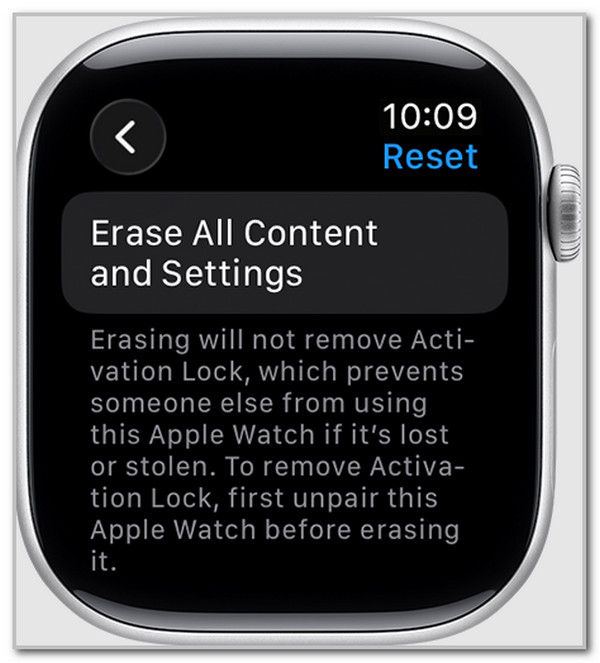
If you still have the watch and can unlock it with your passcode, your first step is to wipe it clean—no iPhone required.
Perform a Full Factory Reset
You can erase all data directly from the Apple Watch:
- Open Settings on the watch.
- Tap General > Reset.
- Select Erase All Content and Settings.
- Enter your passcode when prompted.
- For cellular models, choose:
– Keep Cellular Plan (if you plan to pair with a new iPhone)
– Remove Cellular Plan (if giving it away or selling)
The watch will restart and enter setup mode.
⚠️ Warning: This deletes everything—apps, health data, messages, and Apple Pay cards. There’s no automatic backup.
Bypass Activation Lock With Apple ID
After erasing, the watch will ask for the Apple ID and password used during the original setup. This is Activation Lock in action.
Restore Access If You Know the Credentials
If you remember your Apple ID:
– Enter it during setup.
– The system verifies your identity.
– Activation Lock disables automatically.
– You can now pair the watch with any iPhone running iOS 13 or later.
✅ Good news: You don’t need the original phone. A new iPhone works just fine.
Recover Forgotten Apple ID or Password
Can’t remember your login? Don’t panic—Apple offers secure recovery options.
Use Apple’s iForgot Service
Go to iforgot.apple.com from any web browser.
Steps:
1. Enter an email or phone number linked to your Apple ID.
2. Choose Reset Password.
3. Verify your identity via:
– Trusted device (like an iPad or Mac)
– Trusted phone number (SMS or automated call)
– Recovery key (if Two-Factor Authentication is enabled)
If none of these work, Apple starts Account Recovery, which may take 24 hours to several days. You’ll receive an email or call once access is restored.
✅ Pro Tip: Check appleid.apple.com from a browser to see if you’re already logged in on another device.
Remove Activation Lock Without iPhone or Apple ID
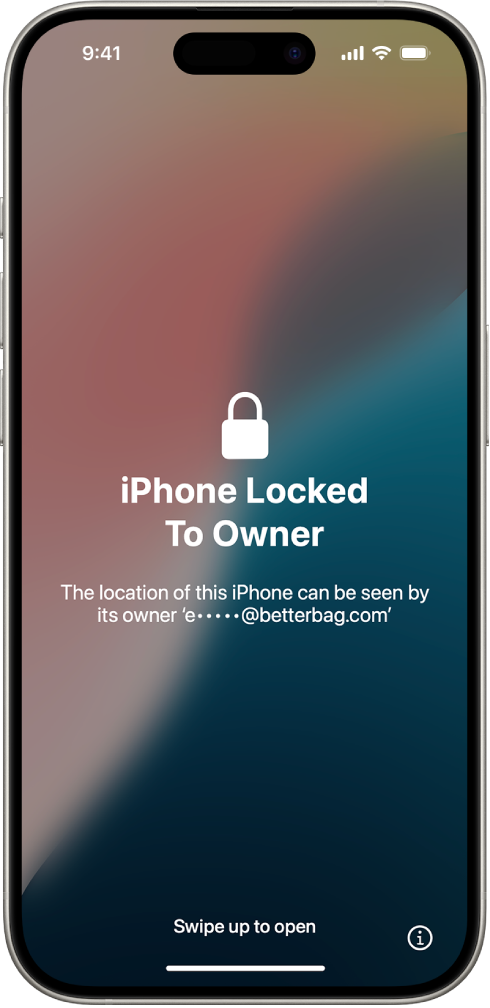
This is the toughest scenario: you have the watch, but no access to the original Apple ID. Common with secondhand purchases or ex-employee devices.
Forget third-party “unlock” websites—they’re scams. The only real solution is Apple’s official removal process.
Submit Proof of Purchase to Apple
Apple can remove Activation Lock remotely—if you prove you own the device.
Step 1: Start the Request
Visit Apple’s official support portal:
https://getsupport.apple.com
Choose:
– Product: Apple Watch
– Issue: Activation Lock
– Follow the prompts
Step 2: Upload Required Documents
Apple typically asks for:
| Document | Requirements |
|---|---|
| Original Receipt | Must show: • Purchase date • Seller name (e.g., Apple, Best Buy) • Serial number or IMEI |
| Photo ID | Driver’s license or passport matching the buyer’s name |
| Serial Number | Found on the back of the watch, original box, or in Settings > General > About (if accessible) |
🚫 Avoid: Credit card statements or order confirmations—they’re rarely accepted unless they include the serial number.
Step 3: Wait for Approval
- Review takes 3–7 business days
- If approved, Apple disables Activation Lock remotely
- You’ll get an email confirmation
Once unlocked, set up the watch with your Apple ID.
✅ Real-World Success: Users with receipts from Apple Retail or authorized dealers report high approval rates.
Visit Apple Store for Immediate Assistance
Need faster results? Go in person.
What to Bring
- The Apple Watch
- Proof of purchase (digital or printed)
- Government-issued photo ID
- Any additional ownership documents (e.g., gift note, company invoice)
What Happens at the Store
An Apple Specialist will:
1. Match your ID to the receipt
2. Check the serial number on the device
3. Submit the Activation Lock removal request
4. Help you set up the watch on the spot
📍 Benefit: Many cases are resolved the same day.
❗ Call ahead: Not all Apple Stores offer this service. Confirm availability before visiting.
Handle Employer-Issued Apple Watches
If your company provided the watch, it’s likely tied to a managed Apple ID, not your personal one.
Why It’s Still Locked
Even after leaving the company, Activation Lock remains active unless the IT admin removes it from Find My.
Solution: Contact IT
Ask them to:
1. Go to icloud.com/find
2. Sign in with the organization’s Apple ID
3. Select All Devices
4. Find the Apple Watch and click Remove from Account
Once removed, the watch can be set up normally.
What If the Admin Is Gone?
If no one can access the account:
1. Contact Apple Business Support
2. Submit:
– Proof the device was company-issued
– A signed letter on company letterhead transferring ownership
– Your ID and the serial number
Apple may intervene if documentation is solid.
💡 Expert Note: Always use your personal Apple ID when setting up a watch. Never pair with a shared or work account unless it’s managed via MDM.
Avoid Buying a Locked Apple Watch
Many secondhand Apple Watches are Activation Locked—making them nearly useless.
Verify Before You Buy
Ask the seller to:
1. Open Settings > [Your Name] > Find My > Find My Apple Watch
2. Turn it off
3. Unpair the watch via the Apple Watch app on their iPhone
During your first setup:
– If it asks for an Apple ID, don’t buy it.
– The device should show “Activation Lock: Off”.
Already Bought a Locked Watch?
Don’t waste money on “unlock” services. They don’t work and may brick your device.
Instead:
– Try to return it
– Or submit proof of purchase to Apple as the new owner
🚫 Red Flag: Extremely cheap Apple Watches on eBay, Craigslist, or Facebook are often stolen or locked.
Skip Third-Party Unlock Tools
Many websites promise to bypass Activation Lock using “DNS spoofing” or “server tricks.”
Why They Fail
- DNS methods never worked reliably on Apple Watch
- Modern devices use secure boot chains and real-time server checks
- Apple continuously patches vulnerabilities
Risks of Using Scam Tools
- Bricked device (permanent lock)
- Malware infection
- Stolen personal data
- Wasted money ($50–$200)
❌ Apple’s Official Stance: There is no way to bypass Activation Lock without the original credentials or Apple’s approval.
Know the Hardware Limits
Understanding your device prevents costly mistakes.
No Physical Reset Button
The Apple Watch has:
– No reset hole
– No recovery mode like iPhone
What the Tiny Holes Are For
Those small openings are:
– Microphones
– Speakers
– Water depth sensors (on Ultra models)
⚠️ Never insert pins or tools—you risk damaging internal sensors.
Manage Cellular After Reset
When erasing:
– Choose Keep or Remove cellular plan
– To cancel service, contact your carrier and provide the IMEI
Prevent Future Lockouts
Avoid this headache with smart habits.
Always Unpair Properly
Before selling or replacing your iPhone:
1. Open Apple Watch app
2. Tap My Watch > All Watches > (i)
3. Tap Unpair Apple Watch
4. Enter Apple ID password
This automatically disables Activation Lock.
Use Your Personal Apple ID
Never set up a watch with:
– A spouse’s ID
– A work or school account (unless managed)
– A family-shared ID
Use your own, with Two-Factor Authentication enabled.
Save Proof of Purchase
Keep digital copies of:
– Receipts
– Serial numbers
– Original box
Store them in iCloud Drive or email them to yourself.
Enable Two-Factor Authentication
Go to:
– Settings > [Your Name] > Password & Security > Turn On Two-Factor Authentication
It makes recovery faster and safer.
Summary: Unlocking Paths by Situation
| Scenario | Solution | Time Required |
|---|---|---|
| Lost iPhone, know Apple ID | Factory reset, sign in | 10 minutes |
| Forgot Apple ID | Use iforgot.apple.com | 5–60 minutes |
| Secondhand watch, locked | Submit proof to Apple | 3–7 days |
| Corporate device, ex-employee | IT removes from Find My | 1 day (if possible) |
| No access to account | Apple Store with receipt | Same day (if approved) |
The only reliable way to unlock an Apple Watch without the paired phone is through Apple’s official channels. Whether you reset it yourself or prove ownership, security comes first—and for good reason. While it may feel inconvenient, Activation Lock protects millions from theft and fraud.
Stay patient, gather your documents, and use this guide to get your Apple Watch working again—safely and permanently.