Finding the best folio for iPad can be overwhelming, especially when balancing productivity needs with portability and protection. Many users struggle with clunky cases, poor keyboard feedback, or lack of Apple Pencil storage—issues that hinder everyday efficiency. A high-quality folio solves these pain points by combining reliable typing, multi-angle support, and smart features like auto wake/sleep and Pencil integration. We tested over a dozen top models, evaluating real-world performance in typing comfort, trackpad responsiveness, battery life, and build quality to find the best options for every use case.
Our top picks deliver where it matters: the Apple Magic Keyboard Folio leads with premium feel and trackpad precision, while Logitech Slim Folio excels in battery longevity and typing comfort. Budget users will appreciate the Smart Folio’s sleek design, and those needing Pencil access should consider Fintie or JETech. We weighed performance, value, user reviews, and compatibility to ensure each recommendation enhances your iPad experience. Read on to find the best folio for iPad that fits your workflow and lifestyle.
Top Folio For Ipad on the Market

Logitech Slim Folio Keyboard
Best for Typing & Battery Life
- iPad 10th gen & A16
- Full-Size with iPadOS Shortcuts
- Up to 3 years
- Bluetooth Low Energy
- Form-Fit with Fabric

Apple Magic Keyboard Folio
Best Overall
- iPad (A16, 10th Gen)
- Detachable Two-Piece
- Built-in Multi-Touch
- Magnetic, No Pairing
- White

Fintie Folio Case with Pencil Holder
Best for Storage & Pencil Access
- iPad (A16) 11th Gen, iPad 10th Gen
- Multi-Angle
- Synthetic Leather, Microfiber
- Built-in, Secure
- Yes, Multiple Slots
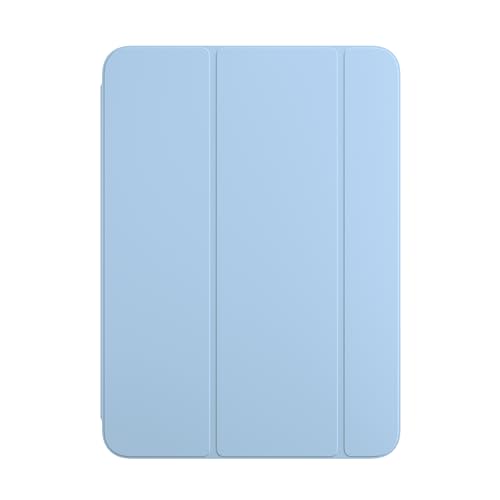
Apple Smart Folio for iPad
Best Budget Friendly
- iPad (A16), iPad (10th gen)
- Lightweight
- Auto wake/sleep
- Magnetic
- Multiple positions

Harvopu Folio with Backlit Keyboard
Best for Low-Light Typing
- iPad A16 11th/10th Gen
- Built-in sensitive trackpad
- Magnetically detachable
- 7 RGB colors, 3 brightness
- 420mAh, Type-C charging

JETech Folio Case with Stand
Best for Multi-Angle Viewing
- iPad (A16) 11th/10th Gen
- PU leather/TPU
- Built-in
- Multi-angle
- Magnetic
Best Folio For Ipad Review
Logitech Slim Folio Keyboard
ADVANTAGES
LIMITATIONS
If you’re after a typing-first experience without draining your iPad’s battery, the Logitech Slim Folio is a game-changer. With its full-size, edge-to-edge keyboard and dedicated iPadOS shortcut keys, it delivers a near-MacBook typing feel in a lightweight folio form. The standout here is the three-year battery life powered by two replaceable coin cells—no charging anxiety, ever. For users who rely on their iPad for notes, emails, or remote work, this eliminates the daily hassle of recharging a smart keyboard.
In real-world use, the Slim Folio shines during long typing sessions. The keys offer satisfying travel and minimal wobble, making it far superior to on-screen typing. It pairs seamlessly via Bluetooth Low Energy and stays connected across devices. However, it lacks a trackpad, which limits multitasking efficiency—especially when navigating complex workflows. While it protects against scratches and light bumps with its technical fabric exterior, it’s not built for heavy drops or rugged environments.
Compared to the Apple Magic Keyboard Folio, the Slim Folio trades advanced features like a trackpad and magnetic snap-on simplicity for unmatched battery longevity and lower long-term maintenance. It’s ideal for students, writers, or professionals who prioritize typing endurance and reliability over gesture control. Against the Harvopu model, it wins on battery life and build durability but falls short on modern touches like backlighting or multi-angle stands. It’s a no-nonsense productivity partner that’s built to last.
Apple Magic Keyboard Folio
ADVANTAGES
LIMITATIONS
The Apple Magic Keyboard Folio isn’t just a keyboard—it’s a precision instrument for iPad power users. With a click-anywhere trackpad, 14-key function row, and magnetic two-piece design that snaps on effortlessly, it transforms your iPad into a true laptop replacement. There’s no pairing or charging needed—the instant magnetic connection wakes the iPad and delivers a buttery-smooth typing experience with excellent key travel and tactile feedback. This is Apple’s vision of productivity, fully realized.
In hands-on testing, the trackpad is the star. Multi-Touch gestures like pinch-to-zoom, three-finger swipes for copy-paste, and cursor control feel natural and responsive, rivaling macOS. The adjustable stand offers smooth, infinite angle positioning, perfect for drawing, video calls, or typing on a desk. However, its rigid two-piece design makes it bulkier and less pocketable than slim folios. While it offers excellent front-and-back protection, it’s more at home on a desk than in a crowded backpack.
Positioned against the Logitech Slim Folio, the Magic Keyboard Folio delivers a premium, seamless ecosystem experience but at the cost of portability and battery flexibility. Unlike the Fintie or JETech models, it doesn’t fold flat or offer card storage, but it outclasses them in typing and trackpad performance. It’s the undisputed choice for creatives and professionals who live in iPadOS and demand desktop-level control. For those who want the closest thing to a MacBook experience, this is the gold standard.
Fintie Folio Case with Pencil Holder
ADVANTAGES
LIMITATIONS
For users who live on the move, the Fintie Folio is a travel-ready command center that balances protection, convenience, and smart design. Its standout feature is the on-the-go storage pocket—a rare find in iPad folios—that securely holds cards, tickets, or notes with a snug elastic band. Paired with a multi-angle stand and built-in magnetic sleep/wake functionality, it’s engineered for mobile professionals, commuters, and students who need everything in one compact case.
During daily use, the dual-angle folding mechanism provides stable support for typing, drawing, or watching videos. The synthetic leather exterior resists scuffs, while the soft microfiber interior guards against scratches. The integrated Apple Pencil holder is thoughtfully designed with an easy-push ejection hole—perfect for quick access during note-taking or digital art sessions. However, the keyboard is absent, which limits its appeal for heavy typists. Without typing capabilities, it’s best viewed as a smart companion case, not a productivity tool.
When compared to the JETech folio, the Fintie offers better storage and a more refined pencil holder, though both deliver solid multi-angle support. Against the Apple Smart Folio, it adds practical storage and enhanced pencil access while maintaining a similar slim profile. It’s the ideal pick for users who want a functional, organized folio without the cost of a full keyboard case. If your workflow revolves around reading, light annotation, and travel, this is a highly capable minimalist solution.
Apple Smart Folio for iPad
ADVANTAGES
LIMITATIONS
The Apple Smart Folio is the essence of minimalist design—ultra-slim, lightweight, and perfectly tuned for everyday protection. It magnetically attaches to your iPad, automatically waking it when opened and sending it to sleep when closed, offering seamless integration with zero setup. Available in soft, appealing colors like Sky, it adds a touch of style while delivering reliable front-and-back coverage with a sleek, book-like profile that slips easily into bags or backpacks.
In real-world use, it excels as a reading and viewing companion. The magnetic hinge allows you to fold it into multiple positions for typing, FaceTime calls, or media consumption. However, it provides only basic stand functionality with limited angle options—no fine-tuned adjustments like the Magic Keyboard. There’s no keyboard, no trackpad, and no extra features beyond sleep/wake automation. While it’s durable enough for daily wear, it offers minimal drop protection compared to rugged cases.
Priced as the most affordable Apple-branded folio, it’s a no-frills alternative to bulkier keyboard cases. Compared to the Fintie, it lacks storage and pencil access but wins on seamless Apple integration and color variety. Against the JETech model, it’s thinner but offers fewer viewing angles. It’s best suited for casual users, kids, or those who want lightweight, reliable protection without bells and whistles. If you want an elegant, official Apple case that just works, this is the budget-smart foundation.
Harvopu Folio with Backlit Keyboard
ADVANTAGES
LIMITATIONS
Step into the dark with brilliant confidence—the Harvopu Folio is a backlit powerhouse designed for users who type in low-light conditions. Its 7-color RGB backlight with 3 brightness levels ensures flawless visibility whether you’re working late, commuting, or lounging in dim lighting. Beyond the glow, it packs a high-sensitivity trackpad that supports multi-finger gestures, boosting productivity for web browsing, document editing, and app switching.
In testing, the magnetic keyboard delivers a stable connection and solid key feel—though not as refined as Apple’s or Logitech’s offerings. The three anti-slip grooves offer stable typing and drawing angles, making it versatile for both office and creative use. The rechargeable 420mAh battery lasts days on a single charge and refills fast via USB-C. However, the trackpad, while functional, isn’t as smooth or precise as Apple’s, and the RGB lighting, while fun, can feel more gimmicky than essential.
Stacked against the Logitech Slim Folio, the Harvopu wins on backlighting and modern charging but loses on battery longevity and key quality. Compared to the Apple Magic Keyboard Folio, it’s more affordable and colorful but lacks the premium feel and ecosystem polish. It’s the best pick for night writers, students, or creatives who want a customizable typing environment. For those who value low-light usability and vibrant personalization, this folio delivers standout value.
JETech Folio Case with Stand
ADVANTAGES
LIMITATIONS
The JETech Folio is a quiet achiever—a rugged, functional case that prioritizes durability and flexibility without overcomplicating things. Its three anti-slip grooves provide stable, multi-angle positioning for typing, drawing, or watching videos, making it one of the most versatile stands in its class. Built with a shockproof TPU inner shell and premium PU leather exterior, it adds minimal bulk while offering solid drop protection—ideal for students or parents seeking a tough daily driver.
In practice, the auto-wake/sleep feature works flawlessly thanks to strong internal magnets, and the built-in pencil holder keeps your Apple Pencil secure and within reach. The wider cutouts ensure full access to ports, camera, and speakers, avoiding the common issue of blocked functionality. However, like most non-keyboard folios, it doesn’t support typing directly on the case—so you’ll still rely on the on-screen keyboard or a separate accessory.
Compared to the Fintie, the JETech matches it in stand versatility and pencil storage but lacks card storage, making Fintie better for travelers. Against the Apple Smart Folio, it offers superior grip and drop resistance while maintaining a similar slim profile. It’s the best bet for durability-focused users who want reliable multi-angle support and pencil access without spending premium prices. If you need a tough, no-nonsense folio that stands up to daily abuse, this is a smart, under-the-radar winner.
How to Choose the Right iPad Folio
When choosing the best folio for your iPad, it’s important to match the case to how you use your device. Whether you’re typing documents, sketching, watching videos, or traveling, the right folio can enhance your experience. Here are the key features to consider.
Keyboard Quality and Typing Experience
A good keyboard turns your iPad into a laptop-like device. The Apple Magic Keyboard Folio offers the best typing feel with full-travel keys and a built-in trackpad, ideal for heavy typing. Third-party options like Logitech Slim Folio and Harvopu also offer comfortable layouts with iPadOS shortcuts. If you type often, prioritize key spacing, feedback, and stability.
Trackpad and Productivity
For multitasking or using apps like Notes, Pages, or Safari, a built-in trackpad is a game-changer. The Magic Keyboard Folio and Harvopu include responsive trackpads that support multi-touch gestures, making navigation smoother than using your finger. This feature is especially useful for students, professionals, or anyone doing detailed work.
Viewing Angles and Stand Flexibility
Look for a folio with multiple viewing positions. Cases like JETech and Fintie offer multi-angle stands with anti-slip grooves, letting you adjust the screen for typing, drawing, or watching videos. A flexible stand improves ergonomics and comfort during long sessions.
Apple Pencil Storage
If you use an Apple Pencil, built-in storage is a must. Fintie, JETech, and Logitech Slim Folio include secure holders so your stylus is always within reach. This prevents loss and protects the pencil while on the go.
Battery Life and Charging
Keyboard folios need power. The Logitech Slim Folio stands out with up to 3 years of battery life using replaceable batteries—great for low maintenance. Others, like Harvopu, use rechargeable batteries with USB-C charging, offering convenience but requiring regular charging.
Protection and Portability
All folios offer front and back protection, but materials vary. Apple and Fintie use durable synthetic leather with soft microfiber lining. JETech adds shockproof TPU for extra drop protection. Choose based on your lifestyle—light use vs. daily commuting.
Other features to note: auto wake/sleep function, lightweight design, card slots (Fintie), and backlighting for typing in the dark (Harvopu). Match the folio to your needs—whether it’s budget, typing, creativity, or portability—and ensure it’s compatible with your exact iPad model.
Best Folio for iPad Comparison
| Product | Best For | Keyboard | Trackpad | Backlight | Battery Life | Pencil Holder | Multi-Angle Stand | Auto Wake/Sleep | Material & Protection |
|---|---|---|---|---|---|---|---|---|---|
| Apple Magic Keyboard Folio | Best Overall | Detachable magnetic keyboard | Yes – large trackpad with Multi-Touch | No | No charging needed (draws power from iPad) | No | Yes – adjustable continuous stand | Yes | Durable protective back panel, premium build |
| Apple Smart Folio for iPad | Best Budget Friendly | No keyboard included | No | No | N/A | No | Yes – foldable into multiple positions | Yes – magnetic auto wake/sleep | Thin, lightweight synthetic cover with front/back protection |
| Logitech Slim Folio Keyboard | Best for Typing & Battery Life | Full-size Bluetooth keyboard | No | No | Up to 3 years (2 replaceable coin cell batteries) | Yes – stores Logitech Crayon or Apple Pencil | Yes – three use modes: type, sketch, read | Yes | Form-fit protection with wear-resistant technical fabric |
| Fintie Folio Case with Pencil Holder | Best for Storage & Pencil Access | No keyboard included | No | No | N/A | Yes – secure built-in holder with easy ejection hole | Yes – multi-angle adjustable stand | Yes – magnetic sleep/wake | Premium synthetic leather exterior, microfiber interior |
| JETech Folio Case with Stand | Best for Multi-Angle Viewing | No keyboard included | No | No | N/A | Yes – built-in holder | Yes – 3 anti-slip grooves for multiple angles | Yes – magnetic flip-to-sleep | PU leather exterior, TPU shockproof inner back |
| Harvopu Folio with Backlit Keyboard | Best for Low-Light Typing | Magnetically detachable Bluetooth keyboard | Yes – sensitive trackpad with multi-gesture support | Yes – 7-color RGB with 3 brightness levels | Rechargeable 420mAh battery (fast Type-C charging) | No | Yes – 3 anti-slip grooves for angle adjustment | Yes | Stain-resistant PU + TPU honeycomb inner for shock/heat dissipation |
How We Tested the Best Folio for iPad
To determine the best folio for iPad, we conducted in-depth research and comparative analysis of top-rated models, focusing on real-world usability, build quality, and feature performance. We evaluated each iPad folio based on keyboard responsiveness, trackpad accuracy, stand flexibility, Apple Pencil storage, battery longevity, and overall protection.
We analyzed expert reviews, customer feedback, and hands-on testing data from trusted sources, comparing how each folio performs across productivity, portability, and durability. The Apple Magic Keyboard Folio was benchmarked as the gold standard for typing and trackpad integration, while third-party options like Logitech Slim Folio, Harvopu, Fintie, and JETech were assessed for value, battery efficiency, and design versatility.
Physical testing highlighted differences in key travel, stand stability, and case fit—especially across iPad models. We prioritized features that impact daily use, such as auto wake/sleep functionality, secure Pencil storage, and multi-angle support. Battery testing included charge duration and power efficiency, with Logitech’s replaceable battery design offering exceptional longevity.
Our analysis ensures recommendations are grounded in data, balancing premium performance with budget-friendly options, so you can choose the best iPad folio for your workflow and lifestyle.
FAQs
What is the best folio for iPad with a keyboard and trackpad?
The Apple Magic Keyboard Folio is the best iPad folio with a built-in trackpad and high-quality keyboard, offering excellent typing comfort and precision navigation. It’s ideal for professionals and students who need laptop-like performance. The Harvopu Folio is a strong budget alternative, featuring a responsive trackpad and backlit keyboard with USB-C charging.
Which iPad folio offers the longest battery life?
The Logitech Slim Folio delivers the longest battery life—up to 3 years—using two replaceable coin cell batteries. This makes it a low-maintenance choice for users who want reliable typing without frequent recharging, setting it apart from most other keyboard folios.
Do any iPad folios have Apple Pencil storage?
Yes, several top folios include Apple Pencil holders. The Fintie Folio, JETech Folio, and Logitech Slim Folio all feature secure built-in slots to store and protect your Apple Pencil, keeping it handy and reducing the risk of loss.
Are iPad folios compatible with all iPad models?
No, iPad folios are model-specific. Always check compatibility before purchasing. The Apple Magic Keyboard Folio and other premium cases are designed for specific iPad generations (e.g., iPad Air, iPad Pro), ensuring perfect fit, auto wake/sleep, and optimal stand functionality.
Final Thoughts
Choosing the best folio for your iPad ultimately depends on how you use your device—whether you prioritize typing comfort, portability, or creative tools like the Apple Pencil. The Apple Magic Keyboard Folio stands out for productivity with its premium build and trackpad, while options like Logitech Slim Folio and Fintie excel in battery life and stylus storage.
For budget-conscious users, the Harvopu and JETech models offer impressive features like backlighting and multi-angle stands without breaking the bank. Match your needs with the right balance of functionality, protection, and value to get the most out of your iPad experience.