
If you’re wondering how long your Apple Watch will stay useful, you’re asking the right question. Millions rely on their Apple Watch for fitness tracking, health monitoring, and seamless connectivity—but like all tech, it doesn’t last forever. The real issue isn’t just how long the device powers on, but how long it remains functional, secure, and compatible with your iPhone and apps.
Most Apple Watches deliver 5 to 6 years of full functionality, after which software support ends, battery life declines, and performance lags. While some early models still work after 8 to 10 years, they often run outdated software and struggle with modern tasks. In short: your Apple Watch may survive a decade, but it will likely thrive for only half that time.
In this guide, you’ll learn exactly what determines an Apple Watch’s lifespan, how to extend it, and when it’s time to upgrade—whether you own a Series 3 or the latest Ultra 3.
Software Support Defines Usable Lifespan
Apple’s software updates are the lifeline of your watch. Without new watchOS versions, your device becomes outdated fast.
How Many Years of watchOS Updates?
Apple supports most Apple Watch models with 5 to 6 years of major watchOS updates. After that, your watch stops receiving new features, security patches, and app compatibility—even if it still turns on.
For example, watchOS 26 (2025) only supports:
– Apple Watch Series 6 and newer
– SE (2nd generation and later)
– Ultra and Ultra 2
This means:
– Series 5 and older no longer get updates.
– SE (1st gen) is stuck on watchOS 10.
– Devices released in 2020 or earlier (except Series 6) are effectively obsolete.
What Happens When Updates Stop?
Once your model is dropped from support:
– New apps won’t install or update.
– Newer iPhones may not pair properly.
– You miss out on advanced health features like sleep apnea detection, temperature sensing, and improved ECG accuracy.
– Security risks increase without patches for vulnerabilities.
Most users upgrade not because their watch breaks—but because it can no longer keep up with daily needs.
2025 watchOS Compatibility Chart
| Model | Released | Supported in 2025? |
|---|---|---|
| Series 11 / Ultra 3 | 2025 | ✅ Yes |
| Series 10 / Ultra 2 | 2024 | ✅ Yes |
| Series 9 / Ultra | 2023 | ✅ Yes |
| Series 8 / SE (2nd gen) | 2022 | ✅ Yes |
| Series 7 | 2021 | ✅ Yes |
| Series 6 | 2020 | ✅ Yes |
| SE (1st gen) | 2020 | ❌ No |
| Series 5 | 2019 | ❌ No |
| Series 4 | 2018 | ❌ No |
| Series 3 | 2017 | ❌ No |
Limited security updates may continue, but core functionality erodes.
Battery Degradation: The #1 Reason for Replacement
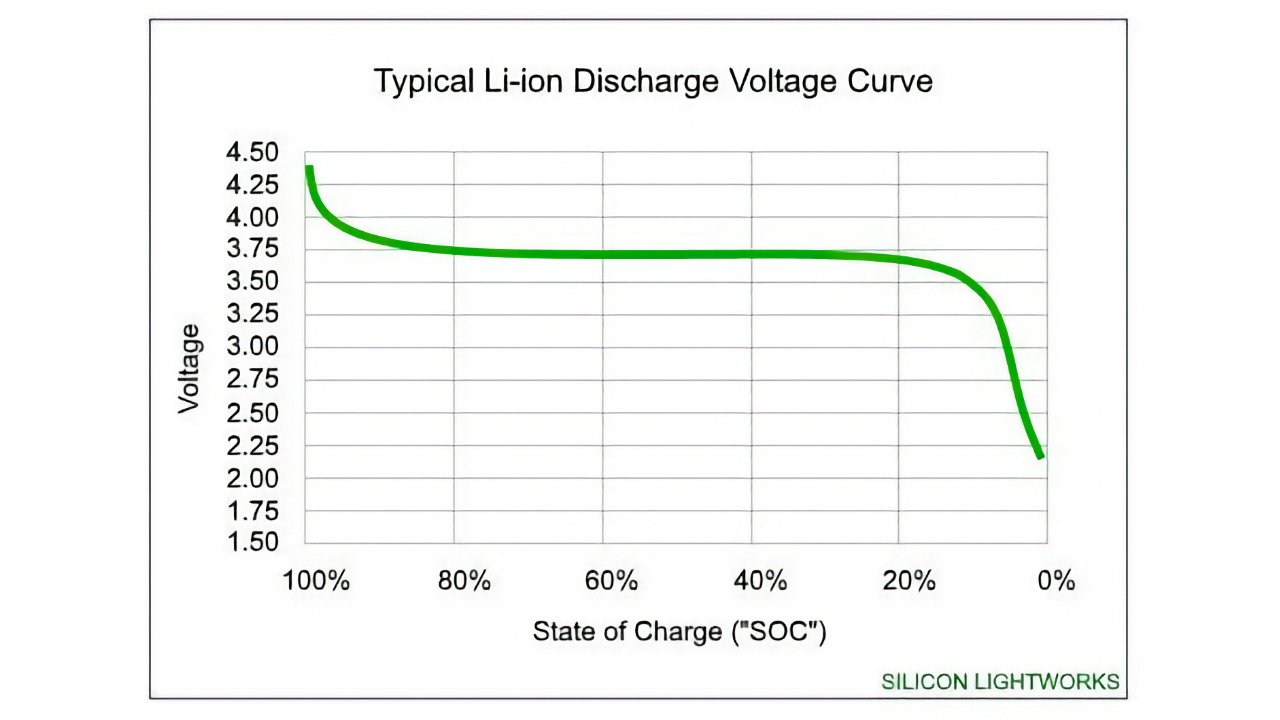
Even if your Apple Watch still runs, battery wear is the top reason people replace it. A watch that dies by 3 PM isn’t practical.
Battery Health Over Time
| Age | Battery Health | Real-World Impact |
|---|---|---|
| 0–2 years | 90–100% | Full day, even with heavy use |
| 2–3 years | 85–90% | May need charging by bedtime |
| 4–5 years | 75–85% | Midday charging becomes routine |
| 6–7 years | 60–75% | Fails to last a full day |
| 8–10 years | Below 60% | Frequent charging; unreliable |
Apple considers a battery worn when capacity drops below 80%. At that point, you might see:
– Unexpected shutdowns at 20–30% charge
– Slower performance during workouts
– Inability to power sensors consistently
Can You Replace the Battery?
Yes—but not as a simple swap. Apple replaces the entire unit for $69–$89 USD, giving you a refurbished watch with a new battery.
Important details:
– You must back up and restore your data.
– For older models (Series 3 and below), replacement cost often exceeds resale value.
– A battery service can add 1–3 more years of usable life.
Maximize Battery Longevity
Extend your battery’s life with these habits:
-
Enable Optimized Battery Charging
(Settings > Battery > Battery Health) — delays charging past 80% until you need it. -
Avoid extreme temperatures
Don’t leave it in hot cars (>95°F/35°C) or freezing conditions. -
Keep charge between 20% and 80%
Avoid full discharges or leaving it at 100% overnight. -
Use Apple-certified chargers
Third-party cables can damage the charging circuit. -
Unplug once fully charged
Prolonged charging stresses the battery. -
Store at 50% if unused
Ideal for backup or storage.
Physical Durability: Built to Last, But Not Indestructible
Apple Watches are tough, but daily wear takes a toll. Build quality varies by model.
Build Quality by Material

| Material | Models | Durability |
|---|---|---|
| Aluminum + Ion-X Glass | Series 1–9, SE | Lightweight but scratches easily |
| Stainless Steel + Sapphire | Edition, Ultra | Resists scratches and impacts |
| Titanium + Sapphire | Ultra, Ultra 2 | Rugged; ideal for outdoor use |
Aluminum models are more prone to cracked screens and scratches, while stainless steel and titanium offer premium resilience.
Common Physical Failures
Screen Damage
- Ion-X glass (standard models) is more fragile than sapphire.
- Dropping on concrete often cracks the display.
- Some users report screen popping off due to battery expansion (especially Series 8, SE).
Button and Crown Issues
- Saltwater exposure without rinsing leads to grit buildup.
- Result: sticky, grinding, or unresponsive Digital Crown.
- Fix: Rinse under fresh water after ocean or pool use.
Water Resistance Failure
All Apple Watches from Series 2 onward are WR50-rated (50 meters)—safe for swimming, surfing, and water parks.
But water resistance is not permanent. Seals degrade over time, especially with:
– Frequent saltwater exposure
– Chlorine in pools
– Lack of rinsing after swims
Water Use Best Practices
To protect water resistance:
– Turn on Water Lock before swimming.
– Rinse with fresh water after salt or chlorinated water.
– Dry thoroughly—shake out speaker, wipe crown.
– Avoid high-pressure water (e.g., jet skis, water slides).
⚠️ Never wear in saunas or hot tubs—heat damages seals and electronics.
Battery Life Per Charge: Newer Models Last Longer
Newer Apple Watches last longer thanks to better chips and Low Power Mode.
Apple Watch Ultra 3 (2025)
- Up to 42 hours normal use
- 72 hours in Low Power Mode
- Workout Mode: Up to 35 hours (reduced GPS + cellular)
- Charge speed: 15 minutes = 12 hours use
Apple Watch Series 11 (2025)
- 24 hours normal use
- 38 hours in Low Power Mode
- Workout Mode: 8 hours (full GPS + heart rate)
- Charge speed: 15 minutes = 8 hours use
Apple Watch SE 3 (2025)
- 18 hours normal use
- 32 hours in Low Power Mode
- Workout Mode: 7 hours (full GPS + heart rate)
- Charge speed: 8 minutes = 8 hours sleep tracking
- Charges 2x faster than SE 2
Real-world battery life depends on settings, cellular use, GPS, and temperature.
Signs It’s Time to Upgrade
Your watch might still turn on—but is it still useful?
1. Battery Dies Before Bed
If you’re charging midday regularly, and battery health is below 75%, it’s time.
2. No More Software Updates
If your model doesn’t support current watchOS, you’re missing security fixes and app compatibility.
3. Apps Won’t Install or Crash
Older watches struggle with modern apps, especially fitness and health tools.
4. Slow Performance
Laggy interface, delayed notifications, or unresponsive apps indicate hardware limits.
5. Physical Damage
Cracked screen, loose band, or unresponsive buttons reduce usability.
6. Missing Key Features
No temperature sensing, blood oxygen, or advanced sleep tracking? Newer models offer major health upgrades.
Best Models for Longevity

Want a watch that lasts? Choose one with long software support and rugged build.
Top Picks
Apple Watch Series 6 and Newer
- Why: Still supported in 2025 (watchOS 26)
- Best for: Users who want 5+ years of updates
Series 7, 8, 9
- Why: Faster charging, brighter screens, better sensors
- Best for: Balanced performance and value
Apple Watch Ultra 2
- Why: Titanium body, sapphire glass, 36-hour battery
- Best for: Outdoor enthusiasts and heavy users
SE (2nd Gen or Later)
- Why: Full software support, affordable
- Best for: Budget buyers who want longevity
💡 Pro Tip: Buy refurbished Series 7, 8, or 9—they offer excellent value and can easily last 5+ years with care.
Can an Apple Watch Last 10 Years?
Physically: Yes
Hardware is built to endure. Many Series 1–3 models still work after 8–10 years. Stainless steel and sapphire models are especially durable.
Functionally: No
After 6 years:
– No software updates
– Poor battery life
– App incompatibility
– Security risks
Reality check: Most watches deliver 5–6 years of full functionality, plus 1–2 years as a basic timepiece.
You can keep using an old Apple Watch as a dumb clock or step counter—but you’ll miss out on the features that make it smart.
How to Extend Your Apple Watch’s Life
Maximize longevity with these tips:
- Install watchOS updates promptly.
- Enable Low Power Mode during travel.
- Delete unused apps to free storage.
- Restart weekly to clear glitches.
- Use a screen protector and case.
- Rinse after swimming and dry thoroughly.
- Erase all data before passing it down.
An Apple Watch typically lasts 5 to 6 years with full functionality. While some units survive 8–10 years physically, they become outdated due to ended software support and battery wear. By following care best practices—especially battery management and software updates—you can stretch its prime usability to the maximum. When performance drops, apps stop working, or charging becomes a chore, it’s likely time for an upgrade. With proper care, your Apple Watch isn’t just a gadget—it’s a reliable companion for half a decade or more.




