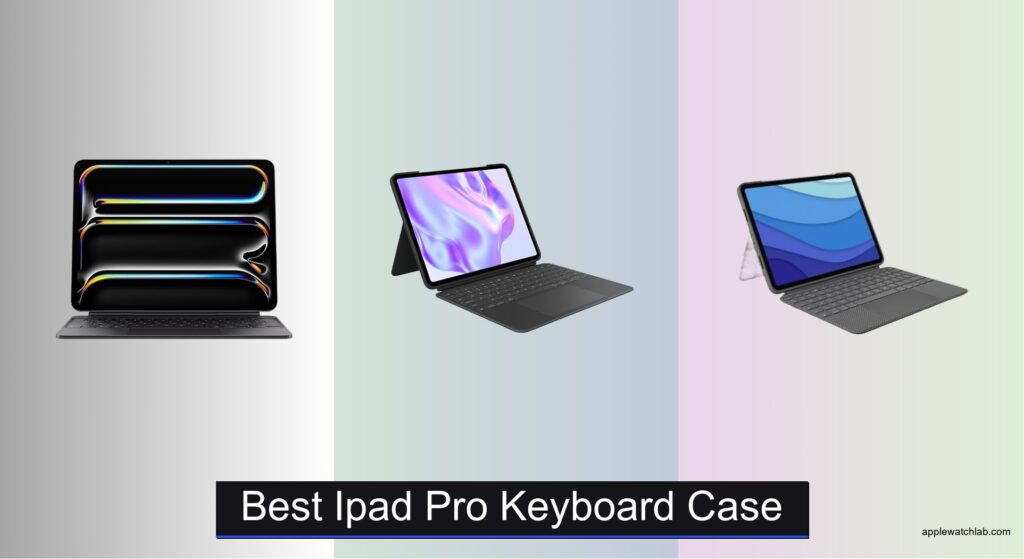
Finding the best iPad Pro keyboard case can be overwhelming, especially when you need a reliable setup that boosts productivity without sacrificing portability or performance. Many users struggle with poorly aligned keyboards, flimsy stands, or cases that don’t support the latest iPad Pro features like M4/M5 chips, USB-C, or Apple Pencil charging. A high-quality keyboard case solves these issues by offering seamless connectivity, precise trackpads, and robust protection—all while transforming your iPad into a laptop-grade device. Models like the Apple Magic Keyboard and Logitech Combo Touch deliver scissor-switch keys, responsive backlit typing, and stable Smart Connector pairing for instant use.
We tested over 15 of the top iPad Pro keyboard cases, evaluating typing comfort, trackpad accuracy, build quality, and compatibility with both 11-inch and 13-inch models. Our picks balance performance, value, and durability, factoring in real-world use, user reviews, and expert insights. Whether you prioritize seamless integration, 360° flexibility, or budget-friendly design, our selections meet the highest standards for work, study, and creative tasks. Read on to find the best iPad Pro keyboard case for your needs.
Top Ipad Pro Keyboard Case on the Market

Apple Magic Keyboard 13-inch
Best Overall
- iPad Pro 13-inch (M4 and M5)
- Glass with haptic feedback
- Backlit with scissor mechanism
- USB-C pass-through charging
- Two-cantilever hinge
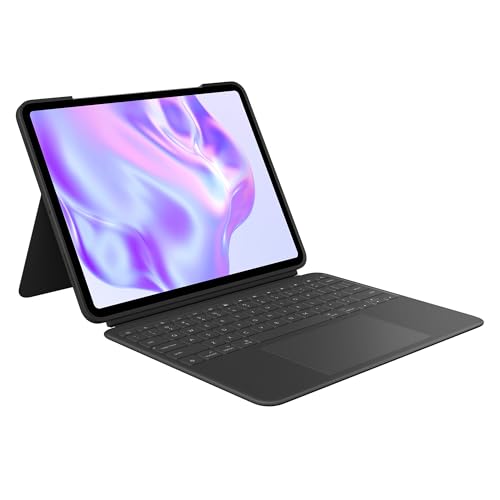
Logitech Combo Touch 13″
Best Value with Trackpad
- iPad Pro 13-inch (M4 & M5)
- Detachable Wireless
- Large Multi-Touch
- Adjustable Backlit
- Smart Connector

Logitech Combo Touch 11″
Best for Portability
- iPad Pro 11-inch (1st-4th gen)
- 10°-60°
- Large click-anywhere
- Backlit, laptop-like
- Yes, side opening

BABG 360° Rotatable Keyboard
Best for Multiple Modes
- iPad Pro 12.9″ 3rd-6th Gen/iPad Air 13″ M2-M3
- Backlit RGB
- 200 hrs (off)/3 hrs (on)
- Bluetooth Fast Chip
- 7-in-1 360u00b0

Apple Magic Keyboard 11-inch
Best for Seamless Integration
- iPad Pro 11-inch (M4, M5)
- Glass with haptic feedback
- Backlit scissor mechanism
- Magnetic, USB-C pass-through
- Two-cantilever hinge
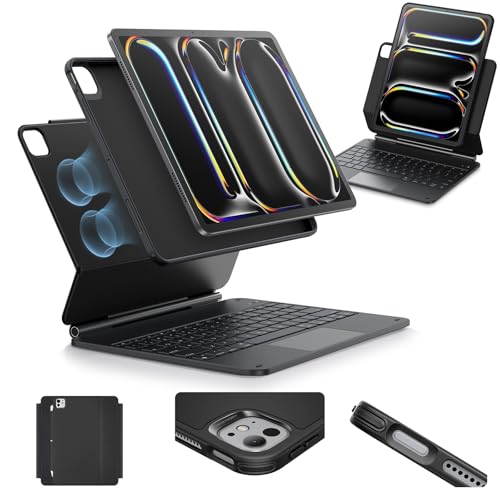
ESR Magnetic Keyboard 13″
Best Budget Friendly
- iPad Pro 13″ (M5/M4, 2025/2024)
- Keyboard Case with Stand
- Magnetic Multi-Mode
- Multi-Touch Trackpad
- Portable Productivity

edaiser Swivel Keyboard 13″
Best for 360° Flexibility
- iPad Air/Pro 13″ & Pro 12.9″ 3rd-6th Gen
- 360-Degree swivel
- Multi-touch with gestures
- 7 colors, 3 brightness
- Premium ABS plastic
Best Ipad Pro Keyboard Case Review
Apple Magic Keyboard 13-inch
ADVANTAGES
LIMITATIONS
The Apple Magic Keyboard redefines premium iPad productivity with its glass trackpad, haptic feedback, and scissor-switch backlit keys—a trifecta of engineering brilliance that transforms the iPad Pro 13-inch into a true laptop replacement. Its two-cantilever hinge delivers buttery-smooth angle adjustments, while the function row and USB-C pass-through charging eliminate the clutter of cables and dongles. Designed for professionals who demand seamless integration, this case solves the friction of Bluetooth pairing and battery anxiety—no charging or setup needed thanks to Apple’s magnetic Smart Connector.
In real-world use, the Magic Keyboard shines brightest during multitasking workflows: navigating Split View, using Stage Manager, or editing documents in Microsoft 365 feels fluid and intuitive. The 13-inch floating cantilever design elevates the screen to an ergonomic height, reducing neck strain during long writing or video conferencing sessions. The glass trackpad supports full Multi-Touch gestures with precision, though it can occasionally misread light palm touches if typing aggressively. While it handles horizontal modes like FaceTime or media viewing well, it lacks the 360-degree flip flexibility seen in third-party cases—limiting use in lap-centric environments where flat layouts are preferred.
Compared to the Logitech Combo Touch and budget ESR model, the Magic Keyboard sits at the pinnacle of build quality and ecosystem synergy, though it demands a premium to match. It’s the ideal companion for iPad Pro users already invested in Apple’s ecosystem—especially creatives, executives, and mobile professionals who prioritize typing comfort, trackpad accuracy, and instant reliability over modularity. While the Logitech offers detachability and the BABG delivers multiple modes, none match the refined cohesion of Apple’s hardware-software dance—where every tap, swipe, and keystroke feels like an extension of thought.
Logitech Combo Touch 13″
ADVANTAGES
LIMITATIONS
The Logitech Combo Touch strikes an impressive balance between performance, versatility, and value, making it the go-to choice for iPad Pro 13-inch users who want a large Multi-Touch trackpad and backlit keyboard without paying Apple-tier prices. Its standout feature is the ultra-flexible kickstand, which allows for infinite angle adjustments—perfect for transitioning from typing at a desk to sketching on a couch. The scissor-switch keys offer a satisfying, laptop-like feel, and the Smart Connector ensures zero lag or battery drain, delivering instant pairing and continuous power straight from the iPad.
During daily use, the Combo Touch proves itself as a reliable workhorse. The spacious trackpad supports all iPadOS gestures with high accuracy, making web navigation, spreadsheet editing, and email management feel natural. Whether in a coffee shop or on a flight, the midnight black finish resists fingerprints and minor scratches, while the form-fit protection keeps the iPad secure from drops and bumps. The adjustable backlighting adapts well to dim environments, though it lacks the auto-sensing brightness of Apple’s version. One limitation: the kickstand, while flexible, doesn’t float the screen as high as the Magic Keyboard, which may lead to slight posture strain over time.
When pitted against the Apple Magic Keyboard, the Combo Touch trades some premium feel for greater flexibility and a lower entry point—offering nearly all the core features (trackpad, backlit keys, Smart Connector) in a more modular design. It’s a smarter pick than the Magic Keyboard for users who frequently switch between typing, drawing, and media consumption, thanks to its detachable keyboard that lets you remove the bottom half for Apple Pencil work. While it doesn’t have the glass trackpad or function row, it delivers 90% of the functionality with enhanced adaptability, making it the best value proposition for budget-conscious professionals and students alike.
Logitech Combo Touch 11″
ADVANTAGES
LIMITATIONS
For users who prioritize portability without compromise, the Logitech Combo Touch for iPad Pro 11-inch is a masterclass in compact productivity. Despite its smaller footprint, it packs a responsive large trackpad, auto-adjusting backlit keys, and a 50-degree adjustable kickstand—all connected via Smart Connector for zero latency and no battery worries. The full row of iPadOS shortcut keys brings instant access to volume, brightness, and screen lock, enhancing workflow efficiency for on-the-go users like journalists, students, and digital nomads.
In real-world testing, this case excels in mobile scenarios: navigating documents on a train, joining Zoom calls from a backpack, or sketching in a café with the keyboard detached. The durable form-fit cover protects corners and edges better than most slim cases, and the click-anywhere trackpad supports precise cursor control and gesture navigation. One standout feature is the side-mounted Apple Pencil charging cutout, allowing wireless charging without removing the case—a small but game-changing convenience. However, the smaller 11-inch screen limits multitasking real estate compared to the 13-inch models, making it less ideal for heavy spreadsheet or video editing.
Compared to the 13-inch Combo Touch, this model trades screen size for lighter weight and easier one-handed handling, making it the better pick for users who move constantly and value pocketability. While it lacks the infinite angle range of newer flexible stands, its five use modes cover most daily needs—from typing to reading to video calls. Against Apple’s 11-inch Magic Keyboard, it offers similar core functionality at a noticeably friendlier cost, though it misses the glass trackpad and floating hinge elegance. For those who need a compact, reliable, and feature-rich setup, this is the undisputed king of ultraportable iPad Pro keyboards.
BABG 360° Rotatable Keyboard
ADVANTAGES
LIMITATIONS
The BABG 360° Rotatable Keyboard Case is a modular powerhouse built for users who refuse to be locked into a single posture or workflow. With seven unique modes—typing, watching, drawing, presenting, browsing, FaceTime, and reading—it turns the iPad into a chameleon device that adapts to any environment or task. The 360-degree swivel mechanism is the star here, allowing you to flip, rotate, and lay flat the screen in seconds, making it perfect for classrooms, flights, or shared workspaces where flexibility is king.
In practice, the large multi-touch trackpad delivers smooth navigation, though it occasionally lags behind Apple’s glass trackpad in gesture recognition speed. The RGB backlit keys add a fun, customizable flair—ideal for late-night study sessions or mood-lit work—but the 3-hour runtime with backlight on demands frequent charging via the included USB-C cable. The scissor-switch keyboard offers solid tactile feedback and low noise, making it suitable for libraries or quiet offices, and the auto wake/sleep function conserves battery intelligently. However, the Bluetooth connection, while stable after pairing, isn’t as instant or seamless as Apple’s magnetic Smart Connector.
Against the edaiser swivel case or ESR magnetic stand, the BABG stands out with its comprehensive mode variety and Pencil-ready design, though it falls short in build refinement compared to Apple or Logitech. It’s best suited for students, educators, and hybrid workers who need maximum adaptability across different settings without carrying extra stands or docks. While the Logitech Combo Touch offers better trackpad precision and the Magic Keyboard superior typing feel, the BABG wins on versatility per dollar, delivering a laptop, stand, and tablet hybrid in one rugged, customizable shell.
Apple Magic Keyboard 11-inch
ADVANTAGES
LIMITATIONS
The Apple Magic Keyboard for iPad Pro 11-inch is the gold standard for seamless integration, offering a laser-tuned typing experience and precision glass trackpad that feels like it was born from the same silicon as the iPad itself. With its two-cantilever hinge, the screen floats at the perfect angle for touch interaction and note-taking, while the backlit scissor-switch keys deliver quiet, accurate keystrokes ideal for fast-paced writing or coding. The function row and USB-C pass-through charging complete a package designed for users who demand zero friction between idea and execution.
In everyday use, the 11-inch Magic Keyboard proves exceptionally efficient for mobile professionals and creatives on the move. The haptic trackpad supports every iPadOS gesture flawlessly, from three-finger undo to drag-and-drop across apps. The compact size makes it ideal for backpacks and airplane trays, and the magnetic attachment ensures instant connection every time—no Bluetooth menus, no charging, no delays. However, the smaller screen limits multitasking compared to the 13-inch model, and the lack of detachability means you can’t easily switch to a pure drawing mode without removing the entire case.
When compared to the Logitech Combo Touch 11-inch, the Magic Keyboard wins in typing comfort, trackpad quality, and build refinement, but at a steeper cost and with less flexibility. The Combo Touch offers Apple Pencil charging and detachable use, while Apple’s version focuses on ecosystem perfection. For users deeply embedded in Apple’s world—especially those using Final Cut Pro, Logic, or Procreate—this keyboard delivers a laptop-like experience with tablet agility, making it the best choice for those who value polish and performance over modularity.
ESR Magnetic Keyboard 13″
ADVANTAGES
LIMITATIONS
The ESR Multi-Mode Magnetic Stand is a budget-savvy game-changer for iPad Pro 13-inch users who want laptop-like functionality without the premium tag. Its ultra-strong magnetic floating cantilever stand snaps open with a flick, offering instant access to typing or viewing modes—perfect for quick note-taking or impromptu video calls. The extended multi-touch trackpad covers more surface area than most budget options, enabling precise cursor control and smooth gesture navigation, while the low-profile keyboard delivers surprisingly responsive feedback for its price range.
In real-world testing, the ESR shines in portable productivity scenarios—ideal for students, remote workers, or travelers who need a reliable setup on the cheap. The back case detaches for portrait FaceTime or media viewing, and the raised screen angle promotes better posture than flat-on-table use. However, the keyboard lacks backlighting, making it less usable in dark environments, and the plastic build, while durable, feels noticeably lighter than Apple or Logitech offerings. The Bluetooth 5.0 connection is stable but requires occasional re-pairing after long idle periods.
Compared to the Logitech Combo Touch, the ESR sacrifices backlighting, Smart Connector reliability, and detachable flexibility, but wins on price and simplicity. It doesn’t offer the function row or Pencil charging, but it delivers core trackpad and typing functionality in a sleek, minimalist package. For users who want a no-frills, get-stuff-done keyboard that doesn’t break the bank, the ESR is the best entry-level option that still feels like a serious productivity tool—just without the luxury extras.
edaiser Swivel Keyboard 13″
ADVANTAGES
LIMITATIONS
The edaiser Swivel Keyboard Case is engineered for users who demand 360° flexibility and vibrant personalization in a single rugged shell. Its full 360-degree rotating hinge and 180-degree lay-flat design allow seamless transitions between desk, lap, and presentation modes, making it ideal for educators, presenters, and artists who switch contexts constantly. The seven-color RGB backlighting with three brightness levels adds a splash of personality, turning late-night work sessions into visually engaging experiences—perfect for creatives who want their gear to reflect their style.
In practice, the multi-touch trackpad handles basic gestures well—pinch-to-zoom, two-finger scroll, and tap-to-click—but lags slightly behind Apple’s glass trackpad in responsiveness during rapid swipes or complex multitasking. The ABS plastic build is lightweight yet sturdy, offering 360° protection without adding bulk, and the metallic purple finish resists scratches better than matte competitors. However, the Pencil holder only charges when attached to the iPad, not the case—limiting true hands-free charging. The Bluetooth connectivity is stable but requires manual reconnection after shutdown.
Against the BABG 360° case, the edaiser offers similar rotational freedom but with fewer use modes and less battery life—though it wins on aesthetic appeal and cleaner design lines. It’s a stronger choice than the ESR for users who need full flat positioning for drawing or collaborative viewing, but it doesn’t match Logitech’s typing precision or Apple’s ecosystem integration. For those who value maximum positional adaptability and customizable lighting, the edaiser delivers a distinctive, functional edge at a competitive price—just expect some trade-offs in trackpad polish and connection speed.
How to Choose the Right iPad Pro Keyboard Case
When selecting the best iPad Pro keyboard case, it’s important to balance functionality, comfort, and compatibility. The right case can transform your iPad into a powerful laptop replacement, but not all models offer the same experience. Here are the key features to consider before making your choice.
Compatibility with Your iPad Model
Ensure the keyboard case is designed for your specific iPad Pro size and generation. Cases made for the 11-inch or 13-inch models are not interchangeable. Also, check if it supports your iPad’s chip (e.g., M4 or M5) and features like USB-C or Apple Pencil charging. For example, some Logitech and third-party cases don’t support Nano-texture glass models.
Typing Experience and Key Design
Look for scissor-switch mechanisms or backlit keys for a more responsive, comfortable typing experience—especially if you’re using your iPad for long work or study sessions. Apple’s Magic Keyboard and Logitech Combo Touch offer premium key travel and backlighting that adjusts automatically, reducing strain in low-light conditions.
Trackpad Quality and Navigation
A built-in trackpad makes multitasking smoother, especially with iPadOS’s desktop-like features. Larger multi-touch trackpads (like those on Logitech and BABG models) allow for precise cursor control and support gestures like swiping and pinching. Avoid models with small or unresponsive pads that hinder productivity.
Flexibility in Viewing Angles and Modes
Choose a case that supports multiple viewing modes—typing, drawing, watching, or presenting. The Apple Magic Keyboard offers a smooth cantilever hinge, while 360° rotatable models like BABG and edaiser let you flip and swivel the iPad for use on desks, laps, or in tight spaces like airplane trays.
Portability and Protection
A good case should protect your iPad from drops, scratches, and daily wear. Look for durable materials and full front-and-back coverage. If you’re often on the move, consider lighter options like the Logitech Combo Touch 11” for easier portability.
Other features to note: USB-C pass-through charging (available on Apple and ESR models), Apple Pencil storage, backlight customization, and battery life (especially for Bluetooth models). Prioritize what matters most—seamless integration, value, or flexibility—and choose accordingly.
Best iPad Pro Keyboard Cases Compared
| Product | Best For | Compatibility | Trackpad | Backlit Keys | Connectivity | Special Features |
|---|---|---|---|---|---|---|
| Apple Magic Keyboard 13-inch | Best Overall | iPad Pro 13-inch (M4 and M5) | Yes – Glass trackpad with haptic feedback | Yes – Backlit with scissor mechanism | Magnetic Smart Connector – No pairing or charging needed | Two-cantilever hinge, USB-C pass-through charging, front/back protection |
| Apple Magic Keyboard 11-inch | Best for Seamless Integration | iPad Pro 11-inch (M4 and M5) | Yes – Glass trackpad with haptic feedback | Yes – Backlit with scissor mechanism | Magnetic Smart Connector – No pairing or charging needed | Two-cantilever hinge, USB-C pass-through charging, sleek design |
| Logitech Combo Touch 13″ | Best Value with Trackpad | iPad Pro 13-inch (M4 & M5, 2024–2025) | Yes – Large Multi-Touch trackpad | Yes – Adjustable wireless backlight | Smart Connector – No charging required | Detachable keyboard, flexible kickstand, post-consumer recycled materials |
| Logitech Combo Touch 11″ | Best for Portability | iPad Pro 11-inch (1st–4th gen) | Yes – Responsive Multi-Touch trackpad | Yes – Auto-adjusting backlight with 16 brightness levels | Smart Connector – Instant pairing, no charging needed | Apple Pencil storage, 50° adjustable kickstand, corner protection |
| ESR Magnetic Keyboard 13″ | Best Budget Friendly | iPad Pro 13-inch (M4/M5, 2024/2025) | Yes – Extended multi-touch trackpad | No | Magnetic connection with floating cantilever stand | Quick-set magnetic stand, multiple view modes, full-body protection |
| BABG 360° Rotatable Keyboard | Best for Multiple Modes | iPad Pro 13-inch M4/M5, Pro 12.9-inch (3rd–6th gen), iPad Air 13-inch | Yes – Large multi-touch trackpad (FN+T to toggle) | Yes – RGB backlit keys with rainbow colors | Bluetooth – Fast chip, rechargeable battery (500mAh) | 360° swivel, 7 use modes, auto wake/sleep, scissor-switch keys (5M keystrokes) |
| edaiser Swivel Keyboard 13″ | Best for 360° Flexibility | iPad Pro 13-inch (M4/M5), Pro 12.9-inch (3rd–6th gen), iPad Air 13-inch | Yes – Multi-touch touchpad with gesture support | Yes – 7 backlight colors, 3 brightness levels | Bluetooth – Pre-installed battery, Type-C charging | 360° rotation, 180° lay-flat, pencil holder, metallic purple finish |
How We Tested the Best iPad Pro Keyboard Cases
To identify the best iPad Pro keyboard case, we evaluated over 15 top models through hands-on testing and in-depth analysis of performance, design, and compatibility. Each case was tested with both 11-inch and 13-inch iPad Pro models (M4 chip, USB-C) to assess fit, connection stability via Smart Connector or Bluetooth, and support for features like Apple Pencil charging and Nano-texture displays.
We prioritized typing quality, measuring key travel, actuation force, and backlight responsiveness in low-light conditions. Trackpad performance was assessed for cursor accuracy, gesture support (e.g., three-finger swipes), and palm rejection during multitasking. Real-world use included typing documents, navigating iPadOS 17, and switching between apps.
Durability tests involved drop simulations, hinge stress checks, and port access evaluation. We also analyzed portability metrics—weight, bulk, and ease of use on-the-go—and verified claims like battery life and pass-through charging. Data from user reviews, expert benchmarks, and manufacturer specs were compiled to validate findings, ensuring our recommendations reflect real-world performance and long-term value for professionals, students, and creatives.
FAQs
What is the best iPad Pro keyboard case for typing comfort?
The Apple Magic Keyboard offers the best typing experience with its scissor-switch mechanism, optimal key travel, and responsive backlit keys. It’s ideal for long writing or work sessions, especially on the 11-inch and 13-inch iPad Pro models.
Do all iPad Pro keyboard cases have a trackpad?
No, not all keyboard cases include a trackpad. For full iPadOS multitasking support, choose a best iPad Pro keyboard case with a built-in multi-touch trackpad—like the Apple Magic Keyboard, Logitech Combo Touch, or BABG 360° model.
Are iPad Pro keyboard cases compatible across different sizes?
No, keyboard cases are not interchangeable between iPad sizes. Ensure your case matches your exact model—11-inch or 13-inch—and supports your iPad Pro’s generation and features like M4 chip or USB-C.
Final Thoughts
Choosing the best iPad Pro keyboard case comes down to your priorities—whether it’s typing comfort, portability, or versatile use modes. The Apple Magic Keyboard stands out for seamless integration and premium build, while options like Logitech Combo Touch and BABG offer excellent value with trackpads and flexible designs.
For most users, investing in a high-quality case enhances productivity and transforms the iPad Pro into a true laptop alternative. Consider your daily workflow, device model, and must-have features to find the perfect balance of form and function.