Your Apple Watch stops responding after slipping off your wrist during a workout. The screen is cracked, but it still powers on. You open Messages and see unread notifications—your health data, fitness streaks, and daily routines are still inside. But now you face a critical question: Should you repair your Apple Watch or replace it? With official repair costs sometimes nearing half the price of a new model, the decision isn’t simple. From cracked screens to swollen batteries, Apple Watch repair can restore functionality—if done right. This guide walks you through every option: Apple’s official service, third-party fixes, warranty coverage, and real-world cost comparisons. You’ll learn how to protect your data, avoid costly mistakes, and get your device working like new—without throwing good money after bad.
Check Warranty & AppleCare+ Coverage First
Before spending a single peso, verify your Apple Watch’s service eligibility. Your repair cost hinges entirely on whether your device is covered.
Use Apple’s Online Coverage Checker
Go to checkcoverage.apple.com and enter your watch’s serial number. This free tool instantly reveals:
– Whether the one-year limited warranty is active
– If AppleCare+ is enrolled
– What types of repairs are eligible
Only Apple or Apple Authorized Service Providers (AASPs) can process warranty-covered repairs. If your watch fails due to a manufacturing defect—like a battery dying prematurely or the logic board failing—and there’s no physical damage, Apple will fix it at no cost.
Know What AppleCare+ Actually Covers
If you purchased AppleCare+, you’ve bought peace of mind. It includes:
– Up to two accidental damage incidents per year
– Fixed service fees instead of full pricing:
– ₱2,900 for cracked screen or back glass
– ₱7,900 for other damage (e.g., bent housing, water exposure)
Battery replacement is also free under AppleCare+ if capacity drops below 80%. Without it, out-of-warranty battery service can cost over ₱5,000—making AppleCare+ a smart investment for active users.
Understand the Fine Print
The standard warranty does not cover:
– Cracks from drops
– Liquid damage (even if your watch is rated WR50)
– Normal battery degradation
– Issues caused by third-party repairs
And even with AppleCare+, each incident uses one of your two annual allowances. After that, you pay full out-of-warranty prices. Always weigh the cost before proceeding.
Compare Repair vs. Replace: When to Upgrade
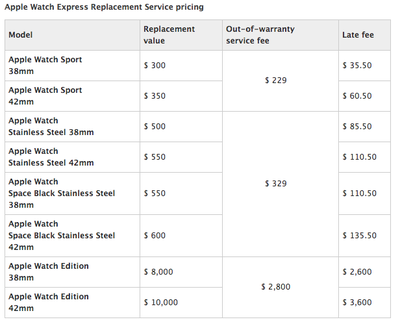
Sometimes, fixing your Apple Watch costs more than justifying it. Use real numbers to decide.
Review Out-of-Warranty Repair Pricing
Apple Authorized Service Providers set their own rates. In the Philippines, for example:
– Cracked screen on Apple Watch SE (Gen 2): ₱14,000
– Diagnostic fee: ₱1,000 (non-refundable in some cases)
Meanwhile, a new Apple Watch SE starts around ₱15,000–₱18,000. At this point, Apple may suggest buying a refurbished or new model instead—especially since newer versions offer better performance and longer software support.
Calculate Your Break-Even Point
Follow this rule:
If repair costs exceed 60% of a new model’s price, consider replacing it.
Also factor in:
– Your personalized watch faces and app layout
– Synced health and fitness history
– Compatibility with existing bands
– Whether your model still receives watchOS updates
For some, the convenience of keeping their current watch outweighs the savings of upgrading.
Choose Apple-Certified Repair for Guaranteed Results

When reliability matters, go through Apple or an authorized provider.
Visit Apple Stores or AASPs
Apple Stores and Apple Authorized Service Providers offer:
– Genuine Apple parts
– Factory-trained technicians
– A 90-day service guarantee (or remainder of warranty)
They follow strict procedures for disassembly, sealing, and calibration—ensuring your watch retains water resistance and sensor accuracy. This is crucial for features like ECG, blood oxygen, and heart rate monitoring.
Start a Repair Request Online
- Open the Apple Support app or go to support.apple.com
- Select Apple Watch
- Describe your issue (e.g., “cracked screen”)
- Follow troubleshooting steps or choose to schedule service
- Book an appointment at the nearest Apple Store or AASP
After signing in with your Apple ID, you can track your repair status in My Support.
Expect Full Diagnostics and Estimates
At the service center:
– A technician runs a complete system check
– You receive a repair estimate (if out of warranty)
– With AppleCare+, the service fee is confirmed upfront
Repairs typically take 1–5 business days, depending on part availability and shipping.
Use Trusted Third-Party Repair for Speed and Savings
If Apple’s pricing is too steep, reputable independent shops offer fast, affordable alternatives.
Find Reputable Local Repair Shops
In cities like Manila, services like MobileCare or Power Mac Center (as AASPs) provide:
– Screen, battery, and water damage repairs
– Support for all models: Series 1 to Ultra 2
– Turnaround time: 1–3 hours for most jobs
Choose shops that:
– Offer free diagnostics
– Provide written estimates before work begins
– Test all functions post-repair
– Use high-quality, name-brand parts
Know the Benefits
Third-party repair advantages:
– 40–60% cheaper than Apple’s out-of-warranty pricing
– Same-day service in most cases
– Transparency: You often see the damaged part after replacement
– 30–90 day repair warranty (shop-specific)
This makes third-party repair ideal for users who need quick fixes and aren’t reliant on full water resistance.
Accept the Risks
Non-authorized repairs come with trade-offs:
– Loss of water resistance due to improper adhesive sealing
– Misaligned sensors affecting heart rate or ECG accuracy
– No Apple warranty protection for future issues
– Possible software alerts if non-genuine parts are detected (a growing concern on newer models)
Avoid any shop claiming to use “original Apple parts” without proof—many use recycled or imitation components.
Avoid DIY Repair Attempts at All Costs

Despite YouTube tutorials and repair kits, do not fix your Apple Watch yourself.
Why DIY Almost Always Fails
Apple Watch design is not user-repairable:
– The screen is fused to the digitizer and casing
– Internal components are sealed with industrial-strength adhesives
– Tiny screws and fragile connectors require precision tools
Without experience, you risk destroying the display, damaging the battery, or bricking the device entirely.
Tools Aren’t Enough
Even with a repair kit, success demands:
– Expertise in micro-soldering and electronics
– Calibration tools for sensors
– Ability to reapply waterproof seals correctly
One slip with a pry tool can tear a ribbon cable or crack the OLED panel.
Apple Blocks Unauthorized Parts
Starting with iPhone 15, Apple restricts features when non-genuine parts are installed. While not yet fully enforced on Apple Watch, future watchOS updates could disable functions like ECG or blood oxygen if a third-party screen is detected. A cheap fix today might cost you features tomorrow.
Prioritize Critical Repairs Immediately
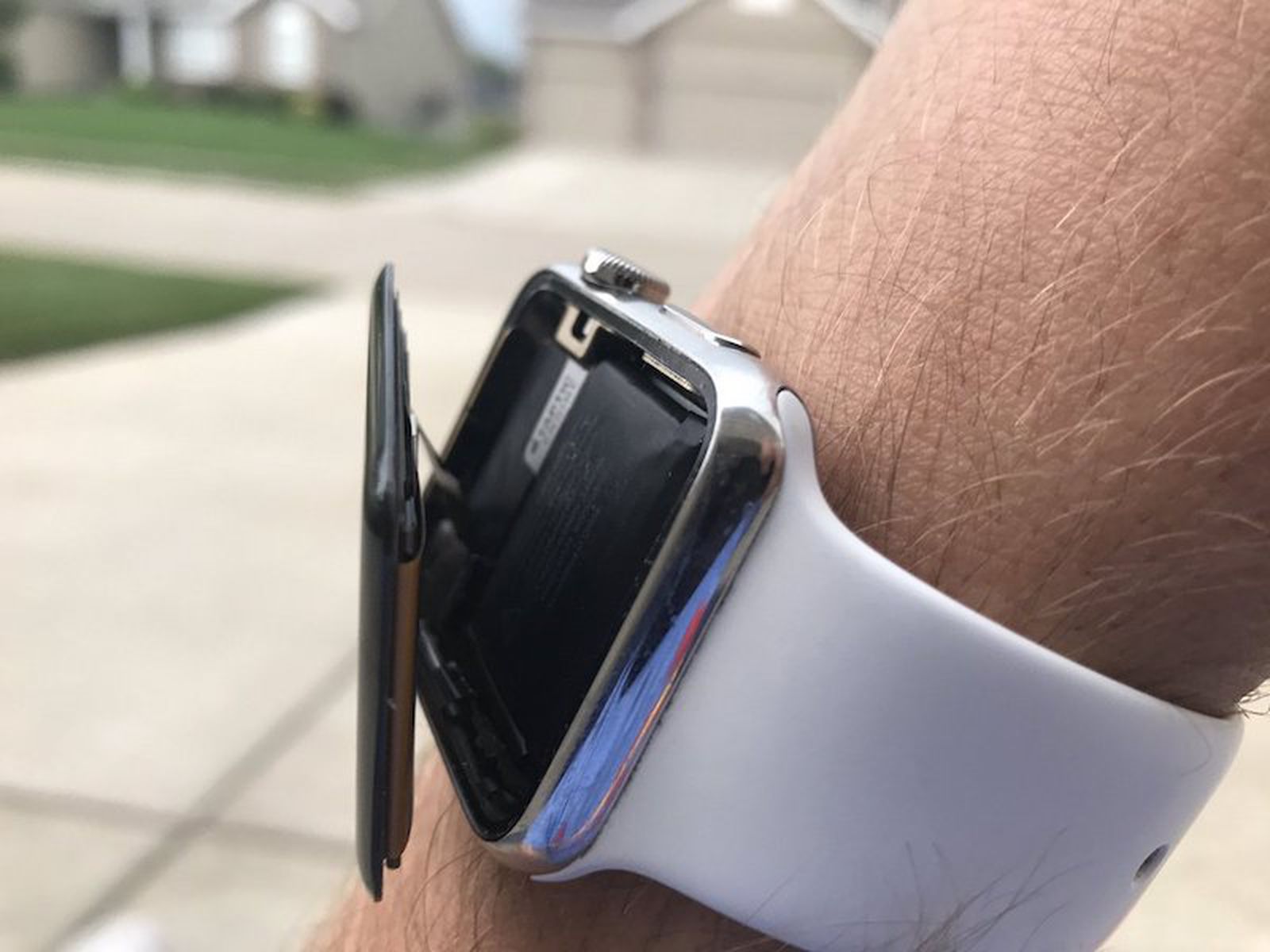
Some issues demand urgent attention to prevent permanent damage.
Replace Swollen Batteries Right Away
A bloated battery is a fire hazard. Signs include:
– Screen popping out of the case
– Device won’t lie flat
– Overheating during charging
Only professionals should handle swollen batteries. They use safe procedures to remove and replace them without risking leakage or thermal runaway.
Address Water Damage Fast
If your watch gets wet beyond its rating:
– Turn it off immediately
– Dry the exterior
– Bring it to a repair shop within 24 hours
Moisture causes corrosion on circuit boards. Quick cleaning improves recovery odds.
Fix Power and Boot Issues
Common symptoms:
– Won’t turn on
– Stuck on Apple logo
– Random freezing
These may stem from:
– Faulty battery connection
– Logic board failure
– Software corruption
Professionals can diagnose whether a battery reset, firmware restore, or component replacement is needed.
Ensure Proper Sealing and Testing After Repair
A successful repair isn’t just about swapping parts—it’s about restoring full function.
Demand Post-Repair Testing
After any repair, insist on testing:
– Touch responsiveness across the entire screen
– Heart rate and ECG accuracy
– Digital Crown and side button operation
– Charging and power cycles
– Water resistance seal (if applicable)
Reputable shops demonstrate each test before returning your device.
Confirm Adhesive Quality
Water resistance depends on proper sealing. Look for:
– Uniform adhesive around the edge
– No gaps near the speaker or sensors
– Use of OEM-grade adhesives
Poor sealing leads to moisture ingress and long-term sensor failure.
Follow Proactive Maintenance Tips
Extend your Apple Watch’s life with simple habits.
Use a Protective Case
Cases absorb impact and prevent cracks. Choose one that:
– Covers the edges
– Doesn’t block sensors
– Allows wireless charging
Essential for athletes, kids, or anyone with an active lifestyle.
Monitor Battery Health
Check via:
– Settings > Battery > Battery Health on your iPhone (under paired devices)
Replace the battery when capacity drops below 80% to avoid sudden shutdowns.
Avoid Extreme Conditions
Don’t expose your watch to:
– Temperatures above 35°C (95°F) or below 0°C (32°F)
– Steam (saunas, hot showers)
– Harsh chemicals (insect repellent, cleaning sprays)
These degrade seals and damage internal components.
Update watchOS Regularly
Software updates:
– Fix bugs
– Improve performance
– Patch security flaws
Keep your watch updated to ensure reliability and compatibility.
Final Note: The best Apple Watch repair decision balances cost, risk, and long-term value. Start by checking your warranty status. Use AppleCare+ whenever possible. For out-of-warranty devices, compare official quotes with trusted third-party options. Never attempt DIY fixes. Prioritize safety, sensor accuracy, and proper sealing. With the right approach, your Apple Watch can last for years—saving you time, money, and data loss.