
If your Apple Watch battery is blinking red and you’ve got a run scheduled in 20 minutes, you’re not alone. The urgency of a dead battery is real—but so is the relief of knowing how fast your Apple Watch can recharge. The answer, though, isn’t one-size-fits-all. How fast your Apple Watch charges depends on your model, charger, and even the room temperature. From the lightning-fast Series 11 to the surprisingly sluggish SE (2022), charging speeds vary dramatically across the lineup.
Modern Apple Watches—especially Series 7 and newer—can go from near-zero to 80% in under an hour. Some models deliver 8 hours of sleep tracking from just 5 minutes plugged in. But if you’re using an older or budget model, you might be waiting twice as long. Understanding these differences helps you stay powered during workouts, overnight tracking, and travel—without the anxiety of a dead screen.
In this guide, you’ll learn real-world charging times by model, what equipment unlocks fast charging, and how to get meaningful battery life in under 10 minutes. We’ll also explain why your watch slows down after 80%, whether third-party chargers are safe, and how to preserve battery health over time. Whether you’re charging before a morning meeting or overnight, you’ll know exactly what to expect—and how to make every second count.
Fastest Charging Apple Watch Models
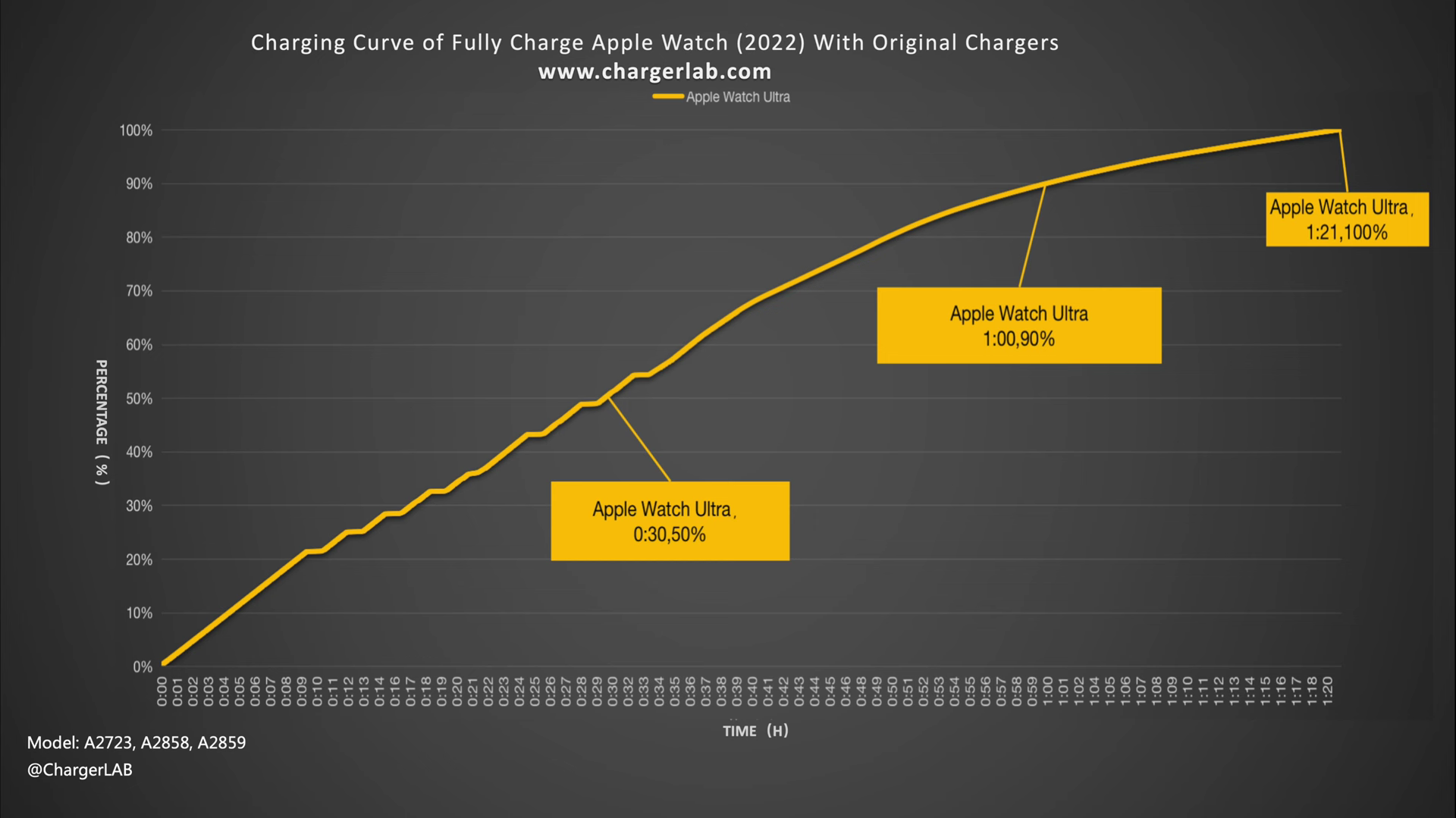
The Apple Watch Series 10 and 11 represent the peak of Apple’s charging technology. These models achieve 80% in about 30 minutes and 100% in roughly 60 minutes when using the correct setup. This speed leap comes from refined thermal management and smarter charging algorithms that maintain high power input during the critical 15%–80% window.
Series 10 and 11: 30-Minute 80% Charge
If speed is your priority, the Series 10 and 11 are your best bet. With Apple’s 20W USB-C Power Adapter and Magnetic Fast Charger to USB-C Cable, both models hit 80% in approximately 30 minutes and reach full charge in about an hour. This is the fastest charging performance available on any Apple Watch.
Even more impressive: a 5-minute charge delivers up to 8 hours of sleep tracking. That means if you forget to charge before bed, plugging it in right before turning off the lights can still capture your full night’s sleep data. Similarly, 15 minutes of charging restores enough power for up to 24 hours of mixed usage—perfect for a quick top-up while you shower, eat breakfast, or get dressed.
Apple Watch Ultra 3: Faster Than Predecessors
Despite its larger battery (1.27 Wh), the Apple Watch Ultra 3 now charges significantly faster than the original Ultra and Ultra 2. It reaches 80% in about 45 minutes and 100% in 75 minutes, matching the performance of Series 7–9 models.
This improvement is crucial for endurance athletes and outdoor adventurers who rely on days-long battery life but still need rapid top-ups between activities. Like the Series 11, the Ultra 3 supports 5 minutes = 8 hours of sleep tracking, making it ideal for last-minute prep before long hikes, races, or overnight trips.
Older Models: Slower Charging Times
Not all Apple Watches charge at the same pace. If you’re using a model older than Series 7—or even the 2022 SE—you’re likely charging at half the speed.
Series 6 and Earlier: No Fast Charging
Apple Watch Series 6 and all earlier models do not support fast charging, no matter what cable or adapter you use. These watches max out at 5W input but lack the optimized charging profile introduced in Series 7.
- 0–80% charge: ~60 minutes
- 0–100% charge: ~90 minutes
These models use the older USB-A magnetic charging cable, which is less efficient than the newer USB-C version. Even if you connect it to a 20W USB-C adapter with a converter, charging speed won’t improve. The hardware simply doesn’t support fast charging.
SE (2022): Surprisingly Slow
The Apple Watch SE (2022) is the slowest-charging current-generation model, taking about 2.5 hours (150 minutes) to go from 0% to 100%. Despite having a battery similar in size to the original SE, hardware changes reduced charging efficiency.
It doesn’t support fast charging, so upgrading your charger won’t help. This makes it a poor choice for users who need quick top-ups. If you own this model, plan to charge overnight or during long breaks.
SE 3: 2x Faster Than SE 2
With the Apple Watch SE 3, Apple finally brought fast charging to the budget line. Now, it matches Series 7–9 performance:
- 0–80%: ~45 minutes
- 0–100%: ~75 minutes
An 8-minute charge provides up to 8 hours of sleep tracking, and 15 minutes gives most users a full day’s power. This is a 2x improvement over the 2022 SE, bringing the entry-level model in line with premium options.
Required Equipment for Fast Charging
You can’t achieve fast charging without the right tools. Even a Series 11 will charge slowly if paired with outdated hardware.
Use the Correct Charging Cable
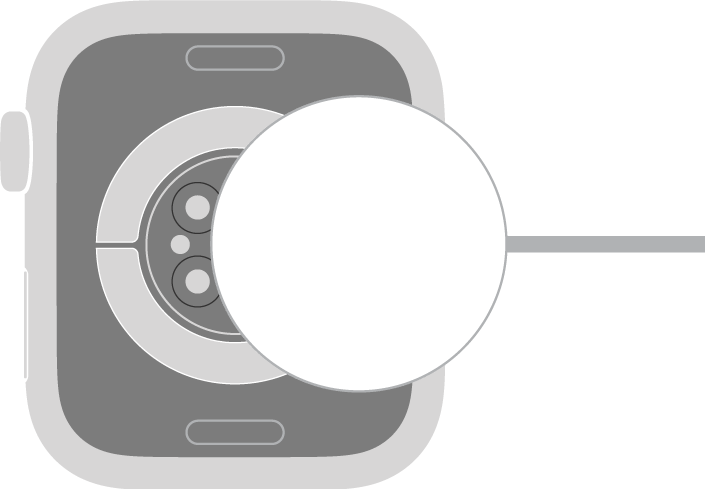
Only the Apple Watch Magnetic Fast Charger to USB-C Cable (Model A2515) enables fast charging on supported models. This cable has been included with all Series 7 and newer watches, including the Ultra and SE 3.
- Included with: Series 7, 8, 9, 10, 11, Ultra 3, SE 3
- Not compatible with fast charging: Older USB-A magnetic cables
- Third-party alternatives: MFi-certified cables (e.g., Anker, Belkin) can deliver equal performance if they support USB Power Delivery (USB-PD)
Using an old cable forces your watch into standard charging mode—even if your model supports fast charging.
Pair with a 20W USB-C Power Adapter
Fast charging requires a USB-C power adapter with USB Power Delivery (USB-PD), rated at 15W or higher. Apple recommends the 20W USB-C Power Adapter (Model A2305) for best results.
- Optimal: Direct wall outlet connection with Apple 20W adapter
- Suboptimal:
- USB hubs or computer ports (often limited to 5–7.5W)
- Multi-port chargers sharing total output
- Non-PD or uncertified third-party adapters
Using a 5W USB-A charger triggers a “Slow Charger” warning in watchOS 26+ under Settings > Battery.
Why Higher-Wattage Chargers Don’t Help
A 60W or 100W MacBook charger will work—but won’t charge your watch any faster. The Apple Watch caps power draw at 5W, regardless of adapter size.
- Maximum input: 5W
- Effective delivery: ~3.5W due to wireless inductive losses
- No benefit from chargers above 15W
Save the high-wattage bricks for your laptop or iPad.
Real-World Charging Benchmarks
Apple designs fast charging around real-life scenarios—like getting enough power to last through sleep or a workout.
5 Minutes = 8 Hours of Sleep Tracking
For Series 11, Ultra 3, and SE 3, just 5 minutes of charging provides up to 8 hours of sleep tracking. Plug in right before bed, and wake up to a nearly full battery—no missed health data.
15 Minutes = Full Day of Power
A 15-minute charge restores meaningful battery life:
- Series 11: Up to 24 hours
- Ultra 3: Up to 12 hours (ideal for long hikes)
- SE 3: Up to 8 hours
This makes morning routines the perfect time for a top-up that lasts all day.
Factors That Slow Down Charging
Even with the right equipment, several factors can reduce speed.
Ambient Temperature Extremes
Apple Watch charges best between 16°C and 22°C (60°F–72°F). Outside this range:
– Cold: Charging pauses until the battery warms
– Hot: Slows or stops to prevent damage
– Direct sunlight or heaters: Trigger thermal throttling
Avoid charging on sunny windowsills or in freezing garages.
Using the Watch While Charging
Active use—like tracking a run or playing music—slows charging significantly. For fastest results, let the watch sit idle or enable Power Reserve mode.
Charging Curves: Why It Slows After 80%
Apple uses a tapered charging curve to extend battery life:
– 15%–80%: Fast charging at up to 5W
– Below 15% and above 80%: Drops below 1W
– Final 20%: Can take as long as the first 60%
This is normal and intentional, reducing stress on the lithium-ion battery.
Optimizing Your Charging Routine
Small habits make a big difference in daily reliability and long-term health.
Start Charging Below 30%
Begin charging when battery drops below 30% to engage fast charging. Avoid waiting until 0%, which stresses the battery.
Use Optimized Battery Charging
Enable Optimized Battery Charging in Settings > Battery > Battery Health. It learns your routine and delays the final 20% until just before you wear it—reducing time spent at 100%.
Choose MFi-Certified Accessories
Look for the MFi (Made for Apple Watch) badge. Recommended options include Anker MagGo and Belkin Boost Up. Avoid uncertified chargers—they may misalign, overheat, or undercharge.
Overnight Charging: Is It Safe?
Yes. Modern safeguards prevent overcharging and overheating. Charging stops automatically at 100%. Optimized Battery Charging further reduces wear by delaying the final charge.
Tip: If you don’t wear your watch immediately, unplug it once full.
Long-Term Battery Health Tips
Fast charging is convenient, but heavy reliance may accelerate degradation. A well-maintained Apple Watch should retain 80%+ capacity after 2 years.
- Keep battery between 30% and 80%
- Avoid deep discharges and full-charge marathons
- Replace worn cables every 1–2 years
- Update watchOS regularly for battery optimizations
Final Note: Charging speed varies widely by model. The fastest—Series 10 and 11—can go from empty to full in about an hour. With the right 20W USB-C charger and Apple’s fast charging cable, you can gain 8+ hours of battery in under 10 minutes. Older models like the SE (2022) charge much slower, while Ultra watches balance large batteries with improved charging times. By optimizing your setup, avoiding temperature extremes, and using features like Optimized Battery Charging, you’ll keep your watch powered and healthy for years.




