If you’re wondering how long Apple Watch battery lasts, the answer depends on your model, settings, and daily habits. While Apple claims “up to 18 hours” for most models, real-world performance varies widely—ranging from a full day on the Series 11 to three full days on the Ultra 3 in Low Power Mode. For users tracking sleep, using GPS workouts, or relying on cellular connectivity, battery life can make or break the experience.
Your Apple Watch may last just 12 hours with heavy use—or stretch to 72 hours with smart settings. Factors like Always On Display, GPS tracking, notifications, and cold weather all play a major role. Even charging speed has improved dramatically, with some models gaining 8 hours of battery in just 15 minutes.
In this guide, you’ll discover exact battery life by model, the top power-draining features, proven ways to extend battery life, how fast each model charges, and when it’s time to replace your battery. Whether you’re a fitness enthusiast, frequent traveler, or casual user, you’ll learn how to maximize your Apple Watch’s endurance and avoid daily charging stress.
Apple Watch Ultra 3: Up to 72 Hours in Low Power Mode
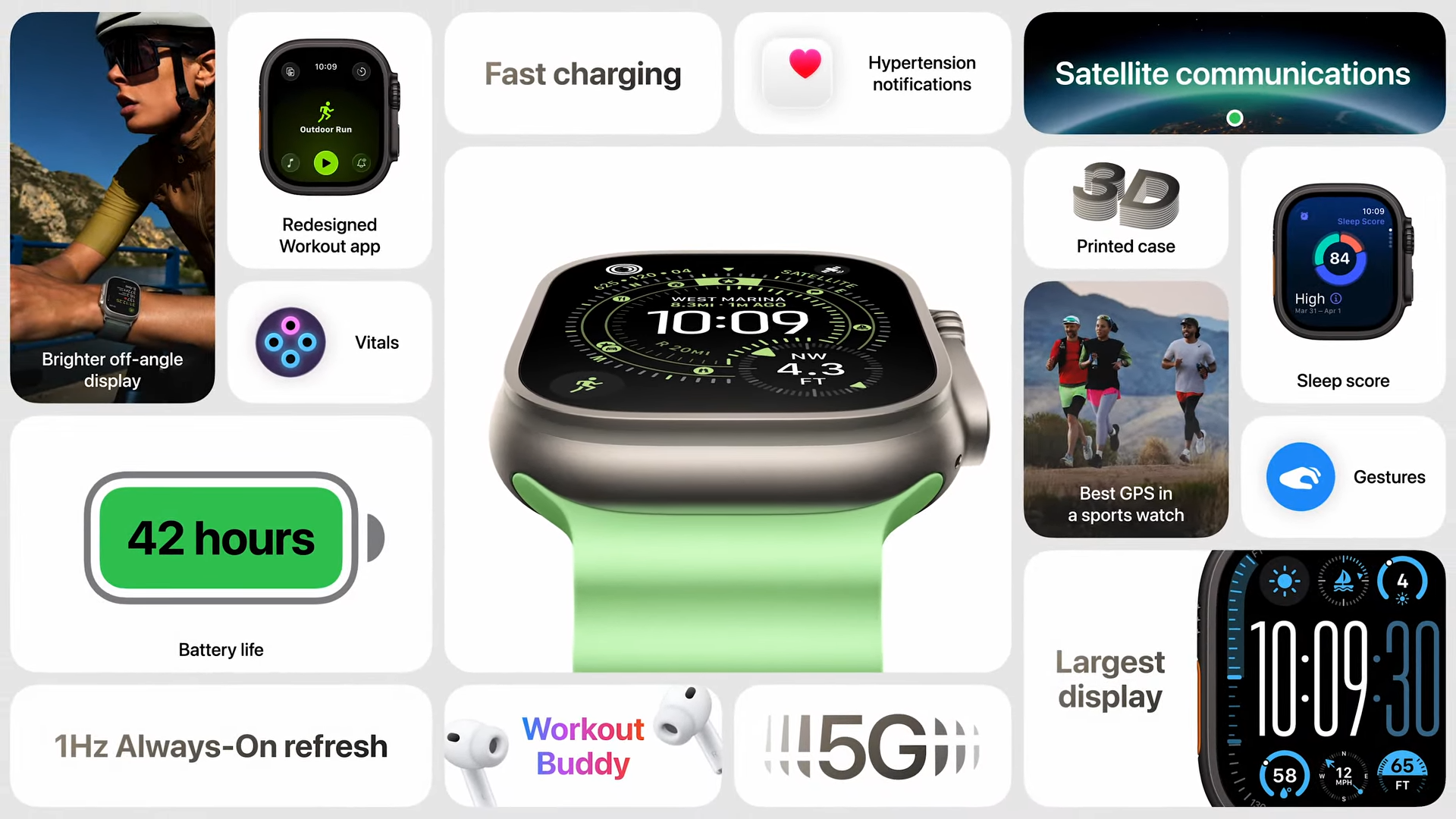
The Apple Watch Ultra 3 is built for extreme endurance and delivers the longest battery life of any Apple Watch.
- Standard use: Up to 42 hours
- Low Power Mode: Up to 72 hours
- Full GPS + heart rate workout: Up to 14 hours (extends to 35 hours with reduced sensor frequency)
- Audio playback: Up to 20 hours
Designed for ultrarunners, hikers, and divers, the Ultra 3 excels in multi-day scenarios. With sleep tracking, notifications, and periodic GPS use, many users report two full days of use without charging. In Low Power Mode, it’s ideal for weekend trips where charging isn’t possible.
Testing conditions: Apple’s official numbers are based on 600 time checks, 180 notifications, 30 minutes of app use, one 60-minute workout with music, and 6 hours of sleep tracking over 42 hours. In Low Power Mode, usage increases to 900 time checks and two workouts over 72 hours.
Apple Watch Series 11: 24 to 38 Hours of Battery Life
The Series 11 strikes a balance between advanced features and all-day endurance.
- Standard use: Up to 24 hours
- Low Power Mode: Up to 38 hours
- GPS workout: Up to 8 hours
- Audio playback: Up to 11 hours
Despite its slim design, the Series 11 handles a full day with ease—even with sleep tracking enabled. Users with moderate usage (notifications, fitness tracking, and one workout) often end the day with 30–40% battery remaining.
Low Power Mode nearly doubles battery life, making it a strong option for travel or long workdays. It’s especially effective when paired with optimized charging, which learns your routine and reduces battery wear over time.
Apple Watch SE 3: 18 to 32 Hours of Reliable Use
The SE 3 is Apple’s best value smartwatch, offering solid battery life at a lower price.
- Standard use: Up to 18 hours
- Low Power Mode: Up to 32 hours
- GPS workout: Up to 7 hours
- Audio playback: Up to 10 hours
Since it lacks Always On Display, the SE 3 is more power-efficient than higher-end models. Most users get 20–24 hours in real-world conditions, making it perfect for daily wear and kids’ safety tracking.
The Apple Watch for Kids (GPS + Cellular) variant lasts up to 16 hours with Find My and cellular enabled—enough for school days and after-school activities.
Older Models: Series 9 Down to SE 2
Battery life drops slightly on older models due to smaller batteries and aging hardware.
- Series 9, 8, 7, SE 2: Up to 18 hours standard use
- Series 5–6: ~14–16 hours (degraded with age)
- Series 1–4: 12–14 hours (may worsen with newer watchOS updates)
Low Power Mode is available on Series 5 and later, SE, and Ultra models running watchOS 9.0 or later, extending life by up to 100%. For example, a Series 9 can stretch from 18 to 36 hours with power-saving features enabled.
What Drains Apple Watch Battery the Fastest?

Even with strong specs, poor settings can slash battery life. Here’s what uses the most power.
Always On Display Can Cut Battery by 30%
The biggest drain is the Always On Display. While convenient, it keeps the screen active even when your wrist is down. Turning it off can add 6–8 hours of battery life on models like the Series 11 and Ultra 3.
Fix: Disable it in Settings > Display & Brightness > Always On. Or use Theater Mode during meetings or workouts.
GPS and Workouts Use Significant Power
A 60-minute run with GPS and music can drain 15–25% of your battery. Long hikes or marathons push usage further:
- Ultra 3: Up to 14 hours of full GPS
- Series 11: 8 hours
- SE 3: 7 hours
For extended activities, enable Low Power Mode and reduce GPS sampling frequency.
Cellular Drains Faster Than Bluetooth
When your iPhone is out of range, cellular connectivity kicks in—and uses more power. GPS + Cellular models consume more energy unless you disable cellular or use on-demand mode in Low Power Mode.
Tip: Turn off cellular when near your phone to conserve battery.
Notifications and Background Apps Add Up
Each notification wakes the screen and uses power. Frequent alerts from messaging, social media, or fitness apps can drain your watch over time. Background app refresh also keeps apps updating in the background.
Solution: Disable non-essential notifications in the Watch app > Notifications. Turn off Background App Refresh for power-hungry apps.
Cold Weather Causes Temporary Shutdowns
In freezing temperatures, lithium-ion batteries experience voltage drops, causing unexpected shutdowns—even at 30–50% charge. This is temporary. Warming the watch restores normal function.
Avoid: Leaving your watch in cold cars or during extreme winter workouts without a backup plan.
How to Extend Apple Watch Battery Life
You don’t need to charge every night. These proven tips can stretch battery life by hours—or even days.
Enable Low Power Mode
Available on Series 5 and later, this is the single most effective setting for saving power. It disables Always On Display, reduces haptics, and limits background activity.
- Ultra 3: 42h → 72h
- Series 11: 24h → 38h
- SE 3: 18h → 32h
Use it during travel, long workouts, or when charging isn’t convenient.
Turn Off Always On Display
If you don’t need constant time visibility:
- Open Settings on your watch
- Go to Display & Brightness
- Toggle off Always On
This can extend battery life by up to 30%, especially on newer models.
Limit Notifications and App Refresh
Reduce unnecessary wake-ups:
- Open Watch app on iPhone
- Go to Notifications → disable non-essential apps
- Under General > Background App Refresh → turn off for rarely used apps
Best to disable: social media, news, and messaging apps you don’t need instantly.
Use Airplane Mode for Workouts
If exercising without your phone:
- Enable Airplane Mode
- Turn Bluetooth back on to play music from your watch
This disables cellular and Wi-Fi, saving power while keeping GPS and music active.
Lower Screen Brightness and Wake Time
- Settings > Display & Brightness → reduce brightness
- Wake Duration → set to Short
Bonus: Tap the screen instead of raising your wrist to wake it—this saves significant power over time.
Charging Performance: How Fast Does It Charge?
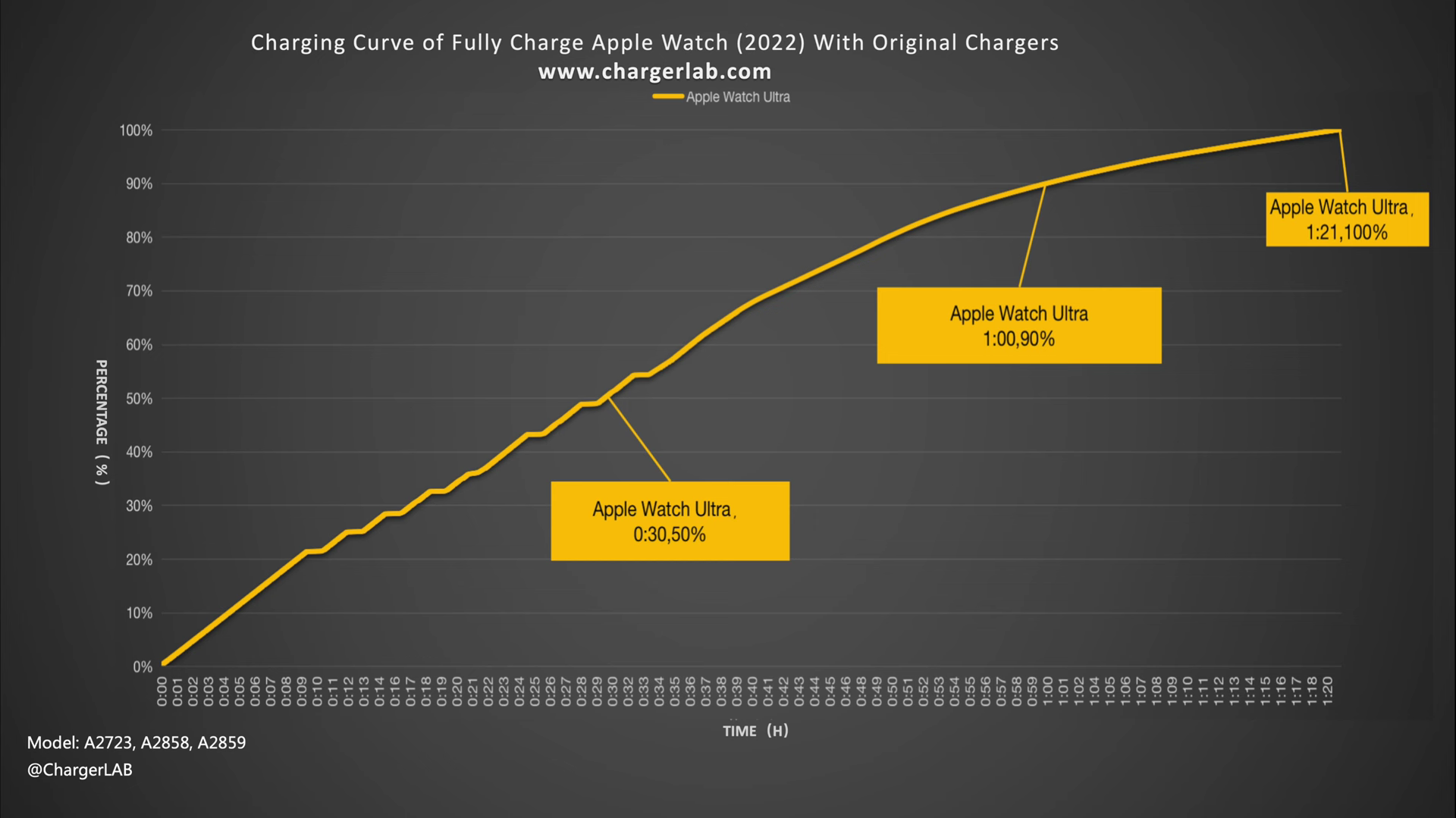
Fast charging makes a big difference when you’re in a rush.
| Model | 0–80% | 0–100% |
|---|---|---|
| Ultra 3 | ~45 min | ~75 min |
| Series 11 | ~30 min | ~60 min |
| SE 3 | ~45 min | ~75 min |
Use Apple’s 20W USB-C adapter and Magnetic Fast Charger for best results.
15-Minute Quick Charge Gains
- Ultra 3: Up to 12 hours of battery
- Series 11 & SE 3: Up to 8 hours
Perfect for a morning boost or pre-workout top-up.
Sleep Tracking Quick Top-Up
- Ultra 3 & Series 11: 5 minutes → 8 hours of sleep tracking
- SE 3: 8 minutes → 8 hours
No need to charge all night—just plug in while brushing your teeth.
Battery Longevity: When to Replace Your Apple Watch Battery
Battery lifespan (how long it lasts before degradation) is different from battery life per charge.
Signs You Need a Replacement
- Dies in less than 12 hours with normal use
- Shuts down at 20–30% charge
- Shows below 80% capacity in Battery Health
Check: Settings > Battery > Battery Health (available on Series 4 and later with watchOS 9+).
Apple considers 80% capacity the threshold for a healthy battery.
Battery and Performance Management
On Series 5 and later, your watch may:
- Slow down apps
- Dim the screen
- Reduce speaker volume
This prevents shutdowns on aged batteries. Disable it only if performance issues persist.
Maximize Battery Lifespan
- Use Optimized Charging
- Avoid full discharges
- Store at 50% charge if unused for weeks
- Keep away from heat and direct sunlight
Final Verdict: Is Apple Watch Battery Life Good Enough?
For most users, yes. The Apple Watch delivers a full day of reliable use, and with Low Power Mode, quick charging, and smart settings, you can go longer without stress.
- Casual users: Series 11 or SE 3 lasts 24+ hours—charge nightly, no issues.
- Fitness users: Ultra 3 or Series 11 handles long workouts with ease.
- Travelers: Ultra 3’s 72-hour mode is a game-changer.
- Kids: SE 3 with cellular lasts 16+ hours—great for safety tracking.
With smart habits, your Apple Watch battery can last longer than you think—and stay healthy for 2–3 years before needing replacement.