If you’re asking how Apple Watch works with Verizon, the answer is simpler than you think: it uses eSIM technology and Number Share to stay connected to Verizon’s 5G/4G LTE network—without needing your iPhone nearby. This means you can make calls, send texts, stream music, and even get turn-by-turn directions on your wrist, whether your phone is at home, in the car, or back at the office.
But here’s the catch: not every Apple Watch model supports this. And if you buy from Verizon, you’re locked into a monthly cellular plan—even if you never use it. To unlock true independence, you need the right hardware, software, and subscription. Whether you’re a runner, a parent, or just want peace of mind during emergencies, understanding how Apple Watch integrates with Verizon is crucial. In this guide, you’ll learn what’s required, how to set it up, what it costs, and whether it’s actually worth it for your lifestyle.
Compatible Apple Watch Models for Verizon
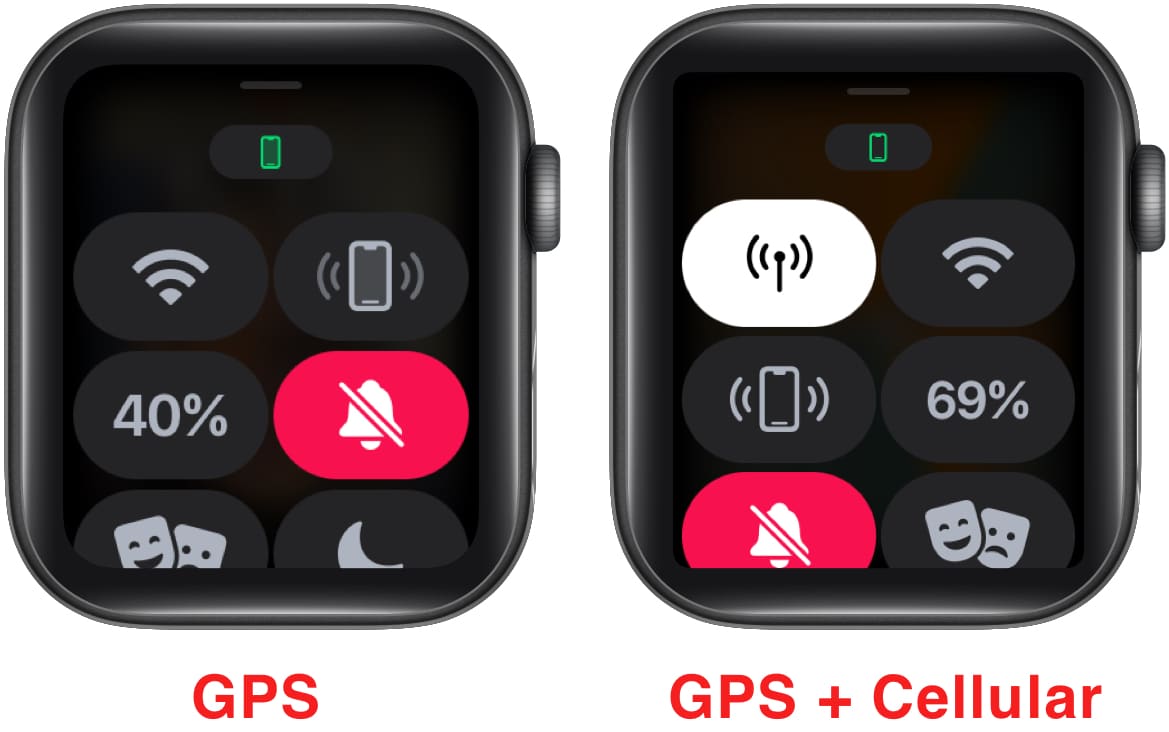
Only cellular-enabled Apple Watch models can connect to Verizon’s network. These include:
- Apple Watch Series 3 (GPS + Cellular) and newer
- Apple Watch Series 4 through Series 9
- Apple Watch Ultra and Ultra 2
- Apple Watch SE (2nd generation) – cellular version
Why Older or GPS-Only Models Won’t Work
The Apple Watch SE (1st generation) and all GPS-only models lack the internal LTE/5G modem. No matter where you buy them—even from Verizon—GPS-only versions cannot access cellular networks.
Important: If you purchase a GPS-only Apple Watch from Apple or Best Buy, it will never support Verizon cellular, even if you later change your mind.
iPhone and Software Requirements
You Must Have an iPhone
Despite its standalone features, your Apple Watch still needs an iPhone for setup and management. Compatible models include:
- iPhone 6s or newer
- Running iOS 14 or later
- Signed in to the same Apple ID as your Apple Watch
Without an iPhone, you can’t activate or manage cellular service on your Apple Watch.
Keep Software Updated
Outdated software blocks activation. To avoid issues:
- Apple Watch: Must run watchOS 7 or later
- iPhone: Must be on the latest iOS version
Pro Tip: Before setting up, go to Settings > General > Software Update on both devices. Update them both to avoid Number Share or eSIM errors.
How Apple Watch Cellular Works on Verizon
Your Apple Watch connects to Verizon’s network using an eSIM—a digital SIM built into the device. Once activated, it functions like a mini-phone on your wrist.
What You Can Do Without Your iPhone
When your iPhone is out of range, your Apple Watch with Verizon cellular can:
- Make and receive calls using your iPhone’s number
- Send and receive SMS and iMessages
- Stream Apple Music, podcasts, and audiobooks
- Use Maps, Weather, and third-party apps
- Get notifications, emails, and alerts
- Call 911 via Emergency SOS
Without cellular, the watch relies on:
– Bluetooth (within ~30 feet of your iPhone)
– Wi-Fi (when both devices are on the same network)
If neither is available, fitness tracking still works—but messaging and calling stop.
How to Activate eSIM on Apple Watch with Verizon
Verizon uses digital eSIMs—no physical card needed. Activation is fast and happens in one of three ways.
1. Via Apple Watch App on iPhone
- Open Watch app → Tap My Watch → Go to Cellular → Tap Set Up Cellular
- Select Verizon and sign in
- Choose Number Share or a new line
2. Directly on the Apple Watch
- Open Settings > Cellular > Setup Cellular
- Follow prompts to select Verizon and sign in
3. Through Verizon App or Website
- Log into your Verizon account
- Add a new connected device
- Scan a QR code to link the eSIM
Activation is usually instant, though it can take up to 24 hours during high-traffic periods.
Warning: The eSIM is permanently tied to the device. To transfer service, you must deactivate the old watch first.
Number Share vs. Dedicated Number: Which Should You Choose?

Number Share: Use Your iPhone’s Number ($10/month)
- How It Works: Your Apple Watch shares your iPhone’s number.
- Best For: Most users who want seamless calling and messaging.
- Requirements:
- Eligible Verizon unlimited plan
- Same Apple ID on both devices
- Features:
- Unlimited talk, text, and data
- Incoming calls ring on both devices (can be disabled)
- Includes roaming in Canada and Mexico
- Limitation: Only one Apple Watch per number
User Benefit: No need to give out a second number—everyone calls your usual number.
Dedicated Number: A Separate Line ($70/month)
- How It Works: The watch gets its own phone number.
- Best For: Privacy, business, or separating personal and wearable activity.
- Features:
- Full standalone calling and texting
- Independent message history and contacts
- Drawback: High cost makes it rare for casual users.
Privacy Insight: A dedicated number reduces data tracking between your phone and watch—ideal for security-conscious users.
Verizon Smartwatch Plans: Cost & Data Options
| Plan | Standard Price | With Discount | Data & Features |
|---|---|---|---|
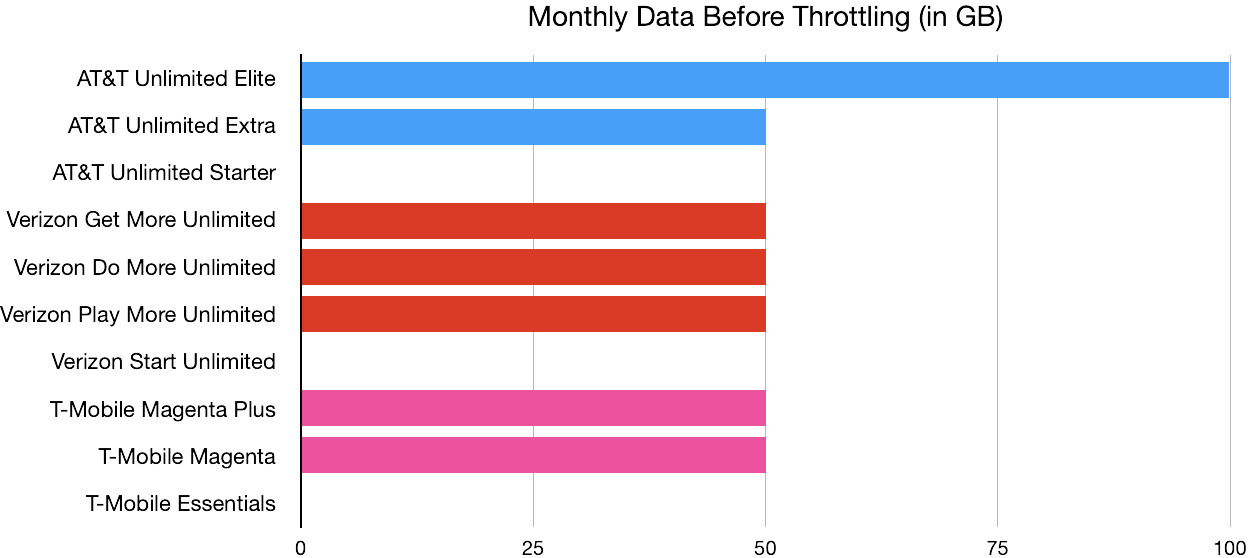
| Unlimited for Watches | $15 | $7.50 | Unlimited 5G/4G LTE; throttles after 15 GB |
| Unlimited Plus for Watches | $25 | $12.50 | Unlimited 5G Ultra Wideband + LTE; throttles after 100 GB |
| Gizmo/CareSmart Plan | $10 | N/A | Unlimited LTE; throttles after 15 GB |
How to Get the 50% Discount
You can cut your bill in half if:
– At least one phone line uses Unlimited Plus, Ultimate, Get More, Do More, or One Unlimited
– Discount applies to one connected device (two with Unlimited Ultimate)
– It’s applied to the highest-priced eligible plan
Note: Gizmo and CareSmart plans do not qualify for discounts.
Data Throttling: What Happens After the Cap?
Even “unlimited” plans slow down during congestion:
- Unlimited Plan: Slows to 1 Mbps after 15 GB/month
- Unlimited Plus: Slows to 1 Mbps after 100 GB/month
- Gizmo/CareSmart: Slows to 1 Mbps after 15 GB/month
Note: 5G Ultra Wideband requires Apple Watch Series 9 or Ultra 2.
International Roaming with Apple Watch
With Number Share, your Apple Watch works in Canada and Mexico:
- Unlimited talk and text
- Up to 2 GB/day of high-speed data
- After daily cap, unlimited 3G-speed data
- Unlimited talk/text to Canada and Mexico from the U.S.
Limitation: Roaming is not available on standalone Gizmo or CareSmart plans.
For other countries, use Wi-Fi only.
Step-by-Step Setup Guide
1. Prepare Devices
- Update iPhone and Apple Watch
- Charge both fully
- Keep them close
2. Pair Apple Watch with iPhone
- Open Apple Watch app on iPhone
- Hold watch near phone
- Follow pairing prompts
3. Activate Cellular
- In Watch app, go to My Watch > Cellular > Set Up Cellular
- Choose Number Share or New Line
- Sign in to Verizon
- Confirm plan and payment
4. Finalize Activation
- Wait for confirmation (usually minutes)
- On Apple Watch, go to Settings > Cellular to check signal
5. Test Connectivity
- Make a test call
- Send a text
- Stream music or open Maps
Troubleshooting Tip: If activation fails, restart devices, ensure Wi-Fi is on, and retry. Use the Verizon app as an alternative.
Buying Options: Verizon vs. Third Parties
Buying from Verizon
- Only sells cellular models
- Must activate a plan—even if you don’t use it
- Minimum cost: $10/month add-on
- Cannot disable cellular to use as GPS-only
User Reality: Many regret the forced fee—especially if they rarely leave their phone behind.
Buying from Apple or Best Buy
- Can buy GPS-only models
- No cellular, no monthly fees
- Ideal for fitness tracking and Bluetooth notifications
Smart Move: If you keep your phone nearby, skip cellular and save $120+/year.
Real User Feedback
- “I never used it”: Many canceled after realizing they kept their phone during workouts.
- “Bluetooth does the job”: For commutes and gym sessions, Bluetooth is enough.
- “Worth it for safety”: Hikers and parents value emergency calling without a phone.
- “Privacy matters”: Some prefer a dedicated number to separate activity.
Trend: As fees rise, more users are choosing GPS-only models.
Troubleshooting Common Issues
“Number Share Not Available”
- Causes: Wrong plan, outdated software, wrong Apple ID
- Fix: Update devices, confirm plan eligibility, restart and retry
“Can’t Set Up Cellular”
- Causes: Incompatible model, account issue, eSIM error
- Fix: Verify model, check account status, contact Verizon
“Activation Failed”
- Causes: Poor Wi-Fi, wrong login, SIM conflict
- Fix: Ensure Wi-Fi, re-enter credentials, try via Verizon app
Pro Tip: Visit a Verizon store—staff can manually push the eSIM profile.
Upgrading Your Apple Watch
Steps to Transfer Service
- Deactivate old watch in Verizon account
- Pair new watch with iPhone
- Set up cellular using same Number Share
- Restore data via iCloud
- Trade in old model for credit
Note: You can’t use Number Share on two watches at once.
Frequently Asked Questions
Do I need a separate line?
Yes—a connected device line starting at $10/month.
Can I use Apple Watch without cellular on Verizon?
Only if bought outside Verizon as GPS-only. Verizon-purchased watches require a plan.
Does it use my iPhone’s data?
With Number Share, yes—but Verizon charges a $10/month add-on regardless.
Can I switch between Number Share and dedicated number?
Yes, but it may cause temporary service loss.
Is there a contract?
No—plans are month-to-month.
Can I use it internationally?
Yes—Canada and Mexico included with Number Share.
What if I cancel the plan?
Cellular turns off. You can reactivate later.
Final Recommendation
Choose Cellular If You:
- Leave your phone behind often
- Want emergency calling without a phone
- Value independence
Best Plan: Unlimited for Watches at $7.50/month (with discount)
Skip Cellular If You:
- Always carry your phone
- Only use for fitness and notifications
- Want to avoid monthly fees
Best Option: GPS-only Apple Watch from Apple or Best Buy
Key Takeaways
- iPhone required for setup
- eSIM only—no physical SIM
- Number Share is standard at $10/month
- Dedicated number costs $70/month
- Plans start at $7.50/month with throttling
- Roaming included in Canada and Mexico
- Verizon purchase = mandatory cellular
- Third-party purchase = GPS-only option
- Ideal with cellular: Runners, hikers, parents
- Ideal without: Casual users focused on health
Bottom Line: Apple Watch with Verizon offers real freedom—but only if you truly need it. For most, a GPS-only model saves money while delivering core features. Evaluate your habits, check your plan, and choose wisely.