
You found an Apple Watch Series 10 for $200—half the retail price. It looks perfect in the photos, the seller seems trustworthy, and it’s “brand new in box.” But before you hit buy, ask yourself: how to check if an Apple Watch is real? Because counterfeit models are no longer obvious knockoffs. Today’s fakes mimic the design, packaging, and even software—tricking unsuspecting buyers into paying hundreds for a device that can’t pair, update, or measure your heartbeat.
The truth is, only a genuine Apple Watch delivers seamless integration with your iPhone, runs watchOS, and passes Apple’s own verification. A fake fails on every level—performance, safety, and functionality. Worse, you might end up with a stolen device locked to someone else’s iCloud, turning your “bargain” into a $400 paperweight.
This guide gives you 10 field-tested methods to verify authenticity—using Apple’s tools, physical inspection, software checks, and real-world performance tests. Whether you’re buying used, secondhand, or “new” from a third-party seller, these steps will expose fakes before you hand over your money.
Let’s dive in.
Verify Serial Number with Apple’s Official Tool
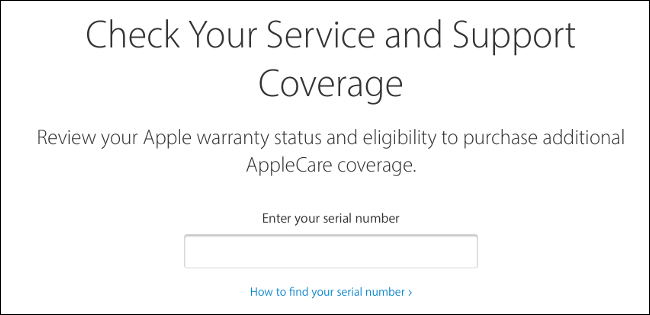
The fastest, most reliable way to confirm authenticity is checking the serial number through Apple’s system.
Check Coverage at Apple’s Website
Visit checkcoverage.apple.com and enter the serial number. You can find it in three places:
- On the watch: Settings > General > About > Serial Number
- On the iPhone: Watch app > General > About > Serial Number
- On the box: Printed on the barcode label
If genuine, Apple will display:
- Exact model (e.g., Apple Watch Series 9 45mm GPS)
- Warranty status
- Repair eligibility
- Activation Lock status
✅ Real Device: Full details match the watch and packaging.
❌ Fake or Stolen: “Invalid serial number,” no data, or mismatched model.
⚠️ Warning: Some scammers use real serial numbers from stolen devices. Always confirm the number matches the physical device and box.
Avoid Fake Serial Number Tricks
Counterfeiters often copy real serials. To spot this:
- Ask the seller for a live video of the Settings > General > About screen.
- Compare the serial on screen to the one on the box.
- If buying online, request a screenshot before payment.
Even if the serial checks out, keep testing. One pass doesn’t guarantee safety.
Match Model Number to Apple’s Official List

Every real Apple Watch has a unique A-number (model number) that identifies its exact specs.
Find the Model Number
- On the watch: Settings > General > About > Model Number (shows A####)
- On iPhone: Watch app > General > About > Tap Part Number to reveal A-number
Cross-Check with Apple’s Database
Go to Apple’s support page (HT208241). It lists every genuine model.
| Apple Watch | Valid Model Numbers |
|---|---|
| Series 10 | A2997–A3003, A3206 |
| Series 9 | A2978–A2985 |
| Ultra 2 | A2986, A2987 |
| SE (2nd Gen) | A2722–A2727, A2855–A2856 |
✅ Genuine: Model number appears and matches case size, material, and LTE.
❌ Fake: Number not listed, or says “A1234” (common in fakes).
Example: A watch labeled “Series 9” showing A1000 isn’t real.
Inspect Build Quality Closely
Fakes cut corners on materials. Even small flaws expose them.
Check Case and Finish
Real Apple Watches use aerospace aluminum, stainless steel, or titanium. Look for:
- Matte or brushed finish—not plastic-like shine
- Precise edges with no gaps between screen and bezel
- Consistent color across case and buttons
❌ Fakes often feel too light, have uneven seams, or show chipping paint.
Examine the Digital Crown
This signature feature should:
- Rotate smoothly with tactile click
- Deliver haptic feedback when pressed
- Show a red ring on LTE models
❌ Fake signs: Crown wobbles, sticks, or lacks vibration.
Inspect Backplate Engraving
Flip it over. The backplate should have:
- Crisp Apple logo—finely etched, centered
- Clear text in correct font and color:
- Apple Watch Ultra: Light gray text
- Other models: Black or dark gray
❌ Red flags: Blurry print, misaligned text, or black text on Ultra models.
💬 User report: “The back text looked smudged—like a cheap stamp.”
Test Screen and Bezel Fit
On real models:
- Screen sits flush with the case
- Bezel is symmetrical and thin
- No lifting or air bubbles under glass
❌ Fakes often have uneven bezels or visible gaps near charging pins.
Test watchOS and Interface
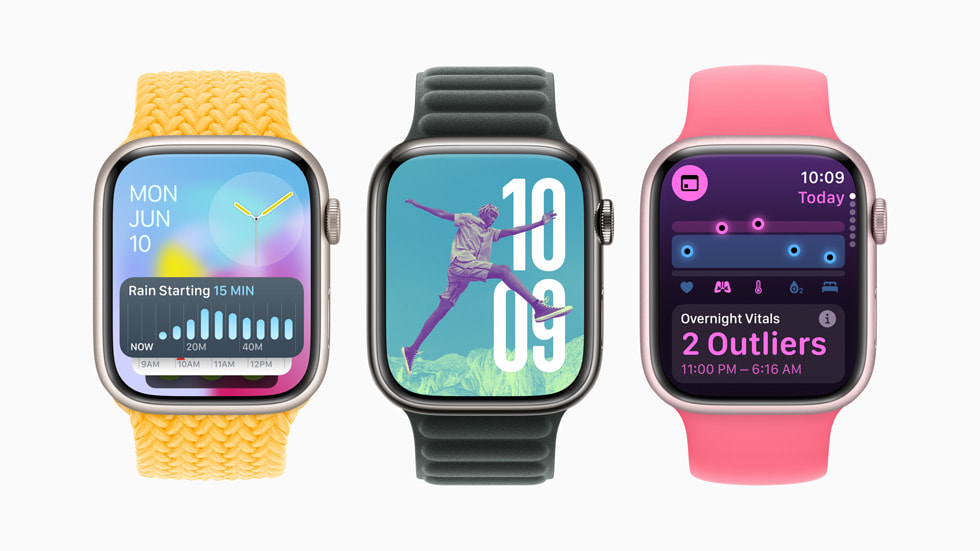
A real Apple Watch runs watchOS—not Android or a knockoff OS.
Confirm watchOS Version
Go to: Settings > General > About > Software Version
✅ Should show watchOS 11.0 or 10.5
❌ Fake signs: “Android,” “v1.0,” or trailing space (e.g., “9.0 ”)
Check for Software Updates
Try: Settings > General > Software Update
✅ Genuine: Shows current version and checks for updates
❌ Fake: Missing, grayed out, or error
Open the App Store
Launch the App Store on the watch:
✅ Genuine: Clean Apple UI, working downloads, real apps
❌ Fake: Cluttered layout, broken buttons, only “Free Watch Faces”
Pro tip: Try downloading Apple’s free “Watch Face” app. If it fails, it’s not real.
Scroll Through Watch Faces
Turn the Digital Crown:
✅ Real: Smooth transitions between Modular, Infograph, Siri, etc.
❌ Fake: Faces don’t change, freeze, or only show 2–3 generic options
Look for Font and UI Consistency
Apple uses custom fonts and icons. Watch for:
- Smooth, sharp text
- Uniform icon design
- No pixelation
❌ Fakes use Android-style fonts, jagged edges, or low-res graphics.
Pair with iPhone Successfully
A real Apple Watch must pair with an iPhone.
Start Pairing Process
- Open Watch app on iPhone
- Tap “Start Pairing”
- Point iPhone at the Apple Watch screen
✅ Genuine: Animation appears, pairing completes in seconds
❌ Fake: No response, error, or only Bluetooth connection
Test iPhone Integration
After pairing, check:
- Can you access Settings, Health, Notifications?
- Does Siri respond to “Hey Siri”?
- Can you make calls or send messages?
✅ Real: Full functionality, synced data
❌ Fake: Limited to music control or step counting
⚠️ Activation Lock Warning: If the watch shows a lock screen with an Apple ID, it’s tied to the previous owner. Do not buy unless they remove it first.
Evaluate Performance and Responsiveness
Genuine Apple Watches feel fast. Lag is a red flag.
Test Navigation Speed
Open Workout, Messages, Weather.
✅ Real: Instant launch, smooth scrolling
❌ Fake: Delays, freezes, unresponsive screen
Check Haptic Feedback
Press the Digital Crown or tap Notifications.
✅ Real: Soft tap from Taptic Engine
❌ Fake: No vibration or weak buzz
Watch Animations
Swipe between screens or raise the wrist.
✅ Real: Fluid transitions, always-on display (Series 5+)
❌ Fake: Choppiness, screen goes black when wrist drops
Inspect Original Packaging
If new or sealed, the box matters.
What’s in Genuine Packaging?
- Apple-branded box with embossed logo
- User manual
- Magnetic charging cable (USB-C or Lightning)
- No third-party accessories
❌ Red flags:
– Poor print quality
– Generic charger
– Missing manual
– Box tampered with
Match Serial Numbers
Compare:
- Serial on box
- Serial in Settings > General > About
- Serial on receipt (if available)
✅ All must match.
❌ Any mismatch = high risk.
Test Sensors and Key Features
Fakes can’t replicate Apple’s advanced sensors.
Heart Rate Sensor
Open Heart Rate app.
✅ Real: Shows live BPM within seconds
❌ Fake: Static number, wrong data, or crashes
ECG App (Series 4+)
Open ECG app, place finger on crown.
✅ Real: Takes 30-second reading, generates PDF
❌ Fake: Missing, fake graph, or instant “error”
Blood Oxygen (SpO2)
Go to Health app > Browse > Respiratory > Blood Oxygen
✅ Real: Measures in 15 seconds, accurate (95–100%)
❌ Fake: No data, stuck at 0%
Always-On Display
Lower your wrist on Series 5+.
✅ Real: Screen dims but stays visible
❌ Fake: Goes completely black
Apple Pay
Add a card and try a test payment.
✅ Real: Works with contactless terminals
❌ Fake: No Apple Pay or fails
Assess Seller and Price
Where you buy matters.
Trusted Retailers
✅ Safe:
– Apple Store
– Apple Authorized Resellers (Best Buy, Target)
– Amazon (sold by Amazon or Apple)
– Swappa
High-Risk Sources
❌ Avoid:
– Facebook Marketplace
– Craigslist
– eBay (unverified sellers)
– Unknown websites
🛑 Red Flag: Price 30%+ below market value.
Example: A new Series 10 for $200? It’s fake.
Pro Buyer Tips
- Ask for video proof of the watch turning on and pairing
- Request screenshots of Settings > General > About
- Check battery health in Watch app (for used models)
- Visit Apple Store for free verification
📌 Bottom line: If it feels off, walk away. A $100 “bargain” could cost you $400.
Spot User-Reported Red Flags
Real buyers have reported these common signs:
- Text on backplate is black (Ultra should be light gray)
- Digital Crown has a visible gap
- Orange Action button (Ultra) feels loose
- No haptics when pressing crown
- Unable to change watch faces with crown
- Fake serial number that passes Apple’s tool
- Missing model number in settings
💬 One buyer said: “It looked real until I turned it on. The font was all wrong.”
Final Note: The only way to be sure is combining serial check, model verification, and hands-on testing. Never rely on one method. If you follow this guide, you’ll avoid fakes, stolen devices, and costly mistakes. Your Apple Watch should work perfectly—from the first tap to the last heartbeat.




