
If you wake up exhausted despite a full night’s sleep, snore loudly, or have been told you stop breathing during the night, you might be dealing with sleep apnea—a common but often undiagnosed condition affecting over 1 billion people worldwide. The good news? Your Apple Watch Series 9, 10, or Ultra 2 can now help detect early signs of moderate to severe obstructive sleep apnea (OSA)—right from your wrist.
Thanks to FDA-cleared technology introduced in watchOS 11 and iOS 18, your Apple Watch can analyze breathing patterns during sleep using only motion data. While it cannot diagnose sleep apnea, it acts as a powerful early warning system, alerting you to potential breathing disturbances so you can seek medical evaluation. This guide walks you through how to enable the feature, interpret results, and take action—so you don’t miss a silent but serious health risk.
Enable Sleep Apnea Detection on Your Apple Watch
Before your watch starts monitoring for breathing issues, you must activate the screening feature in the Health app. It’s straightforward, but only available to eligible users.
Confirm You Meet the Requirements
Apple restricts access to ensure accuracy and regulatory compliance. You can use the feature only if:
– You’re 18 years or older
– You’ve never been diagnosed with sleep apnea
– You own an Apple Watch Series 9, Series 10, or Ultra 2
– Your iPhone runs iOS 18 or later
– Your watch is updated to watchOS 11 or newer
Older models—even the Apple Watch Ultra (1st gen)—won’t show the option, regardless of hardware capabilities. The feature requires the S9 SiP chip for on-device machine learning processing.
Turn On Breathing Disturbance Tracking
Follow these steps to activate screening:
- Open the Health app on your iPhone
- Tap Browse > Respiratory
- Select Sleep Apnea Notifications
- Tap Set Up, then confirm your age and diagnosis history
- Finish setup by tapping Done
Once enabled, the watch begins tracking automatically—no extra steps needed. Just wear it to bed.
How the Apple Watch Detects Breathing Issues
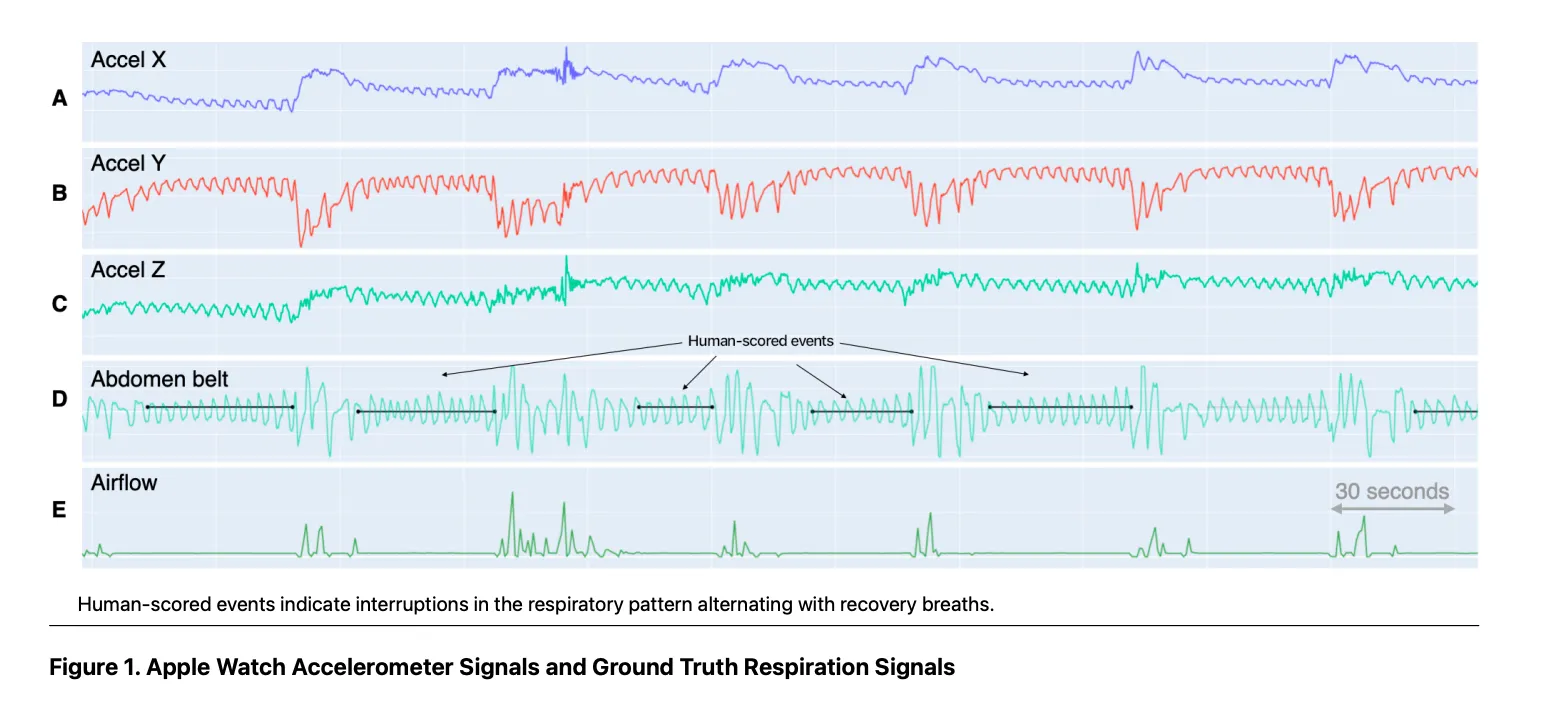
Unlike other wearables that rely on blood oxygen (SpO2), the Apple Watch uses a motion-based approach cleared by the FDA in September 2024. It’s a breakthrough in consumer health tech—privacy-focused, equitable, and highly specific.
Motion Analysis via High-Precision Accelerometer
Your chest moves with each breath, causing subtle wrist motion. The Apple Watch’s low-power accelerometer detects these micro-movements throughout the night. During obstructive sleep apnea episodes, breathing pauses or becomes shallow—changing the rhythm of chest motion.
The watch logs these interruptions in breathing patterns and classifies them as potential disturbances. This method avoids the racial bias seen in pulse oximetry, which is less accurate in people with darker skin tones, and catches events that don’t cause oxygen drops.
On-Device Machine Learning with Clinical Validation
All analysis happens directly on your watch using the S9 chip’s neural engine. No raw motion data leaves your device—ensuring privacy.
Apple trained its algorithm on over 11,000 nights of real-world sleep data, including a dedicated Valid study with academic partners. It was tested against home sleep tests to correlate motion patterns with clinical Apnea-Hypopnea Index (AHI) scores.
The result? A model tuned to flag consistent, clinically relevant disruptions—not temporary changes from alcohol, colds, or sleeping on your back.
Track Breathing Disturbances Over 30 Days

Detection isn’t based on one bad night. The system evaluates trends across a rolling 30-day window to reduce false alarms.
How the 30-Day Evaluation Works
To trigger a notification, the system requires:
– At least 10 nights of sleep data within 30 days
– Five or more nights classified as “Elevated” for breathing disturbances
This ensures occasional snoring or congestion doesn’t prompt unnecessary concern. For example, a weekend of heavy drinking might show irregular breathing—but unless the pattern repeats, no alert is sent.
View Your Nightly and Long-Term Trends
Open the Health app > Browse > Respiratory to see:
– A timeline of Elevated vs. Not Elevated nights
– Trends over the past month, 6 months, or year
– Total nights tracked
This long-term view helps spot recurring issues—even if you don’t get a formal alert.
Understand and Respond to Sleep Apnea Notifications
If your breathing patterns meet clinical thresholds, you’ll get a notification the morning after the final qualifying night.
What “Possible Breathing Issues Detected” Means
This alert indicates:
– Recurrent breathing interruptions were observed
– The pattern aligns with moderate to severe obstructive sleep apnea
– Medical evaluation is strongly recommended
It does not mean you have a diagnosis. But due to the algorithm’s 100% specificity, if you get this alert, there’s a very high chance you’re experiencing significant breathing disruptions.
Note: The system is less sensitive, so mild or intermittent cases may go undetected.
Export Your Data for Your Doctor
Tap the notification or go to Health app > Respiratory > Breathing Disturbances > Export PDF to generate a shareable report.
The PDF includes:
– Your 30-day breathing disturbance history
– Nightly classifications
– Instructions for healthcare providers
Bring this to your doctor—it can support a referral for a home sleep apnea test (HSAT), which many insurers cover when medically indicated.
Know the Limitations of Apple Watch Detection
While revolutionary, the feature has clear boundaries.
Cannot Diagnose or Differentiate Apnea Types
The watch cannot tell if breathing issues stem from:
– Obstructive sleep apnea (blocked airway)
– Central sleep apnea (brain signaling failure)
Only a clinical sleep study can make that distinction. The Apple Watch is strictly a screening tool, not a diagnostic device.
No SpO2 or Heart Rate Data Used
Despite having SpO2 sensors, Apple chose not to use them due to:
– Accuracy disparities in darker skin tones
– Regulatory hurdles for medical claims
– Patent risks tied to pulse oximetry
This means the watch may miss apnea events that don’t affect motion but do impact oxygen levels.
U.S.-Only Availability
The feature is only available in the United States. Even with compatible hardware, users in Canada, the UK, EU, and Australia won’t see the option—due to ongoing regulatory approvals.
Compare Apple Watch to Other Sleep Apnea Devices

Few wearables are FDA-cleared for sleep apnea screening. Here’s how Apple stacks up.
| Device | Detection Method | FDA Cleared | Nights Needed |
|---|---|---|---|
| Apple Watch | Accelerometer (motion) | ✅ Yes (Sep 2024) | 30 |
| Samsung Galaxy Watch | SpO2 (oxygen dips) | ✅ Yes (Feb 2024) | 2 |
| Withings Sleep Analyzer | Mattress sensor (sound/motion) | ✅ Yes | 1–3 |
| Oura Ring | HRV, movement | ❌ No | Ongoing trends |
| Fitbit | SpO2, heart rate | ❌ No | No medical clearance |
Apple’s motion-based method avoids SpO2 bias but requires more nights of data than Samsung’s oximetry approach.
Take Action After a Notification
A notification isn’t a diagnosis—but it’s a strong signal to act.
Schedule a Doctor Visit
Bring your exported PDF and discuss:
– Your symptoms (snoring, fatigue, gasping)
– Risk factors (obesity, family history)
– The watch’s findings
Your doctor may recommend a home sleep test (HSAT)—a simplified, often-insurance-covered version of a lab study.
Consider Treatment Options
If diagnosed, treatments include:
– CPAP machine: Most effective for moderate to severe OSA
– Oral appliance: Custom mouthpiece for mild to moderate cases
– Lifestyle changes: Weight loss, avoiding alcohol, side sleeping
– Surgery: For anatomical obstructions
Early treatment reduces risks of heart disease, stroke, and cognitive decline.
Avoid Common Mistakes
User habits can affect accuracy.
Wear the Watch Correctly
For reliable tracking:
– Wear it snug but comfortable, just below the wrist bone
– Avoid loose or high placement
– Charge it fully—incomplete sleep tracking reduces data quality
Don’t Ignore Symptoms Without Alerts
No notification does not rule out sleep apnea. The system may miss mild cases.
If you still feel drowsy, snore loudly, or have observed breathing pauses, see a doctor regardless.
Avoid Sleep Data Anxiety
Some develop orthosomnia—an obsession with perfect metrics. Remember:
– One bad night ≠ disease
– The watch tracks trends, not absolutes
– Use data to inform—not replace—medical judgment
Who Should Use This Feature?
Ideal Candidates
- Snore loudly or wake up choking
- Feel drowsy despite 7+ hours of sleep
- Have high blood pressure or obesity
- Live alone and no one observes sleep
- Hesitate to pursue formal testing
It’s especially helpful for the 80% of OSA cases that go undiagnosed.
Not for Everyone
- Already diagnosed with sleep apnea
- Use CPAP therapy
- Live outside the U.S.
- Own an older Apple Watch
It’s not designed for managing known conditions.
Maintain Accuracy and Privacy
All analysis happens on-device—no raw data is sent to Apple. Only encrypted summary data syncs to your iPhone.
To keep tracking reliable:
– Wear the watch to bed most nights
– Keep it charged
– Sync regularly
Missing too many nights resets progress toward the 30-day evaluation.
Final Steps: Stay Proactive About Sleep Health
The Apple Watch sleep apnea feature is more than a gadget—it’s a preventive health tool. Use it as a conversation starter with your doctor. Combined with symptoms and risk factors, it can justify testing that insurance might otherwise deny.
Stay updated—Apple may expand the feature to older models or international markets in future software updates.
And beyond apnea screening, use your watch to:
– Track sleep duration
– Monitor heart rate trends
– Set bedtime routines
Better sleep means better health, clarity, and longevity.
Bottom Line: The Apple Watch can’t diagnose sleep apnea—but it can alert you to real risks using advanced motion analysis. If you’re in the U.S., own a Series 9/10 or Ultra 2, and suspect sleep issues, enabling this feature could be your first move toward better health. Just remember: the watch starts the conversation; your doctor closes the diagnosis.





